DJI Fly
- 4.91K
- 3.7
- Installs
- —
- Price
- Free

Screenshots
Analysis by Reviewed APKs
DJI Fly is a companion app for piloting compatible DJI drones and working with aerial photography. I’d look at it if I already owned a supported drone and wanted flight-related tools, wireless transfers, and learning resources in one place. Its purpose is practical rather than broad: it is built around the DJI flying experience, not as a general photo editor or a standalone drone simulator. That focus is useful, provided your equipment is compatible.
A flight-day companion
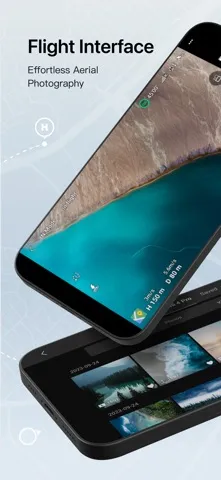
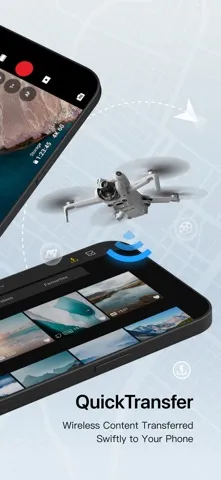
Picture a weekend outing with a compatible DJI drone: I want to get ready to fly, frame an aerial shot, and bring the resulting content back to my phone without juggling unrelated apps. DJI Fly is designed to sit alongside that process. Its flight interface is aimed at aerial photography, while QuickTransfer is there for moving content wirelessly to a phone. The appeal is having flight and transfer tasks gathered in a drone-specific companion.
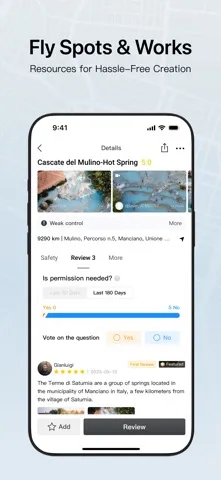
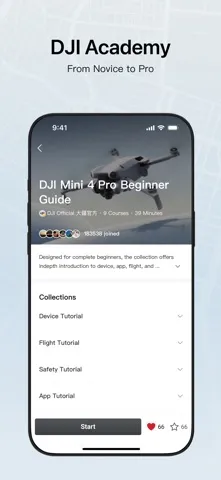
After flying, I could use the app’s Fly Spots & Works resources for ideas and DJI Academy for learning material. That gives DJI Fly a role beyond the moments when the drone is in the air. I would treat it as a working companion for a compatible DJI setup: prepare, fly, transfer, and learn. The exact experience depends on the particular drone, but the app’s stated purpose is clear.
A DJI-specific tool
The obvious comparison is with a general camera app or a broad photo-editing tool. Those are built to work across many phones and cameras; DJI Fly is centered on piloting and using compatible DJI drones. Its flight interface and QuickTransfer make more sense when there is a supported drone in the picture. If I am only looking for a place to organize ordinary phone photos, this is not the app I would reach for.
It is also not a substitute for owning compatible hardware: the app’s main job is tied to flying a drone, rather than creating aerial imagery on its own. Nor would I assume it offers every editing feature I might expect from a dedicated editor. The listed strengths are flight, wireless transfer, Fly Spots & Works, and DJI Academy. That narrower scope is a sensible fit for DJI pilots, but a poor reason to install it without one.
Make a simple routine
I’d make checking compatibility my first habit, before building a routine around the app. DJI Fly supports a wide range of named DJI models, but the right match matters more than the number of models on a list. Once I know my drone is supported, I’d use the flight interface for the aerial-photography side of a trip and keep QuickTransfer in mind for bringing content to my phone afterward.
A second useful habit would be to explore DJI Academy when I have time away from a flight, rather than trying to learn everything in the field. Fly Spots & Works can also be part of the planning-and-inspiration side of using the app. I would keep those resources distinct from the actual flying workflow: learning and browsing can happen at home, while the flight interface and transfer feature serve the outing itself.
More From Our News Desk

Zoom Meetings, Google Meet, or Teams: Which Is Easiest to Join?

How I Build a Free Streaming Lineup With Tubi

Why Crunchyroll Is the Default Anime App for So Many Fans

YouTube TV: A Practical Guide to Cutting Cable

Rummikub and the Small Comfort of Phone Games

TeamViewer Remote Control or AnyDesk for Helping Family?
Who will get the most from it
I’d recommend DJI Fly to people who own, or are considering, one of the compatible DJI drones and want a companion designed for flight and aerial photography. It brings together a flight interface, a wireless content-transfer feature, and resources for learning and inspiration. For someone who flies regularly, that combination gives the app a clear role both during a drone outing and in the time between flights.
It may not suit someone without a compatible DJI model, or someone simply searching for a general camera, gallery, or editing app. The app’s purpose is tied to DJI drone use, so its appeal is limited if that is not part of your routine. I’d also check the specific model and device requirements before relying on it. If those line up, its focused approach is more of a strength than a drawback.
DJI Fly is developed by SZ DJI TECHNOLOGY CO., LTD and is available for iPhone and iPad through the Apple App Store. The store gives it a 3.7 out of 5 rating from 4,914 ratings. It is free to download, has a 4+ age rating, and requires iOS 13.0 or later.
The App Store version is 1.21.18. The app was released on November 10, 2019, and its last update is dated October 27, 2026. Those details describe the store entry; I’d still check the App Store for current compatibility and availability before setting up a particular drone.
A closer look at DJI Fly
First impressions
When I first looked at DJI Fly, its purpose stood out immediately: this is a drone companion, not a general-purpose photography app. The feature set is organized around flight, aerial imagery, moving content to a phone, and learning. That makes it easier to understand what the app is for, though it also means there is little reason to explore it if I do not have compatible DJI equipment.
Before planning a flight around it, I would check that both my DJI model and Apple device fit the supported setup. DJI lists a broad group of compatible drones, from Mini and Air models to Mavic, Avata, and Neo models. The app requires iOS 13.0 or later. That compatibility check is a practical first step, not a minor detail to leave until the day of an outing.
The everyday flight role
The flight interface is the app’s central job, with aerial photography as its focus. In everyday terms, that places DJI Fly alongside the drone outing rather than treating it as a tool for editing ordinary phone pictures. I’d expect to open it when my attention is on using a supported drone and making aerial content. The description emphasizes ease of flying, though it does not spell out every control or screen.
QuickTransfer extends that workflow after the flight by providing wireless content transfer to a phone. That is a useful idea for someone who wants their drone content on a mobile device without making transfer a separate project. I would keep expectations to the feature described: wireless transfer. The app’s stated capabilities do not establish a full editing suite, a particular transfer speed, or a specific sharing workflow.
Learning and inspiration
Two other features give DJI Fly something to do when I am not actively flying. DJI Academy is presented as a learning resource for pilots at different experience levels, while Fly Spots & Works offers resources connected to creating. I like that those ideas acknowledge the planning and learning around drone use, not just the flight itself. They give a curious owner a reason to open the app between outings.
I would use these resources as companions to practice and planning, rather than assume they replace hands-on experience or provide a particular course format. The available description names the resources but does not detail every lesson or item. Even so, their place in the app makes sense: learn when there is time, find creative inspiration, then bring that context into a flight with compatible hardware.
A practical outing routine
My routine would begin before leaving home. I’d confirm that my drone is on DJI’s compatibility list and that my Apple device meets the iOS requirement, then spend a quiet moment with DJI Academy if I had something to learn. I’d browse Fly Spots & Works as part of my creative planning. This separates preparation from the busier moment of flying and keeps the app’s different resources easy to use for their intended purposes.
During the outing, I’d turn to the flight interface for the aerial-photography part of the process. Afterward, QuickTransfer is the natural feature to consider when I want the content on my phone. I would not build in assumed steps that the app description does not promise; the simple routine is enough. It links learning and inspiration with flight and a wireless transfer, without expecting DJI Fly to do every photography task.
Compatibility comes first
The biggest practical limit is that DJI Fly is for compatible DJI drones. A long list of supported models is helpful, but it does not mean every DJI product works with the app. I would verify my exact model before relying on it. The same goes for the phone: this is an iOS app, and the stated minimum is iOS 13.0, so an incompatible device can undermine the whole setup.
The other limitation is its specialized scope. DJI Fly is not presented as a universal photo organizer or a replacement for every creative app on a phone. Its named functions are tied to drone flight, transfer, learning, and creative resources. That focus is reasonable, but prospective users should not download it expecting a broad set of unrelated photography tools or assume features beyond those described.
DJI Fly makes the most sense as a focused companion for someone using a supported DJI drone. Its flight interface, QuickTransfer, DJI Academy, and Fly Spots & Works cover useful parts of the flying routine without pretending to be a general photography hub.
I’d recommend it to DJI pilots who have checked device and model compatibility and want those resources together. If you do not have a supported drone, or need a general editing app, it is unlikely to become part of your everyday setup.
DJI Fly Frequently Asked Questions
What is DJI Fly used for?
DJI Fly is a companion app for flying compatible DJI drones and working with aerial photography. Its described features include a flight interface, wireless QuickTransfer to a phone, Fly Spots & Works resources, and DJI Academy learning material. It is designed around DJI drone use rather than general phone photography.
Which phones and devices support DJI Fly?
DJI Fly is available for iPhone and iPad through the Apple App Store and requires iOS 13.0 or later. It is designed to work with specified compatible DJI drone models, so I would check the app’s current App Store information and DJI’s compatibility details for the exact drone and device before relying on a setup.
Does DJI Fly cost anything?
DJI Fly is free to download on the Apple App Store. Pricing or availability details can vary over time, so it is worth checking the current store entry before downloading. The supplied store facts do not give an in-app purchase price.
Does DJI Fly work with every DJI drone?
No. DJI Fly is described as compatible with a range of named DJI models, but compatibility is model-specific. I would check the current compatibility information for the exact drone rather than assume that every DJI product works with the app. The supported-model information may change, so the store and DJI materials are worth checking.
Is DJI Fly a good choice for beginners?
It may suit a new pilot with a compatible DJI drone, since DJI Academy is described as a learning resource for people from novice to more experienced levels. It is still a drone companion, not a standalone way to learn without compatible hardware. Beginners should check the model and device requirements before making it part of their plans.
Pros
- Combines a drone-focused flight interface with wireless content transfer to a phone.
- Includes DJI Academy learning resources for different experience levels.
- Supports a broad range of named DJI drone models.
- Free to download from the Apple App Store.
Cons
- Its usefulness depends on owning a compatible DJI drone.
- Requires an Apple device running iOS 13.0 or later.
- Its focus is narrower than a general photography or editing app.
- Category
- Photography
- Version
- 1.21.18











