CTU Student Mobile
- 6.82K
- 4.6
- Installs
- 100.00K
- Price
- Free

Screenshots
Analysis by Reviewed APKs
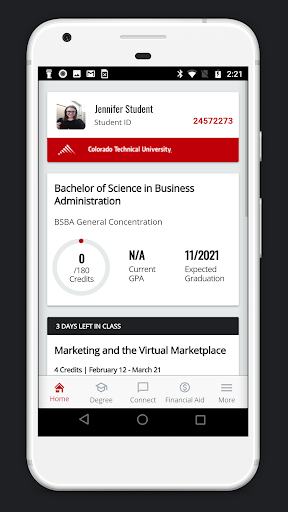
CTU Student Mobile is a companion app for students at Colorado Technical University, whether they study online or on campus. It brings class updates, assignments, grades, live sessions, degree planning, and financial aid details into a phone-friendly place. I see it as a practical way to keep school within reach during a busy day, especially for students who want quick check-ins between other responsibilities.
A School Day in Your Pocket
When I imagine using CTU Student Mobile on a typical weekday, it starts with a quick morning check. I can look for a new assignment or instructor comment before heading out, then check notifications later when I have a few spare minutes. The app is built to bring classroom announcements, grades, due dates, and discussion replies together, so I don’t have to wait until I’m back at a computer to see what needs attention.
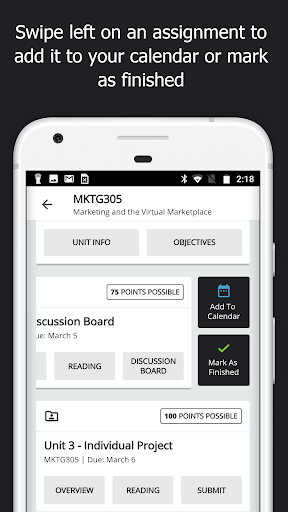
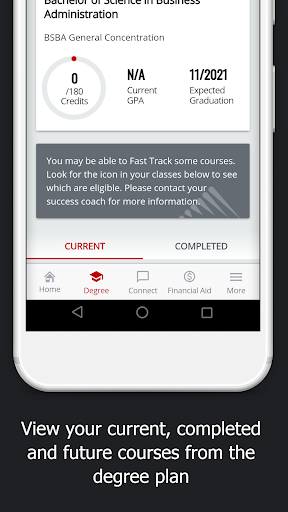
A busy evening can involve more than checking a deadline. I might review an assignment, join a Live Chat from my phone, or play an archived session while settling in at home. If I want a broader view, the degree plan shows past and future courses. That makes the app useful for both immediate class tasks and occasional planning, without making every school check-in feel like a full desktop study session.
A Companion, Not a Campus Portal
The clearest comparison is with signing in to a school’s learning environment through a browser or using a computer for class administration. CTU Student Mobile puts selected classroom information and tools into a mobile view, including assignments, grades, feedback, and Live Chats. That makes it a handy companion when I’m away from a desk, while the app’s description positions it around CTU students rather than as a general study or course platform.
It is not a broad education app for browsing unrelated classes, and it shouldn’t be mistaken for a replacement for every school task. Its purpose is to help CTU students keep up with their own education, including some financial aid information and the ability to send required documents. If I need an expansive workspace for long assignments, I’d still treat a phone as the convenient check-in option rather than assume it suits every kind of coursework.
Small Habits That Help
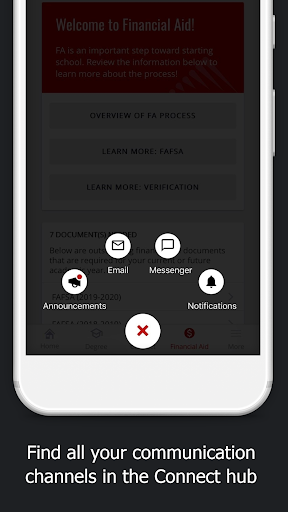
I’d get the most from the app by making short checks part of an existing routine: scan announcements in the morning, look at upcoming assignments after class, and review feedback when I have time to act on it. Push notifications can surface discussion replies, grade updates, Live Chat changes, and due dates. Used this way, the app can help me notice relevant changes without relying on memory alone.
It also helps to separate quick tasks from planning. I can use the classroom view for what needs attention today, then visit the degree plan when I’m thinking about courses further ahead. Financial aid status and document sending fit into another occasional check-in. The point is not to keep the app open all day; it’s to use its different views when a specific school question comes up.
More From Our News Desk

Zoom Meetings, Google Meet, or Teams: Which Is Easiest to Join?

How I Build a Free Streaming Lineup With Tubi

Why Crunchyroll Is the Default Anime App for So Many Fans

YouTube TV: A Practical Guide to Cutting Cable

Rummikub and the Small Comfort of Phone Games

TeamViewer Remote Control or AnyDesk for Helping Family?
Who Will Find It Useful
I’d recommend CTU Student Mobile to current Colorado Technical University students who want class information close at hand. It seems particularly suited to people balancing coursework with work, family, or a commute, since notifications and mobile access can make a short break useful. Online students may appreciate having Live Chats, archived sessions, assignment details, and instructor feedback accessible from a phone as part of their regular course routine.
It may be less appealing to someone who wants a general-purpose learning app, or who prefers to do all coursework on a larger screen. The app’s described tools are tied to CTU’s classes and student processes, so its usefulness depends on being part of that community. I’d also avoid treating mobile access as a substitute for every school task: the strongest fit is keeping up, checking details, and handling select activities on the go.
CTU Student Mobile is an education app from Perdoceo Education Corporation. On Google Play it has over 100,000 installs and a 4.6-star rating from around 6,800 ratings. The app is free to download, and the supplied store facts say it contains no ads and offers no in-app purchases. Its content rating is Everyone, which describes the store’s age classification rather than the app’s intended student audience.
The supplied version number is 7.4.4. The app was released on September 9, 2011, and its recorded last update is October 22, 2026. The minimum Android version is worth checking on Google Play because it can depend on the device and current app requirements. Students should also check the store page for the latest availability and compatibility details before installing.
How CTU Mobile Fits a Student Routine
A Focused First Look
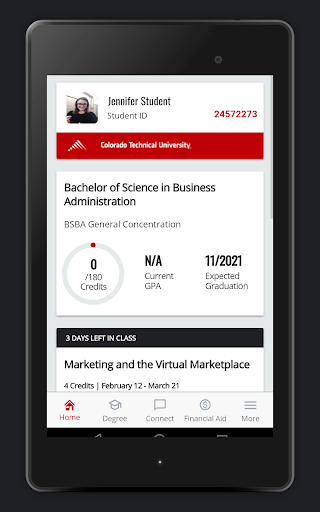
When I first opened the idea of CTU Student Mobile, what stood out was its specific job: making CTU study information easier to reach in short mobile sessions. The app is designed for both online and on-campus students, and the listed classroom view gathers items such as announcements, assignments, grades, and instructor feedback. That focus gives it a more practical feel than a generic campus directory or a broad study planner.
Getting started makes most sense for a student who already knows what they need to check: an upcoming assignment, a grade, a class meeting time, or a Live Chat. The description also includes tablet and phone integration with intellipath. Rather than promise that a phone can do every school task, the app’s emphasis is on bringing relevant class activity into the moments when a computer isn’t nearby.
Keeping Up Between Classes
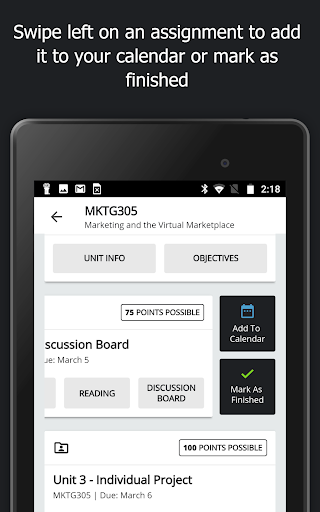
The day-to-day value is in reducing the effort of checking what changed. A new discussion reply or assignment deadline can matter even when I’m away from my usual study space, and push notifications are designed to flag those kinds of updates. I can then use the classroom view to check announcements, assignments, grades, and feedback together instead of treating each passing notification as the whole story.
I like that Live Chats are part of the mobile experience rather than merely appearing as calendar items. The app describes one-touch access to join and participate, as well as the option to play archived sessions on the go. That can be useful when a student’s schedule is uneven. For focused reading or extended work, though, I’d still choose the setup that best suits the task rather than assume every session is ideal on a phone.
Useful Tools Beyond Grades
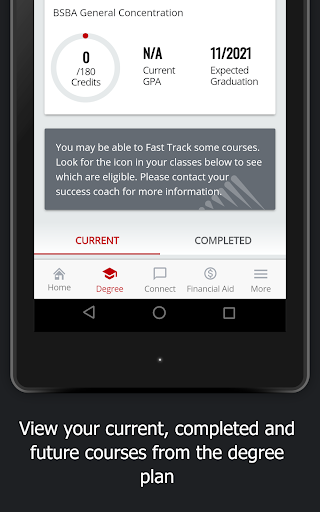
The degree plan gives the app a longer-range use beyond today’s assignments. Students can review both completed and future courses, which offers a convenient way to revisit their academic path from a mobile device. I’d use this as a quick reference when thinking about what’s already behind me and what’s ahead, rather than as a replacement for a detailed conversation about course planning.
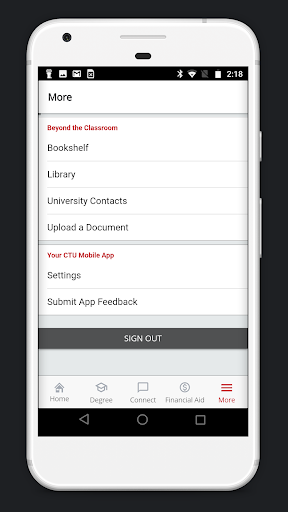
Financial aid is another practical area included in the description. Students can see an at-a-glance view of their status and send required documents to CTU through the device. That is a useful addition to an app otherwise centered on classes, particularly when a document needs attention away from a desk. It is a focused feature, not a reason to expect a full set of unrelated financial or campus services.
A Routine That Makes Sense
A simple routine could begin with a notification check before the day gets busy, followed by a look at assignment dates and announcements when there’s a break. If a discussion reply arrives, I can review it while the conversation is still fresh. Later, I might check grades or instructor feedback and make a note of what needs attention when I sit down for more concentrated study.
Once or twice during a planning session, I’d open the degree plan to review past and future courses. Financial aid status and document sending are more occasional checks, so they don’t need to crowd a daily class routine. This kind of light, purposeful use plays to the app’s strengths: quick access to student information and selected actions without turning every spare moment into a demand to study.
Keep Its Scope in Mind
The app’s usefulness is closely tied to being a CTU student. Its features revolve around CTU classrooms, course plans, Live Chats, and financial aid, so someone outside that setting is unlikely to get much from it. Even for students, mobile access is best understood as a convenient route to selected information and activities, not evidence that every university process or learning resource is handled here.
A phone is also a compact place for coursework. Checking a grade, deadline, or reply is a natural fit; long stretches of study may be more comfortable elsewhere. The supplied description doesn’t establish that every class activity can be completed in the app, so I’d keep expectations centered on the named features. For a student who wants quick updates and mobile access, that focused scope is more useful than a promise to do everything.
CTU Student Mobile makes the most sense as a practical companion for staying connected to CTU classes. I like its mix of timely classroom updates, Live Chat access, degree-plan viewing, and a few useful student administration tools. It is focused rather than universal, which is a reasonable trade-off for students who mainly need a reliable way to check in while away from a computer.
I’d recommend it to CTU students who want a quicker view of what’s happening in class and a way to handle selected tasks on the go. If you’re looking for a general learning platform or prefer doing all coursework on a larger screen, it may not change your routine much. For the right student, though, it can make small gaps in the day more useful.
CTU Student Mobile Frequently Asked Questions
What is CTU Student Mobile used for?
CTU Student Mobile helps Colorado Technical University students keep up with classes and manage selected parts of their education from a mobile device. Its described tools include classroom announcements, assignments, grades, instructor feedback, Live Chats, archived sessions, degree-plan viewing, and financial aid status. Students can also send required financial aid documents through the app.
Which devices can run CTU Student Mobile?
The supplied store information identifies CTU Student Mobile as an Android app, and its description refers to use on phones and tablets. Check Google Play for current device compatibility and availability. Requirements can vary by device and app version, so it’s worth checking the store page before installing.
What Android version does CTU Student Mobile require?
The minimum Android version can vary with the current release and device, so check the Google Play page for the requirement that applies to your phone or tablet. The supplied app information gives version 7.4.4, but that number is the app version, not the minimum Android operating system version.
Does CTU Student Mobile cost money?
The supplied Google Play facts describe CTU Student Mobile as free to download, with no in-app purchases and no ads. Store details can change over time, so check Google Play for current pricing and availability before installing. This information concerns the app itself and does not describe any separate university costs.
Is CTU Student Mobile useful for every student?
It is designed for students at Colorado Technical University, including those studying online and on campus. Its class updates, Live Chats, degree-plan information, and financial aid tools may suit students who want convenient mobile check-ins. It is not presented as a general-purpose learning app, so students outside CTU are unlikely to find the same features relevant.
Pros
- Puts announcements, assignments, grades, and instructor feedback together in a mobile classroom view.
- Provides push notifications for discussion replies, grade updates, Live Chat changes, and due dates.
- Supports joining Live Chats and playing archived sessions while away from a computer.
- Includes degree-plan viewing and a way to send required financial aid documents.
Cons
- Its features are specifically aimed at Colorado Technical University students.
- A phone-sized experience may be less comfortable for extended coursework or study sessions.
- The supplied information does not establish that every school task can be completed in the app.
- Category
- Education
- Version
- 7.4.4











