Cox Panoramic Wifi
Listed on Google Play as “Cox WiFi by Spectrum”
- 26.36K
- 4
- Installs
- 1.00M
- Price
- Free

Screenshots
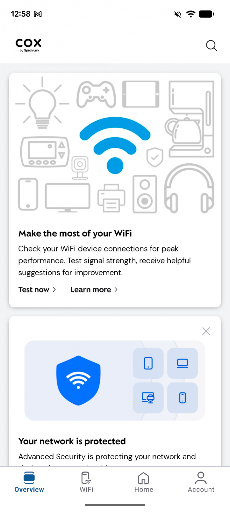
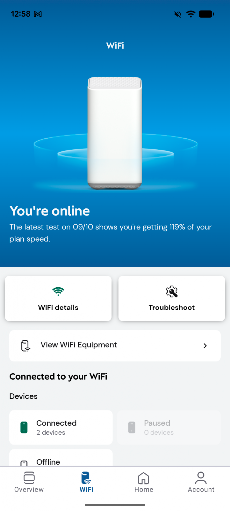
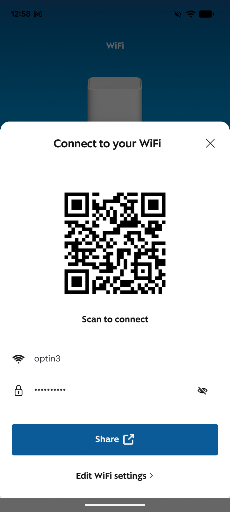
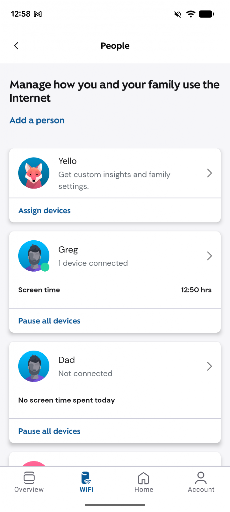
Analysis by Reviewed APKs
Cox WiFi by Spectrum is a home-network management app for people using supported Cox WiFi gateways. It lets you label devices, pause their access, make family profiles, and troubleshoot connection problems. I like the practical focus: it is for handling small household WiFi decisions, not replacing a router or providing internet service. If your home uses one of the compatible gateways, the controls could fit neatly into everyday routines.
A Quieter Dinner Routine
When dinner is ready and everyone is still looking at a screen, Cox WiFi by Spectrum offers a direct way to pause WiFi for a while. I can imagine using that before a meal rather than walking around the house asking each person to put a device away. The app also lets you pause individual devices, which is useful when the request is less sweeping than a household-wide break.
The device nicknames are a small but practical touch in this situation. If I have assigned names that make sense to my household, it is easier to tell which device I mean before pausing access. Family profiles give those controls a household structure. The point is not a complicated schedule or a lecture about screen time; it is having a straightforward network control available when a routine needs a brief pause.
A Network Companion, Not a Router
I see this as a companion to a compatible Cox WiFi gateway, rather than a general-purpose networking app. Its described job is to manage home WiFi options: identify devices, pause access, create family profiles, and get help troubleshooting. That makes it different from simply changing a setting on a router, but it does not turn the phone into a replacement gateway or a way to get internet service.
It also is not a broad device-monitoring suite based on the features described. If what I need is a tool for managing any router, or a detailed view of every aspect of network performance, this focused app may not be the right fit. Its usefulness depends on having a supported CGM4141 or TG1682 Panoramic WiFi Gateway. Without that hardware, its central controls do not match the situation.
Make Device Names Useful
The first habit I would build is giving devices recognizable nicknames. A label that distinguishes a family member’s device from another phone or tablet makes later decisions less of a guessing game. It is especially helpful in a busy home, where a generic device name may not mean much to the person trying to pause access. This is a simple bit of housekeeping that makes the app’s main controls easier to use.
I would also treat family profiles as a way to keep the household organized, then use pausing when a specific moment calls for it. For example, dinner or bedtime can be a cue for a temporary WiFi pause, while a single device can be paused when that is all that is needed. The app’s value comes from making these small actions accessible, rather than requiring a complicated network-management routine.
More From Our News Desk

Zoom Meetings, Google Meet, or Teams: Which Is Easiest to Join?

How I Build a Free Streaming Lineup With Tubi

Why Crunchyroll Is the Default Anime App for So Many Fans

YouTube TV: A Practical Guide to Cutting Cable

Rummikub and the Small Comfort of Phone Games

TeamViewer Remote Control or AnyDesk for Helping Family?
Who May Find It Useful
I would recommend Cox WiFi by Spectrum to people who use a supported Cox gateway and want convenient controls for their home network. Families who want to name devices, organize them into profiles, or pause WiFi at dinner or bedtime have a clear reason to try it. It may also suit someone who wants an app-based route to basic troubleshooting rather than handling every network question through a separate process.
It is less compelling for someone without the supported gateway models, or for a user who wants a general tool that works across different routers. I would not choose it expecting a full internet plan, new WiFi hardware, or features beyond the stated controls. The experience is most relevant when the home already has the compatible Cox setup and the goal is managing everyday access.
Cox WiFi by Spectrum is developed by Cox Communications, Inc. On Google Play, it has over one million installs and a 4.0-star rating from around 26,000 ratings. The app is free to download, with no in-app purchases or ads indicated in its store details. Its content rating is Everyone, which gives a quick reference for the intended general audience.
The listed Android version is 6.13.0-4. The app was released on March 29, 2019, and its listed last update is October 23, 2026. It supports the CGM4141 and TG1682 Panoramic WiFi Gateways, so checking that the household has compatible equipment is important before relying on its network controls.
Everyday Control for Home WiFi
A Focused First Impression
When I first opened the idea of this app, what stood out was how specific its purpose is. It is designed around managing a home network through supported Panoramic WiFi hardware, not around a long list of unrelated phone tools. That focus makes the central promise easy to understand: adjust WiFi options, identify devices, pause access, set up family profiles, and use the app for troubleshooting.
Compatibility is the first practical check I would make. The app supports the CGM4141 and TG1682 Panoramic WiFi Gateways. That detail matters more than any general impression of the interface, because the app’s core job depends on working with compatible equipment. I would confirm the gateway model before building a household routine around the app’s controls.
Small Decisions, Less Fuss
In everyday use, device nicknames are the sort of modest feature that can save a little time repeatedly. When several phones and other devices connect at home, a clear name makes it easier to choose the right one for a pause. The feature does not change the network by itself; it makes the management actions more understandable for the person using the app.
Pausing WiFi is another direct control. I can see it fitting into a dinner or bedtime routine, or into a moment when only one device needs to lose access temporarily. Family profiles add a way to organize household devices. These are practical controls for ordinary household decisions, rather than a promise of more elaborate automation.
Profiles and Troubleshooting
Family profiles stand out because they give the app a household-oriented feel. Rather than treating every connected device as an isolated item, profiles offer a way to group things around family members. That can make a simple pause decision feel more organized, particularly in a home where several people share the network and devices are easy to mix up.
The app also includes easy troubleshooting as part of its role. That is useful to have alongside the everyday controls: if something is not working as expected, the same app used to manage WiFi options is also intended to help with troubleshooting. The description does not specify particular diagnostic tools, so I would view this as a helpful support function rather than assume it provides detailed technical reports.
Build It Into the Day
A sensible routine would start with device names and family profiles, then use pausing only when it serves a clear purpose. I might think of a meal or bedtime as a natural cue to pause WiFi for the household, while using an individual device pause for a narrower need. The app is built around controls that can support those decisions without turning them into a major network project.
I would revisit the device labels whenever the household changes, too. A new phone or a device that is hard to identify can make a pause less certain, so keeping names recognizable is a useful small habit. Profiles can likewise help maintain order as devices are used by different family members. The benefit is less about constant app use and more about having a familiar control ready when needed.
Keep the Hardware in Mind
The clearest limitation is compatibility. Cox WiFi by Spectrum supports the CGM4141 and TG1682 Panoramic WiFi Gateways, so a household with different networking equipment should not assume it will get the same controls. This is not presented as a universal router-management app. Checking the gateway model before downloading or depending on a feature can prevent a mismatch in expectations.
The feature set is also intentionally centered on basic home-network management. The described tools cover nicknames, pausing devices or WiFi, family profiles, and troubleshooting. Anyone looking for controls not named here should avoid assuming they are included. For a compatible home that wants those everyday options, the focus is reasonable; for broader networking needs, it may feel limited.
Cox WiFi by Spectrum makes the most sense as a practical companion for a home with a compatible Cox gateway. Its strongest appeal is the combination of clear device names, family profiles, and simple ways to pause access when household routines call for it. I like that the use case is easy to picture, even if the app’s value depends heavily on the hardware already in place.
I would try it if I had a supported gateway and wanted convenient control over everyday WiFi access or basic troubleshooting. I would skip it if I needed a tool for unrelated routers or expected a much broader network dashboard. For the right household, it is a focused utility worth considering, not a substitute for compatible equipment or internet service.
Panoramic Wifi Frequently Asked Questions
What is Cox WiFi by Spectrum used for?
Cox WiFi by Spectrum is used to manage options on a compatible home network. It supports device nicknames, pausing individual devices or WiFi, setting up family profiles, and troubleshooting. Its listed gateway support includes the CGM4141 and TG1682 Panoramic WiFi Gateways, so it is best suited to homes using that equipment.
Which devices can run Cox WiFi by Spectrum?
Cox WiFi by Spectrum is an Android app available through Google Play. Its network controls are designed for the supported CGM4141 and TG1682 Panoramic WiFi Gateways. The minimum Android version can vary, so check the Google Play store details for the requirement that applies to your device.
Does Cox WiFi by Spectrum cost money?
The app is listed as free to download, with no in-app purchases or ads indicated in its store details. Store information can change, so it is worth checking the Google Play listing before installing if you want the latest cost details. The app is for managing a compatible home network, not a separate internet plan.
What Android version does Cox WiFi by Spectrum require?
The minimum Android version can vary by app release and device. Check the Google Play store listing for the requirement currently shown for Cox WiFi by Spectrum. The app’s listed version is 6.13.0-4, and it supports the CGM4141 and TG1682 Panoramic WiFi Gateways.
Is Cox WiFi by Spectrum suitable for my household?
It may suit a household with a supported gateway that wants to name devices, create family profiles, pause WiFi, or use app-based troubleshooting. It is less suitable if your home uses other networking equipment or you want a general-purpose router app. Check your gateway model and the current Google Play details before deciding.
Pros
- Device nicknames make it easier to identify what you want to manage.
- Supports pausing individual devices or WiFi for household routines.
- Family profiles help organize network controls around the household.
- Includes troubleshooting alongside everyday WiFi management.
Cons
- Its controls are limited to supported Panoramic WiFi Gateway models.
- The described feature set is focused rather than a broad network toolkit.
- Its usefulness depends on already having compatible Cox equipment.
- Category
- Productivity
- Version
- 6.13.0-4