ANZ Plus
- —
- —
- Installs
- 1.00M
- Price
- Free

Screenshots



Analysis by Reviewed APKs
ANZ Plus is an Australian digital banking app for managing everyday spending and savings, with options to bring eligible accounts from other banks into one view. I see its appeal for people who want a clearer picture of their money and a few practical ways to build saving into daily life. Its strongest idea is combining spending tools and savings goals in one place, though it is designed around ANZ Plus accounts.
A clearer view of everyday money
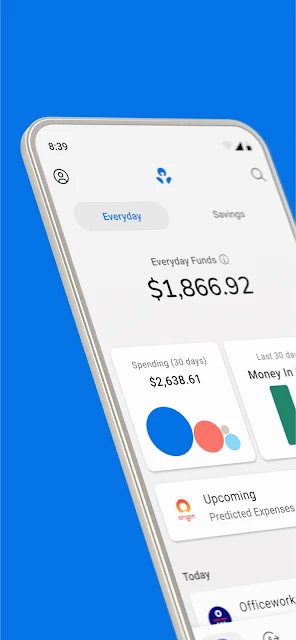
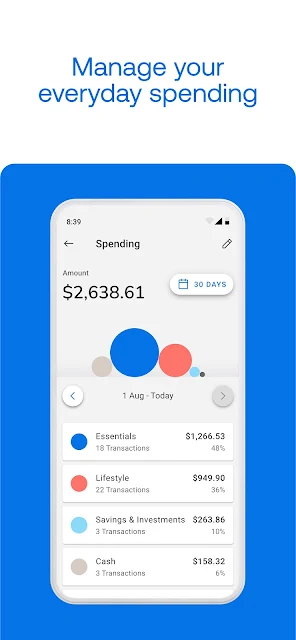
When I imagine using ANZ Plus on a normal payday, the useful part is having an Everyday account for spending and a Growth Saver account for money I want to keep building. The app automatically sorts spending with an Everyday account, which can make it easier to look back at where the month went. Instead of piecing together a rough picture from memory, I can use the app as a central place to check my ANZ Plus finances.
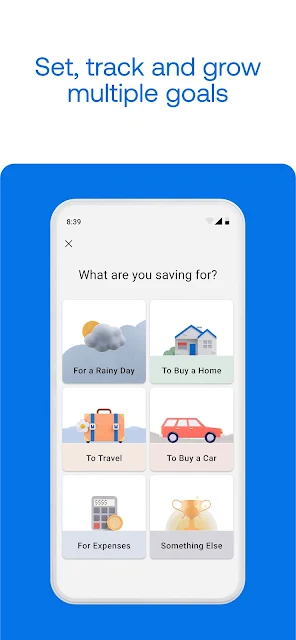
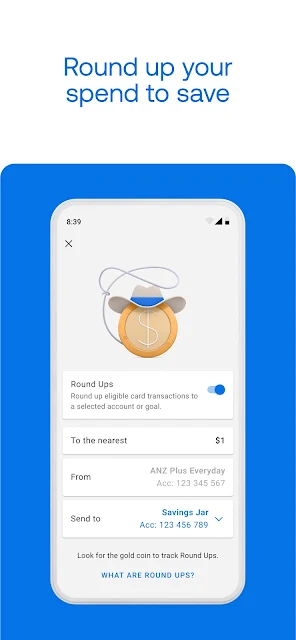
A small purchase can also become part of a saving habit: the app can round up the extra cents on purchases and send them to an eligible ANZ Plus account. I like that this makes saving feel less like another chore to remember. If I have several things I am putting money aside for, Growth Saver supports multiple savings goals. Those tools suit a routine of checking in briefly, rather than sitting down for a full budgeting session.
A focused alternative to banking apps
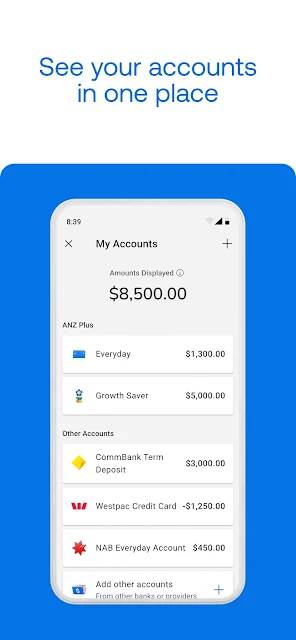
Compared with a basic banking app that mainly gives me an account view, ANZ Plus puts more emphasis on spending organization and savings goals. It can also show eligible accounts with other banks, with my consent, so I may be able to get a broader view without treating every account as an ANZ Plus account. That distinction matters: the feature is for viewing eligible accounts, while managing them still requires other ANZ channels.
I would not mistake ANZ Plus for a general-purpose financial planning service or a universal account manager. Its accounts and home loan are accessed through this app, rather than the ANZ App or Internet Banking, and some features depend on being an ANZ Plus customer. The app does describe home-loan refinancing, but applications are subject to assessment and eligibility. It is most relevant to people willing to bank within the ANZ Plus setup, not someone seeking a neutral hub for every financial product.
Small habits that make it useful
I would get the most from ANZ Plus by making a quick account check part of an existing routine, such as payday or a weekly review. The automatically sorted spending can help me notice patterns, while multiple Growth Saver goals give different savings intentions their own place. I would keep those goals concrete and revisit them occasionally, rather than expecting an app to make decisions for me.
Round-ups are another low-effort habit, especially if I prefer steady contributions over remembering a separate transfer. For a broader snapshot, I could connect eligible accounts from other banks with consent, then treat the displayed figures as a viewing aid rather than a promise that every account is included. If I need help, the secure in-app messaging option lets me contact an ANZ Plus Coach, with support also offering appointments.
More From Our News Desk

Zoom Meetings, Google Meet, or Teams: Which Is Easiest to Join?

How I Build a Free Streaming Lineup With Tubi

Why Crunchyroll Is the Default Anime App for So Many Fans

YouTube TV: A Practical Guide to Cutting Cable

Rummikub and the Small Comfort of Phone Games

TeamViewer Remote Control or AnyDesk for Helping Family?
Who may find it useful
I would recommend ANZ Plus to Australian residents aged 15 or older who want everyday banking and savings tools in one app and are comfortable using ANZ Plus accounts. The mix of spending categorization, multiple savings goals and purchase round-ups makes sense for someone trying to create a more consistent money routine. It may also suit an existing customer who wants to view eligible accounts from other banks alongside their ANZ Plus accounts.
It may be a poor fit if you want to manage all your banking from one provider-neutral app, or if you expect linked accounts to be fully managed inside ANZ Plus. You need a valid passport or driver’s licence, and the app’s account features are tied to ANZ Plus products. I would also suggest checking the terms and eligibility for any account or home-loan product before relying on it; the app’s tools are not a substitute for deciding whether a product suits your circumstances.
ANZ Plus is a finance app from Australia and New Zealand Banking Group Limited. Google Play shows over one million installs. The app is free to download, with no in-app purchases or ads recorded in the supplied store facts. Its content rating is Everyone. The store version is described as varying with device.
The supplied facts do not include a Google Play rating, rating count, minimum Android version, release date or last update date, so I have left those figures out. Android requirements can vary by device and app version; check Google Play for the current compatibility details before installing.
A banking app built around saving habits
Getting oriented
My first impression of ANZ Plus is that its purpose is more specific than simply putting a bank balance on a phone. The app brings Everyday and Growth Saver accounts together with tools for understanding spending and setting savings goals. That gives it a natural starting point for someone who wants to make a regular check-in part of their routine, rather than open a banking app only when a payment is due.
Getting started depends on meeting the stated customer requirements: ANZ Plus is for Australian residents aged 15 and older, with a valid passport or driver’s licence. I would read the relevant digital terms before using it, particularly because the accounts and home loan are handled in the ANZ Plus app rather than the ANZ App or Internet Banking. That separation is worth knowing before building a banking routine around it.
Everyday use
The everyday appeal is the link between spending and saving. With an ANZ Plus Everyday account, spending is automatically sorted, giving me a more organized way to review the money going out. I would treat that as a helpful overview, not as a replacement for looking carefully at my own transactions. Its value is in making a check-in easier to repeat.
On the saving side, a Growth Saver account can track multiple goals, and eligible purchases can be rounded up into an eligible ANZ Plus account. Those are practical features for people who like small nudges built into normal activity. A Flex Saver account is also available to existing ANZ Plus customers for more flexible savings. Product terms and interest conditions matter, so I would check them directly rather than assume every account works the same way.
Features with a purpose
The multiple-goal approach is a useful touch because not all savings have the same purpose. Keeping separate targets in view can make progress easier to follow than treating every saved dollar as one undifferentiated total. The Growth Saver account earns interest, but rates are variable and the conditions for bonus interest depend on account terms. I would check current details with ANZ before making a decision based on interest.
I also like the possibility of viewing eligible accounts held with other banks in the same app. It can help with a broader snapshot, but it is a viewing feature: managing those accounts still means using the relevant other ANZ channels or providers. Consent is required, and the displayed amounts may not represent all money available to spend. That caveat keeps the feature useful without treating it as a complete financial picture.
For support and protection, ANZ describes Falcon and Scam Safe as features designed to help protect against fraud and scams. Users can send a secure in-app message to an ANZ Plus Coach, and support includes appointments. I find the human-help option a sensible complement to self-service tools, while remembering that the app’s security features are described as designed to help, not as a reason to stop checking activity carefully.
A simple weekly routine
A realistic routine for me would be to open the app once a week, review the automatically sorted spending and check whether my savings goals still reflect what I am working toward. If I use round-ups, those can contribute in the background without needing a separate reminder. I would make any changes deliberately and use the account terms to understand how deposits, access and interest work.
If I have accounts elsewhere, I could decide whether connecting eligible accounts would make that review more useful. I would use the combined view as a prompt to check the underlying accounts, not as the only source of truth. And if I hit a question I cannot resolve, messaging an ANZ Plus Coach or arranging an appointment gives me a support route within the app.
Limits to keep in view
ANZ Plus is closely tied to its own accounts, so the experience is less compelling if I do not want to open or use ANZ Plus products. Other-bank account visibility is limited to eligible accounts, requires consent and does not let me manage those accounts from ANZ Plus. That makes it a helpful addition for some customers, but not a one-stop replacement for every banking app.
The savings features also come with product conditions. Growth Saver bonus interest depends on meeting requirements, rates can change, and the Flex Saver account is for existing ANZ Plus customers. The app’s home-loan option is subject to credit assessment and other eligibility criteria. I would check current product terms and suitability before acting, rather than relying on a feature description alone.
Finally, the app is intended for Australian residents aged 15 and older who have a valid passport or driver’s licence. That rules it out for some people before the day-to-day features even come into play. The version and device compatibility can also vary, so checking Google Play for current requirements is a practical first step.
ANZ Plus has a coherent job: bring everyday spending, savings goals and selected account views together for people using its banking products. I like the combination of automatically sorted spending, multiple goals and round-ups, along with access to in-app human support. The main trade-off is that it is an ANZ Plus-centered experience, not a universal manager for all accounts.
I would try it if I were an eligible Australian resident looking for a more structured way to check spending and build a saving routine. I would be less inclined if I wanted to manage every bank account in one place or avoid product-specific conditions. Before opening an account or applying for a home loan, I would review ANZ’s current terms and eligibility information.
ANZ Plus Frequently Asked Questions
What is ANZ Plus used for?
ANZ Plus is a digital banking app for using ANZ Plus Everyday and savings accounts, keeping track of spending, and working toward savings goals. It can also show eligible accounts from other banks with consent, and provides access to ANZ Plus home-loan information. The accounts and home loan are handled in ANZ Plus rather than the ANZ App or Internet Banking.
Which phones and devices support ANZ Plus?
The supplied app information covers Android, and the Google Play version can vary with device. A specific minimum Android version is not included in the supplied facts, so check Google Play for current compatibility details for your phone. The app is intended for Australian residents aged 15 or older who have a valid passport or driver’s licence.
Does ANZ Plus cost money?
ANZ Plus is free to download, and the supplied store facts show no in-app purchases or ads. Banking products and their terms are separate from the download itself. Account features, rates and eligibility can depend on current product conditions, so check the Google Play information and ANZ’s account terms before deciding to use a product.
What Android version does ANZ Plus require?
The minimum Android version is not included in the supplied app facts. Compatibility may vary by phone and app version, so check the ANZ Plus page on Google Play for the requirement shown for your device. The store describes the app version as varying with device.
Who is ANZ Plus best suited to?
It is aimed at Australian residents aged 15 and older who have a valid passport or driver’s licence and want to use ANZ Plus accounts for everyday banking and savings. Its spending categories, savings goals and round-ups may suit people building a regular money check-in. It may be less suitable if you want to manage every bank account fully from one app.
Pros
- Automatically sorts spending with an ANZ Plus Everyday account.
- Supports multiple savings goals through a Growth Saver account.
- Purchase round-ups can contribute to eligible ANZ Plus accounts.
- Offers secure in-app messaging with an ANZ Plus Coach.
Cons
- Designed around ANZ Plus products rather than every bank account.
- Other-bank accounts can be viewed but not managed in the app.
- Some savings and home-loan features depend on eligibility and terms.
- Category
- Finance











