AccuRadio
- 62.91K
- 4.5
- Installs
- 1.00M
- Price
- Free

Screenshots



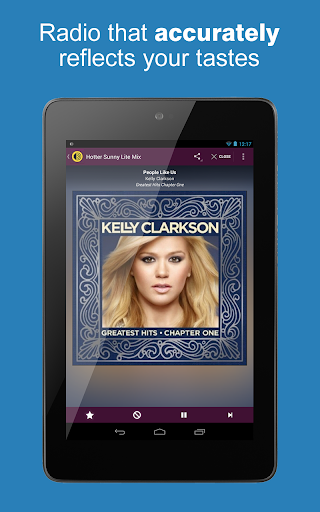
Analysis by Reviewed APKs
AccuRadio is an internet radio app for people who want music ready to play without building a playlist from scratch. Its hundreds of channels cover everything from classic rock and jazz to Celtic music and Korean pop, with options to save favorites and shape a channel by rating or excluding songs. I found it best for casual listening: broad choice, simple habits, and an ad-supported free model.
Music for the everyday
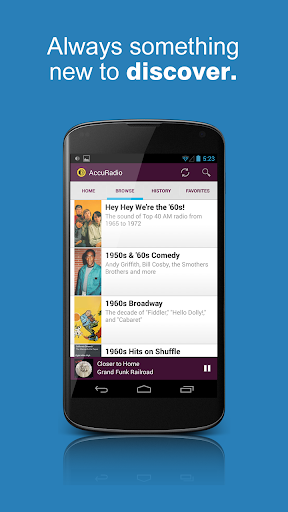
When I want something on while making dinner or tidying up, AccuRadio suits the moment better than stopping to choose every track. I can head for a genre that fits my mood, pick a channel, and let it play. The range makes those quick decisions easier: classic rock, relaxing music, country, and jazz are all among the choices, alongside styles I might not think to search for on an ordinary day.
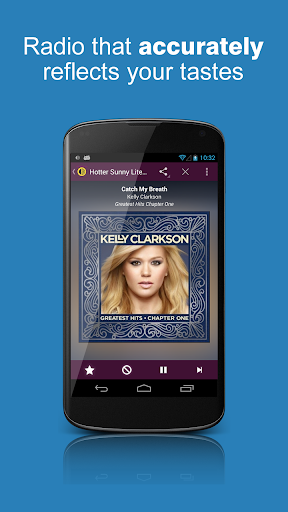
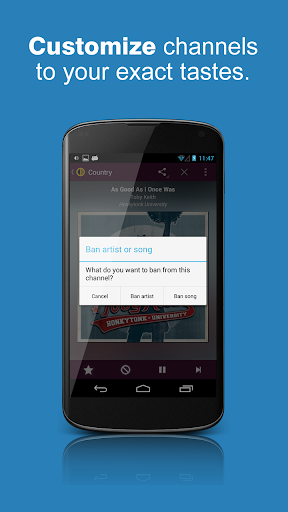
A channel can become a little more personal as I listen. I can rate songs, save channels I return to, and use the listening history to revisit something I heard before. If a particular artist or song is not working for me on that channel, I can ban it there. I like that these are small adjustments to a listening routine, rather than a demand to assemble and maintain a complete playlist.
Radio, not a playlist manager
The clearest comparison is with traditional radio: AccuRadio gives me a channel-based way to listen, but with a much wider spread of genres and some personal controls. It also differs from a hand-built playlist. Rather than choosing each track in advance, I pick a musical direction and let the channel provide the sequence. That makes it useful when I want a soundtrack but would rather not spend my break organizing one.
I would not choose it when the main goal is to play a carefully arranged queue of specific songs. The app is organized around music channels, and its strengths are variety, discovery, and lightweight customization. It is also an internet radio service, so it is for streaming rather than managing a local music collection. People who prefer to control every track may find that channel-first approach less satisfying.
Small habits, better channels
The most useful habit is to save a channel as soon as I notice myself returning to it. That gives me a short route back when I open the app with no particular plan. I can also treat listening history as a breadcrumb trail: if a channel or song caught my attention earlier, I have a way to look back instead of relying on memory. Those two habits make a broad catalog feel more manageable.
Song ratings can do more than register whether I enjoyed a track. AccuRadio says they help unlock a personal Five-Star channel, giving regular listening a small sense of progression. I would use ratings honestly rather than tapping through them automatically. And when a song or artist keeps interrupting the mood of one channel, the ban option lets me make a focused adjustment without treating that preference as a rule for every kind of listening.
More From Our News Desk

Zoom Meetings, Google Meet, or Teams: Which Is Easiest to Join?

How I Build a Free Streaming Lineup With Tubi

Why Crunchyroll Is the Default Anime App for So Many Fans

YouTube TV: A Practical Guide to Cutting Cable

Rummikub and the Small Comfort of Phone Games

TeamViewer Remote Control or AnyDesk for Helping Family?
Who will enjoy AccuRadio
I would recommend AccuRadio to people who like music in the background, enjoy exploring genres, or want a radio-style alternative to repeatedly choosing tracks. Its channel range is appealing if your listening changes with the day: jazz while working, relaxing music in a quieter moment, or oldies when you want something familiar. Saving favorites and rating songs add enough personalization to make repeated visits feel more considered.
It may be a weaker fit for listeners who want precise control over every song or who want to build a fixed playlist as their main activity. Ads are part of the experience, so anyone seeking uninterrupted listening should keep that in mind. I also would not frame it as a specialist tool for music production or collection management. AccuRadio is most convincing when the simple question is, “What should I put on?”
AccuRadio is developed by AccuRadio and is listed in Google Play’s Music & Audio category. The store shows more than one million installs and a 4.5-star rating from about 62,900 ratings. The app is free to download and use, and the supplied store information says it contains ads. It also indicates no in-app purchases, so the listed model is free listening supported by advertising.
The content rating is Teen. The listed app version is 3.0.44, with a release date of February 27, 2013, and a last update date of July 30, 2026. AccuRadio provides music channels across more than 50 genres, with options including favorites, listening history, song ratings, skips, and channel-specific artist or song bans. The Android minimum requirement is not included among the supplied store facts.
A closer look at channel-based listening
A quick first impression
When I first opened AccuRadio, its appeal was easy to understand: this is an app built around choosing a kind of music, not planning a listening session in detail. The number of genres makes browsing feel open-ended, but familiar categories such as pop, country, jazz, and classic rock provide comfortable starting points. I could begin with a broad preference and narrow my taste over time.
Getting started does not require me to decide what every next song should be. I can choose a channel and let the radio format take over. That lowers the effort involved in finding background music, especially when I am doing something else. The first impression is less about elaborate setup and more about having plenty of musical directions available when I want to get listening.
The day-to-day rhythm
In regular use, I think of AccuRadio as a companion for the stretches of a day that benefit from music but do not need my full attention. I can pick a channel for a household chore, a work session, or a quieter evening, then let it run. The promise of no limit on song skips is useful when a track does not fit, without requiring me to abandon the channel altogether.
The key is that the listening experience stays flexible. I can move among a wide range of musical styles, return to saved channels, and use history to remember what I explored. That is different from committing to one long playlist. It gives me room to follow my mood while keeping the basic routine simple: choose a direction, listen, and make small adjustments when something stands out.
Personal touches that matter
Several features work together to make the channels feel less fixed. Saving favorites keeps good finds close, while listening history can help me retrace a recent detour through the catalog. Song ratings add another layer, and AccuRadio describes a Five-Star channel that users can unlock through rating songs. It is a modest incentive, but one that connects a simple reaction to a more personal listening option.
I also appreciate that the ban controls are specific to a channel. If an artist or song does not belong in the mood I want from one station, I can exclude it there rather than treating that choice as a universal dislike. Sharing favorite channels and songs rounds out the social side without changing the app’s central purpose: finding music and making a channel work better for my own listening.
A routine that works
A practical routine might start with one channel for a regular activity, such as a familiar genre during morning chores. If I find another channel that suits an evening walk or a slower weekend, I save that too. After a few sessions, favorites become a short list of reliable starting points, while history helps recover channels I sampled but did not think to save at the time.
As I listen, I can skip songs that do not fit and rate the ones I enjoy. If one channel repeatedly includes an artist I would rather not hear there, I can use its ban feature. The point is not to tune everything perfectly in one sitting. A few small choices over time are more natural, and they let the service’s broad selection do most of the work.
Limits to keep in mind
AccuRadio’s channel format is also its main limitation. It is designed for choosing a musical lane and listening, not for selecting every track in sequence. That distinction matters if I have a specific set of songs in mind or prefer to maintain a carefully ordered playlist. The app offers ways to steer a channel, but those controls are not the same thing as full track-by-track planning.
The free model includes ads, which can interrupt the flow for listeners who expect uninterrupted music. The huge catalog can also make choosing a starting point feel like a small task in itself, particularly if I arrive without a genre or mood in mind. Saving favorites and leaning on history help, but the app works best when I am happy to browse channels rather than expecting one perfect choice immediately.
AccuRadio makes a strong case for the simple pleasure of choosing a genre and letting music unfold. Its broad channel selection, favorites, history, ratings, skips, and channel-specific bans offer useful personalization without turning listening into a project. I found the radio approach especially convenient when I wanted music in the background and did not want to assemble a playlist.
I would try AccuRadio if you enjoy genre-based listening and can live with ads in a free app. It is less suited to people who need exact control over a queue or want a fully uninterrupted experience. For casual discovery and everyday music, though, it gives you plenty of places to start and a few practical ways to make them your own.
AccuRadio Frequently Asked Questions
What is AccuRadio used for?
AccuRadio is an internet radio app for listening to music channels across more than 50 genres. You can save favorite channels, review listening history, rate songs, skip tracks, and ban artists or songs from a specific channel. It suits people who want to choose a style of music and let the channel play, rather than building a track-by-track playlist.
Which devices can run AccuRadio?
The supplied store information describes AccuRadio as an Android app available through Google Play. It does not provide an Android minimum version, so check the Google Play store page for the requirement that applies to your device. Device compatibility can depend on the software and hardware in use, so it is worth checking the current store details before installing.
Is AccuRadio free, and does it have ads?
AccuRadio is listed as free, and the supplied Google Play facts say it contains ads. They also indicate that the app does not offer in-app purchases. Store details and availability can change, so check the Google Play page for the current information before downloading if the cost or advertising model is important to you.
What Android version does AccuRadio require?
The minimum Android version is not included in the supplied app facts. Requirements can change as an app is updated and may depend on the device, so check AccuRadio’s Google Play store page for the current compatibility information. The listed version is 3.0.44, but that does not by itself establish which Android versions are supported.
Who is AccuRadio best suited to?
AccuRadio is a good match for listeners who enjoy genre-based radio, want music in the background, or like discovering channels without curating every song. Its skips and channel-specific bans offer some control, but it is still built around radio channels. People who want an exact, manually ordered queue or an ad-free experience may prefer a different kind of listening setup.
Pros
- Hundreds of channels span more than 50 genres, including familiar and less common styles.
- Favorites and listening history make it easier to return to channels worth keeping.
- Song ratings, skips, and channel-specific bans offer practical ways to shape listening.
- Free access makes it easy to explore channels without an upfront price.
Cons
- Ads can break the flow for listeners who prefer uninterrupted music.
- The channel-based format is less suited to building a precise, ordered playlist.
- A large range of genres can take some browsing before you find a favorite.
- Category
- Music & Audio
- Version
- 3.0.44











