Zwift Companion
- 35.44K
- 4.4
- Installs
- 1.00M
- Price
- Free

Screenshots

Analysis by Reviewed APKs
Zwift Companion is the phone-side partner for Zwift, giving indoor riders a place to find events, keep up with friends, and control parts of a ride without relying only on the main Zwift experience. I found its appeal is practical rather than flashy: it brings planning, social features, and ride information together. It suits people who already Zwift and want their sessions to feel more connected and organized.
Before the Ride Starts
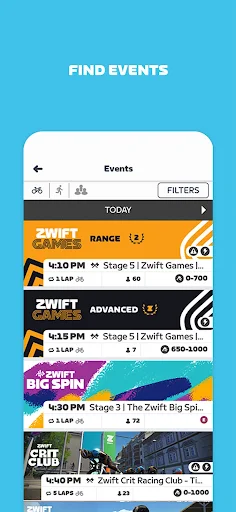
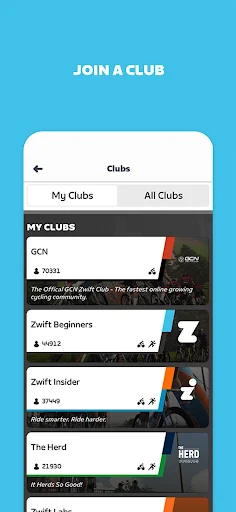
Picture finishing work and trying to choose a ride before your evening workout. With Zwift Companion, I can browse events, look for group rides or races, and see what friends and people I follow are up to. Clubs are part of the discovery mix, too. That makes the app useful in the small window before I get on the bike, when I want a plan without turning preparation into another project.
The social angle changes the feel of that decision. Rather than simply picking a route and riding alone, I can look for an event with other Zwifters or find people with similar interests. I also like that the home screen can show who is currently Zwifting. It gives me a quick sense of what is happening in my circle and can make an otherwise solitary indoor session feel more shared.
A Companion, Not the Ride
The name is a good guide to the app’s role. Zwift Companion supports Zwifting by helping with planning, communication, ride controls, and reviewing progress. It is not presented as a general-purpose fitness tracker or a replacement for Zwift itself. If I am looking for an app to organize every kind of workout, this is too focused; its tools make the most sense in the context of Zwift rides.
Compared with handling everything in the main Zwift experience, the phone app offers a separate place to discover events and keep in touch while riding. That division can be handy when I want to glance at ride information or interact with other riders from my phone. It also means the app’s value depends on already being part of the Zwift routine. Without that context, many of its features have little reason to be used.
Small Habits That Help
A simple habit is to check Companion before a planned ride rather than opening it only once the session is underway. Browsing the event calendar, checking what friends are doing, and looking at clubs can help me decide what kind of ride I want. That quick check is especially useful when my motivation is low and a scheduled group ride sounds more appealing than choosing a route on my own.
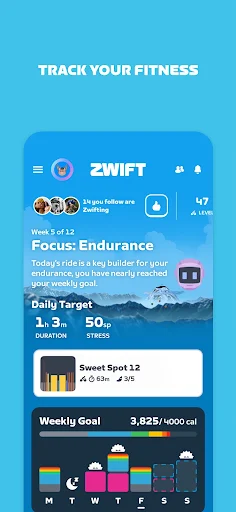
I’d also make a point of checking in after a session. Companion brings ride data, riding companions, progress, goals, achievements, Tours, and challenges into the post-ride picture. That can make individual sessions feel like part of a longer effort. Riders with Zwift equipment can use the app to update its firmware as well, so it is worth keeping in mind as a practical place for equipment-related upkeep.
More From Our News Desk

Zoom Meetings, Google Meet, or Teams: Which Is Easiest to Join?

How I Build a Free Streaming Lineup With Tubi

Why Crunchyroll Is the Default Anime App for So Many Fans

YouTube TV: A Practical Guide to Cutting Cable

Rummikub and the Small Comfort of Phone Games

TeamViewer Remote Control or AnyDesk for Helping Family?
Who Will Get the Most From It
I’d recommend Zwift Companion to people who already ride with Zwift and want event discovery, social connections, and in-ride controls close at hand. It is particularly well suited to riders who enjoy group sessions, follow friends, or want to keep an eye on progress after workouts. The combination of planning, ride-time interaction, and post-ride review gives the phone app a clear job within an existing Zwift habit.
It may be less useful for someone who wants a standalone cycling app, a broad exercise tracker, or a place to build any kind of workout from scratch. The description focuses on supporting Zwift activities, not replacing them. Riders who prefer quiet, unstructured sessions may also have less reason to use the event and social tools. In short, it makes the most sense when Zwift is already part of the routine.
Zwift Companion is a Health & Fitness app from Zwift, Inc. On Google Play, it has over one million installs and a 4.4-star rating from around 35,000 ratings. The app is free to download, and the supplied store facts say it has no in-app purchases and contains no ads. Its content rating is Everyone.
The current version in the supplied facts is 3.91.0. Zwift Companion was released on February 2, 2015, and its most recent update is dated October 30, 2026. No minimum Android version is included in the supplied facts, so riders should check the Google Play entry for compatibility with their device.
How Companion Fits Into a Zwift Ride
A Clear First Impression
When I first opened Zwift Companion, its purpose was easy to understand: it is a helper for Zwift, not an unrelated collection of fitness tools. The description organizes what it does around the moments before, during, and after a ride. That structure is useful because it sets expectations quickly. I can think of it as a place to plan, stay connected, and look back, rather than another app asking me to manage an entirely separate routine.
Getting value from it begins with having Zwift in the picture. Once that is true, the features make sense as parts of the same activity: finding something to ride, checking in with other people, and reviewing what happened. Riders with Zwift equipment have an additional reason to open Companion, since equipment firmware updates are supported. The overall first impression is focused, with the caveat that its usefulness follows the Zwift habit.
Keeping a Ride Moving
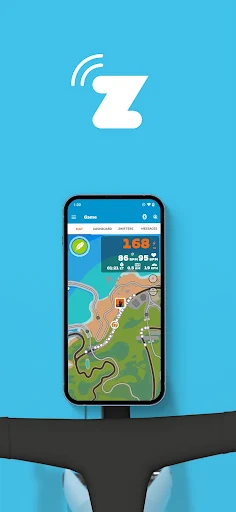
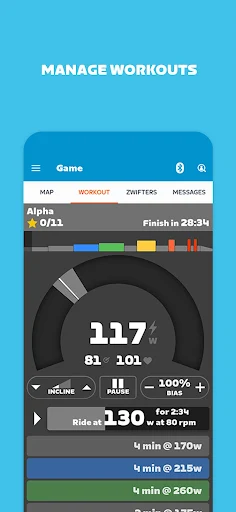
During a ride, Companion can act as a remote control from the phone. The supported controls include sending Ride Ons, chatting with other Zwifters, making U-turns, and choosing between routes. Those are the kinds of small interactions that can be useful while the ride is already in progress, especially when I want to communicate or make a change without treating the session as finished.
Structured workouts add a more specific set of controls. Companion can adjust trainer resistance to make the effort more or less intense, and it can toggle ERG mode. I can also take screenshots and see nearby riders with their stats. I appreciate that these are described as ride-time tools rather than a promise that the phone app replaces the experience of riding in Zwift.
More Than a Remote
The standout feature for me is how Companion covers several stages of a Zwift session. Beforehand, there are events, group rides, races, clubs, and a view of friends or people I follow. During the ride, there are communication and control options. Afterwards, the app brings attention back to ride data and who rode alongside me. That breadth gives it a more useful role than a remote control alone.
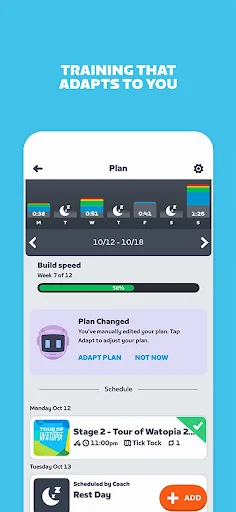
Zwift Plus is also mentioned as a way to access Zwift Coach. The described coaching feature builds a training plan around fitness, goals, and schedule, then offers recommendations for workouts, routes, and events. The plan is described as adapting when life disrupts it. I see that as a more guided option for riders who want structure, while the event and social tools remain useful for people who simply want company.
A Repeatable Routine
A practical routine could start with a quick Companion check before getting ready to ride. I can see who is active, browse events, and decide whether a group ride or race fits the time I have. If I want a more tailored plan, the Zwift Coach option described with Zwift Plus may help organize recommendations around my goals and schedule. Either way, the point is to make the choice before the workout begins.
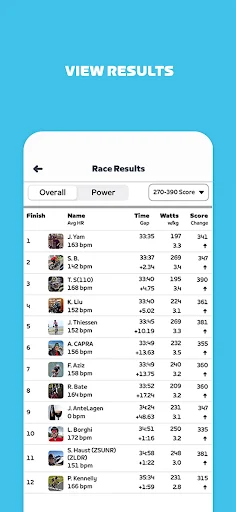
After the ride, I can use Companion to revisit the data, see who I rode with, and check progress toward goals or achievements in Tours and challenges. I like this bookend approach: a little planning beforehand, a few useful controls during the session, and a review afterwards. It gives regular riders a way to connect separate workouts without needing to invent a complicated tracking ritual.
Keep the Scope in Mind
The main limitation is also the app’s defining focus. Companion is designed around Zwift, so it is unlikely to satisfy someone searching for a general fitness dashboard or an all-purpose cycling planner. Its usefulness also depends on how much a rider cares about events, social interaction, workout controls, and Zwift progress. Someone who simply starts a ride and prefers not to interact may find fewer reasons to open it.
There is also a distinction between Companion and Zwift Plus. The description places Zwift Coach and its training-plan features with Zwift Plus, so I would not assume every planning feature is part of the free Companion app itself. The app’s supplied store facts say Companion has no in-app purchases, but riders should check the store for current details about availability and compatibility before relying on a particular setup.
Zwift Companion makes the most sense as a practical sidekick for people who already ride with Zwift. Its strongest case is the way it connects event discovery, social features, ride controls, and progress review in one phone app. I found the scope reassuringly clear, even if that narrow focus will not appeal to everyone.
If you Zwift regularly and want more ways to plan sessions or stay connected while riding, I’d give Companion a try. If you want a standalone fitness app or rarely use Zwift’s social and event features, it is an easier pass. It adds useful context around the ride, rather than replacing the ride itself.
Zwift Companion Frequently Asked Questions
What is Zwift Companion used for?
Zwift Companion supports Zwift rides. It can help riders find events, group rides, races, and clubs, connect with friends, use selected controls during a ride, and review ride data and progress afterwards. It also supports firmware updates for Zwift equipment. Its features are most relevant to people who already use Zwift.
What devices and platforms support Zwift Companion?
Zwift Companion is an Android app distributed through Google Play. The supplied information does not specify a minimum Android version or a complete device list. Compatibility can depend on the device and current app requirements, so check the Google Play entry before installing it.
What Android version does Zwift Companion require?
The minimum Android version is not included in the supplied app facts. Requirements may vary as the app changes and by device, so check the current Google Play entry for the version your phone needs. The current app version in the supplied facts is 3.91.0.
Does Zwift Companion cost money or include purchases?
The supplied Google Play facts describe Zwift Companion as free, with no in-app purchases and no ads. Zwift Plus and Zwift Coach are mentioned in the app description, but those references do not change the supplied purchase facts for Companion. Check Google Play for current availability and terms.
Is Zwift Companion worth trying for casual riders?
It can suit casual riders who already use Zwift and want to find group activities, keep up with friends, or review progress. It may be less compelling if you prefer solo, unstructured sessions or want a general-purpose fitness app. Companion is built to support the Zwift experience rather than stand on its own.
Pros
- Combines event discovery, clubs, and friend activity around Zwift rides.
- Offers ride-time controls, chat, and nearby rider information.
- Brings ride data, goals, Tours, and challenges into post-ride review.
- Free to download, with no ads or in-app purchases in the supplied facts.
Cons
- Its value is closely tied to already using Zwift.
- It is not a general-purpose fitness tracker or cycling planner.
- Zwift Coach features are described as part of Zwift Plus.
- Category
- Health & Fitness
- Version
- 3.91.0











