Zotero
- 1.03K
- 4.6
- Installs
- 500.00K
- Price
- Free
Screenshots
Analysis by Reviewed APKs
Zotero is a research library for collecting sources, keeping them organized, and reading and annotating PDFs on an Android device. I can see it fitting students, academics, and curious readers who gather material across the web and want it in one place. My overall take is that it makes research easier to carry around, while some citation and document-writing work still belongs on Zotero’s web or desktop tools.
A research session on the go
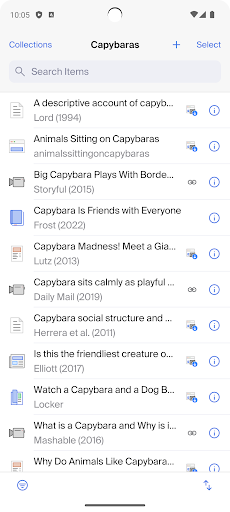
When I’m working on a paper, I often find useful material in several places: a journal page in a browser, a news article someone shared, and a book I spotted while out. Zotero gives those sources a shared home. On Android, I can send a URL to the app from a browser or another app, and I can scan a book’s barcode to add a physical title to my library.
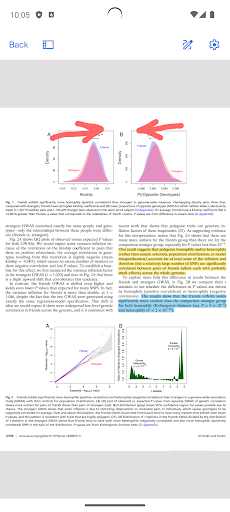
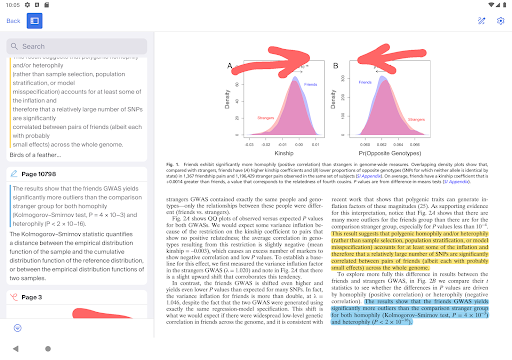
Later, I can open a saved PDF, read it, and add highlights or notes without switching to a separate annotation app. Zotero can retrieve bibliographic details from saved PDFs, which helps keep a collection more useful than a folder full of anonymous files. I’d still expect some PDFs to be unavailable for automatic download when access requires a login, but the workflow suits the common case of gathering and reviewing accessible material.
A library, not a writing suite
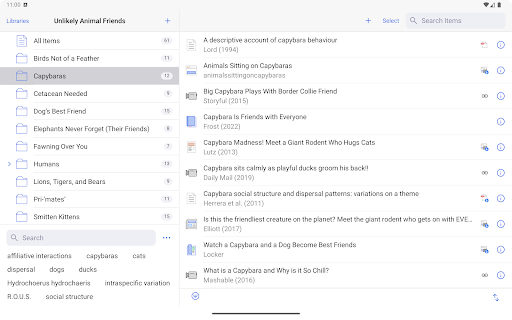
Compared with saving links in a browser or dropping PDFs into general cloud storage, Zotero is built around research sources and their bibliographic details. Collections and tags help me group material by project or topic, while annotations stay with the PDFs I’m reading. That focus is the point: it is a more purposeful place for source gathering than a bookmarks list, especially when a project involves many different kinds of material.
It is not a complete replacement for a word processor or a desktop research workflow. Zotero’s description places citation and bibliography generation in its web library or desktop app, with Android support coming soon, and document integration with Word, LibreOffice, and Google Docs is described as a desktop-app feature. I’d use the Android app to collect and review sources, then turn to those other tools when drafting and citing.
Small habits that help
I’d get more from Zotero by saving a source as soon as I decide it might matter, rather than trusting myself to find it again later. A quick share from the browser keeps that capture close to the moment of discovery. Once a source is in the library, adding it to a collection or applying a tag can make it easier to return to when a project grows.
A useful rhythm is to collect during the day and review later: open the saved PDFs, highlight relevant passages, and add notes while the argument is still fresh. For books, the barcode scanner offers another quick capture route. These habits don’t require elaborate upkeep, but they do make the library more than a holding pen for links and files.
More From Our News Desk

Zoom Meetings, Google Meet, or Teams: Which Is Easiest to Join?

How I Build a Free Streaming Lineup With Tubi

Why Crunchyroll Is the Default Anime App for So Many Fans

YouTube TV: A Practical Guide to Cutting Cable

Rummikub and the Small Comfort of Phone Games

TeamViewer Remote Control or AnyDesk for Helping Family?
Who will find it useful
I’d recommend Zotero to students, researchers, and anyone who regularly gathers articles, books, webpages, or PDFs for a project. It makes particular sense if you want to keep source details alongside the material itself, annotate PDFs, or share a research library with colleagues. The Android app is also handy for capturing sources away from a computer and returning to them later in a more focused session.
It may be less satisfying for someone who wants a phone app to handle every step of writing and citation formatting. The Android description emphasizes collecting, organizing, and annotating, while citation generation and document integration are handled through Zotero’s web or desktop tools. If your needs are mostly casual reading, with no interest in organizing sources or keeping bibliographic information, Zotero’s research-focused structure may feel like more than you need.
Zotero is developed by Zotero and is listed in the Productivity category on Google Play. The Android app has over 500,000 installs and a 4.6-star rating from 1,027 ratings. Its content rating is Everyone. The listed version is 1.0.0-247, with a release date of June 3, 2025, and a last update dated June 5, 2026.
The app is free, with no in-app purchases and no ads. It supports collecting sources, organizing them with collections and tags, and annotating PDFs. An Android minimum-version requirement was not supplied in the available facts, so check Google Play for device compatibility before installing.
How Zotero Fits Into Mobile Research
A focused first impression
When I first opened Zotero, the appeal was easy to understand: it is meant to be a working library for research, not just another place to stash files. The supported tasks cover the path from finding a source to reading it, including saving material, managing its details, and marking up PDFs. That makes the app’s purpose clear even if a full research project may also involve other Zotero tools.
The first step that seems most natural is to bring in something already open in a browser or another app using the sharing option. For printed books, the camera barcode scan gives a different way to start a record. I’d begin with a small set of current sources and see how collections and tags fit my project, rather than trying to reorganize an entire reading history at once.
A useful daily companion
Day to day, Zotero’s strongest role is keeping research material available for another pass. A saved webpage, article, or book record has a place in the same library as PDFs, and bibliographic information can be viewed and edited. That makes it easier to return to the source itself instead of relying on a vague memory of where I found it.
The PDF reader adds a practical layer to that library. I can highlight passages and add notes, images, or ink annotations to a PDF, so the app supports active reading rather than just collection. I’d treat it as a companion for short review sessions on a phone and a way to keep work moving between devices, rather than assuming every writing task is best done on a small screen.
Research details that stand out
One helpful detail is that Zotero can automatically retrieve bibliographic information for PDFs saved to the app. That can reduce the chore of filling in source details by hand, although the app also lets me view and edit bibliographic information when I need to make a correction. The combination makes the library more useful for later reference than a collection of documents with no context.
Collections and tags offer two ways to bring order to a growing pile of research. I can use a collection for a project and tags to label themes or source types, rather than relying on one long undifferentiated list. Zotero also supports collaborative collection and PDF markup in group libraries, which may help colleagues work with shared material.
The wider Zotero workflow matters here. Libraries can synchronize with the desktop app and Zotero website, and the desktop app can use annotations in documents and generate bibliographies. Citation generation is available from the web library or desktop app in many styles; the description says Android support is coming soon, so I wouldn’t count on that feature in the phone app yet.
A simple research routine
For a week of reading, I’d make one collection for the project, then save relevant pages as they turn up during browsing. If I find a printed book, I can use its barcode as a starting point for adding it to the library. This keeps capture lightweight: I don’t have to stop and build a detailed filing system every time I encounter a useful source.
At the end of a study session, I’d open the accessible PDFs I saved and mark the passages that seem important. A short note beside a highlight can preserve why it caught my attention, while tags can help connect sources across projects or themes. When it is time to write, I’d move to Zotero’s web or desktop options for citation and bibliography work, then use the desktop integration described for supported writing tools.
Keep the boundaries in view
The main limitation is that not every part of the research process is available in the same place. Zotero’s description assigns citation and bibliography generation to the web library or desktop app, with Android support coming soon. It also describes inserting annotations into Word, LibreOffice, and Google Docs through the desktop app. On Android, I’d focus on capture, organization, reading, and annotation.
Automatic PDF downloads have a practical boundary too: the description says they are currently limited to PDFs that can be accessed without a login. A source that sits behind a sign-in may need a different route, and it’s worth keeping that in mind when planning a reading session. These limits don’t undermine the library’s value, but they do make Zotero a connected set of tools rather than a phone-only solution.
Zotero earns its place on my phone by making research material easier to capture, sort, and revisit. The PDF annotations and source organization are especially useful for turning scattered reading into a library I can work with. Its boundaries are clear: citation and document tasks still rely on the web or desktop experience.
I’d recommend it to anyone who regularly collects sources and wants a more organized way to read and annotate them. If you expect a complete writing and citation suite on Android, this is not quite that. For research on the move, though, Zotero is a practical companion to its broader workflow.
Zotero Frequently Asked Questions
What is Zotero used for?
Zotero helps you collect and organize research sources such as articles, books, webpages, and PDFs. You can add sources by sharing a URL from another app, scan book barcodes, organize material with collections and tags, and annotate PDFs. Citation and bibliography generation are described as available through Zotero’s web library or desktop app.
Which devices can run Zotero?
This version of Zotero is the Android app, and its description also explains how research libraries can synchronize with Zotero’s desktop app and website. The available Android minimum-version requirement can vary by release or device, so check the Google Play store entry to confirm compatibility with your phone or tablet.
What Android version does Zotero require?
The Android version requirement may vary by app release and device. Check Zotero’s Google Play store entry for the current minimum requirement before installing. The app is designed for Android, while Zotero also describes access to synchronized libraries through its desktop app and website.
Does Zotero cost money or have ads?
The Android app is free and has no in-app purchases or ads according to the provided store facts. Zotero’s description also says the app can synchronize personal and group research libraries with its desktop app and website. Check Google Play for any current changes to the store details.
Is Zotero a good fit for students?
It can suit students who regularly gather sources, manage bibliographic details, and read or annotate PDFs. It is less suited to someone who expects to do all citation formatting and document writing in the Android app: the description places those tasks in Zotero’s web or desktop tools, with Android citation support coming soon.
Pros
- Collects URLs, books, and research PDFs in a library built for sources.
- PDF reading supports highlights, notes, images, and ink annotations.
- Collections, tags, and group libraries support organized research workflows.
- Free to install, with no ads or in-app purchases.
Cons
- Citation generation is described for the web library or desktop app, not yet Android.
- Automatic PDF downloads are limited to files accessible without a login.
- Writing-tool integration is handled through the desktop app.
- Category
- Productivity
- Version
- 1.0.0-247











