Zotero
- 436
- 4.6
- Installs
- —
- Price
- Free
Screenshots
Analysis by Reviewed APKs
Zotero is a research organizer for collecting sources, reading and annotating documents, and keeping citation details together. I’d recommend it to students, academics, and anyone who regularly works with articles, books, or web pages. After spending time with its workflow, my take is that it makes an iPhone or iPad a useful companion to a larger research library, especially when you want to save and review material away from your desk.
A source-saving day
Imagine you’re reading an article in Safari between classes or during a lunch break and want to keep it for a paper. Zotero lets you save material through the Share button, then bring it into your research library instead of leaving the source buried in a browser tab. You can also add a book or article by scanning its barcode or DOI with your device’s camera, which is a handy shortcut when you’re working from print.
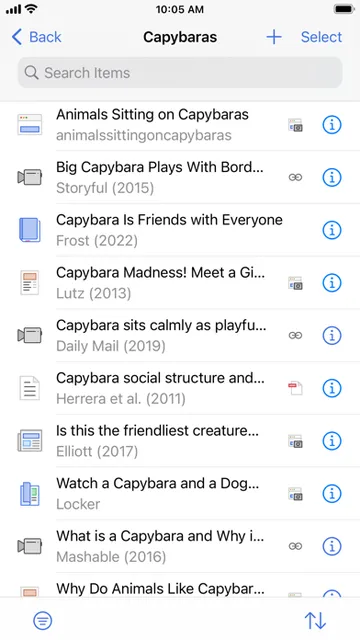
When I picture using Zotero through a busy research week, the value is less about one dramatic feature and more about having a reliable place for sources to land. Collections and tags help separate topics, while editable bibliographic details give you a chance to tidy a citation before it becomes part of a draft. On iPhone or iPad, I can collect a source on the go and return to it later for reading or annotation.
Research tool, not a word processor
Zotero sits between a browser’s bookmarks and a full writing setup. A bookmark can help you revisit a page, but Zotero is built to keep research items and their bibliographic information organized. It can also read PDFs, EPUBs, and saved webpage snapshots, and create citations in a wide range of styles. That makes it a more research-focused home for sources than a general notes app, particularly once a project has more than a handful of references.
It is not a complete replacement for writing software. Zotero’s desktop app is the part described as inserting annotations into Word, LibreOffice, and Google Docs and generating bibliographies from sources used in a document. The iOS app is better understood as a collection, library, and reading companion within that broader workflow. If your main need is drafting prose or managing everyday tasks, this is probably more specialized than you need.
Small habits that help
A useful habit is to save a promising source as soon as you find it, then sort it into a collection or add a tag before moving on. That little bit of organization can make a difference when you return to a project days later and no longer remember which tab held the article. Zotero also lets you view and edit bibliographic information, so I’d make a quick check of the details while the source is still fresh.
For reading sessions, I’d treat highlights and notes as a way to capture why a passage matters, rather than marking every interesting sentence. If you use an Apple Pencil, freehand annotations are another option. You can synchronize personal and group libraries for access through Zotero’s desktop app and website, so keeping the same collection habits across your research routine can make later work easier.
More From Our News Desk

Zoom Meetings, Google Meet, or Teams: Which Is Easiest to Join?

How I Build a Free Streaming Lineup With Tubi

Why Crunchyroll Is the Default Anime App for So Many Fans

YouTube TV: A Practical Guide to Cutting Cable

Rummikub and the Small Comfort of Phone Games

TeamViewer Remote Control or AnyDesk for Helping Family?
Who will get the most from it
I’d recommend Zotero to students, researchers, and curious readers who regularly gather material from different places and want a structured library rather than a stack of browser bookmarks. It is especially appealing if your work involves citations, PDFs, books, or sharing sources with colleagues. Someone already using Zotero on a computer can also use the iOS app to collect and review material away from their usual desk.
It may be a poor fit if you only save a link once in a while, want a general-purpose notes app, or expect to do all your document writing on a phone. Zotero’s strength is managing research materials and connecting them with a wider desktop and web workflow. The interface and organizing options may feel like extra work for casual browsing, but that structure becomes more useful as a project gathers sources.
Zotero is developed by Corporation for Digital Scholarship and is available for iPhone and iPad through the Apple App Store. The app is free, has a 4+ age rating, and requires iOS 16.6 or later. The current version in the supplied store information is 2.0.8, released March 17, 2022.
The App Store information gives Zotero a 4.6 rating from 436 ratings. Its last update date is October 3, 2026. The supplied details do not include an install count, so I’m leaving that out; store figures can change over time.
A portable home for research
A focused first impression
When I first opened Zotero, the clearest idea was that it is a library for work in progress, not simply a place to stash links. Its main jobs—collecting, organizing, annotating, citing, and sharing—fit together around research materials. That focus gives the app a practical purpose from the start, though it also means the experience makes most sense if you already have sources you want to manage.
The first setup decision is less about customizing a dashboard and more about thinking through how you want to group your research. Collections and tags provide ways to organize items, and bibliographic details can be viewed and edited. I’d start with a small number of useful project groupings rather than trying to design a perfect system before saving anything.
Collect, then return
The day-to-day loop is straightforward: find a source in an app such as Safari, use the Share button to save it, and return to the library when you have time to read. Zotero can automatically download article PDFs, which is useful when the next step is reading rather than merely remembering a title. For printed material, scanning a book barcode or article DOI offers another route into the same library.
What I like about this pattern is that it separates finding something from processing it. A source can be collected during a short break, then reviewed and organized during a longer session. You can edit its bibliographic information, file it with a collection or tags, and keep moving. That makes Zotero easier to imagine as a repeated research habit than as a one-time citation generator.
Reading and annotation
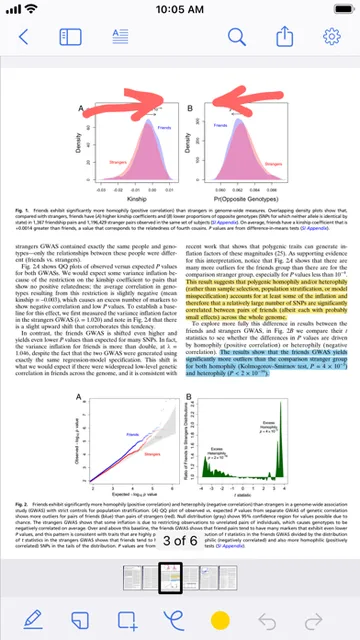
Zotero can open PDFs, EPUBs, and webpage snapshots for reading and annotation. Highlights and notes help capture useful passages, while Apple Pencil users can make freehand annotations. These options give the library a role beyond storage: you can return to a saved item and do some of the thinking work there, rather than relying entirely on a separate reading app.
I’d keep annotations purposeful. A few highlights that preserve an argument or a detail you may cite later are easier to revisit than pages covered in marks. Notes can help explain why a passage matters to your project. This is a practical advantage for focused reading, but it doesn’t turn the app into a general notebook; its annotation tools are tied to research items.
Citations and collaboration
Citation support is one of Zotero’s most useful features for research projects. It can generate citations and bibliographies in more than 10,000 formats and journal styles, including APA, Chicago, IEEE, MLA, Turabian, and Vancouver. That breadth matters when a course, publication, or project calls for a particular style. I’d still review generated details as part of normal editing, especially after changing an item’s bibliographic information.
Group libraries let colleagues collect sources and mark up PDFs together. Personal and group libraries can synchronize so they are accessible through Zotero’s desktop app and website as well as the iOS app. For document writing, the described integration happens through the desktop app, which can insert annotations into Word, LibreOffice, and Google Docs and generate bibliographies from the sources used.
A workable research routine
For a class paper or a long reading project, I’d use Zotero in three passes. First, save articles, books, and web pages as I encounter them. Second, sort the new items into collections or apply tags and check their bibliographic details. Third, read the most relevant material, adding a small number of highlights and notes that will help when I return to the topic.
That routine keeps collection from becoming a pile-up. When it is time to write, the desktop app can connect sources with documents and bibliographies, while the iOS app remains useful for collecting and reviewing. If I’m working with colleagues, a group library offers a shared place to gather sources and mark up PDFs. The workflow is most effective when I make organization part of the process, not a cleanup task at the end.
Zotero makes sense as a companion for people who handle research in stages: finding sources, organizing them, reading closely, and eventually citing them. Its tools are specific and useful, while the broader writing workflow depends on the desktop app. I found the strongest case for it in keeping a growing collection of research material together.
I’d recommend it to students and researchers who want a portable way to save and annotate sources, especially if they also use Zotero on a computer. Casual readers may find its structure unnecessary, and anyone seeking a mobile word processor should look elsewhere. For source-heavy work, it is a capable, focused iOS library.
Zotero Frequently Asked Questions
What is Zotero used for?
Zotero helps you collect and organize research sources, read and annotate PDFs, EPUBs, and webpage snapshots, and generate citations and bibliographies. It also supports group libraries for sharing sources and marking up PDFs with colleagues. Its iOS app fits into a wider workflow that can include Zotero’s desktop app and website.
Can I use Zotero on an iPhone or iPad?
Yes. Zotero is available for iPhone and iPad through the Apple App Store. The supplied requirement is iOS 16.6 or later. It can synchronize personal and group libraries for access through the iOS app, Zotero’s desktop app, and the Zotero website.
What iOS version does Zotero require?
The supplied App Store details specify iOS 16.6 or later. Compatibility requirements can change as the app is updated, so check the Zotero App Store page for the current requirement before installing it on an older iPhone or iPad.
Is Zotero free, and does it cost extra?
Zotero is described as a free app, and the supplied store information gives its price as $0. Details about any additional purchases can vary, so check the App Store page for the current cost information before downloading.
Is Zotero a good fit for casual readers?
It can work for anyone who wants to save and annotate research material, but its collection, citation, and library tools are most useful for source-heavy projects. If you mainly need a general notes app or a place to save occasional links, Zotero may feel more specialized than necessary.
Pros
- Collects sources from Safari and other apps through the Share button.
- Supports reading and annotating PDFs, EPUBs, and webpage snapshots.
- Offers citations and bibliographies in a broad range of styles.
- Group libraries help colleagues collect sources and mark up PDFs.
Cons
- The full document-writing workflow relies on Zotero’s desktop app.
- Collections, tags, and citation tools may be more than casual readers need.
- The iOS app is a research companion rather than a general-purpose writing tool.
- Category
- Productivity
- Version
- 2.0.8











