Zeely: AI Marketing Platform
- 23.73K
- 4.6
- Installs
- —
- Price
- Free
Screenshots



Analysis by Reviewed APKs
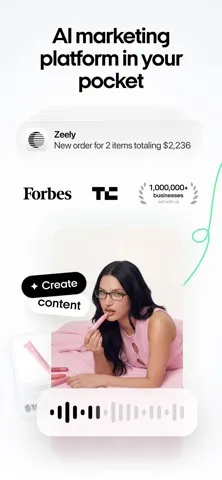
Zeely: AI Marketing Platform is a phone-based toolkit for creating product ads, launching campaigns, and keeping an eye on orders. I can see it suiting small sellers who want to handle marketing without building every creative from scratch or switching between several business tools. Its range is appealing, though it reaches beyond ad making into sales and order management, so it is best approached as a working platform rather than a simple video editor.
A campaign from your phone
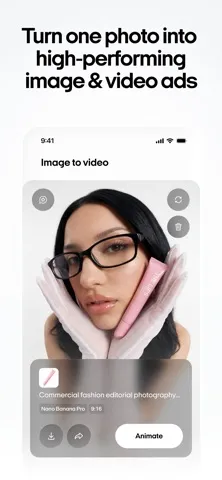
Imagine I have a product to promote and a product page ready, but no finished ad creative. Zeely’s described workflow starts with that link: the app can pull out key information, suggest video scripts, and generate creatives. I can then shape a video with an AI avatar and custom music, or make image-based ad materials. That puts the app’s main job in context: turning product details into marketing assets without requiring me to start with a blank canvas.
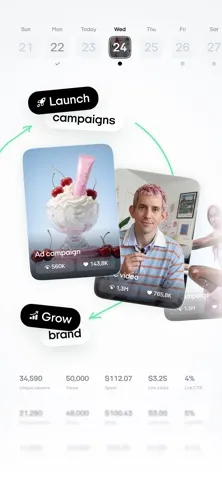
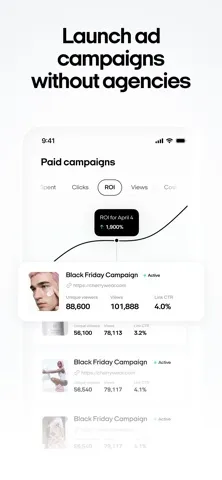
Once I have a few options, Zeely is also designed to help move the work into a campaign. It can create ad copy, launch ads on Facebook and Instagram, test multiple creatives or videos, and track campaign activity from the phone. In the same broader workflow, its order tools cover new-order notifications, customer contact, and order processing. I would treat these as connected steps, not a promise that every campaign will produce a particular sales result.
More than an ad editor
The obvious alternatives are narrower tools: a video editor for polishing clips, a design app for making social graphics, or an ad manager for campaign controls. Zeely’s distinction is that it brings AI-assisted creative generation, ad launching, and sales-related tools together. That can be useful when I want to move from a product link to several campaign assets in one place, rather than export files between separate apps.
That breadth also means it is not simply a general-purpose design studio or a standalone social network. Its tools are framed around promoting products and managing online sales, including a sales-page option for people without an online store. If I only want to trim a personal video or make an unrelated poster, much of the app’s business-focused toolkit may be beside the point. The ad and sales focus is the reason to consider it.
Small workflow improvements
I would get more from Zeely by treating each product as a small campaign rather than making one creative and calling it done. The app describes testing three to ten creatives and videos per campaign, so I could prepare several variations and compare their performance. Keeping the product information consistent while changing the script or visual gives the campaign a clearer focus and makes the testing workflow easier to follow.
There is also a practical rhythm to the sales tools: check for order notifications, process new orders, and contact customers to confirm shipping details. When connected to a payment provider, the app describes sales revenue going to a bank account, while its analytics can help monitor click-through rate and goals. I would use these features as a lightweight routine alongside creative work, not assume that installation alone handles a whole business.
More From Our News Desk

Zoom Meetings, Google Meet, or Teams: Which Is Easiest to Join?

How I Build a Free Streaming Lineup With Tubi

Why Crunchyroll Is the Default Anime App for So Many Fans

YouTube TV: A Practical Guide to Cutting Cable

Rummikub and the Small Comfort of Phone Games

TeamViewer Remote Control or AnyDesk for Helping Family?
Who may find it useful
I’d recommend giving Zeely a look if you sell products online and want one mobile app for AI-assisted ad materials, campaign launching, and order-related tasks. It is particularly relevant to a seller who already has product details or a product link, but wants help turning that information into video scripts, creatives, or ad copy. The sales-page option may also appeal if you do not have an online store and want to create a page through the app.
It may be less suitable if your main need is a full desktop creative suite, a general-purpose video editor, or a tool unrelated to online selling. The description emphasizes a phone-based workflow and social advertising on Facebook and Instagram, so people who do not use those channels may find less of a match. I’d also take time to review the store’s current cost and purchase details before building a routine around the service.
Zeely: AI Marketing Platform is an iOS productivity app from Zeely, Inc. It is free to download on the App Store, has a 4.6-star rating from about 23,700 ratings, and carries a 17+ age rating. The listed version is 8.16.0. The app first appeared on October 26, 2021, and its most recent update is dated November 2, 2026.
The stated minimum requirement is iOS 18.0. Zeely’s described tools cover AI-assisted marketing creatives, ads, sales pages, and order tracking. The available facts do not give an install count, advertising status, or in-app purchase details, so I have left those figures out rather than guess. Store terms and availability can change, so it is sensible to check the App Store before downloading.
From Product Link to Campaign
A focused first impression
Zeely’s pitch is easy to understand: bring product marketing work onto a phone and use AI to speed up the creative steps. I like that the feature set starts with familiar inputs such as a product link, rather than assuming I have a finished campaign plan or a library of polished assets. The first impression is practical, although the breadth suggests there will be several different parts of the business to explore.
The setup described by the app depends on what I want to do. A product link can feed creative generation, while a seller without an online store can use an AI-powered sales page and connect a payment account. The description names Stripe and PayPal as options for that sales-page setup. I would begin with one product and one objective, so I can understand the workflow before expanding into campaign or order management.
Daily campaign work
The day-to-day appeal is having the creative and campaign steps close together. I can imagine making a few product-focused assets, generating ad copy, then launching on Facebook or Instagram without moving through several separate tools. Zeely describes testing three to ten creatives and videos per campaign, which gives the workflow a useful comparison step rather than treating the first draft as the only option.
Campaign tracking also has a place in that routine. The app says I can track and manage campaigns on the go, and check analytics such as click-through rate. That is more useful than simply generating an attractive-looking ad because it connects the creative work with campaign performance. I would still read the numbers in context; the app’s materials describe measurement tools, not guaranteed results or automatic business growth.
Creative tools with range
The video maker is one of the more distinctive parts of Zeely’s description. It can generate talking videos, use scripts intended for selling, and include AI avatars based on real UGC creators. Custom music is another option. Those ingredients give a seller more than a static graphic to work with, especially when the product may be easier to show or explain in a short video.
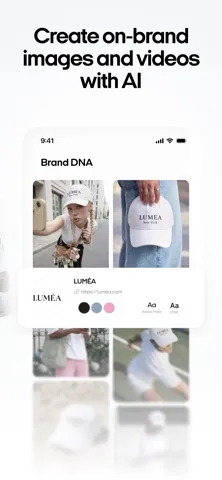
The creative builder complements that video workflow with AI-generated materials made from a product link. The app says those materials can be adjusted and produced in sizes for ads, posts, and stories. That range matters in practical terms: one product may need different formats depending on where the material will appear. I appreciate that editing is part of the described process, rather than generation being presented as the last step.
A seller’s weekly rhythm
A realistic routine might start with adding or reviewing a product, then making a small batch of creative variations for a campaign. I could write or generate ad copy, launch the campaign on Facebook or Instagram, and return later to check its activity. Keeping the work organized around one product at a time would make the creative tests easier to compare and reduce the temptation to change too many things at once.
On the sales side, I could check order notifications during the day, process new orders, and contact customers to confirm order and shipping details. Zeely also describes connecting a payment provider and monitoring analytics. These are useful adjacent tasks for a seller managing work from a phone, though the exact routine will depend on whether I use the sales page, a payment connection, and the campaign features.
A few limits to weigh
Zeely is aimed at product marketing, not every kind of creative or business work. Its ad-launching description centers on Facebook and Instagram, so a seller focused on other channels may need separate tools. The app also combines several areas—creative generation, campaigns, payments, and orders—which is convenient in theory but may be more than someone needs if they only want a basic design or editing tool.
AI-generated scripts and creatives are starting points, not a substitute for reviewing what represents a product accurately. The description includes options to tweak and improve creative materials, and I would make that review part of the process before using them in an ad. I would also check the current App Store information for costs and device details, since those practical terms can change over time.
Zeely makes the most sense as a mobile marketing workspace for sellers who want to create product-focused ads, test campaign materials, and keep sales tasks nearby. Its mix of video, creative, advertising, and order features is broader than a single-purpose editor, which is both its strongest appeal and the main thing to consider before committing to it.
I’d recommend it to small online sellers who work from an iPhone and want AI assistance across several steps of promotion. If you only need occasional graphics, or your sales workflow does not fit the channels and tools described, a narrower app may be simpler. Start with one product and check the current App Store details before settling into a routine.
Zeely Frequently Asked Questions
What is Zeely: AI Marketing Platform used for?
Zeely is a mobile toolkit for product marketing and online sales. Its described features include generating videos and other creatives from product information, creating ad copy, launching campaigns on Facebook and Instagram, tracking campaign activity, and handling order-related tasks. It also offers an AI-powered sales page for people without an online store.
Which devices can run Zeely: AI Marketing Platform?
Zeely is an iOS app available through the Apple App Store, and its stated minimum requirement is iOS 18.0. Check the App Store page on your device for current compatibility details, since supported devices and store information may vary as the app is updated.
What iOS version does Zeely: AI Marketing Platform require?
The stated minimum is iOS 18.0. If you are unsure whether your iPhone or iPad can run the app, check the compatibility information in the App Store before downloading. The store is also the best place to confirm current requirements after updates.
Does Zeely: AI Marketing Platform cost money?
Zeely is free to download on the App Store. The available information does not specify whether it offers in-app purchases or what those prices may be, so check the current App Store page for purchase terms before relying on particular features.
Who is Zeely: AI Marketing Platform best suited to?
It is aimed at sellers who want to promote products and manage parts of online sales from a phone. It may suit someone who needs AI-assisted ads, creative materials, or order tools. If you want only a general video editor or do not use the channels and sales workflow described, it may be less relevant.
Pros
- Combines AI-assisted video, creative generation, and campaign tools in one mobile app.
- Can generate materials in formats for ads, posts, and stories.
- Includes campaign tracking and order-related tools for online sellers.
- Offers a sales-page option for sellers without an online store.
Cons
- Its product-sales focus may be excessive for people who only need a basic editor.
- The described ad-launching tools center on Facebook and Instagram.
- Current purchase details are worth checking before building a workflow around it.
- Category
- Productivity
- Version
- 8.16.0











