Yuka - Food & Cosmetic Scanner
- 174.68K
- 4.7
- Installs
- 10.00M
- Price
- Free

Screenshots
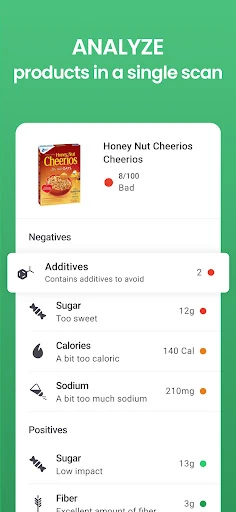
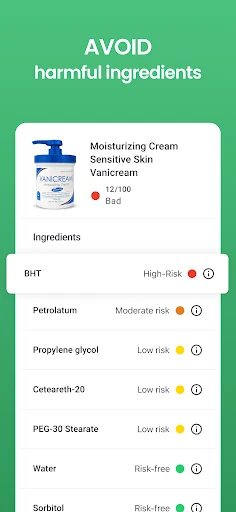
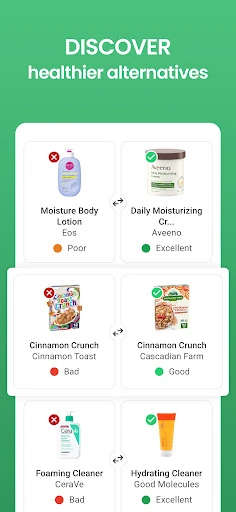
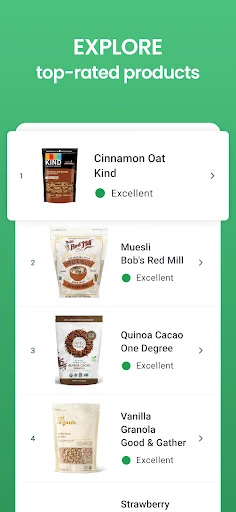

Analysis by Reviewed APKs
Yuka - Food & Cosmetic Scanner helps me make more sense of food and personal-care labels while shopping. I scan a product and get a color-coded score, with details explaining how it was evaluated and, for poorly rated products, a similar alternative. It suits curious shoppers who want a quick reference, though I treat its ratings as one way to compare products rather than the whole story.
A quicker label check
Picture me in a grocery aisle, deciding between two packaged snacks while the cart waits beside me. Instead of trying to parse every ingredient and nutrition line on the spot, I scan a product in Yuka and get a color-coded assessment: excellent, good, mediocre, or poor. I can then open the product information for more detail. That quick first read is the app’s main practical appeal when shopping feels rushed.
I can use the same basic routine with a beauty or personal-care product. Yuka analyzes the listed ingredients and assigns a score, with information about the assessment available on the product page. If a product receives a negative grade, the app can suggest a similar alternative with a better rating. That gives me a concrete next step, rather than leaving me with a number and no idea what to compare it against.
A shopping aid, not a rulebook
Yuka sits somewhere between reading every label myself and relying on a general shopping guide. Its color code makes a quick comparison easy, while the detailed product information gives me a reason to look beyond the headline score. It covers both food and beauty products, so I can reach for the same app in more than one aisle. That breadth is useful if I want one simple reference for everyday purchases.
I would not treat Yuka as a substitute for my own priorities or as a complete guide to every product decision. Its job is to assess products using its stated criteria and explain the resulting grade; it is not a general nutrition plan or a personal consultation. A score can help me decide what to inspect next, but I still need to consider what I actually want to buy and the information that matters to me.
Make scans more useful
I get more out of Yuka when I scan products I already buy, not just unfamiliar items that catch my eye. Seeing the assessment for a regular grocery or personal-care purchase gives me a useful point of comparison when I next shop. If a grade surprises me, I can open the product details and look at the basis for it instead of reacting only to the color.
A small habit that works well is to scan a couple of candidates in the same category before choosing. That keeps the app focused on a real decision rather than turning a shopping trip into a long research session. When Yuka recommends a similar product after a negative grade, I can use that suggestion as another option to check. The app is most helpful to me as a quick prompt to compare, not an automatic shopping list.
More From Our News Desk

Zoom Meetings, Google Meet, or Teams: Which Is Easiest to Join?

How I Build a Free Streaming Lineup With Tubi

Why Crunchyroll Is the Default Anime App for So Many Fans

YouTube TV: A Practical Guide to Cutting Cable

Rummikub and the Small Comfort of Phone Games

TeamViewer Remote Control or AnyDesk for Helping Family?
Who may find it useful
I’d recommend Yuka to shoppers who often find ingredient lists hard to interpret and want an uncomplicated starting point. It is especially handy for people who buy both food and personal-care products and would rather check a label with a scan than search through product information on their own. The simple grades are easy to understand at a glance, while the detailed pages give interested users somewhere to go when they want more context.
It may be less satisfying for someone who wants every product decision handled for them or who prefers to judge each label without a single overall grade. Yuka’s assessments are useful as comparisons, but they do not replace personal preferences or other considerations. I also would not expect it to turn shopping into a full health program: its focus is scanning products, explaining their ratings, and offering alternatives for negative grades.
Yuka - Food & Cosmetic Scanner is made by Yuka App and is available on Google Play for Android. The app is free to download, with in-app purchases listed at $10.00 to $20.00 per item. It does not contain ads. Google Play gives it a 4.7-star rating from about 175,000 ratings, and it has over 10 million installs.
The app is rated Everyone and requires Android 7.0 or later. The current version is 4.54.1. Its release date is December 2, 2019, and its most recent update was February 5, 2026. Those details give Android users a practical way to check compatibility before installing, while the store page is the place to review current purchase information.
What Scanning Feels Like in Practice
A clear first impression
When I first opened Yuka, the central idea was easy to grasp: scan food or a beauty product, then use the grade and product details to understand the result. The color scale keeps the initial read simple, with four levels running from excellent through poor. I like that the app does not require me to decode a complicated score before I can tell whether a product deserves a closer look.
Getting started is easiest when I have a product nearby to check. A scan turns the app’s purpose into something practical straight away: I can see the grade and open the information page for the reasoning behind it. The experience is built around product checks, so I do not need to invent a separate project or routine before the app becomes useful.
The everyday scan
In day-to-day use, Yuka works best at the moment a choice comes up. I can scan an item while comparing options, glance at its color-coded assessment, and decide whether I want to read further. That is a more natural fit for a shopping trip than sitting down later to research every item in the basket. It makes the app feel like a small reference tool I can bring into an ordinary errand.
The detailed product page matters because a color alone would be a thin explanation. When a grade catches my attention, I can check the information behind it and get a clearer sense of the assessment. For food, the evaluation uses nutritional value, additives, and the product’s organic dimension. For beauty products, the scoring is based on ingredient analysis and assigned levels of risk informed by current scientific research.
Food and beauty together
The most distinctive part of Yuka is that it covers two kinds of everyday shopping in one app. Food products are evaluated using three stated criteria: nutritional value, additives, and the organic dimension. Beauty and personal-care products are assessed by analyzing their ingredients, with each ingredient assigned a risk level based on current scientific research. That gives the app a wider role than a scanner focused only on groceries.
I also appreciate the difference between seeing a grade and being able to inspect its explanation. If I get a result I did not expect, I can look at the product information instead of treating the color as the entire answer. When an item receives a negative grade, Yuka can recommend a similar product with a better grade. That turns the assessment into a comparison I can follow up on while shopping.
A simple shopping routine
A practical way to use Yuka is to check products when I am already choosing between them. I might scan a packaged food item, read the grade, and open its details only if I want to understand more. If I am considering a beauty product, I can use the same pattern. Keeping the scan tied to a decision helps me spend time on products I am actually thinking about buying.
Over time, checking familiar purchases can give me a useful baseline. If I scan a regular item and then compare it with another option, I have a clearer sense of how Yuka rates each one. I can also follow a recommended alternative when the original receives a negative grade. I would still make the final choice myself, but the app gives me another piece of information at the point where it can be useful.
Keep the score in context
The main limitation is also part of the appeal: Yuka compresses a product assessment into a clear grade. That is convenient when I have a few seconds, but the color should be the beginning of a check rather than the only thing I consider. The detailed page is there for a reason, and I find it more useful to look at the explanation when a result could affect what I choose.
The app is focused on evaluating food and beauty products, not giving me a complete plan for what to eat or which personal-care products to use. Its recommendations are similar products with better grades when an item scores negatively, rather than a substitute for my own preferences. Users who want a quick comparison tool will likely understand the trade-off; people seeking a broader guide may want more than product scans.
Yuka makes product-label checks feel manageable. I like the fast color-coded read, the option to inspect the reasoning, and the fact that food and beauty products share one scanning app. Its suggested alternatives can also help turn a low grade into a useful comparison rather than a dead end.
I’d recommend it to curious shoppers who want an accessible way to assess products while they are choosing what to buy. I would not use a grade as my only deciding factor, but as a practical prompt to look closer, Yuka earns a place in my shopping routine.
Yuka Frequently Asked Questions
What is Yuka - Food & Cosmetic Scanner used for?
Yuka scans food and beauty or personal-care products and evaluates their impact on health. Food assessments use nutritional value, additives, and the organic dimension. Beauty product scores are based on ingredient analysis. The app uses a color-coded grade and provides a detailed product page; for products with negative grades, it can suggest a similar alternative with a better grade.
Which devices support Yuka - Food & Cosmetic Scanner?
Yuka - Food & Cosmetic Scanner is available on Android through Google Play. It requires Android 7.0 or later. Check the Google Play store page for current compatibility information for a particular device, since requirements and availability can vary.
How much does Yuka - Food & Cosmetic Scanner cost?
The app is free to download and contains in-app purchases. Google Play lists in-app product prices from $10.00 to $20.00 per item, and the app does not contain ads. Purchase details can vary, so check the store page for the current information before buying.
What Android version does Yuka - Food & Cosmetic Scanner need?
Yuka - Food & Cosmetic Scanner requires Android 7.0 or later. If you are unsure whether it will work on your phone or tablet, check the app’s Google Play page from that device for the latest compatibility details.
Is Yuka - Food & Cosmetic Scanner a good fit for me?
It may suit shoppers who want a quick way to check food and beauty product assessments, then read more about a grade or compare a suggested alternative. It may be less appealing if you want the app to make every decision for you or are looking for a broader health guide. I find it most useful as one reference while shopping.
Pros
- Color-coded grades make quick product comparisons easy while shopping.
- Covers both food and beauty or personal-care products.
- Detailed product pages explain the basis of each assessment.
- Can suggest similar alternatives for products with negative grades.
Cons
- A simple grade can leave important context to explore on the product page.
- Its focus is product assessment, not a complete health or shopping guide.
- The final choice still depends on personal preferences beyond the score.
- Category
- Health & Fitness
- Version
- 4.54.1











