Wearfit Pro
- 120.89K
- 3.2
- Installs
- 10.00M
- Price
- Free

Screenshots

Analysis by Reviewed APKs
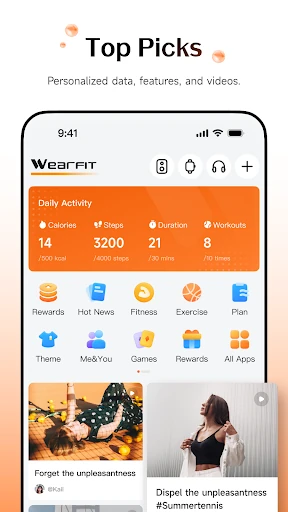
Wearfit Pro is a companion app for connecting compatible wearables and keeping an eye on everyday activity, including steps, heart rate, and workouts. It also supports connected devices such as Bluetooth speakers and real-time translation patches. I see it as a practical option for people who already use a supported device and want its information in one place, rather than a fitness app meant to do everything on its own.
A Day With Your Wearable
When I first opened Wearfit Pro, I thought of the ordinary moments where a wearable can be useful: a walk to the store, a short workout, or checking activity after a busy day. The app’s core job is to connect with a wearable and track steps, heart rate, and workouts. That makes it most relevant when you have a compatible device on your wrist and want a companion app for the information it collects.
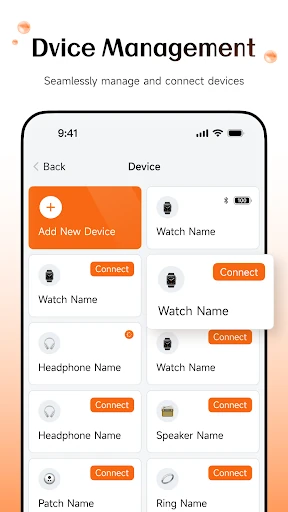
The connection is central to the experience. Wearfit Pro is designed to synchronize information to a connected device, and its description notes that permissions matter for timely syncing. I would start by pairing the wearable and reviewing the permissions it requests, then give the connection a chance to settle before relying on the data. It is a practical setup step, not an extra feature to skip if you want the devices to work together.
A Companion, Not a Coach
Compared with using a watch by itself, Wearfit Pro gives you an app to pair with it and track everyday measures such as steps, heart rate, and workouts. Compared with a general fitness tracker that works without a wearable, though, this is a more device-centered proposition. The app’s value depends on having compatible hardware to connect; it is not presented as a standalone workout logging system.
I also wouldn’t approach it as a full training or health program. The available description focuses on connecting devices, tracking activity, and SMS core functionality; it does not establish a broader coaching or social experience. If your main goal is to follow a structured plan or get detailed analysis, those needs may call for a different tool. Wearfit Pro makes more sense as a companion for the wearable you already use.
Make Syncing a Habit
A small routine can make a device companion feel less fussy. I’d check that the wearable is connected when I begin using it, then give the app time to synchronize instead of opening it only when I want a quick number. Since the app calls out permissions as important to timely syncing, I’d also pay attention to those during setup and revisit the connection if information stops appearing as expected.
For everyday use, it helps to keep the goal modest: glance at steps after a walk, check heart-rate information around a workout, or review the activity you have been tracking. I would treat these as convenient snapshots rather than a substitute for context or professional guidance. The app is most useful when checking it becomes a quick part of a routine, not another dashboard that demands attention all day.
More From Our News Desk

Zoom Meetings, Google Meet, or Teams: Which Is Easiest to Join?

How I Build a Free Streaming Lineup With Tubi

Why Crunchyroll Is the Default Anime App for So Many Fans

YouTube TV: A Practical Guide to Cutting Cable

Rummikub and the Small Comfort of Phone Games

TeamViewer Remote Control or AnyDesk for Helping Family?
Who Might Like Wearfit Pro
I’d recommend Wearfit Pro to Android users who have a compatible wearable and want an app to connect it with everyday activity tracking. It covers a straightforward set of uses: steps, heart rate, workouts, and synchronization with connected devices. The additional support for Bluetooth speakers and real-time translation patches may also appeal to someone whose connected-device setup goes beyond a watch.
It may be a poor fit if you expect an app to deliver a complete fitness program without a wearable, or if you need features beyond the activity tracking and device connection described here. I would also be cautious about choosing it solely for a particular watch until checking compatibility in the store. The overall experience hinges on whether your hardware connects smoothly and whether its available tracking matches what you want to follow.
Wearfit Pro is developed by Wakeup and is listed in the Health & Fitness category on Google Play. The app has more than 10 million installs and a 3.2-star rating from about 121,000 ratings. It is free to download, with no in-app purchases or ads reported in the provided store facts. Its content rating is Everyone.
The listed Android requirement is Android 8.0 or later. The current version provided is hw_5.5.77. Wearfit Pro was released on May 10, 2020, and its latest update date in the provided facts is February 9, 2026. As with any wearable companion, the practical experience also depends on connecting a compatible device.
How Wearfit Pro Fits Into Everyday Tracking
First Connection
My first impression is that Wearfit Pro has a clear role: it is a bridge between a phone and supported connected devices. Before expecting useful activity information, I would have the wearable nearby and ready to connect. That keeps the initial experience grounded in what the app is for, rather than treating it like a tracker that can collect everything without hardware.
I would take a moment during setup to consider the permissions the app requests. Its description says permissions are important for synchronizing information to a connected device in a timely way. That is worth understanding before dismissing a prompt, especially if the wearable depends on the phone connection for updates. A deliberate setup should make it easier to tell later whether a sync issue is a connection or permission matter.
Everyday Tracking
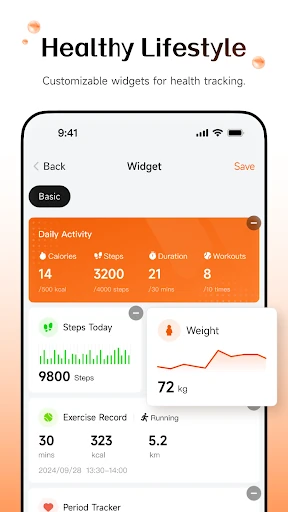
Day to day, the most concrete reasons to return to Wearfit Pro are steps, heart rate, and workouts. Those are familiar measures, so the app’s usefulness comes less from novelty and more from having the information associated with a connected wearable. I can imagine checking steps after walking around town or looking at workout information after a session, without turning either check into a major task.
I’d keep expectations sensible. A tracked number is one piece of information, and the app’s description doesn’t position it as a diagnosis or a personal training service. For casual activity awareness, that distinction is easy to live with. If you want a more elaborate interpretation of your data, you should first check whether the connected device and app provide the specific detail you need.
More Than a Watch
Wearfit Pro’s stated device support reaches beyond smartwatches. It can connect with Bluetooth speakers and real-time translation patches as well, giving the app a broader connected-device role. That is a useful distinction if you are comparing it with a phone app devoted only to exercise tracking. Still, the description does not spell out how each device works, so the exact experience will depend on the hardware you connect.
The app also mentions SMS core functionality. I would treat that as part of its device-connected toolkit rather than assume a particular messaging workflow or a specific set of controls. The practical point is that Wearfit Pro is meant to help connected devices stay in sync with information. That makes compatibility and permissions more important than an impressive list of unrelated wellness features.
A Simple Routine
A routine I’d use is to check the connection before heading out for a walk, wear the device as usual, and look at the step information afterward. For a workout, I’d make sure the wearable is connected beforehand and then check the tracked activity once it has synchronized. This keeps the app in a supporting role and makes it easier to notice if the device has failed to pass information along.
If syncing seems delayed, I would first check that the connected device is still paired and consider whether the relevant permissions were granted. The app’s own description emphasizes permissions for timely synchronization, so they are a sensible place to start. I wouldn’t keep repeatedly opening the app expecting a fix if the wearable is disconnected; confirming the connection is a more useful first habit.
Keep Expectations Grounded
The main limitation is that Wearfit Pro depends on a compatible connected device for its central purpose. Without one, the app’s described tracking and device synchronization have little to work with. Even with a wearable, the available description doesn’t establish that every model supports every function, so I’d check the device’s compatibility before making it part of a daily routine.
I would also avoid assuming that the app includes every feature commonly associated with fitness platforms. Its confirmed focus is device connection, steps, heart rate, workouts, and SMS core functionality. That narrower scope can be perfectly adequate, but it means people looking for a broader program should compare carefully. The Google Play rating is 3.2 stars, another reason to check recent user feedback before deciding.
Wearfit Pro is a focused companion for people who want to connect a wearable or another supported device and keep basic activity information close at hand. I like the straightforward purpose, but the experience depends on hardware compatibility and smooth syncing. It is not a replacement for a full training platform, and I would keep its role modest.
If you already own a compatible device and want to track steps, heart rate, or workouts, Wearfit Pro is worth considering. Check that your device works with it and take care with setup permissions. If you want an app that stands on its own or offers a more expansive fitness experience, I’d look elsewhere.
Wearfit Pro Frequently Asked Questions
What is Wearfit Pro used for?
Wearfit Pro connects with wearable devices and other supported hardware, including smartwatches, Bluetooth speakers, and real-time translation patches. Its described activity tracking covers steps, heart rate, and workouts. It also includes SMS core functionality and is designed to synchronize information with connected devices.
Can I use Wearfit Pro on iPhone or other devices?
The provided store information is for the Android app on Google Play. It does not establish availability on other platforms, so check the relevant store for current options. You will also need a compatible device to use the app’s wearable connection and tracking functions.
What Android version does Wearfit Pro require?
The listed minimum requirement is Android 8.0. Wearfit Pro’s ability to connect and sync also depends on the device you pair with it. If you are unsure about a particular wearable or phone setup, check the Google Play store details and the device’s compatibility information.
Does Wearfit Pro cost money?
Wearfit Pro is free to download, and the provided facts report no in-app purchases or ads. Store details can change, so it is worth checking the current Google Play page before installing if cost is a deciding factor.
Is Wearfit Pro suitable for beginners?
It may suit someone who wants basic activity tracking through a compatible wearable, including steps, heart rate, and workouts. The app is centered on connecting devices, so it may not suit someone seeking a standalone fitness program. Check that your wearable is compatible before relying on it.
Pros
- Tracks everyday measures including steps, heart rate, and workouts.
- Connects with smartwatches and other supported connected devices.
- Free to download, with no ads or in-app purchases reported.
- A practical companion for users already wearing compatible hardware.
Cons
- Its core tracking experience depends on having a compatible device.
- Permissions and device syncing may require attention during setup.
- The 3.2-star Google Play rating suggests checking recent feedback.
- Category
- Health & Fitness
- Version
- hw_5.5.77











