Waymo
- 40.46K
- 4.9
- Installs
- 1.00M
- Price
- Free

Screenshots
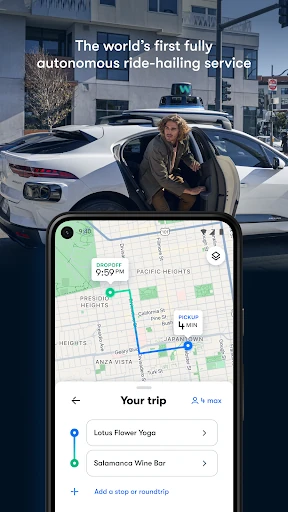
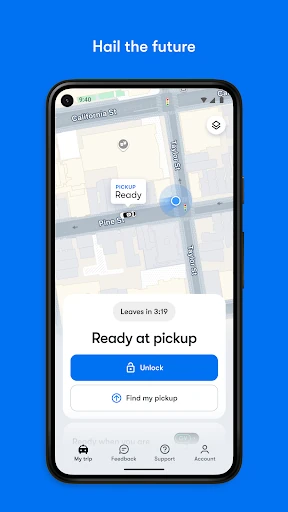
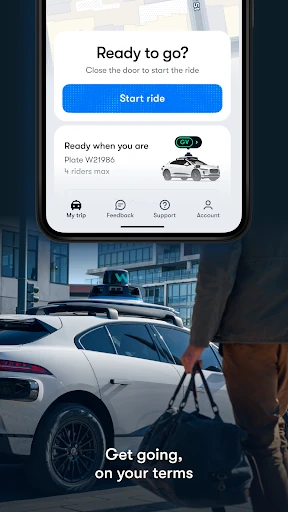
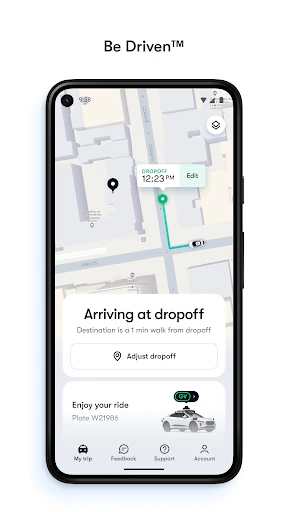
Analysis by Reviewed APKs
Waymo is a ride-request app for people who want to travel in a fully autonomous car rather than drive themselves. You enter a destination, request a pickup, and start the ride from the passenger screen once you’re inside. I like that the app treats the ride as a whole experience, with scheduling, trip sharing, and in-car controls. The big practical catch is that rides are only offered in existing service territories.
From request to ride
Picture a familiar errand: I’m heading across town, carrying a bag, and would rather not deal with parking at the other end. In the Waymo app, I enter my destination and request a ride. The car is meant to pick me up at my current location; once I’m inside, I tap “Start Ride” on the passenger screen. That’s the core job here: arranging and managing a ride, not finding a route to drive myself.
What makes the flow different is that there’s no driver to greet or guide me through the trip. The passenger screen can show what the Waymo Driver sees, and Rider Support is available from there. I can share live arrival times with someone waiting for me, too. Those details make the experience feel designed around traveling as a passenger, from pickup through arrival, rather than simply sending a car to an address.
A different kind of ride app
Waymo sits somewhere between a conventional ride-hailing app and a personal car service, but the defining difference is that the vehicle drives itself. The app is for requesting those autonomous rides in Waymo’s existing territories. It isn’t a general-purpose navigation tool, a car-rental app, or an app for summoning a human driver. If I’m outside a service area, the central feature won’t help with that particular trip.
Compared with driving my own car, a Waymo ride can remove the need to steer, navigate traffic, or find parking at the destination. Compared with a taxi or rideshare, the vehicle’s autonomous operation changes what happens once I get in: I start the trip on the car’s screen, and the app offers controls such as sharing the trip and adjusting the ride’s temperature or music. That distinction is interesting, but it also makes local service availability essential.
Small habits that help
A useful habit is to think about pickup before I’m rushing out the door. Waymo supports scheduling pickups up to one hour ahead, which can help when I have a known departure time. I’d also check that the requested pickup point is where I can comfortably meet the car. Planning a little reduces the chance that the final minutes of a trip become a scramble.
Once a ride is underway, the app’s options are practical rather than complicated. I can share live arrival times with friends or family, add as many as four destinations to a trip, or pull over using the app or the in-car screen. If I want the car’s temperature or music adjusted, those controls are available through the app or screen. These small choices make a multi-stop day easier to organize.
More From Our News Desk

Zoom Meetings, Google Meet, or Teams: Which Is Easiest to Join?

How I Build a Free Streaming Lineup With Tubi

Why Crunchyroll Is the Default Anime App for So Many Fans

YouTube TV: A Practical Guide to Cutting Cable

Rummikub and the Small Comfort of Phone Games

TeamViewer Remote Control or AnyDesk for Helping Family?
Who may enjoy Waymo
I’d recommend Waymo to people who live in, work in, or are visiting an area where the service operates and are curious about traveling without driving. It could suit someone who wants a ride to an errand, a planned pickup, or a trip with several stops. The app’s trip-sharing and in-car controls are useful touches for people who want to stay in touch or personalize a ride along the way.
It may not suit someone who needs a ride outside Waymo’s existing territories, prefers a human driver, or is looking for turn-by-turn directions for their own car. The app’s usefulness depends on whether a Waymo pickup is available for the trip at hand. I’d also suggest that anyone unsure about the autonomous experience take time to understand the passenger-screen flow and support options before relying on it for a time-sensitive journey.
Waymo is developed by Waymo LLC and is listed on Google Play in the Maps & Navigation category. Google Play shows over one million installs and a 4.9-star rating from around 40,000 ratings. The app is free to download, and the supplied store facts indicate that it contains no ads and does not offer in-app purchases.
The app has an Everyone content rating and requires Android 8.0 or later. The supplied current version is 26012205.865920132-release. It was released on April 20, 2021, and its last update was February 9, 2026. Those are practical details about the Android app; the ride itself is available only in Waymo’s existing service territories.
The details that shape a Waymo ride
Getting started
When I first opened Waymo, the key question was simple: where am I going, and can I request a ride from here? That focus keeps the app’s purpose clear. You enter a destination to request an autonomous ride in an existing territory, rather than being dropped into a general map with lots of unrelated tools.
The first-ride process continues in the car. After pickup, I get in and use the passenger screen to tap “Start Ride.” The screen can also show what the Waymo Driver sees and offer access to Rider Support. I appreciate that the app description explains this handoff, because it sets an expectation that the phone is only one part of the ride experience.
The ride, day to day
For an ordinary trip, the appeal is having a car to myself without needing to drive or park it. I request the ride, meet the pickup, get in, and begin the trip from the passenger screen. The experience sounds especially straightforward for a familiar journey where I know the destination and want to spend the travel time as a passenger instead of managing the road.
The small controls matter once the ride is moving. I can choose a temperature and select music through the app or the in-car screen. Bluetooth can be used for automatic door unlocking when I’m near the car, with settings available in the app’s My Car tab. These features give passengers a few ways to make a ride their own without changing the basic request-and-travel routine.
Standout ride controls
Scheduling is one of the more useful options for a day with a fixed timetable. Waymo lets riders set a pickup time up to one hour in advance. That won’t cover every kind of advance planning, but it can help with a known departure, such as leaving for an appointment. I like that the feature is specific and easy to understand rather than framed as an open-ended booking promise.
The trip tools also account for journeys that aren’t a single point-to-point hop. A rider can add up to four destinations to a trip, share live arrival times, or pull over with a tap in the app or on the in-car screen. The description also notes trunk space and says the trunk opens automatically when exiting, a small convenience when there are belongings to collect.
A practical trip routine
For a day with a couple of errands, I’d start by entering the first destination and checking that the pickup makes sense for where I’m standing. If my departure time is predictable, I could schedule pickup up to an hour ahead. Before setting off, I’d think through any additional stops so I can use the multi-stop option, which supports up to four destinations per trip.
During the ride, I could share the live arrival time with whoever is expecting me, then adjust the temperature or music using the app or passenger screen. If plans change, the option to pull over is available from either. It’s a simple routine, but it makes clear how Waymo’s app connects booking, passenger preferences, and trip updates instead of stopping at the initial request.
Limits to keep in mind
The biggest limitation is geographic: a ride can only be requested in Waymo’s existing territories. The app description names countries where the app is available to download, but that should not be read as a promise that rides operate throughout each country. Before making plans around a ride, I’d check whether the specific pickup and destination are in a served area.
The service also asks passengers to be comfortable with a fully autonomous vehicle. The in-car screen and Rider Support provide context and a way to get help, but they don’t turn the experience into a conventional taxi ride with a human driver. And while scheduled pickups and extra stops add flexibility, the scheduling window described is up to one hour, so it’s not a tool for booking far in advance.
Waymo’s app has a clear purpose: request an autonomous ride, then manage the trip and a few passenger preferences. Scheduling, live trip sharing, multiple destinations, and in-car controls give it more day-to-day usefulness than a bare ride request. The experience is thoughtfully described, though its value depends first on having service where you need to go.
I’d try Waymo if I lived in or was visiting an existing service territory and wanted to experience a driverless ride. It’s a less relevant download for people seeking navigation or a conventional ride with a human driver. Check local availability before building a commute or important appointment around it.
Waymo One Frequently Asked Questions
What is the Waymo app used for?
Waymo is used to request autonomous rides in the company’s existing service territories. Riders enter a destination, meet the pickup, then start the trip from the passenger screen inside the car. The app also supports scheduled pickups up to one hour ahead, trip sharing, multiple destinations, and some ride preferences such as temperature and music.
Can I use Waymo on Android or iPhone?
The supplied store information is for the Android app on Google Play, which requires Android 8.0 or later. The description also says the app is available to download in a number of countries. Device and platform availability can vary, so check the relevant store listing for current compatibility and availability.
What Android version does Waymo require?
Waymo requires Android 8.0 or later according to the supplied Google Play facts. If you’re using an older version of Android, check the store listing on your device for current compatibility. Keep in mind that installing the app and having access to a ride are separate questions: rides are offered in existing service territories.
Does Waymo cost money or have in-app purchases?
The Android app is free to download, and the supplied facts say it has no in-app purchases and contains no ads. Those details refer to the app itself. Ride availability and any ride-related costs can vary, so check the current Google Play listing and the app’s ride information before making plans.
Is Waymo a good fit for my trip?
Waymo may suit you if you want an autonomous ride and your pickup and destination are within an existing service territory. It supports features such as sharing arrival times and adding multiple stops. It is not a general navigation app or a conventional ride with a human driver. Check the store and local service information to see whether it fits your trip.
Pros
- Combines ride requests with scheduling, trip sharing, and passenger controls.
- Supports up to four destinations on a single trip.
- Offers in-car screen access to ride information and Rider Support.
- Free Android app with no ads or in-app purchases.
Cons
- Rides are limited to Waymo’s existing service territories.
- The autonomous ride experience may not suit passengers who want a human driver.
- Pickup scheduling is limited to one hour ahead.
- Category
- Maps & Navigation
- Version
- 26012205.865920132-release











