My Location - Track GPS & Maps
- 65.15K
- 4.3
- Installs
- 10.00M
- Price
- Free

Screenshots
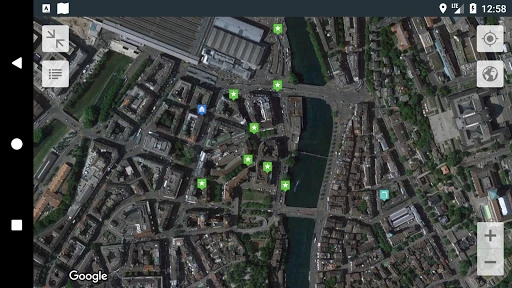
Analysis by Reviewed APKs
My Location - Track GPS & Maps is a practical mapping tool for checking where you are, finding places, saving destinations and keeping track of routes. I’d recommend it to travelers, walkers and anyone who wants a handy record of useful places without turning every outing into a complicated planning project. Its mix of location sharing, saved spots and route tools is appealing, though the number of options may be more than a casual map user needs.
A map for everyday outings
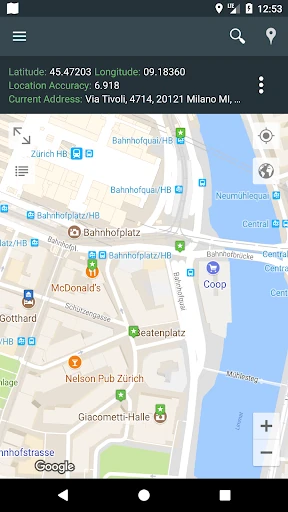
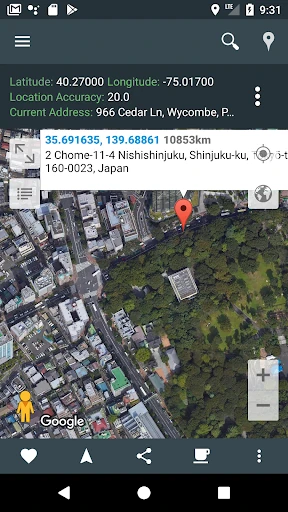
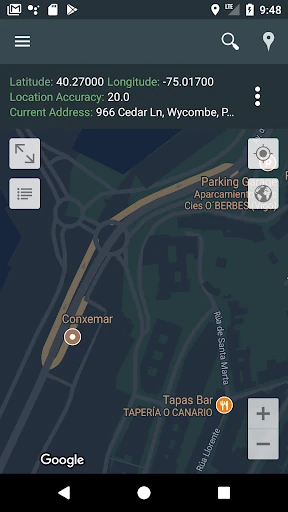
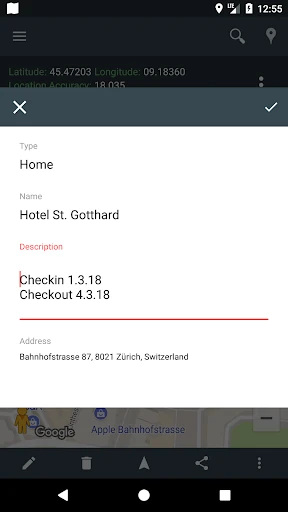
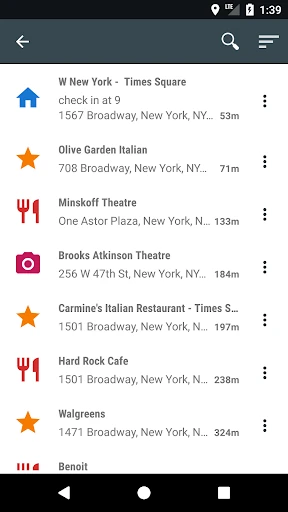
Imagine arriving in an unfamiliar part of town with a few hours to spare. My Location can show your current position and address, help you search for a place by name, and surface nearby businesses, cafes and other points of interest. If you find somewhere worth returning to, you can save it with a title, description and destination type. That turns a quick browse into a small, useful personal map.
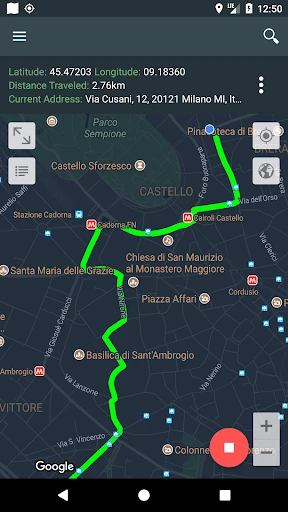
I can also see it fitting into a weekend walk or bike ride. You can look up a destination, request directions for walking, cycling or driving, and track a route to review later. For a group outing, sharing your current position or another map location gives everyone a straightforward reference point. The appeal is practical: it gathers several location-related jobs in one app instead of treating every trip as a fresh search.
More than a directions app
The obvious comparison is a general-purpose navigation app. Those are often the first stop when I need to get from A to B, while My Location puts extra emphasis on saving places, managing tracks and working with location files. It can also show latitude and longitude, which is useful when an address is not the clearest way to describe a spot. That makes it more of a location notebook and map companion than a single-purpose route finder.
That wider scope is not automatically better for everyone. If all you want is the quickest possible address lookup, the saved-place tools, imports and route history may feel unnecessary. I would not treat the app as a travel guide with editorial recommendations, either: its description focuses on maps, nearby places, directions and user-managed locations. It is best suited to people who want to keep useful map information organized alongside the basic act of getting somewhere.
Small habits, better maps
A little organization should make the saved-place feature more useful over time. I’d give each spot a clear title and use the description to add the detail I might forget later, such as why I saved it or what makes it a useful destination. The app also lets you choose a destination type. Keeping those notes consistent can make a growing collection easier to scan when you are planning another visit.
For an outing, I’d check the destination before leaving, then enable location tracking if I want to look back at the route afterward. A saved place can also be reached from the navigation widget, while the save-location widget is intended to capture your current position quickly. If you already keep map data elsewhere, importing or exporting KML, GPX or GEOJSON files may fit into that routine.
More From Our News Desk

Zoom Meetings, Google Meet, or Teams: Which Is Easiest to Join?

How I Build a Free Streaming Lineup With Tubi

Why Crunchyroll Is the Default Anime App for So Many Fans

YouTube TV: A Practical Guide to Cutting Cable

Rummikub and the Small Comfort of Phone Games

TeamViewer Remote Control or AnyDesk for Helping Family?
Who will get the most from it
I’d suggest My Location to people who regularly explore new neighborhoods, travel, hike or cycle and want more than a one-off route. The combination of saved places, address search, route tracking and location sharing gives it several useful roles. It also makes sense for anyone who likes keeping personal map notes or needs to exchange common geographic file formats rather than relying only on a list of destinations.
It may be less appealing if your map use is occasional and limited to checking one address. The extra ways to save, track and manage locations could be clutter rather than convenience for that kind of routine. Anyone deciding whether it fits should also consider its ads and in-app purchases, along with the Android requirement. I’d try it if location organization is a recurring need, not just an occasional detour.
My Location - Track GPS & Maps is an Android app from Andev in the Maps & Navigation category. Google Play shows over 10 million installs and a 4.3-star rating from about 65,000 ratings. It is rated Everyone and requires Android 8.1 or later. The app first appeared on June 4, 2014, and its current version is 3.106, last updated December 16, 2025.
The app is free to install and contains ads. It also offers in-app purchases, with listed items ranging from $0.99 to $13.99 each. Those are the practical cost details I’d check before making it part of a regular routine, especially if you prefer an ad-free experience. My Location is listed for Android, so these requirements and store details apply to the Google Play version.
A Closer Look at Location Tools
First look and setup
When I first opened the idea of using My Location, what stood out was how many familiar map tasks it brings together: seeing your position, searching for an address, saving a place and asking for directions. That makes the app’s purpose easy to grasp even if you do not need every tool on every outing. The basic starting point is your current location, with the map acting as the workspace for finding and organizing places.
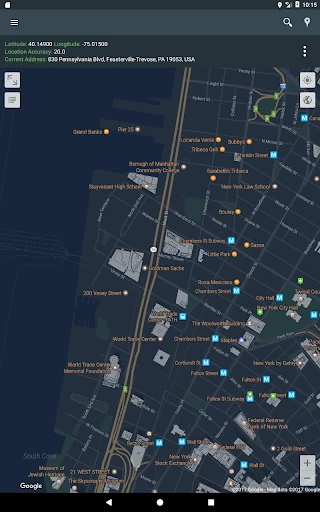
I’d begin by checking the current address and trying a search for a destination I already know. Then I’d save one useful location with a descriptive title, so I could see how the app handles a basic personal map. The description also points to map themes such as retro and dark, plus a night mode. Those options offer a way to adjust the map’s appearance without changing what the app is for.
The daily map routine
For everyday use, the most direct loop is simple: check your position, search for somewhere to go, and pull up directions. My Location supports walking, cycling and driving directions, so it can serve different kinds of short trips. Nearby-place search adds another practical use when the destination is not fixed yet and you are looking for cafes, businesses, malls or other places in the area.
I like the possibility of returning to a saved spot instead of searching for it from scratch. A description and destination type can make a saved location more informative than a bare pin. When a route itself matters, location tracking can record the route for later viewing. In practice, that gives the app a role before, during and after an outing: planning, finding your way and revisiting where you went.
Tools beyond the pin
The saved-location feature is more than a quick mark on a map. The app lets you add a title or description and note the destination type, which is useful when a place needs context. There are also import and export options for KML, GPX and GEOJSON files. That support could help people who already work with geographic files move saved locations into or out of the app.
Location sharing is another notable part of the package. You can share your current location or another location on the map, and the app describes live sharing and tracking with friends and family. Widgets provide shortcuts for navigating to favorite locations or saving your current position. Add latitude and longitude, address lookup and map themes, and this becomes a fairly broad set of tools for a map-focused app.
A useful trip workflow
For a day exploring somewhere new, I’d start by searching for a likely destination and saving any promising stops with names that will make sense later. If I’m walking or cycling, I’d request directions in the appropriate mode. When I want a record of the journey, I’d enable tracking so I can revisit the route afterward. That keeps planning and remembering the trip in the same place rather than scattered across notes.
If I were meeting someone, I could share a location from the map rather than trying to explain a meeting point in a long message. For a destination I visit often, the navigation widget may make it quicker to start navigating from the home screen; the save-location widget is a handy concept for capturing a spot on the go. The key is to use only the shortcuts that match your habits, rather than setting up every option.
Keep expectations practical
My Location covers a lot of ground, but that breadth can make it feel like more app than some people need. A person who only checks an address now and then may not benefit from route tracking, file import and export, saved-place details or widgets. The app’s strongest case is for users who will return to those tools, not someone looking for a bare map with a single purpose.
It is also worth keeping the cost model in view: the app is free to install, contains ads and offers in-app purchases. That may matter if you expect a quiet, uninterrupted map experience. Directions and location features also depend on the device and the circumstances of use, so I would check the app’s current Google Play details and permissions before relying on a particular workflow for an important outing.
My Location - Track GPS & Maps makes the most sense as a flexible location organizer with directions attached. Saved places, route tracking, sharing and geographic file support give it more depth than a simple address lookup, while the widgets offer shortcuts for recurring tasks. I’d recommend it to travelers and active map users who will make use of that extra depth.
If you only need occasional directions, a simpler mapping routine may suit you better. But if you like saving places, keeping track of routes or sharing map locations, this app is worth a look. Just be prepared for ads and consider whether the in-app purchase options fit your preferences.
My Location Frequently Asked Questions
What is My Location - Track GPS & Maps used for?
My Location - Track GPS & Maps helps you view your current position and address, search for places, find directions and save locations with extra notes. It also supports location sharing, route tracking and importing or exporting KML, GPX and GEOJSON files. It is intended for Android users who want several map and location tools together.
Can I use My Location - Track GPS & Maps on an iPhone?
The app details provided are for its Android version on Google Play. It requires Android 8.1 or later. If you are looking for an iPhone version or support on another platform, availability may vary, so check the relevant store for current information before choosing it.
What Android version does My Location - Track GPS & Maps require?
My Location - Track GPS & Maps requires Android 8.1 or later. The app is currently version 3.106, with its latest update dated December 16, 2025. Device compatibility and store details can change, so it is worth checking Google Play on the device where you plan to install it.
Is My Location - Track GPS & Maps free?
It is free to install and contains ads. The app also offers in-app purchases, with items listed from $0.99 to $13.99 each. The exact options available may vary, so check the current Google Play listing for the purchase details that apply to your device.
Who should use My Location - Track GPS & Maps?
It is a good fit for people who travel, explore on foot or by bike, save useful destinations or want to review routes. Location sharing and geographic file support may also appeal to people with those specific needs. If you only want occasional address searches and directions, its broader collection of tools may be unnecessary.
Pros
- Combines saved places, directions and route tracking in one map-focused app.
- Saved locations can include a title, description and destination type.
- Supports KML, GPX and GEOJSON import and export.
- Widgets offer shortcuts for saving a location or navigating to favorites.
Cons
- Ads and in-app purchases may not suit users seeking a quieter free app.
- The broad feature set may be unnecessary for occasional address lookups.
- Requires Android 8.1 or later.
- Category
- Maps & Navigation
- Version
- 3.106