MapQuest: Get Directions
- 75.54K
- 4.3
- Installs
- 10.00M
- Price
- Free

Screenshots
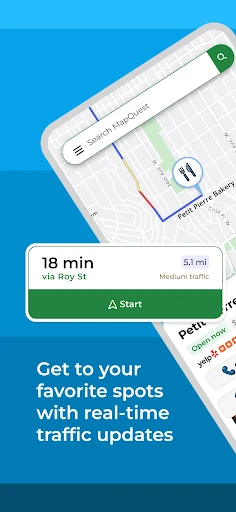

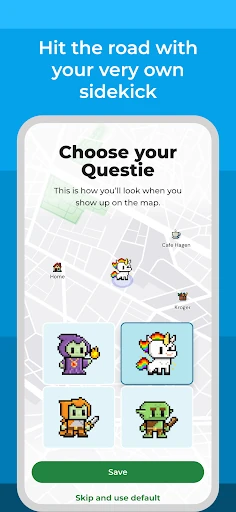


Analysis by Reviewed APKs
MapQuest: Get Directions is a navigation app for planning trips and finding your way by car or on foot, with traffic updates and nearby places alongside directions. I found its appeal is practical rather than flashy: it brings route choices, saved locations and useful stops into one place. It should suit drivers and travelers in the United States and Canada who want more than a basic map, but not a full trip-planning service.
A Route for the Day
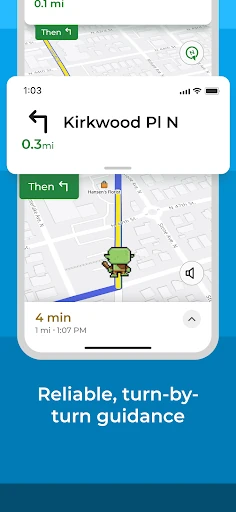
Picture a Saturday with a grocery stop, a lunch reservation and a visit to a friend across town. In MapQuest, I can build a route with multiple stops instead of looking up each leg separately. Turn-by-turn voice directions cover the driving, while alternate routes give me a choice if the suggested path does not suit. That makes the app useful for ordinary errands, not just a long drive to an unfamiliar place.
I also like that planning does not have to start from where I am standing. If I am working out tomorrow’s trip from home, I can set a different starting point and check the route in advance. Saved favorites can keep home and work addresses close at hand. In a typical week, that cuts down on repeated searches and gives me a quick way to get directions without re-entering familiar destinations.
More Than a Basic Map
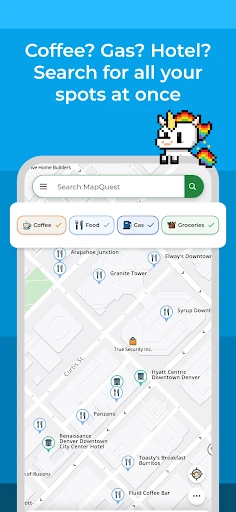
The obvious comparison is a standard navigation app that gets me from A to B. MapQuest does that, but also puts nearby restaurants, gas stations, hotels and other points of interest in reach through its map layers. Traffic updates, route settings for avoiding toll roads or highways, and multiple-stop planning make it feel more like a practical travel toolkit than a bare directions screen.
That extra scope is useful, but it does not make MapQuest a general travel companion for every kind of trip. Its stated navigation coverage is the United States and Canada, and its strengths are driving and walking directions, nearby places and route planning. I would not choose it as a destination in itself or expect the review to establish coverage beyond those countries. It is a way to get somewhere and find useful stops along the way.
Small Habits That Help
A little setup can make everyday use smoother. I would save home, work and other repeat destinations as favorites, then add less familiar stops to a multipoint route when a day involves several errands. For a trip that includes toll roads or highways I want to avoid, route settings are worth checking before departure rather than after I have started following directions.
Before setting off, I would compare alternate routes and glance at traffic so I have a sense of the options. The speedometer can show current speed alongside the speed limit along the route, while local weather can help with basic planning. If I am running navigation in the background, I would keep battery use in mind: the app warns that continued background GPS use can drain it noticeably.
Reads About MapQuest
More From Our News Desk

Zoom Meetings, Google Meet, or Teams: Which Is Easiest to Join?

How I Build a Free Streaming Lineup With Tubi

Why Crunchyroll Is the Default Anime App for So Many Fans

YouTube TV: A Practical Guide to Cutting Cable

Rummikub and the Small Comfort of Phone Games

TeamViewer Remote Control or AnyDesk for Helping Family?
Who Might Like MapQuest
I would recommend MapQuest to drivers who regularly visit multiple places, want voice-guided directions and appreciate having traffic, route alternatives and nearby stops together. It is also a sensible fit for someone who likes to plan a route before leaving, save familiar addresses or compare gas station prices nearby. The app’s combination of driving and walking directions makes it useful for more than just highway trips.
It may be less appealing to someone who only needs a single, simple route and does not care about discovery or planning tools. People should also keep its stated United States and Canada navigation focus in mind. I would be cautious about relying on background navigation for a long stretch without considering battery life. Those limits do not undo its everyday usefulness, but they help set realistic expectations about where it fits.
MapQuest: Get Directions is developed by MapQuest and is listed in Maps & Navigation. On Google Play, it has more than 10 million installs and a 4.3-star rating from about 75,500 ratings. It is free to download, contains ads and offers in-app purchases. The listed in-app purchase range is $1.99 to $39.99 per item.
The app has an Everyone content rating. Its listed version is 10.30.0; it was released on February 15, 2011, and last updated on October 21, 2026. The supplied store details do not give a minimum Android version, so check Google Play for device compatibility before installing.
How MapQuest Fits Into Real Trips
A Useful First Look
When I first opened MapQuest, the range of jobs it handles stood out: it is for directions, but the map also points toward nearby places and travel planning. That can be handy when a destination is only part of the day’s plan. I would start with a familiar address, then look at how route choices and saved locations could help with the errands I repeat most often.
There is no need to turn setup into a project. Saving regular places such as home and work is a straightforward way to make repeat trips easier, and the option to plan from somewhere other than my current location is useful before I leave. The main practical consideration is battery use: MapQuest notes that keeping GPS active in the background can drain the battery significantly.
Directions in Daily Use
For a routine drive, turn-by-turn voice navigation is the central feature. I can pay attention to the road rather than repeatedly checking a map, and real-time traffic updates help inform route choices. If the suggested path does not work for my plans, alternate routes offer another option. MapQuest also supports walking directions, which gives it some use when I leave the car behind.
I spent an evening thinking through a typical run of errands: pick up a friend, stop for gas, then head to dinner. Multipoint routing is the feature that makes that sequence feel manageable in one plan. It can be more convenient than separately searching for directions between every stop, especially when I already know the places I want to visit.
Features With Practical Value
Route controls are among the more useful details. I can choose settings that avoid highways or toll roads, and compare alternate routes rather than treating one suggested line as the only possibility. The speedometer can compare my current speed with the speed limit along the route. These features add context to navigation without changing its basic purpose: helping me get to a destination.
The layers bar brings nearby points of interest into the map, including restaurants, bars, gas stations and hotels. MapQuest also describes local weather, gas price comparisons, hotel deals and access to roadside assistance. For food, its points of interest can connect users with menus, reservations and ordering through OpenTable and GrubHub. Those options make the app more useful when a trip calls for a stop, not just a route.
Up-to-date satellite imagery and maps round out the map-focused side of the app. I would treat the nearby listings as a way to explore possible stops while planning, rather than as the reason to install a navigation app. The most distinctive value is how these discovery tools sit alongside voice guidance, traffic information and route planning.
A Simple Trip Routine
For a busy day, I would first set the starting point and add the day’s destinations in order. If I am leaving from work rather than my current location, planning from another start avoids building the route around the wrong place. I would then review the alternate routes and adjust settings if I prefer to avoid toll roads or highways.
Once the route looks right, I would save any destinations I expect to visit again. During the trip, voice navigation can handle the turn-by-turn guidance, and the nearby-place layers can help when I need to find a gas station, restaurant or hotel. Before relying on navigation for a long drive, I would account for the battery impact of background GPS use.
Limits to Keep in Mind
The clearest geographic boundary in the app description is navigation in the United States and Canada. That makes MapQuest a more natural fit for local trips and travel in those countries than for someone seeking directions elsewhere. Its tools cover driving and walking, but the app’s main identity remains navigation and route planning.
The extra discovery and travel options may be more than some people need, particularly if they only want quick point-to-point directions. The app also contains ads and offers in-app purchases, so users who prefer an entirely ad-free experience may want to consider that before installing. Free to download does not mean every element is necessarily free.
Finally, GPS use in the background can affect battery life, and the minimum Android requirement is something to check on Google Play for a particular device. These are manageable considerations for many trips, but worth remembering when planning a long day of navigation or installing on an older phone.
MapQuest: Get Directions is a capable everyday option for people who want turn-by-turn guidance with traffic, route choices and useful stops close by. Its multiple-stop planning and saved favorites make it especially practical for busy days with several destinations. I like that it brings those needs together without losing sight of its main job: helping me get where I am going.
I would try it if I drive regularly in the United States or Canada and want a little more flexibility than a basic directions tool. If I only need occasional one-stop navigation, its added features may not matter much. Keep the ads, optional purchases and background GPS battery use in mind, then check the store for device compatibility.
MapQuest Frequently Asked Questions
What is MapQuest: Get Directions used for?
MapQuest: Get Directions is for finding routes and navigating by car or on foot. It includes turn-by-turn voice guidance, traffic updates, alternate routes and planning for multiple stops. Users can also explore nearby places such as restaurants, gas stations and hotels. Its described navigation coverage is the United States and Canada.
Which phones and devices support MapQuest?
MapQuest: Get Directions is an Android app available through Google Play. Its description also mentions a corresponding Android Watch app for getting directions on the go. Compatibility depends on the device and software version, so check the Google Play store entry for the requirements that apply to your phone or watch.
What Android version does MapQuest require?
The minimum Android version for MapQuest: Get Directions can vary by device and app release. Check the app’s Google Play store entry to see whether your phone meets the current requirement. The app description warns that continued background GPS use can significantly reduce battery life, which is worth considering for longer trips.
Is MapQuest: Get Directions free?
MapQuest: Get Directions is free to download, but it contains ads and offers in-app purchases. The listed purchase prices range from $1.99 to $39.99 per item. What is available can vary, so check Google Play for current purchase details before deciding whether the free version meets your needs.
Is MapQuest a good fit for everyday drivers?
MapQuest: Get Directions may suit drivers who want voice navigation, traffic information, route alternatives, saved places and planning for several stops. It can also help with nearby points of interest. Its described navigation focus is the United States and Canada, and people who only need occasional basic directions may not use its extra tools.
Pros
- Combines voice-guided driving and walking directions with real-time traffic updates.
- Multipoint routes and alternate choices support errands and more involved trips.
- Nearby places, gas price comparisons and weather add useful travel context.
- Favorites and route settings make repeat journeys easier to plan.
Cons
- Continued background GPS use can significantly reduce battery life.
- The app contains ads and offers in-app purchases despite being free to download.
- Its described navigation coverage focuses on the United States and Canada.
- Category
- Maps & Navigation
- Version
- 10.30.0