Viator Tours & Attractions
- 69.87K
- 4.9
- Installs
- 5.00M
- Price
- Free

Screenshots




Analysis by Reviewed APKs
Viator Tours & Attractions is a travel app for finding and booking tours, activities, and attraction tickets, then keeping booking details handy while you’re out. I found its strongest appeal in having inspiration, traveler reviews, and trip management together rather than scattered across separate searches and emails. It suits travelers who like to plan a few activities in advance but still want room to change their plans.
Planning a Day Out
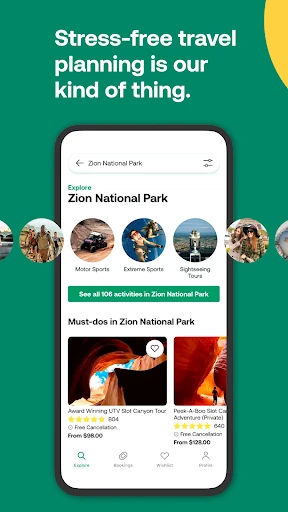
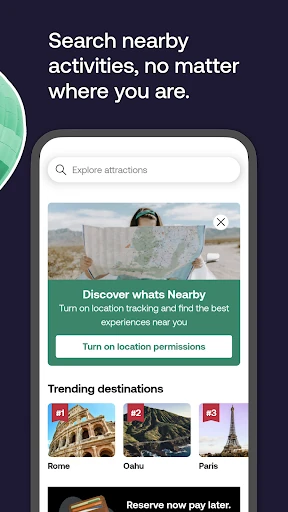
When I’m arriving in a city with only a rough idea of what I want to do, Viator gives me a place to browse tours and activities before or during the trip. I can compare options using traveler reviews, save possibilities to a wishlist, and return to them when the rest of the day’s plans become clearer. That makes it useful for turning an open afternoon into something more organized without planning every hour.
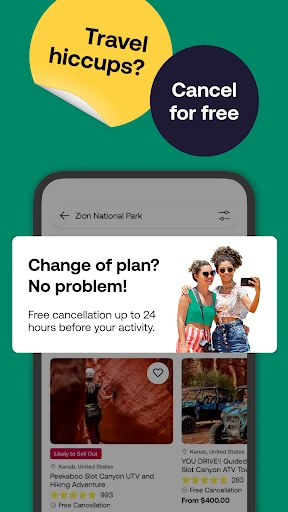
The app also has a practical role after I’ve booked. I can look up my tickets on the go, including offline, and check activity notifications for directions to a departure or pickup point. If plans change, booking management includes options to modify, edit, or cancel. I’d still read each activity’s details carefully, but keeping these tasks in one travel app can cut down on last-minute searching.
A Booking Tool, Not a Guidebook
Compared with browsing travel articles or asking friends for ideas, Viator is more directly focused on finding bookable experiences. Reviews from Tripadvisor and Viator travelers add context, while wishlists give me a simple way to collect options before deciding. It can be a handy companion to broader trip research, especially when I already know the destination and want to explore things to do there.
I wouldn’t treat it as a complete travel guide or a general itinerary app for every part of a vacation. Its described focus is tours, activities, and tickets, with tools for managing those bookings. It doesn’t replace the work of figuring out transport between unrelated stops or deciding what kind of trip I want. Travelers who prefer unstructured days and don’t expect to book activities may have less reason to keep it close.
Small Planning Habits
I’d get more out of Viator by browsing before the busy parts of a trip, then saving appealing activities to a wishlist rather than trying to choose in one sitting. Reading reviews alongside the activity information gives me a second perspective before I commit. That small pause is useful when several tours sound similar or when I’m balancing a planned outing with time to wander.
After booking, I’d make a habit of checking the app for the ticket and any same-day activity notification, especially when a pickup or departure point matters. Offline ticket access is useful when I’m out and don’t want to rely on a connection to retrieve booking information. If I have a question for a guide, the app also supports direct contact, keeping the conversation tied to the activity.
More From Our News Desk

Zoom Meetings, Google Meet, or Teams: Which Is Easiest to Join?

How I Build a Free Streaming Lineup With Tubi

Why Crunchyroll Is the Default Anime App for So Many Fans

YouTube TV: A Practical Guide to Cutting Cable

Rummikub and the Small Comfort of Phone Games

TeamViewer Remote Control or AnyDesk for Helping Family?
Who Will Find It Useful
I’d recommend Viator to travelers who like having a few worthwhile activities lined up but don’t want to handle every booking detail in separate places. It can help people compare tours, use traveler feedback, save ideas for later, and access tickets while away from home. The option to manage bookings on the go is especially relevant when a trip has several activities and plans may need adjusting.
It may be less appealing if you rarely book tours or prefer to decide everything spontaneously without researching activities. Viator’s focus is experiences and tickets, not a full travel-planning toolkit for every part of a journey. I’d also suggest checking the terms for an individual activity before booking, since cancellation timing and other practical details can matter to how well it fits your plans.
Viator Tours & Attractions is developed by Viator and is listed in Google Play’s Travel & Local category. It has more than 5 million installs and a 4.9-star rating from about 69,870 ratings. The app is free to download, and the provided store facts say it contains no ads and offers no in-app purchases.
The app has an Everyone content rating and requires Android 11 or later. The current version in the provided facts is 15.1.0. It was released on November 12, 2012, and was last updated on February 9, 2026. Those details make it a long-running option for Android travelers who want to browse and manage activity bookings.
How Viator Fits Into a Real Trip
Opening the App
My first impression is of an app built around the question many travelers ask between arrival and dinner: what could I do here? Viator presents its role as helping people browse experiences and access tickets, so its value is easy to understand without treating it as an all-purpose vacation organizer. I’d start by exploring activities for the destination and saving any that look promising.
The useful setup is less about building a detailed itinerary and more about making a short list of possibilities. I can use wishlists to keep interesting tours together, then come back to compare them when I know my timing. That approach feels manageable for a weekend away, when I may want a couple of planned activities but still want open time.
The Day-to-Day Flow
In everyday use, the app’s job continues after a booking. I can return to the app for tickets, make changes to bookings, and use offline ticket access when I’m away from a reliable connection. That is a practical combination for travel days, when I’d rather not search through email or repeat a booking lookup just to find the details I need.
Same-day notifications can provide activity updates and directions to departure or pickup points. I’d check those details before leaving, rather than assuming I remember where a tour begins. The ability to contact tour guides directly is another useful part of the flow: questions can be handled in connection with the activity instead of becoming a separate search.
Features That Matter
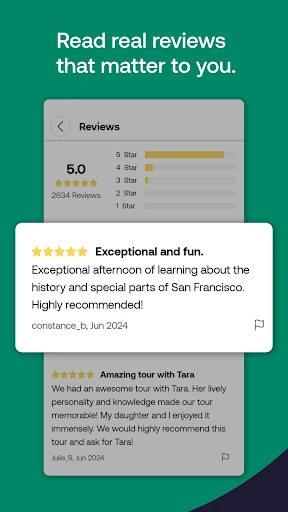
Traveler reviews are among the most useful tools for deciding between experiences. Viator says it includes reviews from Tripadvisor and its own travel community, giving me firsthand perspectives to read alongside the activity information. Reviews can help me understand what other travelers thought, though I’d still consider whether their priorities match mine.
Booking flexibility is another notable part of the app. The description includes options to modify, edit, or cancel bookings, and says free cancellation is available up to 24 hours in advance. It also describes reserve-now-pay-later and installment payments through Klarna, as well as card, PayPal, and Apple Pay options. I’d check the terms shown for a specific booking before relying on any payment or cancellation option.
Wishlists and direct guide contact round out the planning tools. A wishlist lets me collect options before making a decision, while messaging a guide can help with activity-related communication. Viator also describes a rewards program for eligible purchases, with rewards that can be used toward future bookings.
A Simple Travel Routine
For a practical routine, I’d browse activities before a trip, read reviews, and save a few possibilities rather than immediately filling every day. Once I choose an outing, I’d check the booking information and keep the ticket accessible in the app. This leaves room for a mix of planned experiences and unstructured time, instead of making the whole vacation feel like a timetable.
On the activity day, I’d check for notifications and directions before heading out, then use offline ticket access if I’m somewhere with limited service. If a plan needs to change, the app’s booking-management tools and guide contact can help me handle the relevant details. The benefit is having several activity-related tasks in one place, not eliminating the need to pay attention to each booking’s conditions.
Limits to Keep in Mind
Viator is centered on tours, activities, and tickets, so it won’t cover every planning need on a trip. If I want a broad overview of a city, help with unrelated transport, or a complete day-by-day itinerary, I’d need other resources too. The app works best as a focused companion for choosing and managing experiences rather than as the only travel tool.
A large choice of activities can also mean spending time comparing options. Reviews and wishlists help with that, but I’d still read the details of an activity and its booking terms closely. Flexibility is useful, yet cancellation timing and the arrangements for an individual experience are worth checking before I commit.
The app’s payment choices, rewards, and promotional offers may be useful to some travelers, but I wouldn’t choose an activity based only on those extras. My main decision would still be whether the experience fits the day, destination, and budget I have in mind. That keeps the app’s convenience in perspective.
Viator is at its best when I want to discover an activity, make a considered booking, and keep the details accessible while traveling. Reviews, wishlists, booking management, offline tickets, and activity notifications give it a practical role beyond browsing ideas. It remains focused on experiences rather than covering every part of a vacation.
I’d recommend it to Android travelers who regularly book tours or attraction tickets and want a convenient way to manage them. If your trips are mostly spontaneous or you need a complete itinerary planner, it may be more app than you need. For activity-focused planning, it’s a useful option to consider.
Viator Frequently Asked Questions
What is Viator Tours & Attractions used for?
Viator is for browsing and booking tours, activities, and attraction tickets, then managing those bookings while traveling. It also includes traveler reviews, wishlists, offline ticket access, same-day activity notifications, and direct contact with tour guides. It is focused on experiences rather than every part of vacation planning.
Which devices support Viator Tours & Attractions?
The provided platform information is for Android, and the app requires Android 11 or later. Check the Google Play store for current device compatibility and availability, since those details can vary. The available facts here do not establish support for other platforms.
What Android version does Viator require?
Viator Tours & Attractions requires Android 11 according to the provided app facts. If you are unsure which Android version your device runs or whether your particular device is compatible, check its settings and the Google Play store before installing.
Does Viator Tours & Attractions cost money?
The app is free to download, and the provided facts say it has no in-app purchases and contains no ads. Booking experiences may involve their own charges and terms. Payment choices and booking details can vary, so check the information shown for an activity in the store app.
Is Viator Tours & Attractions suitable for casual travelers?
It can suit casual travelers who want to browse activities, compare traveler reviews, and keep tickets and booking details handy. It may be less useful if you rarely book tours or prefer completely unplanned days. Its main focus is finding and managing experiences, not organizing every aspect of a trip.
Pros
- Combines activity browsing, traveler reviews, and wishlists for easier trip planning.
- Offline ticket access is useful when traveling without a reliable connection.
- Booking management and guide contact help keep activity details in one place.
- Same-day notifications can provide directions to departure or pickup points.
Cons
- Its focus on tours and activities leaves broader trip planning to other tools.
- Comparing many experiences can take time before choosing the right fit.
- Individual booking details and cancellation terms still need careful checking.
- Category
- Travel & Local
- Version
- 15.1.0











