Lime - #RideGreen
- 654.22K
- 4.9
- Installs
- 10.00M
- Price
- Free

Screenshots
Analysis by Reviewed APKs
Lime - #RideGreen helps you find and unlock a shared electric bike or scooter for short trips around town. I see it as a practical option for commuters, visitors, and anyone whose destination is too far to walk but awkward to reach by car. The app keeps the basic job straightforward, though the ride depends on vehicles being available nearby and on local riding conditions.
A short trip across town
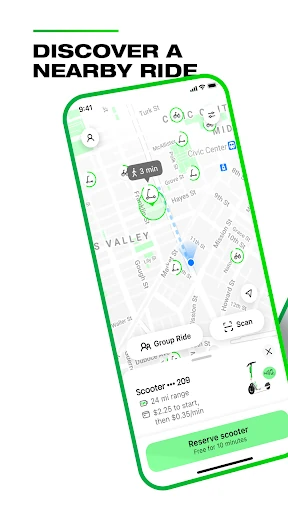
When I first opened Lime, I pictured the kind of trip that often becomes a small hassle: getting from a train stop to an appointment a few neighborhoods away. The app's map shows nearby Lime vehicles, so I can check whether a scooter or e-bike is around before deciding how to finish the journey. Availability depends on the city and local supply, which makes checking first a useful part of the plan.
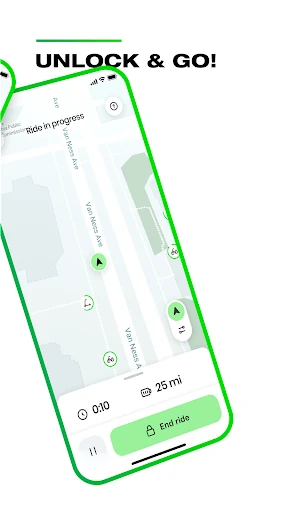
Once I have found a vehicle, the basic flow is easy to understand: create an account, locate a ride, then unlock it by scanning its QR code, entering its plate number, or using the app's button. That gives me more than one way to get started. I would still leave a little time for finding the vehicle and getting oriented, rather than treating a shared ride as a perfectly predictable connection.
A tool for the last mile
Lime makes most sense to me as a small piece of a larger trip, rather than a replacement for every way of getting around. It can help bridge the gap between a transit stop and a destination, or handle a nearby errand without taking a car. Compared with walking, it covers more ground; compared with a car, it avoids the need to drive and park one. Those advantages matter most when a vehicle is close at hand.
This is not a route-planning app for every mode of travel, and it is not useful for a trip if there are no Lime vehicles available in the area. The app is centered on finding and unlocking Lime e-bikes and e-scooters. I would not rely on it as my only option for a tight appointment or a long journey. It works better as a flexible alternative when the route, local supply, and riding conditions suit.
Make the ride easier
A little preparation makes the app's quick unlock flow more useful. I would check the map before leaving, then keep the phone ready when I reach the vehicle. Lime supports scanning a QR code, typing the plate number, or tapping a button in the app to unlock, so I can use whichever method is easiest in the moment. Knowing those options beforehand helps avoid fumbling around while standing on a busy street.
I also find it useful to make responsible riding part of the routine instead of an afterthought. Lime advises riders to use bike lanes rather than sidewalks, wear a helmet, and park clear of walkways, driveways, and access ramps. Thinking about where I will leave the vehicle before I set off can make the end of the trip less rushed. The app points riders toward its safety information for more guidance.
More From Our News Desk

Zoom Meetings, Google Meet, or Teams: Which Is Easiest to Join?

How I Build a Free Streaming Lineup With Tubi

Why Crunchyroll Is the Default Anime App for So Many Fans

YouTube TV: A Practical Guide to Cutting Cable

Rummikub and the Small Comfort of Phone Games

TeamViewer Remote Control or AnyDesk for Helping Family?
Who will find it useful
I would recommend Lime to people who already know their city has Lime vehicles and who want a flexible option for short urban trips. It may suit a commuter filling a gap between transit and the office, a visitor exploring nearby streets, or someone making a quick local journey. The map and several unlock methods keep the core task approachable, while the vehicle choice gives riders a way to cover more distance than walking.
It may be a poor fit for someone whose area has little vehicle supply, who needs a fully predictable door-to-door journey, or who does not want to ride an e-bike or scooter. Lime also asks users to ride responsibly and park considerately, so it takes more than simply getting to a destination. I would check the local map and think about the route before making it part of a regular commute.
Lime - #RideGreen is developed by Neutron Holdings, Inc. On Google Play, it has over 10 million installs and a 4.9-star rating from about 654,000 ratings. The app is free to download, and its content rating is Everyone. Google Play lists Android 9 as the minimum Android version, making the operating system requirement worth checking against an older phone.
The Google Play details give the current version as 3.250.0, with a release date of May 10, 2017, and a last update of February 8, 2026. The app is listed without ads or in-app purchases. Rides themselves are a separate part of using the service, and Lime directs users to its terms for information about how ride prices are calculated.
How Lime fits into a real trip
Opening and getting started
My first impression is that Lime is built around a single clear question: is there a vehicle near me that can help with this trip? The map puts that search at the center, rather than asking me to sort through a long list of transportation choices. That makes the app feel focused. It is most useful once I have a destination in mind and want to see whether a nearby ride is an option.
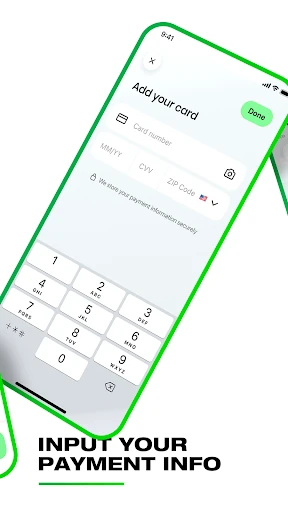
Getting ready involves downloading the app, creating an account, and accepting its terms. After that, the app's stated process is to find a vehicle on the map and unlock it. I like that there are three described unlock methods, since a QR scan may not be the handiest choice in every situation. The overall setup sounds simple, though the ride still depends on nearby availability.
The everyday ride flow
In daily use, the map is the practical starting point. I would open Lime when I am close to leaving, look for a nearby e-bike or scooter, and decide whether it suits the trip. That sequence is easy to remember and avoids making the app feel like a project in itself. The useful part is not just seeing a vehicle, but being able to move from locating it to unlocking it in the same app.
The flow also has a natural pause before the ride: I need to identify the right vehicle and choose an unlock method. That is a small but real step compared with simply walking out the door. Since vehicle availability can vary by city and supply, I would keep another way of reaching my destination in mind. Lime is convenient when the map cooperates, not a reason to ignore the rest of the day's timing.
Three ways to unlock
The choice of unlock method is one of the more concrete conveniences in Lime. Riders can scan the vehicle's QR code, enter its plate number, or tap a button in the app. I appreciate that flexibility because a simple alternative can save a moment if scanning is inconvenient. It also makes the process easier to understand: find the vehicle, identify it, and use one of the available ways to begin.
The other notable feature is the map-based vehicle search. Rather than beginning with a generic trip planner, Lime focuses on showing nearby Lime vehicles, with availability shaped by local supply. That keeps the app's purpose narrow and clear. Its e-bike and e-scooter focus is useful for short local travel, but it should not be mistaken for a tool that covers every kind of transport or every route.
A useful commute routine
For a regular commute, I would treat Lime as a possible connection rather than the whole plan. Before leaving, I would check whether a vehicle appears near my starting point and think through where I need to go. If one is available and the route feels suitable, I can use the app to locate and unlock it. If not, I have caught that before depending on a ride that may not be there.
At the destination, I would slow down long enough to park thoughtfully. Lime specifically asks riders to keep vehicles clear of walkways, driveways, and access ramps. That is easy to forget when I am focused on being on time, so making it the final step in the routine helps. The app also advises riding in bike lanes rather than on sidewalks and wearing a helmet.
Limits to keep in mind
The biggest limitation is straightforward: a map can only help if there is a Lime vehicle nearby. The app's description says availability depends on the city and supply, so the experience can be less useful in places with few vehicles. That makes local coverage a more important question than the app's simple interface. I would check the map for the areas where I expect to ride before building a routine around it.
Lime also depends on being comfortable with the kind of trip it supports. A scooter or e-bike is not the right choice for every destination, and responsible riding and parking take attention. The app's purpose is to locate and unlock Lime vehicles, not to make every journey effortless. I would weigh the route, timing, and availability, and keep a different option in mind when those details do not line up.
Lime - #RideGreen keeps its main job focused: find a nearby Lime e-bike or scooter, then unlock it through one of several methods. I like the straightforward flow and can see it working well for short city trips, especially when it fills a gap in a longer commute. The main catch is that a useful ride depends on local vehicle availability and a route that suits this kind of travel.
I would recommend trying Lime if you live, work, or travel somewhere with nearby vehicles and want another option for local journeys. I would not make it my only plan when timing is tight or availability is uncertain. Check the map, ride responsibly, and think about parking before you set off; with those habits, the app has a clear, practical place in an urban routine.
Lime Frequently Asked Questions
What is Lime - #RideGreen used for?
Lime - #RideGreen helps users find nearby Lime e-bikes and e-scooters and unlock a vehicle for a ride. The app's basic process is to create an account, check the map, and unlock by scanning a QR code, entering the plate number, or tapping a button. Vehicle availability depends on the city and local supply.
Which devices can run Lime - #RideGreen?
Lime - #RideGreen is available on Android through Google Play. The listed minimum is Android 9, so check your phone's Android version if you are unsure whether it meets that requirement. Store availability and compatibility details can vary by device, so the Google Play page is the best place to check before installing.
What Android version does Lime - #RideGreen require?
Google Play gives Android 9 as the minimum version for Lime - #RideGreen. If your phone runs an older version, check the app's Google Play page for current compatibility information. The app's version and device support can change with updates, so it is worth checking the store details on the phone you plan to use.
Does Lime - #RideGreen cost money?
The Lime - #RideGreen app is free to download and is listed without in-app purchases or ads. Using a Lime vehicle is a separate part of the service, and the company directs riders to its terms for details on how prices are calculated. Ride pricing can vary, so check the app or store information before you ride.
Is Lime - #RideGreen suitable for a daily commute?
Lime - #RideGreen can suit a commute that includes a short local trip, especially when a vehicle is available near the route. It may not suit every area or schedule, since availability depends on city and supply. I would check the map before relying on it and consider whether riding and parking a scooter or e-bike fits the journey.
Pros
- Shows nearby Lime vehicles on a map, making a possible short ride easy to assess.
- Offers three ways to unlock: QR scan, plate number, or an app button.
- Can help bridge the gap between transit, local errands, and nearby destinations.
- Keeps its core job focused on finding and unlocking Lime e-bikes and scooters.
Cons
- Vehicle availability depends on the city and local supply.
- Works only for trips suited to riding an e-bike or scooter.
- Riders need to account for responsible riding and considerate parking.
- Category
- Travel & Local
- Version
- 3.250.0