Veo - Shared Electric Vehicles
- 12.62K
- 4.7
- Installs
- 1.00M
- Price
- Free

Screenshots
Analysis by Reviewed APKs
Veo - Shared Electric Vehicles is a travel app for finding and unlocking shared scooters, bikes, and e-bikes for short trips. It suits commuters and city visitors who want an alternative to walking or arranging a car ride. I like the straightforward idea: find a nearby vehicle, scan its code, ride, then end the trip in the app or at the bike lock. Its usefulness depends on having Veo vehicles nearby.
A Short Trip, Made Simpler
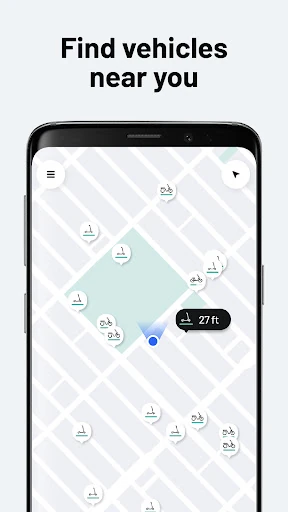
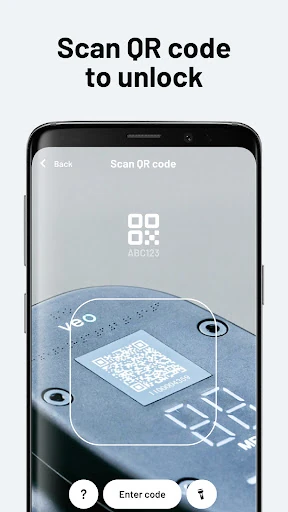
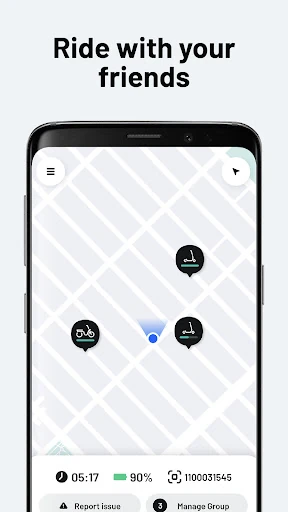
Picture leaving a bus stop with a few blocks still between you and your destination. With Veo, I can open the app and look for a nearby scooter, bike, or e-bike instead of immediately walking the whole way. Once I reach a vehicle, I scan its QR code or enter its ID number to unlock it. The steps are easy to understand, and the app is focused on getting a ride started rather than planning an elaborate itinerary.
The end of the trip matters just as much as the start. Veo shows designated parking zones in the app, so I can check where to leave the vehicle before I finish. To stop the fare, I tap End Ride in the app or, for a bike, push down the lever on its lock. That clear finish step is useful when I am in a hurry and want to avoid walking away before the ride has ended.
A Local Ride, Not a Trip Planner
Veo makes most sense as a practical last-mile option: the ride between a transit stop and work, a quick trip across a neighborhood, or a way to cover ground when walking would take too long. Compared with bringing your own bike, the appeal is being able to find a shared vehicle when one is available rather than storing and maintaining one yourself. The app's job is to connect the rider with that vehicle and handle the ride's start and finish.
It is not a general navigation app or a substitute for planning a long journey. The core flow is about finding a Veo vehicle, unlocking it, and parking in a designated zone. That makes it less useful if there are no vehicles in your area, if your destination is outside an available parking zone, or if you need a conventional public-transit schedule. I would treat it as one local travel option, not assume it can solve every leg of a commute.
Small Habits That Help
I would check the map before heading out, rather than waiting until I am already late to see whether a vehicle is nearby. It is also worth looking at the designated parking zones around the destination before unlocking. That small bit of planning can prevent an awkward last-minute search for an acceptable place to leave the vehicle, especially when I am unfamiliar with the neighborhood.
At the vehicle, I would match the QR code or ID number carefully and make sure the ride has actually started before setting off. At the end, I would pause long enough to tap End Ride or use the bike lock lever, then confirm the trip is finished in the app. These are simple habits, but they make the app's scan-to-unlock and designated-parking workflow easier to use consistently.
More From Our News Desk

Zoom Meetings, Google Meet, or Teams: Which Is Easiest to Join?

How I Build a Free Streaming Lineup With Tubi

Why Crunchyroll Is the Default Anime App for So Many Fans

YouTube TV: A Practical Guide to Cutting Cable

Rummikub and the Small Comfort of Phone Games

TeamViewer Remote Control or AnyDesk for Helping Family?
Who Will Get the Most From Veo
I would recommend Veo to people who regularly make short urban trips and have Veo vehicles available nearby. It is a good fit for someone who wants a scooter, bike, or e-bike for the gap between transit and a destination, or for occasional neighborhood errands. The app keeps the central task clear: locate a vehicle, unlock it, ride, and end the fare in the right place.
It may not suit people who need a vehicle on a fixed schedule, want a full route-planning tool, or live and travel where Veo vehicles are hard to find. I would also be cautious about relying on it for a trip until I had checked the available vehicles and parking zones in the app. For someone whose usual routes match the service area, though, its simple ride flow is appealing.
Veo - Shared Electric Vehicles is developed by VeoRide and is available on Google Play for Android. The app has over one million installs and a 4.7-star rating from about 12,600 ratings. Google Play gives it an Everyone content rating. Its listed minimum requirement is Android 7.0, and the current version in the provided app information is 4.51.2.
The app is listed as free to download, with no in-app purchases and no ads. Its release date is October 25, 2017, and the listed last update is February 5, 2026. The latest change notes mention bug fixes and performance improvements. Those details offer a quick snapshot of the app, while the Google Play listing is the place to check for any changes to its current version or requirements.
The Details Behind a Veo Ride
A Clear First Impression
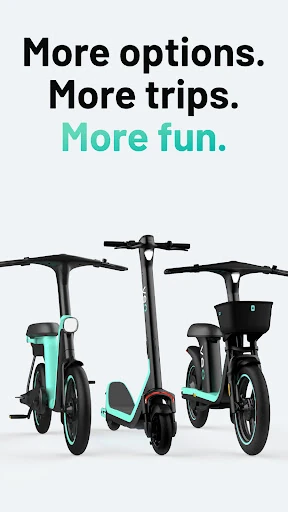
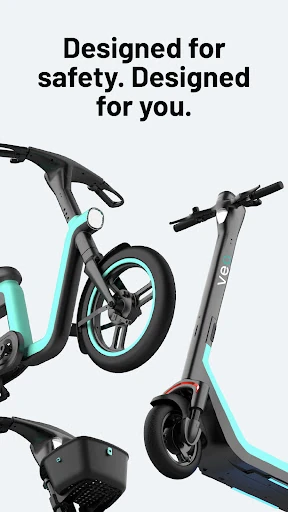
When I first opened Veo, the appeal was easy to grasp: find a shared vehicle, scan it, and go. The app's description lays out the ride in three direct steps, which gives a new rider a useful mental checklist before setting out. It covers scooters, bikes, and e-bikes, so the service is not limited to just one type of two-wheeler.
Getting started with a trip depends on what is nearby. The app is designed to help locate the closest vehicle, and the next action is to scan its QR code or enter the vehicle's ID. I appreciate that there is an alternate ID-entry method if scanning is not the route I use. The instructions are practical rather than buried in a long explanation of travel features.
The Everyday Ride Flow
The core experience follows a useful sequence: find a vehicle, unlock it, ride, and park in a designated zone. That order is easy to remember when I am stepping out between errands or trying to make a short connection after public transit. Veo keeps the app's main purpose close to the actual trip, rather than presenting it as a broad travel service with unrelated tools.
Finishing the ride has two stated options: tap End Ride in the app, or push down the lever on the bike lock. That detail makes the last step concrete. I would still give myself a moment to check that I have ended the ride before walking off. A quick confirmation habit is especially sensible when I am distracted by traffic, a meeting, or the next errand.
Vehicle Choice and Parking
The choice of scooter, bike, or e-bike gives Veo some flexibility for everyday trips. A scooter may suit a quick hop across an area, while a bike or e-bike can be a better match for a different rider or route. The app's supported options are clear, although the actual choice on a given trip depends on which vehicles are available nearby.
The parking-zone information is one of the most practical parts of the stated workflow. Rather than treating the destination as an afterthought, the app shows designated zones where a ride can be parked. I would check this before unlocking if my destination is unfamiliar. Knowing the parking constraint early can help me decide whether that particular shared ride fits the whole trip.
A Routine That Works
For a regular commute, I would make checking nearby vehicles part of the moment when I decide how to cover the final stretch. If a suitable option appears, I can head to it, scan the code or enter its ID, and continue. Before leaving, I would look at the designated zones near the destination so I am not trying to solve that question at the last minute.
For an occasional ride, I would use the same small checklist: locate, unlock, park in a marked zone, and end the ride. It is simple enough to remember without turning a short trip into a planning session. If I am going somewhere new, checking the map and parking information first should make it easier to judge whether Veo is a sensible option for that outing.
What to Keep in Mind
Veo's usefulness is tied to local availability. The app can help find a nearby vehicle, but the trip depends on having a scooter, bike, or e-bike in reach when I need one. I would not build a tight schedule around a shared ride without checking the app first, particularly if missing that connection would make the rest of the journey difficult.
Designated parking zones also shape where a ride can finish. That is a reasonable part of a shared-vehicle workflow, but it means the closest point to a destination may not be the right place to leave the vehicle. The app focuses on shared rides rather than broad route planning, so I would pair it with whatever other travel information I need instead of expecting it to cover every detail.
Veo has a focused job and a sensible flow for it. The combination of nearby vehicle discovery, QR or ID unlocking, and designated parking gives short local rides a clear beginning and end. I especially like that ending a ride is spelled out, since that is an easy step to overlook when rushing to the next thing.
I would try Veo if I lived, worked, or traveled somewhere with vehicles and parking zones nearby, and wanted a flexible option for short trips. It is less compelling as a standalone travel planner or a dependable choice where availability is uncertain. Check the map for your usual area first; if the service fits your routes, the app's straightforward process is its main strength.
Veo Frequently Asked Questions
What is Veo - Shared Electric Vehicles used for?
Veo helps riders find and unlock shared e-scooters, bikes, and e-bikes for local trips. The app shows designated parking zones, and riders can end a trip in the app or, for a bike, use the lever on its lock. It is intended for shared rides, not as a general-purpose route-planning app.
Which devices can run Veo - Shared Electric Vehicles?
Veo is an Android app on Google Play. The listed minimum requirement is Android 7.0. For the current compatibility details and device-specific requirements, check the app's Google Play store page, since requirements may vary as the app is updated.
How much does Veo - Shared Electric Vehicles cost?
The app is free to download, and the provided Google Play information says it has no in-app purchases and no ads. That describes the app listing, not the cost of taking a ride. Check the app or Google Play information for current ride-related details, which may vary.
How do I start a ride with Veo?
Find a nearby scooter, bike, or e-bike in Veo, then scan its QR code or enter its ID number to unlock it. When you are done, park in a designated zone shown in the app and tap End Ride; for a bike, you can also push down the lock lever to finish.
Is Veo - Shared Electric Vehicles a good fit for me?
It may suit people who want a shared scooter, bike, or e-bike for a short local trip and have vehicles and designated parking zones nearby. It may be less useful if you need a broader trip planner or cannot rely on local availability. Check the app's map for your area before depending on it.
Pros
- Supports shared scooters, bikes, and e-bikes for different kinds of short trips.
- Vehicle unlocking works by scanning a QR code or entering its ID.
- Designated parking zones are shown in the app before rides end.
- Ride-ending steps are straightforward and explained clearly.
Cons
- Its usefulness depends on vehicles being available in the area.
- Designated parking zones can make the final part of a trip less convenient.
- The app focuses on rides rather than comprehensive trip planning.
- Category
- Travel & Local
- Version
- 4.51.2











