Office NX: TextMaker
- 32.63K
- 4.6
- Installs
- 500.00K
- Price
- Free

Screenshots



Analysis by Reviewed APKs
Office NX: TextMaker is an Android word processor for creating and editing documents, especially Word files, on a phone or tablet. I see it as a practical fit for people who need more than a quick note app but do not always have a computer nearby. Its broad file support and substantial editing toolkit make a strong first impression, though some useful export and sharing options require a subscription.
A document on the go
When I first opened TextMaker, I pictured a familiar errand: a colleague sends a DOCX file while I am away from my desk, and I need to correct a few paragraphs before the end of the day. TextMaker is built for that sort of work. I can open the document on an Android phone, make edits, apply formatting, and save it in Word’s DOCX format rather than rebuilding the file in a different editor.
The same idea suits a longer stretch of writing, such as drafting a report during a commute or revising a document from a tablet at the kitchen table. Styles, tables, spell checking, comments, and page-related fields give me room to work beyond plain text. I would still choose a computer for a long, intricate editing session, but the app gives mobile document work more depth than a basic notes tool.
More than a quick note
TextMaker sits closer to a desktop word processor than to a lightweight note-taking app. It supports DOCX and DOC files, along with OpenDocument, RTF, and HTML, and it can save documents in those formats. That matters when I need to continue working with Microsoft Word or exchange files with OpenOffice or LibreOffice users. Its range of formatting and complex-document tools also makes it useful for reports and structured writing.
That breadth does not make it a general office suite inside this particular app: TextMaker is the word-processing component, not a spreadsheet or presentation editor. Nor would I pick it just to jot down a fleeting reminder. It is designed around documents, formatting, and file compatibility. The subscription also matters if my workflow depends on printing, PDF or EPUB export, direct sharing, or tracked changes.
Small habits that help
I would start by keeping active documents in one predictable place, either on the device or in a cloud service TextMaker can access. The app supports Google Drive, Dropbox, Nextcloud, and most other cloud services, so I can work from files stored away from the phone’s local storage. That makes it easier to return to a draft later without making a separate copy just for mobile editing.
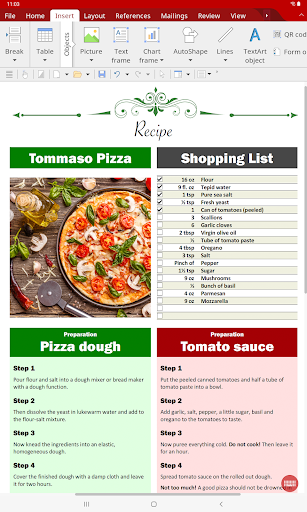
For recurring documents, templates and paragraph or character styles can reduce repetitive formatting. I would also use the format painter when one passage already has the look I want, and spell checking as a final pass in a supported language. On a phone, the toolbars are designed for one-finger use; on a tablet, the ribbon-style layout offers a more computer-like way to reach editing controls.
More From Our News Desk

Zoom Meetings, Google Meet, or Teams: Which Is Easiest to Join?

How I Build a Free Streaming Lineup With Tubi

Why Crunchyroll Is the Default Anime App for So Many Fans

YouTube TV: A Practical Guide to Cutting Cable

Rummikub and the Small Comfort of Phone Games

TeamViewer Remote Control or AnyDesk for Helping Family?
Who may find it useful
I would recommend TextMaker to people who regularly receive or edit Word documents on Android and want a fuller set of editing tools than a plain-text app provides. Students, office workers, and anyone handling structured documents may appreciate its support for tables, styles, comments, footnotes, and other long-document elements. It is also a sensible option for users who move documents between a phone or tablet and desktop versions of TextMaker.
It may be less appealing if all I need is a quick scratchpad, or if I expect every document task to be free: printing, PDF and EPUB export, direct sharing, and track changes are subscription features. Phone screens also remain a tighter workspace than a computer, even with a mobile-oriented interface. People who mostly work with spreadsheets or presentations would need the other apps in the Office NX suite rather than TextMaker alone.
Office NX: TextMaker is made by SoftMaker Software GmbH. On Google Play, it has over 500,000 installs and a 4.6-star rating from 32,631 ratings. The app is free to install and contains no ads. Google Play gives it an Everyone content rating. Its listed version is 2026.1505.1015.0.
The app includes optional in-app purchases, priced from $0.99 to $11.49 per item. The store information gives an original release date of April 30, 2021, and a last-updated date of October 15, 2026. The Android version requirement is worth checking on Google Play, since it can vary with the app version and device.
A desktop-style writing toolkit in your pocket
A capable first impression
When I first opened TextMaker, the main thing I noticed was its ambition: this is meant to handle real documents, not just capture a sentence or two. The interface adapts to the device, with practical toolbars on phones and ribbons on tablets. That difference makes sense in use: a phone encourages quick edits, while a tablet gives document controls more room.
The choice of file formats is reassuring before I even begin writing. DOCX is the app’s native format, and it can open and save DOC files as well as OpenDocument, RTF, and HTML. Password-protected Word documents are supported too. I would still check an important file after editing, but the aim is straightforward: avoid unnecessary conversion when exchanging documents with Word.
Editing through the day
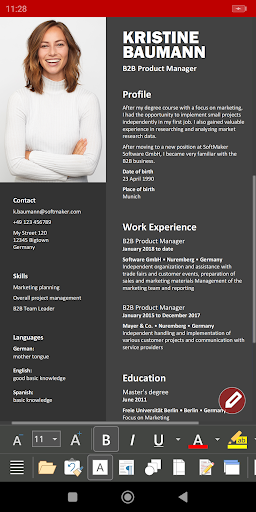
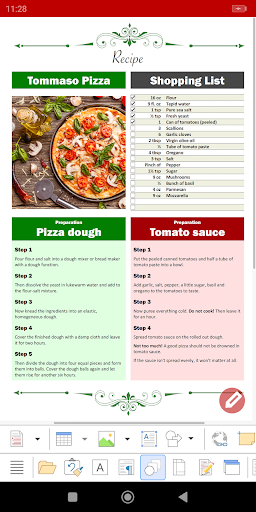
For everyday writing, TextMaker covers the usual mix of words and layout. I can apply paragraph and character styles, adjust borders and shading, add tables, and use automatic numbering for lists or headings. The format painter is a useful shortcut when I want a new section to match an existing one. Spell checking in numerous languages adds another practical check while drafting.
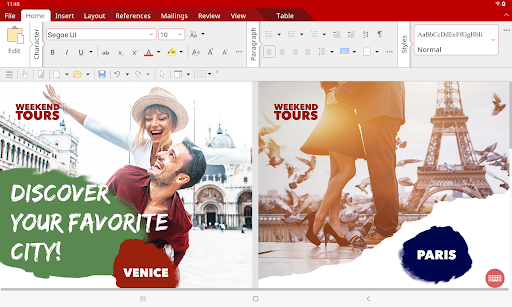
The mobile layout is central to whether those tools feel usable. On a phone, a one-finger toolbar approach is intended to keep common actions within reach; the tablet interface uses ribbons more like the desktop versions. I would expect to take a little time to learn where less familiar commands live, especially when moving between device sizes, but the design acknowledges that phone and tablet work are not identical.
Tools for complex documents
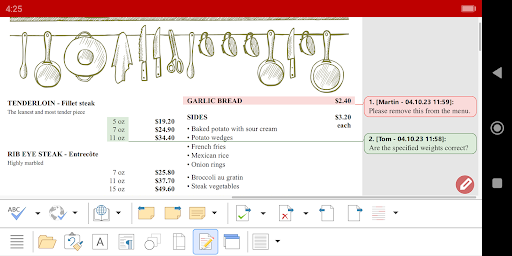
TextMaker has features that reach beyond a simple letter or short note. Comments, an outliner, cross-references, footnotes, endnotes, indexes, tables of contents, and bibliographies are all part of its toolkit. Forms can include input fields, dropdown lists, and calculations. Those options are useful when I am working with a longer or more structured document, where navigation and organization matter as much as typing.
There are visual tools as well: I can insert pictures, crop them, adjust brightness and contrast, draw in a document, and use charts or TextArt effects. Tables can also include calculations. I would not assume every complex layout will be pleasant to build on a small screen, but having these capabilities available can help when a document needs a quick mobile adjustment instead of waiting for a desktop.
A practical file routine
A workable routine might start with a DOCX saved in Google Drive or Dropbox. I can open it in TextMaker, make a small revision, check spelling, and save the document in its existing format. The app can also access Nextcloud and most other cloud services. That makes a phone useful as a bridge between a file received away from home and a later session on a computer.
For a document I create often, I would begin with a template and lean on styles for headings and body text rather than formatting each part separately. Before handing the file off, I would review comments and any tables or pictures I changed. If the handoff requires direct sharing or a PDF export from the app, those options are among the subscription features, so I would plan that step accordingly.
Keep the trade-offs in view
The biggest practical distinction is between the free editing toolkit and the paid extras. TextMaker says almost all of its features can be used free of charge, but printing, PDF and PDF/A export, EPUB export, direct document sharing, track changes, and free customer support are subscription features. If one of those is central to my routine, I would check the current subscription options in Google Play before depending on it.
A broad toolset can also mean more controls to navigate than I need for a casual note. The phone interface is designed for smaller screens, but editing a dense report remains a more demanding task than making a brief correction. And while cloud access and desktop compatibility help with file movement, TextMaker itself is a word processor, not the place to handle every kind of office work.
TextMaker makes a convincing case for doing serious Word-document work on Android. Its format support, desktop-style editing tools, and phone-and-tablet layouts give it more range than a basic writing app. I especially like the idea of being able to make a meaningful revision without converting a file or waiting until I am back at a computer.
I would try it if Word documents are part of my regular routine and I want capable mobile editing. Before relying on it for a particular workflow, I would check whether its subscription-only export, printing, sharing, or tracked-change tools are essential to me. For short notes or spreadsheet-heavy work, a simpler or different app may be a better fit.
Office NX Frequently Asked Questions
What is Office NX: TextMaker used for?
Office NX: TextMaker is an Android word processor for creating and editing documents. It supports Word formats including DOCX and DOC, as well as OpenDocument, RTF, and HTML. Its tools include formatting, tables, spell checking, comments, and features for complex documents. It can also access files stored on a device or in cloud services such as Google Drive, Dropbox, and Nextcloud.
Which devices can run Office NX: TextMaker?
TextMaker is an Android app designed for smartphones and tablets. Its phone layout uses practical toolbars, while the tablet interface uses ribbons similar to its computer versions. The minimum Android version can vary with the app version and device, so check the Google Play store information for the requirement that applies to your device.
Does Office NX: TextMaker cost anything?
The app is free to install, has no ads, and makes almost all of its features available free of charge. Optional in-app purchases are listed from $0.99 to $11.49 per item. Printing, PDF, PDF/A and EPUB export, direct sharing, track changes, and free customer support are subscription features. Check Google Play for current purchase details.
Can Office NX: TextMaker export PDFs?
Yes. TextMaker offers PDF and PDF/A export, along with EPUB export, as subscription features. Printing, direct document sharing, and track changes are also included among the subscription options. If you need one of these for a particular task, check the current details on Google Play before planning your workflow around it.
Who should use Office NX: TextMaker?
It is a good fit for Android users who regularly edit Word documents or need tools for longer, formatted writing. Support for styles, tables, comments, footnotes, indexes, and other document elements gives it room to handle more than quick notes. It may be less suitable if you only need a scratchpad or mainly work with spreadsheets and presentations.
Pros
- Supports DOCX and DOC, plus OpenDocument, RTF, and HTML files.
- Includes formatting, tables, spell checking, comments, and complex-document tools.
- Adapts its interface for phones and tablets.
- Can access files from Google Drive, Dropbox, Nextcloud, and other cloud services.
Cons
- Printing, PDF and EPUB export, direct sharing, and track changes require a subscription.
- A wide range of controls may feel like more than casual note-taking requires.
- Working with dense documents can still be demanding on a phone screen.
- Category
- Productivity
- Version
- 2026.1505.1015.0











