Sync - Secure cloud storage
- 5.43K
- 3.9
- Installs
- 1.00M
- Price
- Free
Screenshots
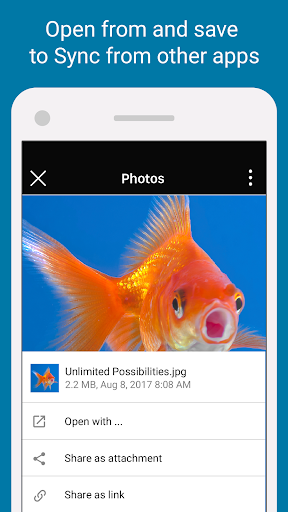
Analysis by Reviewed APKs
Sync - Secure cloud storage is for keeping files online, reaching them from different devices, and sharing them with other people. I see it as a practical fit for anyone who wants a private place for documents, photos, or videos rather than a complicated team-work suite. Its encryption and sharing tools make a useful combination, though its appeal depends on whether 5 GB of free storage is enough for your routine.
Files Along for the Day
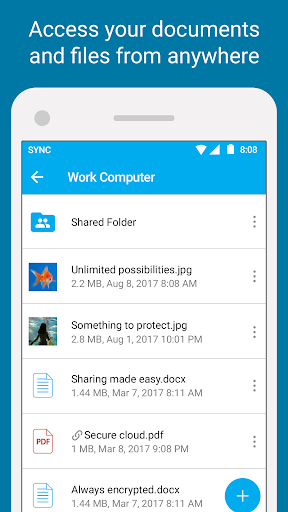
Imagine you are away from your computer and need a document you saved earlier, or want to send someone a large video without attaching it directly to a message. Sync is designed for that kind of in-between moment: store a file in the cloud, reach it from your phone or tablet, and share it using a link. I like that this core job covers both personal access and sending something to another person.
The same idea works for the less urgent parts of a week. You could put photos and videos in Sync, then look them up from another device when you need them. For a small project, shared folders offer a place for collaborators to work with shared files. It is not a dramatic change to how I organize everything; it is a useful extra destination for files I want available beyond one device.
A Different Kind of Cloud
Sync sits in the same broad category as other cloud storage services, but privacy is central to its pitch. The app describes its storage as end-to-end encrypted and says only you can access your data. That focus may matter if you want your documents, photos, or videos stored with access controls, rather than treating cloud space as just a convenient dumping ground.
I would not choose it expecting a full office suite, a photo editor, or a project-management system. The described strengths are storing, accessing, uploading, and sharing files, with shared folders for team collaboration. That makes Sync a better match for people who need a secure file home than for someone looking for tools to create or edit content inside the app.
Make Storage a Habit
A little organization can make cloud storage more useful. I would pick a few clear categories—work documents, personal records, and photos, for example—and put files in the right place as I go. That way, reaching a file from a phone or tablet is more straightforward than trying to remember which device has the latest copy.
Sharing also benefits from a deliberate routine. When I need to send a large file, I can use a link; when a group needs access to related files, a shared folder is the more natural option. Sync includes built-in access controls, so I would pay attention to who can reach shared material. The idea is simple: store once, then choose the right way to make it available.
More From Our News Desk

Zoom Meetings, Google Meet, or Teams: Which Is Easiest to Join?

How I Build a Free Streaming Lineup With Tubi

Why Crunchyroll Is the Default Anime App for So Many Fans

YouTube TV: A Practical Guide to Cutting Cable

Rummikub and the Small Comfort of Phone Games

TeamViewer Remote Control or AnyDesk for Helping Family?
Who Might Find It Useful
I would recommend Sync to people who regularly move between a computer, phone, and tablet and want their files accessible from each. It also suits anyone who shares large files or collaborates through shared folders, especially if privacy is a priority. The free 5 GB gives a newcomer room to try the basic approach and see whether cloud storage fits their everyday routine.
It may be less appealing if you need a lot of space without paying, or want a broad set of editing and productivity tools in one app. Sync’s described focus is secure storage and sharing, not making documents or managing a complex workflow. People who rarely need files off their main device may also find that another storage routine is already enough.
Sync - Secure cloud storage is a free Productivity app from Sync.com Inc. On Google Play, it has over 1 million installs and a 3.9-star rating from around 5,400 ratings. The app is marked Everyone. The description says new users get 5 GB of secure cloud storage. The app is free, with no in-app purchases or ads reported in the provided store facts.
The recorded Android app version is 3.8.54. It was released on October 14, 2014, and its listed last update is October 28, 2026. The minimum Android version is not included in the available facts, so check Google Play for device compatibility before installing. Sync’s description highlights access across computers and devices, file uploads, sharing links, shared folders, encryption, and access controls.
A Closer Look at Sync’s File Routine
A Privacy-First First Impression
When I first considered Sync, the clearest point was its emphasis on encrypted storage. The app is not just presented as somewhere to park files; it connects that storage with private access and sharing. That gives the service a recognizable purpose before getting into the details: keep files in one place you can reach from your devices, while limiting who can access them.
The free 5 GB is a practical starting point for trying that approach. I would begin with a few files I actually need away from my computer, rather than immediately moving an entire library. That keeps the first step manageable and gives me a real sense of whether the available space and cross-device access work for my habits.
Everyday Access and Sharing
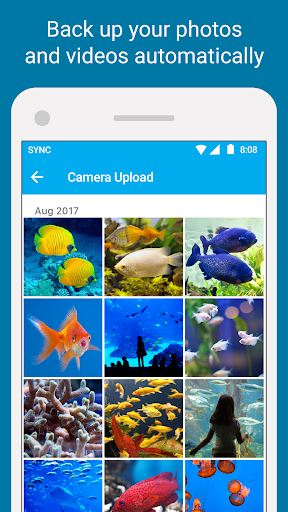
The central experience is moving files between places and people. Sync says you can access files stored on any computer or device from a phone or tablet, which is useful when a document is needed while out of the house. Uploading photos and videos is another clear use, especially for someone who wants personal media stored alongside other files.
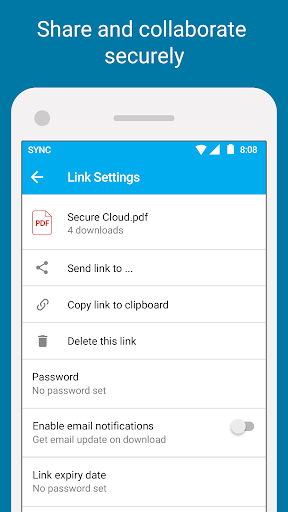
Sharing is part of the same workflow, not an unrelated extra. Links are intended for sending large files, while shared folders support collaboration with a team. I find that distinction helpful: a one-off transfer and an ongoing shared collection are different needs. The app describes a way to handle both without making its purpose sound broader than cloud storage.
Encryption and Access Controls
The feature that stands out most is Sync’s claim of end-to-end encrypted cloud storage. Its description says that only the user can access their data, and that Sync cannot read the files. For someone storing personal documents or family photos, that privacy framing is a meaningful part of the product rather than a minor technical footnote.
Built-in access controls add another layer to the sharing story. A link or shared folder can make files convenient to reach, but convenience is only useful when access is handled thoughtfully. I would treat these controls as a reason to be deliberate about sharing, not as a reason to send sensitive material without considering who should see it.
A Simple Weekly Workflow
A routine I would use is to upload a small batch of files at the end of a workday or after taking photos I want available elsewhere. I could keep active documents and personal media in separate groups, then reach for the phone or tablet when I am away from the computer. The app’s cross-device access is most useful when it solves a real retrieval problem.
For a project with other people, I would use a shared folder for files that belong together. If I only need to send one large item, a link is a better fit. Keeping those two situations distinct makes sharing easier to manage. It also helps avoid treating every file as something that needs to be shared with everyone.
Space and Scope to Consider
The most obvious limit is the 5 GB of free storage. That can be a reasonable amount for a modest collection of documents and selected photos, but video files and larger libraries can use space quickly. I would be selective about what I upload if I want to stay within the free allowance, and check the store for current details if my storage needs change.
The other limit is scope. Sync is described as a place to store, access, and share files; it is not positioned as an editing suite or an all-purpose office app. Its privacy-first approach will matter more to some people than others. If all you need is a few files on your phone, the extra emphasis on encrypted cloud storage may feel like more than your routine requires.
Sync makes sense when secure file storage, access across devices, and straightforward sharing are all part of the same need. I like that its purpose is easy to understand, and that links and shared folders cover different kinds of sharing. The free 5 GB is a sensible way to try the service, though it asks you to be mindful about what you keep there.
I would try Sync if privacy and reaching files from multiple devices are priorities, particularly for personal documents or a small collaborative project. I would look elsewhere if I wanted substantial free space or built-in tools for creating and editing content. For its focused job, Sync offers a clear and practical set of reasons to keep files in the cloud.
Sync Frequently Asked Questions
What is Sync - Secure cloud storage used for?
Sync is used to store files in the cloud, access them from computers and mobile devices, and share them with other people. Its description also mentions uploading photos and videos, sending large files with links, and collaborating through shared folders. It emphasizes end-to-end encryption and built-in access controls for protecting access to stored and shared files.
Which devices can use Sync - Secure cloud storage?
The app is available on Android through Google Play, and its description says files can be accessed across computers and devices from a phone or tablet. The minimum Android version can vary by app release and device; check the Google Play entry for the current compatibility details before installing.
What Android version does Sync - Secure cloud storage require?
The minimum Android requirement may vary with the current release and device. Check the Google Play store entry for the latest compatibility information before downloading. The listed app version is 3.8.54, but that version detail does not establish which Android versions a particular device needs.
Does Sync - Secure cloud storage cost money?
The app is free to install and its description offers 5 GB of secure cloud storage free. The provided store facts show no in-app purchases and no ads. If you are planning to store more than the free allowance, check Google Play for current storage options and terms, as those details may vary.
Is Sync - Secure cloud storage right for everyday use?
It can suit people who want to keep files accessible across devices, share large files, or work with others through shared folders. Its privacy-focused storage may be especially appealing if encryption and access controls matter to you. It may be less suitable if you need extensive free space or expect built-in file editing tools.
Pros
- End-to-end encryption is a central part of its cloud-storage approach.
- Access files from a phone or tablet across computers and devices.
- Links and shared folders handle one-off transfers and collaboration.
- Includes 5 GB of free cloud storage for getting started.
Cons
- The free 5 GB may feel limited for large photo and video collections.
- Its focus is storage and sharing, not document creation or editing.
- The minimum Android version should be checked in Google Play.
- Category
- Productivity
- Version
- 3.8.54











