Starlink Satellites Tracker
- —
- —
- Installs
- 500
- Price
- $0.99
Screenshots
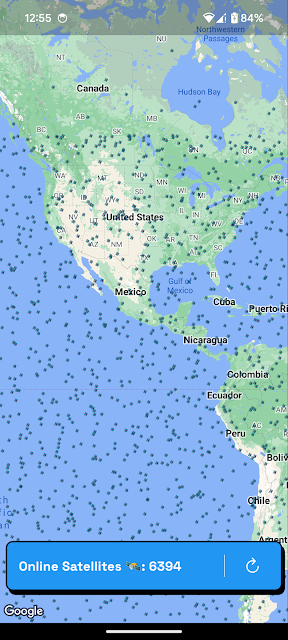
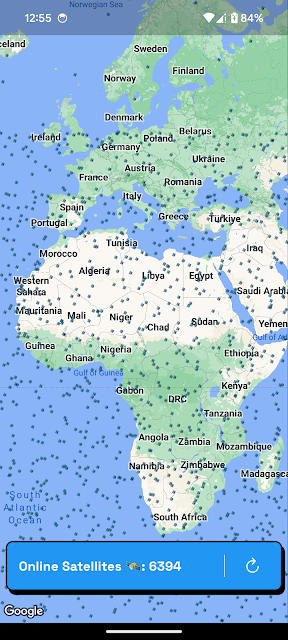
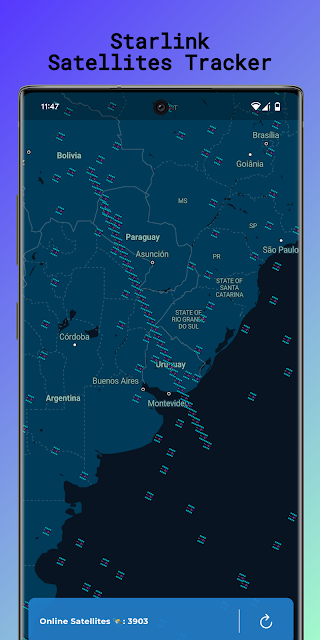
Analysis by Reviewed APKs
Starlink Satellites Tracker is a focused Android app for finding the real-time positions of Starlink satellites, including when you are having trouble with Starlink internet service. I can see it appealing to Starlink users who are curious about what is overhead or want a little context during a connection problem. Its purpose is narrow, which makes it easy to understand, but it is a tracker rather than a tool for fixing service.
A quick look overhead
When I first opened the idea of using Starlink Satellites Tracker, the clearest use case was an ordinary moment of uncertainty: my Starlink connection is acting up, and I want to see where the satellites are. The app is meant to show their positions in real time, so I could use it to put the satellite network in view instead of treating it as an invisible part of the service.
That kind of check is most useful when curiosity and a connection problem happen together. I would reach for the tracker, look at the satellite positions, and then return to whatever I was doing with a little more context. It does not promise to explain a particular outage, but it gives Starlink users a way to see where satellites are rather than only noticing whether the internet is working.
A tracker, not a fix
Compared with simply waiting for an internet connection to recover, this app has a different job: it focuses on the satellites themselves. It also suits someone who wants a direct answer to “where are they now?” more than someone looking for a broad space reference. The appeal is that the subject is specific to Starlink, so there is little ambiguity about what the app is intended to follow.
I would not treat it as a substitute for internet troubleshooting or as a general guide to every satellite and spacecraft. Its stated role is to show Starlink satellite locations, including when Starlink internet is giving you problems. That distinction matters. Seeing a satellite’s position may be interesting context, but the app does not claim to diagnose a fault, restore a connection, or explain why service is interrupted.
Make it a small check-in
The easiest habit is to open the tracker when a question comes up, rather than turning it into a constant monitoring task. If the connection falters, I can check the satellite positions and then get on with my day. If nothing is wrong, a quick look can still satisfy a passing curiosity about the network serving my Starlink connection.
I would also keep expectations simple: use the app for the location information it is designed to provide, and keep the internet problem itself separate. That makes the check more useful and less frustrating. There is no need to invent a complicated routine around a focused tool. A brief glance when the subject is relevant is likely enough for the casual user this app seems built to serve.
More From Our News Desk

Zoom Meetings, Google Meet, or Teams: Which Is Easiest to Join?

How I Build a Free Streaming Lineup With Tubi

Why Crunchyroll Is the Default Anime App for So Many Fans

YouTube TV: A Practical Guide to Cutting Cable

Rummikub and the Small Comfort of Phone Games

TeamViewer Remote Control or AnyDesk for Helping Family?
Who may enjoy it
I would recommend Starlink Satellites Tracker to Starlink users who like having a visual way to check where the satellites are, especially when their internet service is giving them trouble. It also makes sense for curious people who want to follow this particular satellite network without needing a wider astronomy app. The app’s narrowly defined purpose is a plus if all you want is a direct satellite-location check.
It may not suit someone expecting a full internet support tool, detailed explanations of service interruptions, or information about satellites beyond Starlink. I would also look elsewhere if I wanted an all-purpose astronomy experience. The tracker’s value depends on whether its specific subject interests you; for people without a connection to Starlink or curiosity about its satellites, there may be little reason to keep it close at hand.
Starlink Satellites Tracker is an Android app in the Maps & Navigation category, developed by SGC - Software Development. Google Play shows over 500 installs. The app is listed at $0.99, and it does not contain ads or offer in-app purchases. Its content rating is Everyone. Those details make the cost straightforward: it is a paid app rather than a free download with optional purchases.
The current version is shown as “Varies with device,” and the release date is September 21, 2022. Google Play does not provide a rating figure in the supplied store information, so there is no score or rating count to include here. The minimum Android version and last update date are also not included in the available details; check the Google Play entry for the requirements that apply to your device.
A focused window on Starlink satellites
A clear first impression
The app’s name and purpose set expectations quickly: this is for tracking Starlink satellites, not for browsing a large collection of unrelated tools. When I first considered it, the appeal was how plainly it connects a technical subject to a familiar question: where are the satellites right now? That focus is helpful for someone who wants a straightforward point of reference.
The description emphasizes real-time satellite locations and mentions checking them when Starlink internet service is causing problems. That gives the app a practical entry point as well as a curiosity angle. I would go in expecting to look at satellite positions, rather than expecting a setup process or a suite of additional utilities that the app’s stated purpose does not establish.
The everyday experience
Day to day, the central experience is easy to describe: open the app when you want to discover where Starlink satellites are in real time. That makes it a useful kind of quick reference for an owner who is already thinking about the service. The task is specific enough that I would not need to decide among several unrelated reasons to use it.
What I like about that simplicity is that it keeps the app’s role legible. A satellite tracker can give me a view of satellite locations, while my internet connection remains a separate matter. When service is unreliable, I can check the positions without assuming the map or tracker will tell me the cause. That modest expectation is the best way to avoid asking it to do more than it says.
One useful distinction
The standout feature supported by the app’s description is real-time tracking of Starlink satellites. That is the whole reason to open it, and the detail that makes it more specific than a general-purpose reference. I can see the positions when I am curious, or bring up the tracker when I am having problems with Starlink internet service and want to see where the satellites are.
I appreciate that this feature has a clear boundary. It offers location information, not a promised explanation of how a connection is behaving. That can still be worthwhile: seeing the satellite network gives the user a concrete subject to check, instead of leaving the question entirely abstract. The app’s usefulness comes from that focused view, rather than from a long list of extra capabilities.
A practical moment
Imagine settling in for an evening online when the Starlink connection starts acting up. I would open Starlink Satellites Tracker to see where the satellites are, take in the information, and then decide what to do about my evening separately. It is a small, relevant check rather than a full troubleshooting session, and that is a reasonable place for this app in a Starlink user’s routine.
On another day, the same app can answer a less urgent question. I might simply wonder where the satellites are and check their positions without a service problem in progress. That second use gives the tracker a little life beyond moments of frustration. It remains a niche utility, but curiosity is a perfectly good reason to use a focused app when its subject is already part of your internet service.
Keep expectations grounded
The main limitation is also the app’s main strength: it is centered on Starlink satellite locations. If I wanted a broad astronomy guide, or a tool that diagnoses internet interruptions, this would not be the right fit based on its stated purpose. A satellite’s position is information, but it should not be mistaken for a complete explanation of a connection problem.
The available store details also leave some practical points for users to check before installing, such as the Android requirement for a particular device. Version information is given as varying with device, so the exact experience may depend on the phone or tablet. For a simple tracker, those are sensible details to review in Google Play before paying, especially if device compatibility is a concern.
Starlink Satellites Tracker has a clear, narrow purpose: show where Starlink satellites are in real time. I like that it can serve both a practical glance during internet trouble and a casual check driven by curiosity. The important caveat is that tracking locations is not the same as troubleshooting the service.
I would recommend it to Starlink users who want that specific view and are comfortable paying $0.99 for a focused utility. If you need a broader astronomy app or help diagnosing a connection, look for something designed for that job. For the right user, this is a simple way to make the satellite network a little less abstract.
Starlink Satellites Tracker Frequently Asked Questions
What is Starlink Satellites Tracker used for?
Starlink Satellites Tracker is used to discover where Starlink satellites are in real time. Its description also points to checking satellite positions when you are having problems with Starlink internet service. It is a location tracker for the Starlink network, not a stated internet repair or diagnostic tool.
Which devices can run Starlink Satellites Tracker?
Starlink Satellites Tracker is an Android app available through Google Play. The minimum Android version can vary by device or may be worth checking on its Google Play page before installing. Check the store entry for compatibility with your specific phone or tablet.
Does Starlink Satellites Tracker cost money?
The app is listed at $0.99 on Google Play. It does not contain ads or offer in-app purchases, so the listed price is the stated purchase cost. Store details and availability can change, so it is sensible to check the current Google Play entry before downloading.
Does Starlink Satellites Tracker fix internet problems?
The app helps you see where Starlink satellites are, including when you are having trouble with Starlink internet service. Its stated purpose is tracking satellite locations, not diagnosing or fixing a connection. Treat the position information as context, rather than as an explanation of why service is interrupted.
Who should try Starlink Satellites Tracker?
It is best suited to Starlink users who want to check satellite locations or are curious about the network supporting their service. People looking for a general astronomy guide or an internet troubleshooting tool may find its focus too narrow. Its usefulness depends on wanting this specific Starlink satellite view.
Pros
- A clear, focused way to check Starlink satellite positions in real time.
- Useful for both practical curiosity and checking locations during service problems.
- No ads or in-app purchases are listed alongside the $0.99 price.
Cons
- Its narrow Starlink focus may not suit general astronomy users.
- Satellite location information is not a substitute for diagnosing internet problems.
- Check Google Play for the Android requirement that applies to your device.
- Category
- Maps & Navigation











