Quantum Fiber from AT&T
- 2.25K
- 1.8
- Installs
- 100.00K
- Price
- Free

Screenshots
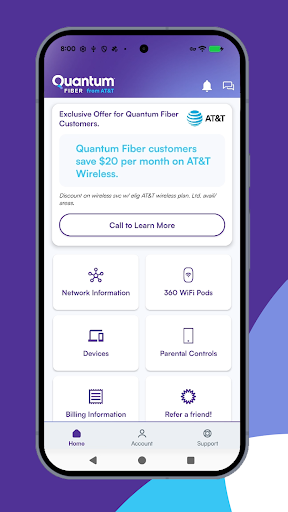
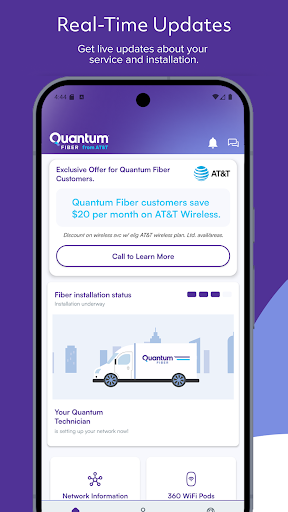
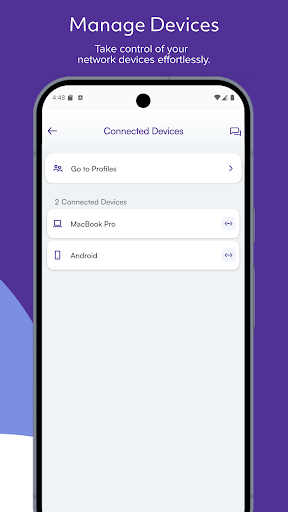
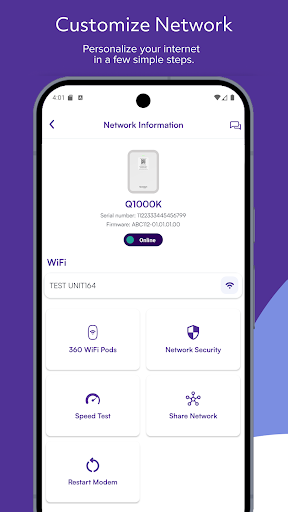
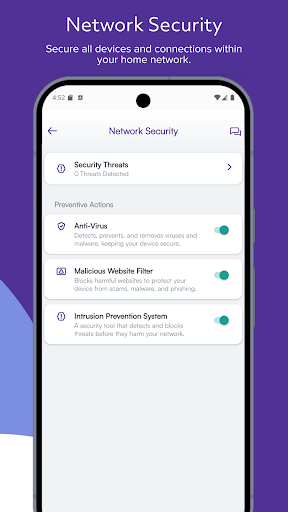
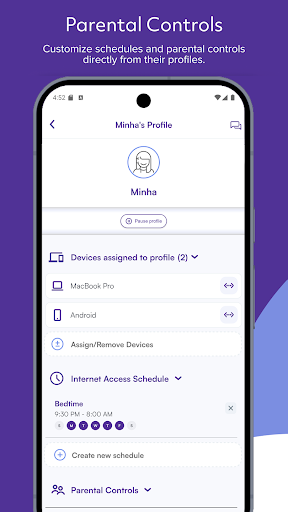
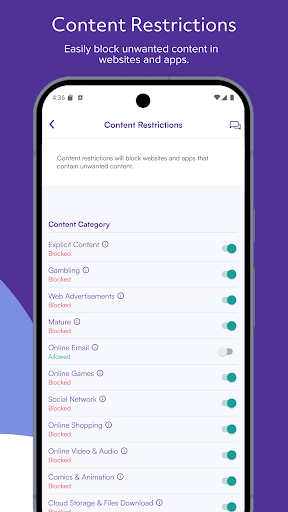
Analysis by Reviewed APKs
Quantum Fiber from AT&T is a companion app for customers who want to manage their home Wi-Fi without reaching for a computer. It puts practical network controls—like checking connected devices, changing network details, and pausing access—in one place. I found its purpose refreshingly narrow: it is useful for everyday account and device management, but it is not a general-purpose internet app or a replacement for the service itself.
A quick household check-in
Picture a busy evening: a guest asks for the Wi-Fi password while someone else is streaming in the living room. With Quantum Fiber, I can look up my network details and create a QR code for visitors to scan instead of spelling out a long password. The app also shows the devices connected to the network, which makes it easier to check what is online without logging into a separate desktop interface.
The controls are useful in small, specific moments. If I want a particular device to take a break from Wi-Fi, I can pause its access; if a device should not be on the network, I can block it. I can also check network health and status. These tools make the app feel less like something I open every day and more like a handy control panel when a household question comes up.
A companion, not a speed test
The obvious comparison is with a router's own management tools or a provider's account portal. Quantum Fiber focuses on the customer-facing tasks named in its feature set: network name and password, connected devices, access controls, installation progress, and network status. That focus is welcome if those are the things I need to manage. It keeps the purpose clear rather than trying to turn the app into a broad dashboard for every internet-related activity.
I would not choose it as a general internet troubleshooting guide, a speed-testing tool, or a way to browse plan options. Those functions are not part of the described app experience. It is for Quantum Fiber customers who want to manage their network and account-related setup from a phone. If I mainly want to compare providers or monitor detailed usage, this is not the tool I would reach for.
Small habits that help
A useful habit is to check the connected-device list when something feels off at home. I can compare what appears there with the phones, computers, and other devices I expect to be online. That is a simple check, not a deep diagnosis, but it gives me a starting point before I decide whether a device needs to be paused or blocked.
I would also keep the QR code option in mind before friends or family arrive, rather than waiting until everyone is standing by the router. For a new service, checking installation progress is another natural use. Once the network is set up, reviewing its name and password and enabling biometric sign-in can make occasional visits to the app quicker and more convenient.
More From Our News Desk

Zoom Meetings, Google Meet, or Teams: Which Is Easiest to Join?

How I Build a Free Streaming Lineup With Tubi

Why Crunchyroll Is the Default Anime App for So Many Fans

YouTube TV: A Practical Guide to Cutting Cable

Rummikub and the Small Comfort of Phone Games

TeamViewer Remote Control or AnyDesk for Helping Family?
Who will find it useful
I would recommend Quantum Fiber from AT&T to customers who want a straightforward way to check their home network and make a few practical changes from a phone. The connected-device list, pause and block controls, network details, and guest QR codes all address familiar household needs. It should be especially convenient for people who would rather handle these quick checks on the go than sit down at a computer.
It may be less appealing to people who expect a full internet diagnostic suite or a broad account-management hub. Its role is focused on network and device management, so the value depends on whether those controls are useful in your routine. It is also specifically aimed at Quantum Fiber customers; someone using a different internet provider should not expect it to manage that service.
Quantum Fiber from AT&T is a productivity app developed by Forged Fiber 37, LLC. Google Play shows over 100,000 installs and a 1.8-star rating from 2,254 ratings. The app is free to download, with no in-app purchases or ads. Its content rating is Everyone.
The listed version is 2.9.9. The app was released on July 27, 2021, and its last update is dated October 23, 2026. The minimum Android version is not included in the available app details, so check Google Play for the requirement that applies to your device.
A Closer Look at Home Wi-Fi Controls
Getting started
When I first opened Quantum Fiber, its purpose was easy to understand: it is a mobile companion for managing a Quantum Fiber network. The setup-related tools are practical rather than flashy. I can view and customize the network name and password, and the app can help me track the installation process. Those are useful starting points for a new customer getting a household online.
Biometric login support is a thoughtful convenience for an app I may open briefly and then put away. I can imagine using it when a guest needs access or when I want to check a device list without typing credentials each time. The app’s listed role is clear from the outset, though the feature set is aimed at customers who already use Quantum Fiber.
Everyday network checks
The day-to-day value is in answering simple questions quickly: What devices are connected? Is the network showing a healthy status? Can I give a visitor an easier way to join? Having those controls gathered in a phone app makes sense for the little interruptions that happen around a shared home connection.
The device controls also offer a direct way to manage access. I can pause Wi-Fi for a specific device or block a device from using the network. These are concrete actions, not a promise that every connection issue will be solved from the app. I would treat them as convenient management options alongside the other tools, rather than as a substitute for all forms of support or troubleshooting.
Guest access and device control
The guest QR code feature is one of the most immediately useful touches. Instead of reading the network password aloud or asking visitors to type it carefully, I can create a code for them to scan. It suits the familiar moment when someone arrives with a phone and asks to join, and it makes network sharing feel a little less fiddly.
I also like that the app puts connected-device visibility beside pause and block controls. Seeing devices and having access options in the same management context is more practical than treating each as an isolated task. Network health and status add another useful check. Together, these features give customers several basic ways to understand and manage their home connection from a mobile device.
A simple weekly routine
For an established household, I would use the app as an occasional check-in rather than a constant monitor. If a device is behaving unexpectedly or someone asks to join the network, I can check the connected-device list, share a QR code, or adjust access. If there is a concern about the connection, I can look at network health and status before deciding what to do next.
During a new installation, the workflow is different: I would use the installation-tracking option, then review the network name and password once the setup is ready. Afterward, biometric login can reduce friction during future visits. This is a modest routine, but that is part of the appeal: the app is there for short, specific jobs rather than demanding attention all day.
Keep its scope in mind
The clearest limitation is its narrow audience and purpose. It is for Quantum Fiber customers, and the described tools center on their network, devices, and installation. If I want a universal router app, detailed internet analytics, or a speed test, I should look elsewhere for those capabilities rather than assume they are included here.
The Google Play rating is 1.8 stars from 2,254 ratings, which is a useful piece of context when weighing the app. A rating cannot tell me exactly how it will work for a particular household, but it is worth keeping in mind alongside the practical feature list. I would check the current store information and consider whether its specific controls match what I need.
Quantum Fiber from AT&T is a focused utility for customers who want quick access to network details and basic device controls. I like the guest QR code, device list, and installation tracking because they connect directly to ordinary home routines. Its best use is occasional and practical: open it, handle a small network task, and get on with the day.
I would try it if I were a Quantum Fiber customer who wanted these controls on a phone, while keeping expectations centered on network management rather than broader diagnostics. The low store rating is worth considering, but the feature set is easy to understand. For the right customer, it can be a convenient companion to the service.
Quantum Fiber Frequently Asked Questions
What is Quantum Fiber from AT&T used for?
Quantum Fiber from AT&T is a companion app for managing a Quantum Fiber home network. It lets customers view and customize network name and password details, track installation, see connected devices, check network health and status, share access with QR codes, and pause or block device access.
Which phones or devices can run Quantum Fiber from AT&T?
The app is available for Android through Google Play. The minimum Android version is not included in the app details here, and compatibility can vary by device, so check the Google Play entry for the current requirement. The app is designed for Quantum Fiber customers and their network-management tasks.
Does Quantum Fiber from AT&T cost money?
The app is free to download on Google Play. It has no in-app purchases and contains no ads, according to its app details. Its features are intended for Quantum Fiber customers, so the app’s usefulness depends on having that service rather than using it as a general-purpose network manager.
What Android version does Quantum Fiber from AT&T require?
The minimum Android version is not included in the available app details. Requirements can change as an app is updated and may differ by device, so check Google Play before installing. The listed app version is 2.9.9, with a last update date of October 23, 2026.
Who should use Quantum Fiber from AT&T?
It is best suited to Quantum Fiber customers who want to manage network details and connected-device access from a phone. The QR code for guests, installation tracking, and network status checks may be useful for everyday household tasks. It may not suit someone looking for a universal router tool or extensive diagnostics.
Pros
- Makes it easy to share Wi-Fi with guests using a QR code.
- Shows connected devices alongside options to pause or block access.
- Includes network status checks and installation tracking for customers.
- Free to download, with no ads or in-app purchases.
Cons
- Its network-management tools are intended for Quantum Fiber customers.
- The Google Play rating is low at 1.8 stars from 2,254 ratings.
- The available feature set is focused, not a broad diagnostic toolkit.
- Category
- Productivity
- Version
- 2.9.9











