Princess Cruises
- 3.75K
- 4.1
- Installs
- 1.00M
- Price
- Free

Screenshots

Analysis by Reviewed APKs
Princess Cruises is a trip-planning and onboard companion for people sailing with Princess, covering everything from pre-cruise check-in to finding activities and ordering items on the ship. I like that it brings practical travel tasks and day-to-day ship information together instead of making passengers juggle separate tools. Its strongest appeal is to guests who want to plan ahead and keep useful cruise details close at hand.
From Port Plans to Shipboard Days
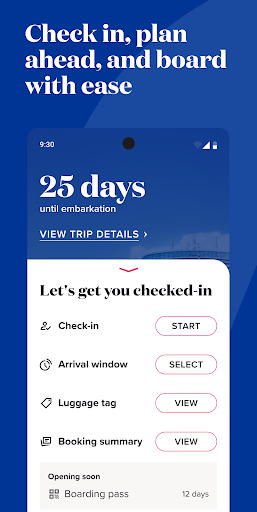
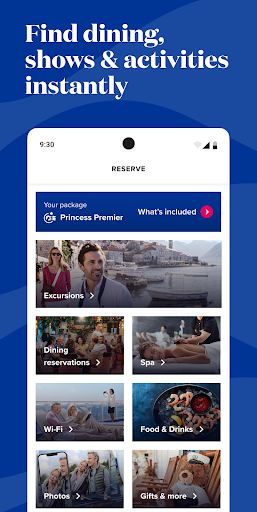
Imagine the week before a cruise: travel documents need attention, dinner plans are still open, and you are trying to decide what to do in each port. Princess Cruises gives those jobs a shared starting point. Its guided OceanReady steps cover check-in and required travel documentation, while the app also lets guests make dining reservations, book shore excursions, and look into spa treatments before arriving.
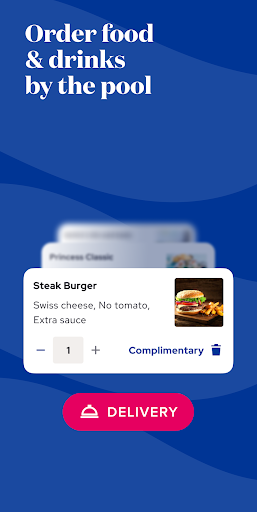
Once aboard, the app shifts from preparation to navigation and daily plans. I can see why having deck plans, directions to venues, and a schedule of onboard events in one place would be handy when I am getting my bearings. Guests can also manage dining reservations and, after connecting to the ship’s MedallionNet Wi-Fi, use OceanNow to order food, beverages, and other items.
A Cruise Companion, Not a General Planner
The app makes the most sense as a companion to a Princess cruise, rather than as a general travel planner. Its tools are tied to Princess-specific tasks and onboard services: OceanReady check-in, the ship’s activities and deck plans, dining, excursions, and MedallionNet-connected features. That focus is useful if you are sailing with the line and less compelling if you are simply comparing destinations or arranging a trip with another cruise operator.
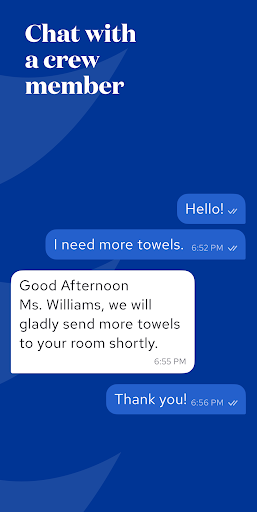
It also is not just a static brochure. The description includes practical actions such as booking activities and excursions, locating shipmates, tracking onboard spending, and contacting crew through chat. Those are useful jobs during a sailing, but the app’s usefulness depends on being part of the Princess cruise experience. I would think of it as a trip utility, not a replacement for general travel research or a standalone entertainment app.
Small Habits That Help
I would start with the pre-cruise tasks rather than waiting until the port. Working through the guided OceanReady steps, checking dining options, and reviewing excursions gives the app a clear purpose before departure. Saving activities that catch my eye would also make it easier to revisit the day’s options later, instead of trying to remember an event after seeing it once.
Onboard, a quick look at the day’s schedule and deck plans can help turn a loose afternoon into a more manageable plan. I would also check reservations and package redemption statuses when those details matter, and use ship navigation when heading somewhere unfamiliar. The app’s many tools are most useful when treated as small, timely helpers rather than one big planning session.
More From Our News Desk

Zoom Meetings, Google Meet, or Teams: Which Is Easiest to Join?

How I Build a Free Streaming Lineup With Tubi

Why Crunchyroll Is the Default Anime App for So Many Fans

YouTube TV: A Practical Guide to Cutting Cable

Rummikub and the Small Comfort of Phone Games

TeamViewer Remote Control or AnyDesk for Helping Family?
Who Will Get the Most From It
I would recommend Princess Cruises to guests who want one place for the practical parts of a Princess sailing. The pre-trip check-in steps, dining and excursion bookings, onboard event information, deck plans, and ship directions cover a broad range of cruise-day needs. It should particularly suit travelers who like to make a few plans ahead of time but still want to adjust their schedule once they are aboard.
It may be less useful to someone who is not sailing with Princess, since its central features are designed around the company’s cruises and ship services. Guests who prefer to arrange everything in person may not need as many of its planning tools. And while it can help organize onboard options, it does not replace deciding what kind of trip you want or choosing activities that fit your own pace.
Princess Cruises is developed by Princess Cruise Lines and is available on Google Play for Android. The app is free to download, has over one million installs, and holds a 4.1-star rating from around 3,700 ratings. Google Play gives it an Everyone content rating. The available facts do not give a minimum Android version, so check the app’s Google Play page for device compatibility.
The Google Play information gives version 1.11, a release date of November 24, 2023, and a last update of October 5, 2026. It indicates no in-app purchases and no ads. Separately, the app description says OceanNow orders have a one-time fee, which is complimentary with the Princess Plus or Princess Premier package. Those service terms are distinct from the app’s download price.
How the App Fits a Princess Cruise
A Task-Focused First Look
My first impression is that the app is organized around the stages of a cruise rather than around a single feature. Before departure, it points guests toward check-in, dining, excursions, spa services, and package choices. That gives the app a clear role early in the trip: it is a place to work through practical preparations and see what can be arranged in advance.
The setup details in the description are straightforward in concept. Guests follow guided OceanReady steps before arriving, and connect to the ship’s MedallionNet Wi-Fi to use the onboard services that depend on it. I appreciate that distinction because it sets expectations: some planning can happen beforehand, while several ship-specific tools belong to the onboard part of the journey.
Useful in the Daily Flow
On an ordinary cruise day, the app’s value comes from reducing the number of separate questions I need to answer. What is happening today? Where is that venue? Do I have a dining reservation? The event schedule, deck plans, directions, and reservation management address those everyday needs. They are not flashy features, but they can save a guest from repeatedly trying to piece together the day.
The app also covers practical services beyond planning. OceanNow can be used to order food, drinks, amenities, and more from around the ship after connecting to MedallionNet Wi-Fi. CrewCall chat offers a way to get help at any hour, according to the description. Together, these tools make the app relevant during the sailing, not just in the weeks before it.
Features With Cruise Context
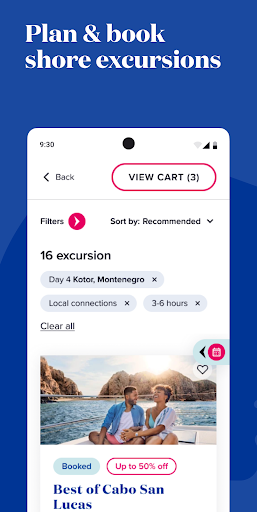
The standout feature is the way Princess-specific planning and onboard information sit side by side. Guests can book shore excursions for port days, review detailed deck plans, and browse events and activities. They can also bookmark activities and view or manage dining reservations. That combination helps connect the broader cruise itinerary with the smaller decisions that shape each day aboard.
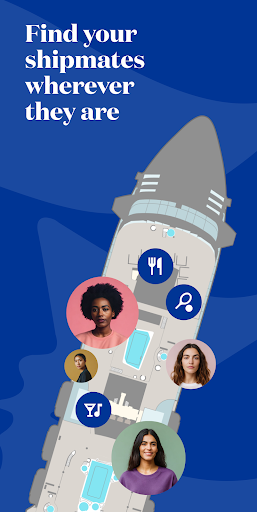
Some features are more specialized. The app can provide directions to venues and points of interest, and it can locate shipmates in real time and give directions to them. Guests can track onboard spending and package redemption statuses, too. I would not treat any one of these as a reason to download the app on its own; the appeal is having several relevant cruise tools available together.
A Simple Cruise-Day Routine
A practical routine could begin with the upcoming day’s events. I would browse the schedule, bookmark anything I want to remember, and check the deck plan before heading to an unfamiliar venue. If the day includes a port stop, I could also review the excursion details already booked or look at available shore excursions. This makes the app a reference point without requiring constant attention.
Later, I could check dining reservations, use directions to get around, or order through OceanNow if that service suits the moment. For guests tracking their package use or spending, the relevant status information gives another reason to check in periodically. The idea is not to plan every minute. It is to use the app when a specific question comes up and then get back to the vacation.
Keep the Boundaries in Mind
The biggest limitation is also the app’s defining focus: it is built for Princess guests. Its usefulness is tied to a Princess cruise, and features such as ship navigation, shipmate location, onboard ordering, and crew chat relate to the onboard environment. A traveler looking for a broad cruise comparison tool or an all-purpose itinerary organizer should not expect this app to fill that role.
There are also a couple of practical distinctions worth remembering. The description says MedallionNet Wi-Fi is needed to connect to the ship’s onboard services, and OceanNow has a one-time fee unless it is complimentary through a Plus or Premier package. The app itself is free according to Google Play, but that does not mean every service or package described within the cruise experience is free.
Princess Cruises looks like a useful, well-scoped companion for people sailing with the line. It covers a surprisingly broad stretch of the trip, from guided check-in and bookings to ship navigation, event plans, onboard ordering, and spending information. I especially like its practical focus: most of its tools answer a real question a guest may have before or during a cruise.
I would recommend it to Princess passengers who are comfortable using a phone to organize travel details and navigate onboard options. It is less relevant outside that setting, and guests should keep the stated OceanNow fee and Wi-Fi connection in mind. For the right traveler, it can make cruise logistics easier to manage without trying to take over the vacation.
Princess Cruises Frequently Asked Questions
What is the Princess Cruises app used for?
Princess Cruises helps guests prepare for and manage a Princess sailing. Its features include guided OceanReady check-in, dining and excursion bookings, spa appointments, event information, deck plans, ship directions, and onboard services such as OceanNow ordering. Guests can also manage reservations, contact crew through CrewCall chat, and view onboard spending and package redemption statuses.
What devices and platforms support Princess Cruises?
Princess Cruises is available on Google Play for Android. The supplied information does not specify a minimum Android version, so device compatibility may vary; check the app’s Google Play page for the current requirement. The app description also refers to connecting to the ship’s MedallionNet Wi-Fi for onboard services.
Is the Princess Cruises app free?
Google Play lists Princess Cruises as free to download, with no in-app purchases or ads indicated in the supplied app facts. However, the app description says OceanNow orders carry a one-time fee, waived for guests with a Princess Plus or Princess Premier package. Package and service terms may vary, so check the store and cruise information for current details.
Can I use Princess Cruises before I sail?
Yes. The description says guests can use guided OceanReady steps to check in and provide required travel documentation before arriving. It also describes pre-cruise options for dining reservations, shore excursions, spa treatments, and package purchases. Once aboard, additional features include ship directions, event information, reservation management, and OceanNow ordering.
Who should use the Princess Cruises app?
It is best suited to people sailing with Princess who want cruise-specific planning and onboard tools in one app. Guests who like checking schedules, managing reservations, or finding their way around a ship may find it particularly useful. It is less suited to travelers seeking a general-purpose trip planner or tools for a cruise with another operator.
Pros
- Combines pre-cruise check-in, bookings, and onboard information in one Princess-focused app.
- Deck plans, directions, and daily event details can help guests navigate shipboard routines.
- Supports dining and excursion reservations before or during a sailing.
- Includes practical onboard tools such as OceanNow ordering and CrewCall chat.
Cons
- Most features are relevant only to guests sailing with Princess.
- OceanNow has a one-time fee unless complimentary with a Plus or Premier package.
- MedallionNet Wi-Fi is needed to connect to the described onboard services.
- Category
- Travel & Local
- Version
- 1.11











