OnShift Mobile
- 3.45K
- 2.1
- Installs
- 500.00K
- Price
- Free

Screenshots
Analysis by Reviewed APKs
OnShift Mobile is a work companion for employees and schedulers in communities that use OnShift. Employees can check schedules, look at open shifts, read community updates, and access certain rewards or wage features when their employer has the relevant service. Schedulers can handle call-offs and contact staff. I see it as a practical way to reach work information on a phone, rather than a general-purpose calendar or messaging app.
A Shift Check on the Go
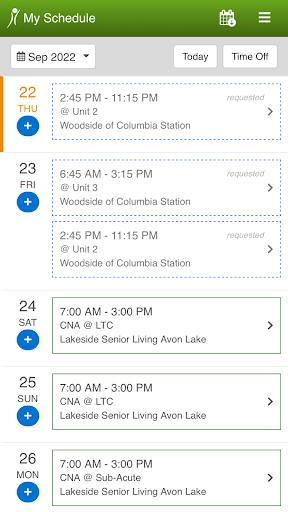
Picture checking your work schedule while getting ready for the week. Instead of waiting until you are back at a computer, OnShift Mobile puts the schedule on your phone, where you can see it when planning errands or deciding whether you can take an extra shift. If open shifts are available, the app lets you view and request them from the same mobile experience. That makes its central job easy to understand: keep work scheduling within reach.
The app also brings community updates and messages into that routine. I can imagine opening it before a shift to catch a workplace update, then checking the schedule again later when plans change. For a scheduler, the day might look different: a call-off comes in, and the app can help remove and log the employee and message available, qualified staff. These are focused work tasks, not features meant to organize every part of someone's life.
A Workplace Tool, Not a Planner
Compared with a paper schedule, a shared calendar, or a general chat app, OnShift Mobile is tied to the workplace's OnShift setup. Its value is having schedules, open-shift requests, community communication, and certain staff information together rather than splitting those jobs among unrelated tools. It also serves two roles: employees can check work details, while schedulers can respond to call-offs and reach staff through the Worker Directory.
That focus is also a limit. I would not choose OnShift Mobile as a personal calendar, a broad team collaboration platform, or a way to find work at an unrelated employer. The app is for people whose community uses OnShift, and some listed options depend on Engage or Wallet access. It is not a substitute for an employer's policies or a conversation with a manager when a scheduling issue needs context.
Small Habits That Help
A simple habit is to check the schedule when planning the week, then return to it before making decisions about an open shift. Keeping those checks together can make it easier to spot a conflict before requesting additional work. I would also build a quick look at community messages into the start of a workday, since the app is designed to deliver updates and let employees respond rather than merely display dates.
Schedulers have a similarly practical routine: after a call-off, use the app to record the change, then reach out to available and qualified staff. The Worker Directory provides a direct way to contact staff members. If the employer uses OnShift Engage or OnShift Wallet, it may also be worth checking rewards balances or earned wages where those services apply. The useful workflow is modest: check what is relevant, act, and move on.
More From Our News Desk

Zoom Meetings, Google Meet, or Teams: Which Is Easiest to Join?

How I Build a Free Streaming Lineup With Tubi

Why Crunchyroll Is the Default Anime App for So Many Fans

YouTube TV: A Practical Guide to Cutting Cable

Rummikub and the Small Comfort of Phone Games

TeamViewer Remote Control or AnyDesk for Helping Family?
Who Will Find It Useful
I would recommend OnShift Mobile to employees at communities that use OnShift and who want schedule access, open-shift requests, and workplace communication on a phone. It is also relevant to schedulers who need to log call-offs and contact available, qualified staff while away from a desk. People whose employer has the applicable Engage or Wallet service may have additional reasons to use it, including checking rewards or earned wages.
It may not suit someone looking for a standalone scheduling app, a personal planner, or a tool that works independently of an employer's OnShift environment. Employees who prefer to handle all work matters through a manager or desktop may not need the mobile version. The Google Play rating is 2.1 from about 3,400 ratings, so I would set expectations carefully and check whether its particular functions match the way my workplace uses OnShift.
OnShift Mobile is developed by OnShift and is listed in the Productivity category. On Google Play it has over 500,000 installs and a 2.1-star rating from 3,449 ratings. Those figures suggest it has reached a substantial workplace audience, while the low score is a useful reason to read recent user feedback and consider how well the app fits your employer's setup.
The app is free to download, with no in-app purchases and no ads. Its content rating is Everyone. The listed version is 6.2.0; it was released on January 20, 2014, and last updated on May 21, 2026. The minimum Android version is not included in the available app details, so check Google Play for the requirement on your device.
A Closer Look at Work on Mobile
A Focused First Impression
When I first opened the idea of OnShift Mobile, what stood out was how closely it follows a workday. Its advertised tools are not broad productivity extras; they center on schedules, open shifts, workplace updates, rewards, earned wages, and staffing tasks. That gives the app a clear purpose. Someone arriving to check a shift should not have to guess whether this is meant for personal organization or for their employer's OnShift community.
Getting value from the app depends on being part of an OnShift customer community. That context matters more than any generic setup advice: the app's employee and scheduler functions correspond to workplace roles, and some options are specifically tied to Engage or Wallet customers. I would start by figuring out which of those services my employer uses, then focus on the functions relevant to my role rather than expecting every capability to apply.
The Everyday Core
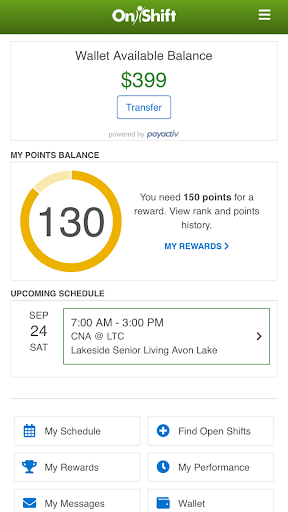
For employees, the everyday center is schedule access. The app lets users view their schedule anytime and see and request open shifts on a mobile device. That combination is useful for the ordinary moments between shifts: checking a date while making plans, or seeing whether an available shift is worth requesting. It keeps the job-specific information together without pretending to replace every calendar or communication tool a person might use.
Messages and community updates add another layer to that routine. Employees can receive and respond to updates and messages, which puts work communication alongside schedule checks. For schedulers, the daily experience leans toward staffing: handle call-offs, remove and log called-off employees, and send messages to available, qualified staff. The app's core is therefore different depending on the user's role, even though both groups use it to stay connected to the same workplace.
More Than the Schedule
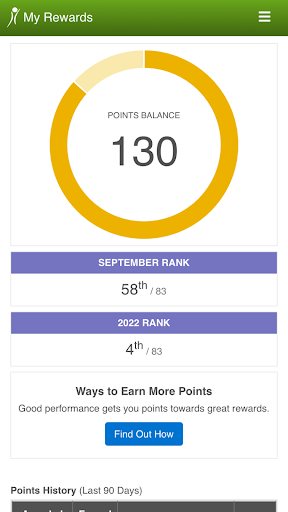
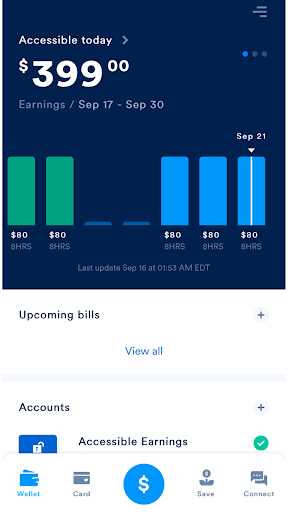
A few optional features extend the employee side beyond scheduling. OnShift Engage customers can view rewards-point balances and performance statistics. OnShift Wallet customers can access earned wages between paychecks, as well as exclusive discounts and free financial counseling. These options may make the app more useful for people whose workplace has those services, but they are not universal features to assume every employee will see.
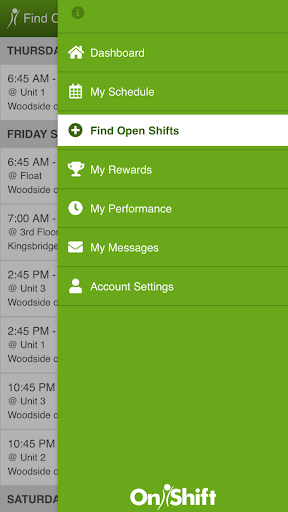
On the scheduler side, the Worker Directory is a practical distinction from a schedule-only app. It provides a way to contact staff members directly, while messaging available and qualified staff can support the response to a call-off. I like that these tools are connected to actual staffing needs. They are not presented as a general social network; the useful detail is that communication sits alongside the scheduling work.
A Practical Work Routine
A sensible employee routine could be to check upcoming shifts when planning the week, then look at open shifts only when availability changes. Before or during a workday, a quick review of community messages can help keep workplace updates from getting lost among personal conversations. If the employer provides Engage or Wallet, those sections could be checked when relevant rather than treated as a daily obligation.
A scheduler's routine is more event-driven. When an employee calls off, the scheduler can use the app to log and remove that person, then contact available and qualified staff. I would keep that sequence simple and use the Worker Directory when direct contact is needed. OnShift Mobile is most compelling in these short, specific moments: a schedule check, an update, or a staffing response that needs to happen away from a desk.
Keep the Limits in View
The main limitation is that the app's usefulness depends on an employer's use of OnShift and, for some features, its use of Engage or Wallet. That means two employees who download the same app may not have the same set of relevant tools. It is worth knowing which services your workplace has before relying on a feature such as rewards balances or access to earned wages.
The Google Play rating is 2.1 from 3,449 ratings, a notably low score for an app people may need to use for work. That does not explain any individual user's experience, but it is a reason to keep expectations measured and check current feedback. I would also avoid treating a mobile app as the only route for urgent workplace communication; the app's described tools help with messages and staffing, but workplace procedures still matter.
OnShift Mobile has a clear, useful role for employees and schedulers in workplaces that use OnShift. Schedule access, open-shift requests, messages, call-off handling, and direct staff contact all make sense on a phone. Optional Engage and Wallet tools can add value for customers who have those services, without changing the app's central workplace focus.
I would try it if my employer uses OnShift and I wanted work schedules or staffing tools close at hand. I would not download it expecting a universal planner or assume every feature applies to my workplace. The low Play rating is worth weighing, but the app's focused purpose may still make it a practical part of a specific community's work routine.
OnShift Mobile Frequently Asked Questions
What is OnShift Mobile used for?
OnShift Mobile helps employees access schedules, view and request open shifts, and receive or respond to community updates and messages. Schedulers can manage call-offs and contact staff. Depending on the workplace's OnShift services, employees may also have access to rewards information or earned-wage features.
Which phones and devices support OnShift Mobile?
OnShift Mobile is an Android app available through Google Play. The minimum Android version may vary as the app changes, so check the Google Play store entry for the current requirement and compatibility with your device.
What Android version does OnShift Mobile require?
The available app details do not provide a minimum Android version. Requirements can change with app updates and device compatibility, so check the OnShift Mobile page on Google Play before installing or updating.
Does OnShift Mobile cost money or include purchases?
OnShift Mobile is free to download, and its app details show no in-app purchases or ads. Some capabilities are connected to OnShift Engage or OnShift Wallet customers. Check Google Play and your employer's OnShift setup for current availability and details.
Is OnShift Mobile right for every employee?
It is most relevant to employees and schedulers at communities that use OnShift. Employees can check schedules and workplace messages, while schedulers have call-off and staff-contact tools. It may not suit someone looking for an independent planner or an app unrelated to their employer's OnShift environment.
Pros
- Puts schedule access and open-shift requests on a mobile device.
- Combines workplace updates and messages with scheduling tools.
- Schedulers can log call-offs and contact available, qualified staff.
- Optional Engage and Wallet features add relevant employee tools.
Cons
- Its usefulness depends on the employer's OnShift setup.
- Some employee features require Engage or Wallet access.
- Its Google Play rating is low, so expectations should be measured.
- Category
- Productivity
- Version
- 6.2.0











