NYC ACCESS HRA
- 118.62K
- 4.6
- Installs
- 1.00M
- Price
- Free

Screenshots
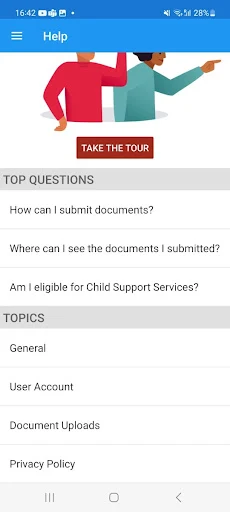
Analysis by Reviewed APKs
NYC ACCESS HRA puts useful case information and document tasks for New York City benefits within reach of an Android phone. I see its value most clearly for SNAP and Cash Assistance clients who want to check a balance, keep an eye on appointments, or send in requested paperwork without waiting to use a computer. It is a focused companion to agency services, not a general benefits guide, and that focus makes it practical.
A Case Check Between Errands
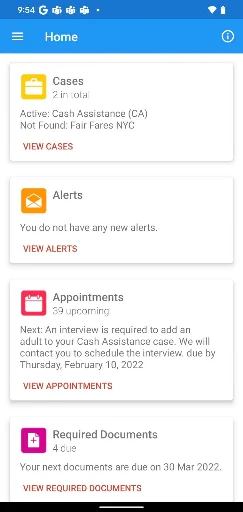
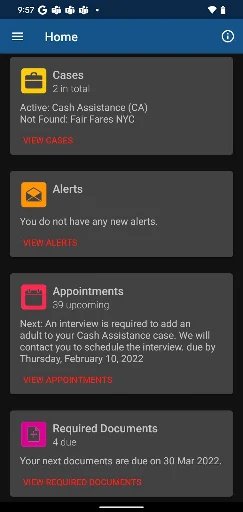
Picture a busy weekday: you are out running errands and want to know whether a SNAP recertification date is approaching. Rather than wait until you get home, you can open the Cases area and check case status, EBT balances, and upcoming recertification dates. The app also covers Fair Fares NYC discount and renewal status, plus Access-A-Ride status, so the useful information depends on which services apply to you.
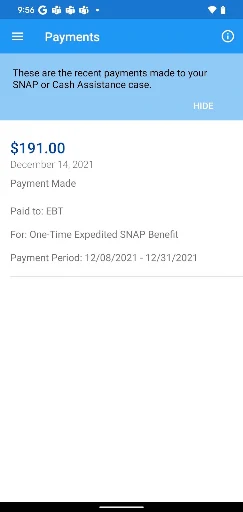
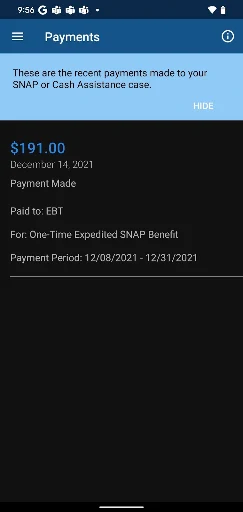
Appointments are another everyday reason to reach for the phone. The app shows upcoming, missed, and completed appointments, and lets you add a reminder to your device. Payments have their own view, including upcoming and past payments made to a landlord, utility company, or EBT card. I like that these are distinct checks rather than one vague status screen; each answers a concrete question you might have during the day.
A Companion, Not a Handbook
Compared with keeping paper notices in a folder or trying to remember dates from a letter, ACCESS HRA gives clients a mobile place to review case details and follow document requests. Its strongest role is checking and managing information connected to an existing application or case. Required documents can be photographed or chosen from the camera roll, and the app keeps an upload history, which is more direct than juggling separate images and reminders.
I would not treat it as a general guide to every benefit, nor assume that uploading a file means the agency has accepted it. The app’s own guidance makes that distinction important: submitted documents still need review, and accepted documents appear in My Documents. It also is not a substitute for agency decisions or a promise that a case will change instantly. Think of it as a mobile window into specified HRA tasks.
Small Habits That Help
A useful routine is to check the Cases and Appointments sections when you receive a notification or know a deadline is coming up. If an appointment appears, adding its reminder to your phone or tablet can put it alongside the rest of your day. For payments, a quick look at both upcoming and past items can help you understand what the app shows without relying on memory or searching through older papers.
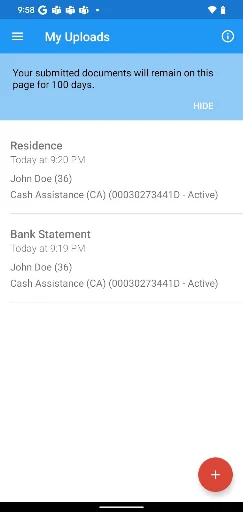
For paperwork, I would start with the Required Documents list, then take a clear photo or choose the right image from the camera roll. After uploading, check My Uploads for the submission history and My Documents for accepted items. The app says uploaded items stay on the list for 100 days and accepted documents for 60 days from acceptance, so reviewing those sections is more useful than assuming a file remains visible indefinitely.
More From Our News Desk

Zoom Meetings, Google Meet, or Teams: Which Is Easiest to Join?

How I Build a Free Streaming Lineup With Tubi

Why Crunchyroll Is the Default Anime App for So Many Fans

YouTube TV: A Practical Guide to Cutting Cable

Rummikub and the Small Comfort of Phone Games

TeamViewer Remote Control or AnyDesk for Helping Family?
Who May Find It Useful
I’d recommend NYC ACCESS HRA to New York City residents who already deal with SNAP, Cash Assistance, Fair Fares NYC, or Access-A-Ride and want key case details on a phone. It is especially appealing if you often need to check an appointment, review an EBT balance, track payment information, or send requested documents while away from a computer. The available English, Spanish, Arabic, French, Korean, Russian, and Simplified Chinese options broaden its usefulness.
It may be less helpful to someone looking for general benefit education, services outside the app’s stated scope, or a fully self-contained way to resolve eligibility questions. Document uploads still require attention to image quality and acceptance status, and the app’s case information is only one part of dealing with the agency. If you prefer handling paperwork on a larger screen, the phone-first convenience may matter less than the familiar desktop or paper process.
NYC ACCESS HRA is published by NYC Human Resources Administration. On Google Play, it has over 1 million installs and a 4.6-star rating from about 119,000 ratings. The app is free, with no in-app purchases and no ads. Its content rating is Everyone, making the store rating suitable for a broad audience.
The app’s current version is 3.10. It was released on March 16, 2017, and was last updated on October 9, 2025. Google Play’s Android requirement can vary by device and app version, so check the store page on your phone before installing.
The Useful Details Behind the Case Screen
A Practical First Look
When I first considered what I’d want from this app, it was not a tour of every agency service; it was a quick route to the next practical task. ACCESS HRA groups case details, appointments, payments, required documents, accepted documents, and profile information into named areas. That gives the app a clear purpose from the outset: bring common account checks and paperwork actions onto a phone.
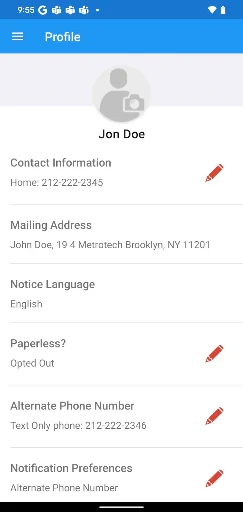
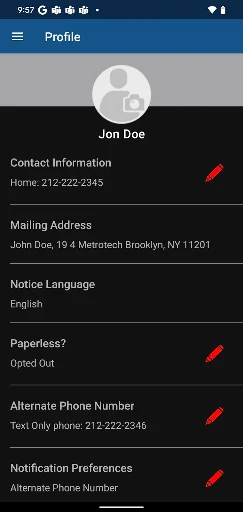
The language choices are worth noticing before you begin. ACCESS HRA mobile is available in English, Spanish, Arabic, French, Korean, Russian, and Simplified Chinese. The Profile section also shows contact information and notification preferences previously provided to the agency. For people with a SNAP or Cash Assistance case, profile details can be updated once every 24 hours; Fair Fares NYC-only clients can update as often as needed.
Checks You Can Make Daily
The day-to-day value is in being able to look up several kinds of case information without treating each check as a separate project. Cases covers current SNAP or Cash Assistance status, EBT balances for benefits, and upcoming recertification dates. Depending on your situation, it can also show Fair Fares NYC renewal timing and discount status, or Access-A-Ride status. That makes a quick check useful even when you are not ready to do a larger task.
Appointments and Payments add a different kind of visibility. An appointment can be marked in the app as upcoming, missed, or completed, while payments can be viewed as upcoming or past. The examples include payments to a landlord, utility company, or EBT card. I appreciate that the app describes what these sections show, rather than making the user infer everything from a single generic activity feed.
Document Tools That Matter
The Required Documents section turns a request into a more manageable list. You can take a photo of each item or select an image from your camera roll, then see the history of uploaded documents on My Uploads. This is a straightforward phone workflow: find the requested item, capture or select it, and keep track of what you sent. The app says each uploaded document stays on the list for 100 days.
The key detail is that sending a document does not establish that it proves an eligibility factor or that it has been accepted. The agency’s accepted documents appear in My Documents, where each stays for 60 days from acceptance. I would make that screen part of the process, not an afterthought. The app also calls out image quality, so a readable photo matters when you are submitting paperwork from a phone.
A Simple Weekly Routine
A low-effort routine could be to check case details once a week, especially when a recertification date or appointment is approaching. If an appointment is shown, add a reminder to your phone or tablet rather than relying on a mental note. When a payment question comes up, look at the upcoming and past entries in Payments. Those small checks make the app most useful as an everyday reference, not something you only open in a crisis.
When a document request arrives, I’d use the Required Documents list as the starting point and make sure the photo is clear before sending it. Later, check My Uploads to see the history and My Documents to confirm whether the agency accepted it. Notifications can also alert you to matters such as recertification due dates, application submission confirmation, upcoming appointments, required documentation, and E-notices. They help surface tasks, while the sections remain useful for checking details.
Limits to Keep in Mind
There are a few reasons not to mistake convenience for completion. Uploading paperwork is a submission, not confirmation of acceptance, and the app specifically directs users to My Documents for accepted items. The 100-day and 60-day document windows also mean these lists are not permanent archives. If you need to keep records beyond those periods, the app’s described document history should not be your only copy.
The app is centered on supported HRA information and tasks, so its usefulness will depend on which cases or services you have. The description does not present it as a general resource directory or a replacement for every agency interaction. Profile editing also has a 24-hour limit for clients with SNAP or Cash Assistance cases. These boundaries do not undo the convenience, but they set realistic expectations about what a mobile check can accomplish.
NYC ACCESS HRA makes routine case checks and document follow-up more convenient, particularly when a phone is the device already in your hand. Its most useful features are specific: balances, appointments, payments, requested documents, and accepted-document status. I’d keep it installed if I were regularly managing one of the services it covers.
My recommendation is straightforward: try it if you are an HRA client who wants a mobile way to monitor case details and handle paperwork. Just remember to verify acceptance in My Documents and keep the app’s time-limited document lists in perspective. For broader guidance or tasks beyond its stated functions, this focused companion may not be enough on its own.
NYC ACCESS HRA Frequently Asked Questions
What is NYC ACCESS HRA used for?
NYC ACCESS HRA lets users check SNAP or Cash Assistance case status, EBT balances, recertification dates, appointments, and payment information. It also covers Fair Fares NYC and Access-A-Ride status, document uploads and accepted documents, profile information, and notifications about case-related tasks.
Which phones can run NYC ACCESS HRA?
NYC ACCESS HRA is an Android app available through Google Play. The Android version required may vary with the device and app version, so check its Google Play page from your phone for the requirement that applies to your installation.
What Android version does NYC ACCESS HRA require?
The Android requirement can vary by device and version of NYC ACCESS HRA. Check the Google Play store page on the device you plan to use for the current compatibility details before installing or updating.
Does NYC ACCESS HRA cost money?
NYC ACCESS HRA is free on Google Play and does not offer in-app purchases. It also does not contain ads. Store details can change, so the Google Play page is the best place to check current information before installing.
Is NYC ACCESS HRA useful for every New York resident?
It is most useful for people managing SNAP, Cash Assistance, Fair Fares NYC, or Access-A-Ride information through the app’s listed features. It is a focused case and document companion, not a general benefits guide. Whether it suits you depends on the services and tasks you need.
Pros
- Combines case status, EBT balances, appointments, and payment information in one mobile app.
- Lets users photograph or select requested documents and review submission history.
- Shows accepted documents separately, helping distinguish receipt from agency acceptance.
- Offers notifications and seven listed language options.
Cons
- An uploaded document is not automatically accepted or proof of eligibility.
- Uploaded and accepted document lists have limited retention periods.
- Some profile updates are limited to once every 24 hours.
- Category
- Health & Fitness
- Version
- 3.10











