MyTSA
- 4.43K
- 4
- Installs
- 1.00M
- Price
- Free
Screenshots
Analysis by Reviewed APKs
MyTSA is a travel reference app for people who want to check airport security details before heading out. It brings together carry-on item guidance, airport wait-time information, delays, weather, and ways to ask TSA a question. I found its appeal straightforward: it helps answer practical checkpoint questions in one place, though its information is best treated as a planning aid rather than a promise about what travel day will bring.
Before You Leave Home
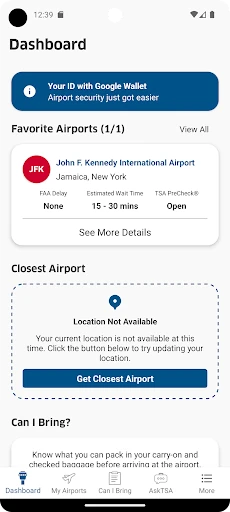
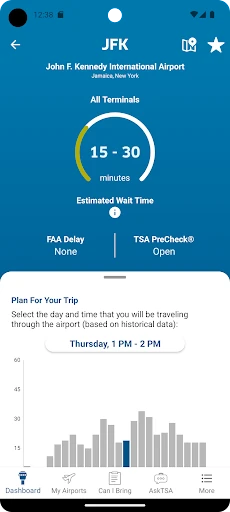
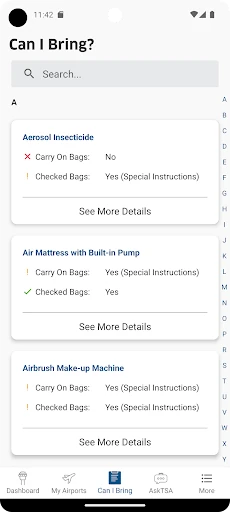
When I’m packing for a flight, the small question of whether an item can go through the checkpoint can interrupt an otherwise simple routine. MyTSA lets me search for items before I zip the bag, instead of trying to remember a rule from a past trip. I can also look up the airport’s historically busy periods for my travel day and check crowd-sourced checkpoint wait times as part of deciding when to leave.
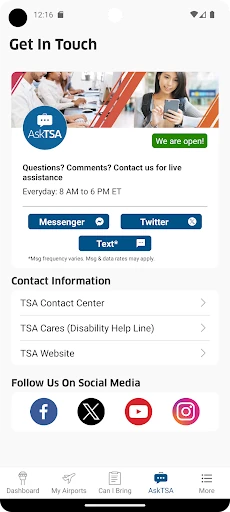
I also like having airport delay information and current weather conditions nearby when I’m reviewing the day’s plans. The app does not turn those details into a complete itinerary, but it gives me several useful bits of context without making me search each question separately. If I’m unsure about a TSA matter, the AskTSA social media integration provides a way to request assistance, alongside the app’s checkpoint preparation guide.
A Travel Reference, Not a Planner
MyTSA makes the most sense beside an airline app, a map, or a flight search tool, not as a replacement for them. Its focus is the TSA checkpoint: what items can pass through, how busy a checkpoint may be, and how to prepare for screening. It also covers airport delays and weather, but its defining job is helping travelers get oriented around security rather than organizing every part of a trip.
That narrow focus is useful when I have one specific question and don’t want to sift through broad travel advice. It is not a booking service, a boarding pass wallet, or a source of personal flight arrangements. Wait-time information is crowd-sourced, while the busy-period information is historical, so I would use both to inform my plans rather than assume either will match conditions when I arrive.
Small Habits That Help
I’d make MyTSA part of the packing check rather than wait until I’m standing in line. Searching questionable carry-on items before leaving gives me time to reconsider what I bring. A quick look at the TSA Guide can also help me refresh the checkpoint process, especially if I have not flown in a while. These are small checks, but they are easier to do at home than while juggling bags at the airport.
For a trip with a fixed departure time, I would check the selected airport and travel period, then revisit the information closer to departure. Travelers can also add a checkpoint wait time for others, but the app says they must be at the airport to report one. I’d keep that contribution tied to an actual visit, and remember that crowd-sourced reports are a snapshot, not a forecast.
More From Our News Desk

Zoom Meetings, Google Meet, or Teams: Which Is Easiest to Join?

How I Build a Free Streaming Lineup With Tubi

Why Crunchyroll Is the Default Anime App for So Many Fans

YouTube TV: A Practical Guide to Cutting Cable

Rummikub and the Small Comfort of Phone Games

TeamViewer Remote Control or AnyDesk for Helping Family?
Who Will Find It Useful
I’d recommend MyTSA to occasional and frequent flyers who like to settle checkpoint questions before travel day. It is especially handy for someone checking a particular carry-on item, comparing airport wait-time information, or looking for a simple refresher on getting through security. The combination of item search, airport details, and TSA assistance gives it a clear role in the few days before a flight.
It may be less compelling for travelers who already know the checkpoint rules and only need flight booking, gate updates, or a full itinerary. MyTSA is focused on TSA-related information, so it will not replace an airline’s own tools. I’d also avoid leaning too heavily on crowd-sourced wait times or historical busy periods: they can help with planning, but travel conditions can change.
On Google Play, MyTSA is published by the TSA Mobile Team and has over one million installs. It has a 4.0-star rating from around 4,400 ratings. The app is free to download, with no in-app purchases and no ads. Its content rating is Everyone, making the store’s audience designation broad.
The current version is 4.5.0, and the latest update was December 6, 2024. MyTSA was first released on November 1, 2012, and requires Android 7.0 or later. Those details make it a long-running, focused travel utility; as with any app, I’d check Google Play for current compatibility and release information before installing.
A Practical Checkpoint Companion
A Focused First Impression
When I first opened MyTSA, the scope was easy to understand: it is there to answer the questions passengers commonly bring to TSA. That focus helps the app feel more like a practical reference than a general travel magazine. I would start by looking up an item I plan to pack, then check the airport information for the trip, rather than browsing without a particular need.
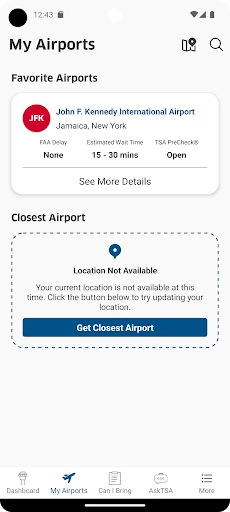
Getting value from it depends on choosing the right airport and travel timing when checking airport information. I’d take a moment to make sure I’m looking at the airport I’ll actually use, especially if a metro area has several options. The app also includes a TSA Guide, so a first visit can be useful even when I do not have an urgent question.
Useful in the Planning Rhythm
The core experience fits naturally into the routine before a flight: check a packing question, review the airport’s expected busy periods, and look at crowd-sourced checkpoint wait times. MyTSA also provides airport delay information and current weather conditions. I like that these checks relate to the same travel day, while still recognizing that each one offers a different kind of context.
On a busy morning, I would use the information as one input alongside my own travel plans. Historical busy periods can help me think about timing, while submitted wait times give another view of checkpoint conditions. Neither removes the need to allow time for the rest of the airport journey. The app’s job is to make TSA and airport details easier to consult, not to manage the whole departure.
More Than Item Searches
The item search is an immediately practical feature because it addresses a familiar packing uncertainty. Instead of trying to infer a rule from a general travel article, I can search the object I am considering bringing through the checkpoint. That does not make every travel decision effortless, but it gives the app a clear everyday purpose before a trip begins.
I also appreciate the mix of airport information and direct assistance options. The AskTSA social media integration lets users request live assistance, and the app can show which airports and airlines support TSA PreCheck and explain how to sign up. These are distinct from the checkpoint guide, which is about preparing for and moving through screening. Together, they cover several common TSA questions without becoming a full travel organizer.
A Pre-Trip Routine
For a practical routine, I’d open MyTSA while packing and search any item that gives me pause. Next, I’d review the TSA Guide if I need a reminder about checkpoint preparation. After confirming the airport and travel time, I’d check its historical busy information and any crowd-sourced wait-time reports, then look at the airport’s delay and weather details.
If I’m already at the airport and see a checkpoint wait that may help other travelers, the app allows me to submit a wait time. The requirement to be at the airport matters; this is not something I’d fill in from memory later. I’d treat the rest of the routine as a useful cross-check, not a substitute for making sensible time allowances or checking travel details through the relevant services.
Keep Its Limits in View
The clearest limitation is that MyTSA concentrates on TSA and airport information. It does not serve as an all-in-one trip manager, so I would still use other appropriate tools for bookings and the rest of my travel arrangements. That is less a flaw than a boundary: the app is most useful when the question concerns checkpoint preparation or airport conditions.
Some of its airport context has inherent limits. Busy-period information is historical, and checkpoint wait times are crowd-sourced, so neither should be read as a precise description of what I will encounter later. The app also asks users to be physically at the airport before submitting a wait time. Keeping those qualifications in mind makes its information easier to use sensibly.
MyTSA is a focused, practical companion for the questions that tend to come up before airport security. I like its combination of item searches, checkpoint guidance, airport conditions, and a way to ask TSA for help. Its best use is as a quick reference in the packing and departure routine, with its wait-time information treated as one planning aid among several.
I’d suggest trying it if you fly and want TSA-related information close at hand, particularly when packing or visiting an unfamiliar airport. If you want an app to handle your entire trip, this is not that. For checkpoint preparation and airport context, though, MyTSA has a clear purpose and a useful collection of travel-day references.
MyTSA Frequently Asked Questions
What is the MyTSA app used for?
MyTSA provides information passengers commonly request from TSA. You can search whether items can go through the checkpoint, review airport busy-period and crowd-sourced wait-time information, and consult airport delays, weather, and the TSA Guide. It also includes an AskTSA social media integration and information about TSA PreCheck support and sign-up.
Which devices can run MyTSA?
MyTSA is an Android app available through Google Play. It requires Android 7.0 or later. For the latest compatibility details and supported device information, check the Google Play store page for MyTSA, since device and store requirements can change.
What Android version does MyTSA require?
The stated minimum requirement is Android 7.0. If your device runs an older version, check Google Play for current compatibility information before trying to install the app. Requirements can change with later releases, and compatibility may also depend on the device.
Does MyTSA cost money or include purchases?
MyTSA is free to download. The store information says it has no in-app purchases and contains no ads. I’d still check its Google Play page for the current details, since app pricing and store information can change over time.
Is MyTSA a good fit for every traveler?
It is a good fit for travelers who want TSA checkpoint guidance, item searches, and airport wait-time or condition information. It may be less useful if you want a complete trip planner or only need airline-specific travel tools. The app focuses on TSA-related questions rather than managing an entire journey.
Pros
- Searches carry-on items before you head to the checkpoint.
- Combines TSA guidance with airport wait-time and condition information.
- Includes a way to request TSA assistance through social media.
- Free to download, with no ads or in-app purchases.
Cons
- Crowd-sourced checkpoint wait times may not reflect later conditions.
- Historical busy periods are useful context, not a real-time forecast.
- Its TSA focus means it is not a complete trip-planning app.
- Category
- Travel & Local
- Version
- 4.5.0











