myCigna
- 21.83K
- 4.2
- Installs
- 1.00M
- Price
- Free
Screenshots
Analysis by Reviewed APKs
myCigna is a health coverage companion for Cigna customers who want to keep plan details, claims, ID cards, and care searches close at hand. It suits people who would rather check coverage or find a provider on their phone than dig through paperwork. After spending time with its range of practical tools, my take is that it is most useful as a member’s everyday reference, not a substitute for care or personal advice.
A day when details matter
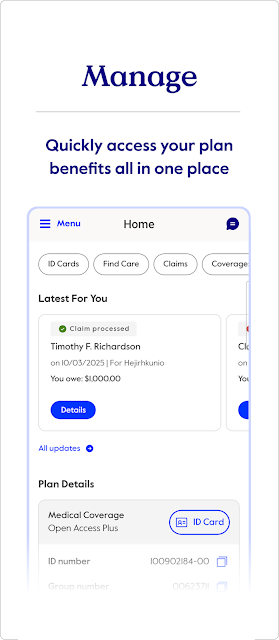
When I imagine reaching for myCigna during an ordinary week, it is usually for a small task that would otherwise send me searching through email or plan documents. I can pull up an insurance ID card, check a claim, or look at what my plan covers from my phone. Those quick checks are the app’s clearest strength: it brings several common member errands into one place.
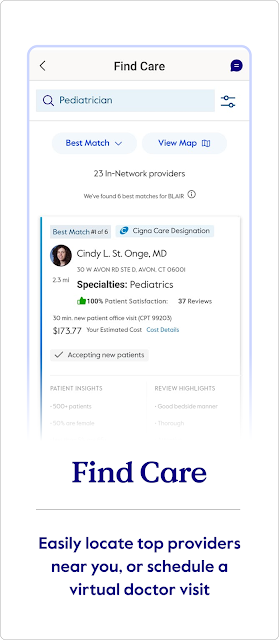
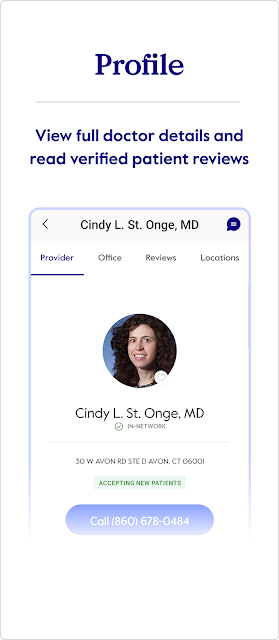
The provider search is useful when a routine changes, too. I can look for a doctor, dentist, pharmacy, or health care facility in Cigna’s national network, then compare listed quality-of-care ratings and costs. That does not make a choice for me, but it gives me information to consider before I make one. For a customer planning a visit or checking an expense, the app can shorten the hunt for relevant details.
A member tool, not a clinic
Compared with a general health tracker, myCigna has a narrower, more administrative job. It focuses on Cigna coverage and related tasks: ID cards, claims, plan details, health fund balances, and prescription management. It also has wellness tools, including goal activity and awards, but the app’s center of gravity is still the practical side of being a plan member.
That distinction matters. I would not treat myCigna as a general medical reference, a way to get a diagnosis, or a universal directory for every plan. You must be a Cigna customer to use it, and the features you see depend on your coverage. It can help me prepare and understand what is available through my plan, but it is not a replacement for talking with a health professional or confirming details when they matter.
Small habits that help
I get the most value from an app like this by checking it before I need it. Looking at an ID card or plan coverage ahead of an appointment is less stressful than trying to find those details at the last minute. A quick review of recent claims can also help me keep track of activity over time, while checking balances can make health fund information easier to find when a question comes up.
For ongoing use, I would keep the app’s tools tied to real routines rather than opening it just to browse. For example, I could check the provider search while planning care, use the pharmacy area when a refill is due, and review coverage when comparing options. If I choose to share Health Connect data, the wellness area can use activity, sleep, and exercise metrics for tracking, insights, and rewards.
More From Our News Desk

Zoom Meetings, Google Meet, or Teams: Which Is Easiest to Join?

How I Build a Free Streaming Lineup With Tubi

Why Crunchyroll Is the Default Anime App for So Many Fans

YouTube TV: A Practical Guide to Cutting Cable

Rummikub and the Small Comfort of Phone Games

TeamViewer Remote Control or AnyDesk for Helping Family?
Who will find it useful
I would recommend myCigna to Cigna customers who regularly need their plan information on the go. The strongest fit is someone who wants a mobile way to view an ID card, look up claims, check coverage, find in-network care, or manage eligible prescriptions. Having those jobs gathered together can be handy during a busy day, especially when paperwork is not within reach.
It may be a poor fit for someone who is not a Cigna customer, or for anyone looking for an all-purpose fitness or medical app. Coverage affects which features are available, so the experience can differ between members. People who prefer managing every detail through another channel may not need it often. I see it as a convenient companion to a health plan, rather than something every phone owner would use.
myCigna is developed by Cigna and is listed on Google Play in the Health & Fitness category. It is free to download, has no in-app purchases, and contains no ads. Google Play shows a 4.2 rating from about 21,800 ratings and over one million installs. The content rating is Everyone, making the store’s age classification broad.
The listed app version is 7.33.0, with a release date of December 14, 2012, and a last update date of November 1, 2026. A minimum Android version is not included in the available app details, so check Google Play on the device you plan to use. Access requires Cigna customer status, and the features available depend on the member’s coverage.
Keeping Plan Details Within Reach
A practical first impression
When I first opened myCigna, the range of jobs it covers stood out more than any single wellness feature. It is designed to bring together information a member may need at different moments: an ID card, plan coverage, claims, balances, provider searches, and prescriptions. That makes the app feel like a pocket reference for health benefits rather than a tool with just one narrow purpose.
The important first step is being a Cigna customer. After that, what appears in the app depends on the coverage attached to the account. I would keep that in mind while exploring: a feature being part of the app’s overall offering does not mean every member will have it. Spanish and English are supported, which gives members a language choice when using the app.
Everyday member tasks
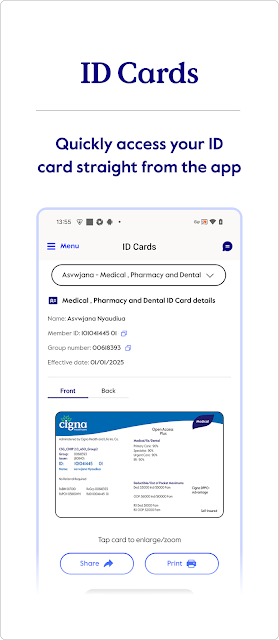
The day-to-day appeal is reducing small bits of friction. Instead of having to locate a physical card, I can view the front and back of an ID card on a mobile device, and the app supports printing, emailing, or sharing it. When I need to revisit a claim, I can view and search recent and past claims rather than relying only on a paper trail.
Other checks fit naturally into the same pattern. I can review plan coverage, authorizations, deductibles, and maximums, or look for what is covered under my plan. Health fund balances are available too. These are reference tools, not guarantees about a particular bill or care decision, but they can make it easier to start with the relevant plan information.
Features with a clear purpose
Find Care is one of the more decision-oriented areas. It searches for doctors, dentists, pharmacies, and health care facilities in Cigna’s national network, and lets members compare quality-of-care ratings and costs. I like that the search is paired with comparison information, since a directory alone can leave a lot of follow-up work. The results still need to be considered in light of a person’s specific needs and coverage.
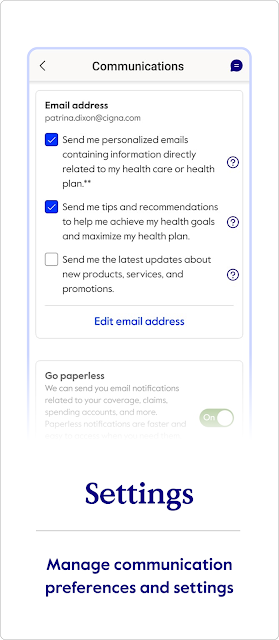
The pharmacy area supports viewing and refilling prescriptions, along with updating billing and shipping preferences. Wellness is a different kind of feature: members can see goal activity and awards, and may use Health Connect data for personalized tracking, insights, and rewards. The app accesses only data a member chooses to share, so that tracking is optional rather than an unavoidable part of using the other tools.
A routine around appointments
A useful routine might begin before an appointment, while I still have time to check the basics. I could search for a doctor or facility in the network, compare available cost and quality information, then review my coverage and any relevant authorization details. Keeping an ID card accessible is another simple preparation step. The app gathers those checks without claiming to make the appointment or care decision for me.
After a visit, I might return to review a claim when it appears, or check a health fund balance if that is part of my coverage. If a prescription needs attention, I can use the pharmacy tools to view or refill it and adjust billing or shipping preferences. The advantage is continuity: related member tasks can live in one app, even if I only use each one occasionally.
Limits to keep in mind
The biggest limitation is also part of the app’s purpose: myCigna is for Cigna customers, and availability of features depends on coverage. It is not a universal insurance account, and a member should not assume that every tool described will appear for every plan. If I were choosing an app for general fitness tracking alone, this would not be my first pick; its wellness options sit alongside plan administration.
I would also keep expectations grounded around the provider information and claim details. The app offers search and comparison information, but it does not remove the need to consider personal circumstances or check important plan questions. Health Connect sharing is optional, and members choose what data to share. For anything that depends on a particular benefit or device, the store and the member’s coverage details are sensible places to verify specifics.
myCigna earns its place on a phone by making common Cigna member tasks easier to reach. I especially value the mix of digital ID cards, coverage references, claim searches, care finding, and prescription tools. It is a broad set of practical conveniences, with wellness tracking available as an extra rather than the app’s whole identity.
I recommend it to Cigna customers who want their plan information close by and expect to use at least a few of these tools. Those outside Cigna’s customer base, or people looking for a standalone medical or fitness product, should look elsewhere. For the intended audience, it is a useful companion whose value depends on the coverage and routines each member has.
myCigna Frequently Asked Questions
What is the myCigna app used for?
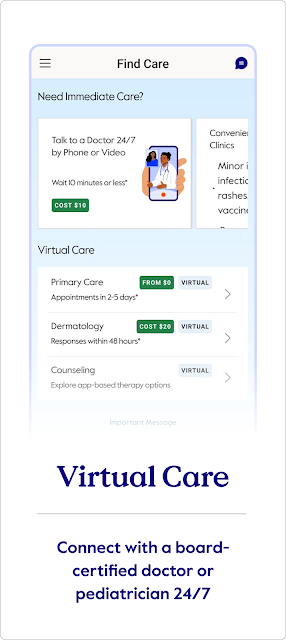
myCigna gives Cigna customers mobile access to health plan information and related tools. Depending on coverage, members can view ID cards, search claims, check plan details and balances, find care, and manage prescriptions. It also includes wellness features such as goal activity and optional use of Health Connect data for tracking, insights, and rewards.
Which phones and devices can run myCigna?
The app is available on Google Play for Android devices. The app details provided do not specify a minimum Android version, and compatible requirements can vary as the app changes. Check Google Play from the device you plan to use for current compatibility information. Access is intended for Cigna customers, and available features depend on their coverage.
What Android version does myCigna require?
A minimum Android version is not included in the available details for myCigna. Requirements can vary by release and device, so I would check the app’s Google Play page from the phone before installing. The listed app version is 7.33.0, but that does not by itself establish which Android versions are supported.
Does myCigna cost money or include purchases?
myCigna is free to download from Google Play. The provided app facts show no in-app purchases and no ads. You still need to be a Cigna customer to use it, and which tools are available depends on the coverage you have. Check Google Play for current details about availability and requirements.
Is myCigna useful for every Cigna member?
It can be useful for Cigna customers who want to access ID cards, claims, coverage details, provider searches, or prescription tools on a phone. The exact features depend on the member’s coverage, so the experience is not identical for everyone. It is less suited to people seeking a general health or fitness app without Cigna plan tools.
Pros
- Puts ID cards, claims, and coverage references together in one mobile app.
- Provider search includes network care and comparisons of ratings and costs.
- Prescription tools support viewing and refilling, plus billing and shipping preferences.
- Optional Health Connect sharing supports wellness tracking, insights, and rewards.
Cons
- You must be a Cigna customer, and tools depend on your coverage.
- It is more focused on plan administration than general health or fitness.
- A minimum Android version is worth checking in Google Play before installing.
- Category
- Health & Fitness
- Version
- 7.33.0











