My BMW
- 40.51K
- 4.8
- Installs
- 500.00K
- Price
- Free
Screenshots
Analysis by Reviewed APKs
My BMW is a companion app for checking and managing a BMW from a phone. It brings vehicle status, selected remote controls, trip planning, service access and BMW news together, with a demo mode for people who do not own a vehicle. I found its appeal clearest in the small moments around driving: checking a car before leaving, planning a destination or keeping track of service needs.
A quick check before leaving
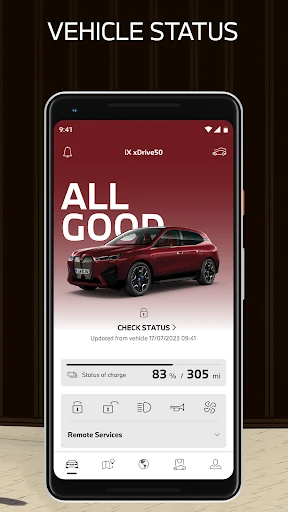
When I first imagined using My BMW in an everyday routine, the useful moment was just before heading out: open the app, check the vehicle’s fuel level and range, and confirm that the doors and windows are locked. If I have forgotten whether I locked up, that glance is more convenient than walking back to the car. The app can also show the vehicle’s location, which is handy when I have parked somewhere unfamiliar.
The same routine can stretch into the drive itself. I can look up a destination, nearby gas or charging stations, or parking options, then send a destination to the vehicle’s navigation system. For an electric BMW, the app also offers range and charging planning. These are practical jobs rather than flashy ones, and they make the app most compelling when it shortens the little errands that gather around owning a car.
A car companion, not a map replacement
My BMW makes the most sense beside the car it is designed to support. Its status checks, remote controls, service access and ability to send destinations to the vehicle’s navigation system connect phone tasks with the BMW itself. A general maps app can help with directions, but My BMW also brings together vehicle information and selected controls. That connection is the point; it is not simply another place to search for a route.
It is not a universal driving app, either. The available functions depend on the vehicle’s equipment and ConnectedDrive contract, and the app is optimized for BMWs built from 2014 onward. Country differences matter too. Without owning a vehicle, demo mode offers a way to explore the app, but it does not make the app a substitute for a car-management tool tied to an actual BMW.
Make checks part of a routine
I would get more from My BMW by using it at natural checkpoints rather than opening it just to browse. A quick status check before a longer trip can cover range, fuel and locked doors. When planning a destination, I can look at traffic and identify fuel, charging or parking options before sending the route to the car. Keeping those tasks together gives the app a clear role without turning every drive into a phone session.
Service and electric-vehicle tools offer other useful moments to return. I can keep an eye on required service and book an appointment through the app, while an electric-car owner can review charging history and plan range and necessary charging. I would also check which features my own BMW supports before building a routine around them. The app’s capabilities are broad, but the car and contract determine which parts are relevant.
More From Our News Desk

Zoom Meetings, Google Meet, or Teams: Which Is Easiest to Join?

How I Build a Free Streaming Lineup With Tubi

Why Crunchyroll Is the Default Anime App for So Many Fans

YouTube TV: A Practical Guide to Cutting Cable

Rummikub and the Small Comfort of Phone Games

TeamViewer Remote Control or AnyDesk for Helping Family?
Who will get the most from it
I would recommend My BMW to BMW owners who want a single phone app for vehicle status, supported remote controls, trip planning and service tasks. It is especially relevant if you regularly check fuel or range, want to send destinations to the car, or drive an electric BMW and would use charging information. People who prefer handling service appointments and basic vehicle checks from a phone may find it a useful everyday companion.
It may be less useful to someone without a BMW, or to a driver whose vehicle and contract do not support the functions they want. Demo mode can introduce the app to prospective users, but it is an exploration tool rather than the same experience as managing an owned vehicle. Drivers looking only for general maps or everyday news can likely skip it; its strongest features are tied to BMW ownership.
My BMW is developed by BMW and is available on Google Play for Android. The app is free to download, with no in-app purchases or ads. It has 500,000+ installs and a 4.8-star rating from 40,513 ratings. Its content rating is Everyone. The stated minimum Android requirement is Android 9, so it is worth checking compatibility on your device before installing.
The current version listed is 5.11.4. My BMW was released on March 22, 2021, and its latest update was January 19, 2026. The update notes describe bug fixes and ongoing improvements to the user experience. These figures give a practical snapshot of the Android app; the features available after setup still depend on the BMW, its equipment, the ConnectedDrive contract and the user’s country.
How My BMW Fits Around Driving
A clear first impression
When I first opened My BMW, the breadth of its purpose stood out: it aims to connect vehicle checks, remote functions, trip planning and service in one place. That is a sensible starting point for an app meant to support a car rather than a single isolated task. The design is described as modern, with guided navigation, and the range of tools makes it easy to see why the app might earn a spot on an owner’s phone.
There is also a way to look around without an owned vehicle. Demo mode lets people select a BMW demo vehicle in the app garage and explore functions, including those related to electric mobility. I like that as a first look, because it can help someone understand the app’s general scope. It should be treated as a preview, though: the functions available with a real car depend on its equipment and contract.
Useful checks, when needed
The everyday core is a set of vehicle-status checks. My BMW can show whether the car is drive-ready, where it is, its fuel level and range, and whether its doors and windows are locked. It can also help keep vehicle software up to date. I would not expect to open every one of these screens each day, but having them available makes sense when a question comes up before a trip or after parking.
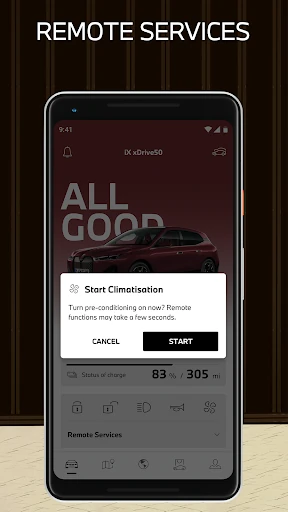
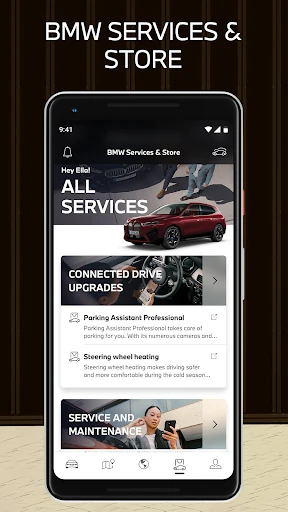
Remote controls add another layer for supported vehicles. The app can be used to lock or unlock doors, operate the horn and flashers, and plan and switch on air conditioning. It can also set up a BMW Digital Key and record images from the vehicle environment. Those options sound most useful in specific situations, such as checking on a parked car or preparing the cabin, rather than as controls I would use constantly.
Planning and service together
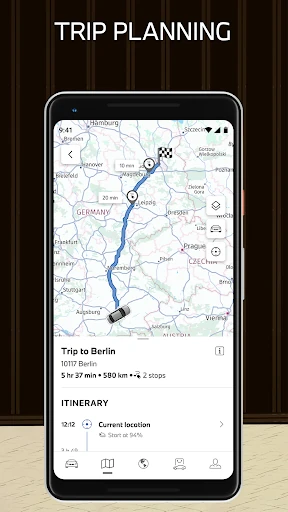
The navigation tools make My BMW more than a status dashboard. I can plan drives, keep an eye on current traffic, find destinations and send them to the car’s navigation system. Searches can include gas stations, charging stations and parking areas; the app also offers detailed information about fuel and charging stops and parking at a destination. That mix gives a driver several useful planning steps before setting off.
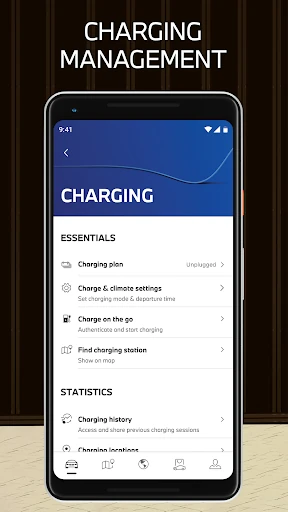
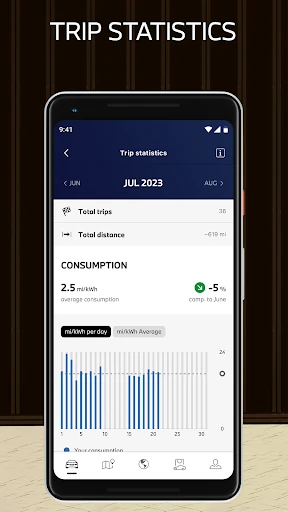
For electric mobility, the app can help plan range and necessary charging, locate nearby charging stations and show charging history. Route planning can account for charging times in a load-optimized plan. Separately, service tools let owners keep an eye on required services and book appointments through the app. I appreciate that these are distinct parts of the same ownership routine: plan the trip now, and keep track of maintenance for later.
A practical trip routine
For a longer outing, I would start with the destination and current traffic, then check whether fuel or charging stops and parking near the destination need attention. If I am driving an electric BMW, I can use the range and charging tools to think through the route. Sending the destination to the vehicle’s navigation system ties the phone planning step to the car, instead of leaving the route stranded in a separate search.
On an ordinary weekday, a lighter routine may be enough: check range and locks before leaving, use a supported remote function if it is useful, and look at required service when the app indicates it is time to plan. I would keep these checks purposeful. The app brings together many features, but the best experience is likely a few relevant actions that fit naturally around driving.
Keep the car in mind
The main limitation is also the app’s defining boundary: it is built around BMW vehicles. It is optimized for cars built from 2014 onward, but that does not mean every function works with every eligible vehicle. Equipment, a ConnectedDrive contract and country all affect availability. I would check those details before relying on a specific remote control or planning feature, especially if it is central to how I expect to use the app.
People without a vehicle can explore demo mode, but that is a different proposition from connecting a personal car. And while the app includes maps, traffic and route planning, its wider value comes from pairing those tools with BMW ownership. Someone who wants only a general navigation app may find the vehicle-specific sections unnecessary. Keeping that distinction in mind makes it easier to judge My BMW on the jobs it is actually designed to do.
My BMW is a practical, broad companion for owners who want vehicle status, selected remote controls, trip planning and service access close at hand. I like that it also gives prospective users a demo mode and brings electric-mobility tools into the same app. Its everyday value, however, depends on the specific BMW and available services.
I would recommend giving it a try if you own a supported BMW and expect to use at least a few of its connected features. If you want general maps or do not have a BMW, the app’s focus may feel too narrow. Before counting on a particular tool, check its availability for your car and country.
My BMW Frequently Asked Questions
What is My BMW used for?
My BMW helps users check vehicle status, use supported remote functions, plan trips and access BMW service. It can show information such as vehicle location, fuel level and range, and whether doors and windows are locked. Trip tools include traffic, destinations, fuel or charging stops and parking. Electric-vehicle features include range and charging planning, nearby charging stations and charging history.
Which phones and devices support My BMW?
My BMW is available on Android through Google Play, and the stated minimum Android version is Android 9. The app is optimized for BMW vehicles built from 2014 onward, though individual features depend on the car’s equipment and ConnectedDrive contract. Availability can also vary by country. Check the store information and the app’s compatibility details for your device and vehicle.
Does My BMW cost anything to download?
My BMW is free to download on Google Play. The available information says it has no in-app purchases and contains no ads. Vehicle-related features may depend on the BMW’s equipment and ConnectedDrive contract, so the free app download does not mean every function will be available for every car. Check the store listing for current app details.
What Android version does My BMW require?
The stated minimum requirement for My BMW is Android 9. If your phone runs an older version, it may not meet that requirement. The app’s compatibility and available functions can also depend on your device, vehicle and country, so it is worth checking the Google Play store information before installing or relying on a specific feature.
Can I use My BMW without owning a BMW?
Yes. My BMW includes a demo mode where you can select a BMW demo vehicle in the app garage and explore a range of functions, including electric-mobility features. That can help you get familiar with the app, but managing a personal car and using particular features depends on the vehicle, its equipment, the ConnectedDrive contract and country.
Pros
- Combines vehicle status, supported remote controls, trip planning and service access.
- Offers electric range and charging tools alongside charging history.
- Demo mode lets non-owners explore the app’s general features.
- Can send destinations to the BMW’s navigation system.
Cons
- Feature availability depends on vehicle equipment, contract and country.
- Its strongest functions are relevant mainly to BMW owners.
- Vehicles built before 2014 fall outside its stated optimization.
- Category
- Travel & Local
- Version
- 5.11.4











