MobiOffice: Word, Sheets, PDF
- 1.50M
- 4.6
- Installs
- 100.00M
- Price
- Free

Screenshots

Analysis by Reviewed APKs
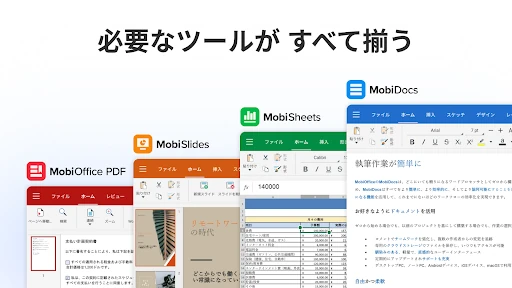
MobiOffice: Word, Sheets, PDF is a mobile office suite for working with documents, spreadsheets, presentations, and PDFs away from a desk. I see it suiting students, office workers, and anyone who occasionally needs to fix a file on a phone. Its appeal is breadth: one app handles several familiar file types. That convenience comes with a busy feature set and paid extras to weigh.
A quick fix between meetings
When I imagine using MobiOffice on a normal day, it is less about writing a whole report on a phone and more about catching a useful moment. A colleague sends a Word document while I am on the train, or I need to check a spreadsheet before a meeting. I can open the file, make a small edit, and save it without waiting to get back to my laptop.
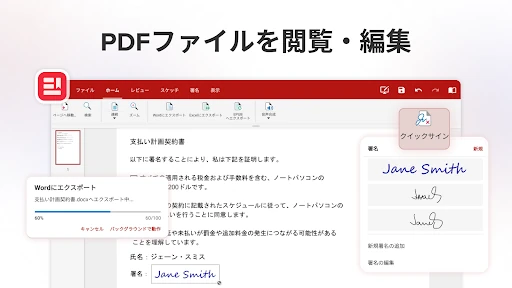
The same idea applies to PDFs. I might need to read a form, fill in fields, or add a digital signature while away from my desk. MobiOffice brings those jobs together with editing for Word documents, Excel spreadsheets, and PowerPoint presentations. It is a practical back-pocket office kit, especially when a file arrives at the wrong time and a computer is not close by.
A suite, not a specialist
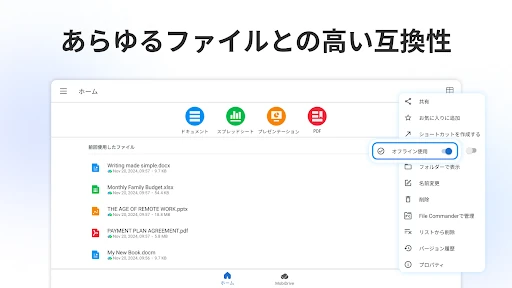
The obvious alternative is using separate apps for documents, spreadsheets, slides, and PDFs. MobiOffice’s advantage is having those jobs under one roof, with support for common Microsoft Office formats as well as Google Docs, OpenOffice, LibreOffice, and other formats. It can also connect to services including Google Drive, OneDrive for Business, Box, and Dropbox, which helps if files already live in the cloud.
That range does not make it a replacement for every desktop workflow. A phone screen is still a cramped place for long reports, intricate spreadsheet work, or detailed slide design. I would treat MobiOffice as a handy companion for reviewing and making practical changes, rather than assuming it will feel like a full-sized computer. Someone who only needs a PDF reader may also find the broader suite more than they need.
Small habits that help
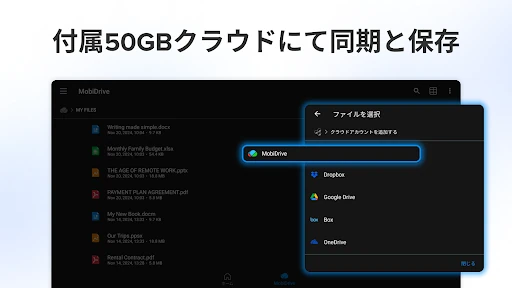
I would start by connecting the cloud account where my working files already live. That cuts down on the familiar phone shuffle of downloading a document, editing it, and wondering which copy is current. MobiOffice also includes 5GB of MobiDrive storage, so there is an option for saving files within its own cloud service instead of linking an existing account.
It helps to match the tool to the task. I would use the document editor for a quick wording change, formulas and conditional formatting for spreadsheet work, and presentation mode when I need to show slides. For sharing or sending a finished file, exporting documents, sheets, and presentations to PDF can keep the result easy to view. These small choices make a broad app feel more purposeful.
More From Our News Desk

Zoom Meetings, Google Meet, or Teams: Which Is Easiest to Join?

How I Build a Free Streaming Lineup With Tubi

Why Crunchyroll Is the Default Anime App for So Many Fans

YouTube TV: A Practical Guide to Cutting Cable

Rummikub and the Small Comfort of Phone Games

TeamViewer Remote Control or AnyDesk for Helping Family?
Who may find it useful
I would recommend MobiOffice to people who regularly receive a mix of office files and need to read or adjust them while away from a computer. Students checking a document, a worker reviewing a spreadsheet during a commute, or someone filling out a PDF form could all make use of its range. Existing cloud users may appreciate being able to link accounts rather than build an entirely separate filing routine.
It may be less appealing if you rarely edit files on a phone, need a focused PDF-only tool, or expect a mobile app to match the comfort of desktop editing for complex projects. The free app includes ads, and premium benefits are offered through in-app purchases, so people who want an ad-free experience or advanced tools should consider that before settling in. A smaller, single-purpose app may suit occasional readers better.
MobiOffice is made by MobiSystems and is listed in the Productivity category. On Google Play it has over 100 million installs and a 4.6-star rating from about 1.5 million ratings. The app is free to download, contains ads, and offers in-app purchases. Google Play lists those purchases at $1.49 to $149.99 per item. Its content rating is Everyone.
The current version in the supplied app details is 16.7.61404. MobiOffice was released on December 22, 2011, and its last update is dated October 9, 2026. The supplied details do not give a minimum Android version, so it is sensible to check the Google Play requirements for the device being used. Premium benefits include an ad-free experience and additional tools.
A closer look at mobile office work
Opening the file
My first impression is of an app trying to cover a lot of ordinary work in one place. MobiOffice handles documents, spreadsheets, presentations, and PDFs, so the basic promise is easy to understand: open the file you have, then choose whether to read, edit, convert, or sign it. That breadth is useful, although it also means the experience is bigger than a simple document viewer.
I would get set up by linking whichever cloud service holds my files, or by using MobiDrive. The app supports Google Drive, OneDrive for Business, Box, and Dropbox, and the description says MobiDrive includes 5GB of free storage. If a workday involves switching between accounts or file types, getting this connection sorted early should make later tasks less fiddly.
Everyday editing
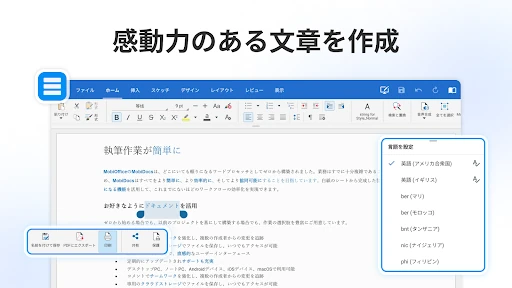
The day-to-day value is having familiar editing jobs available when I only have my phone. I can work with Word documents, Excel spreadsheets, and PowerPoint slides, then export them to PDF when a fixed-format copy is useful. That makes the app relevant to small, time-sensitive edits: correcting a sentence, checking a sheet, or making a presentation available to review.
I would still be selective about what I tackle on a small screen. A quick change or a read-through is a natural fit; a long document or an elaborate spreadsheet can take more concentration and screen space than a phone comfortably provides. MobiOffice is most convincing as a way to keep work moving between larger sessions, not as a promise that every office task becomes effortless on mobile.
Tools beyond basics
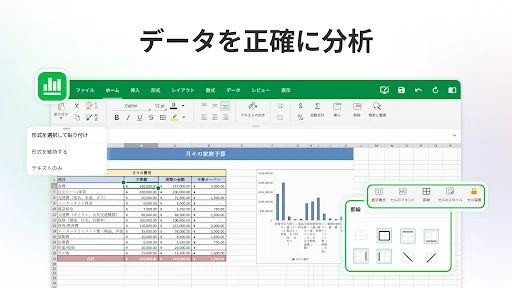
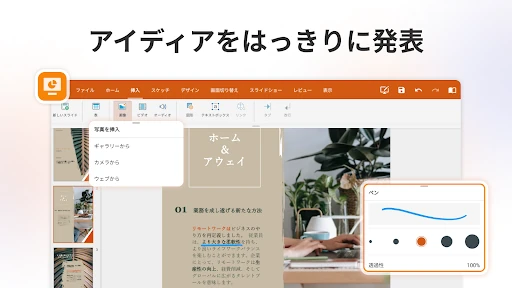
Some of the more advanced document tools include format painter and track changes. In spreadsheets, the listed options include formulas and conditional formatting. Presentations have a presentation mode. Those additions make the suite more than a bare file opener, particularly for people who need to review changes or preserve some familiar editing habits while away from a desktop.
PDF handling is another substantial part of the package. MobiOffice can read, edit, and fill PDFs, work with fillable forms, and digitally sign documents. It can also convert PDFs to Word, Excel, or ePub, while documents, sheets, and presentations can be exported to PDF. I would check the in-app options for the particular task, since premium benefits include unlimited use of the PDF converter.
A useful weekly routine
A realistic routine might start with a shared document in cloud storage. I would open it on my phone to review a draft, use track changes for a suggested revision, and save it back to the connected service. Later, I might check spreadsheet formulas before a meeting, then open slides in presentation mode when I need to show them. The app’s range can reduce the need to switch between several tools.
For paperwork, I would keep a similar sequence: read a PDF, fill in its form fields, and use the signing feature if the document needs a digital signature. If the recipient needs a more editable copy, conversion to a supported office format may help. This sort of repeatable routine is where a multi-format suite can earn space on a phone: not by replacing a computer, but by covering the little gaps between computer sessions.
Keep expectations grounded
The main limitation is the nature of mobile editing. Even with a range of tools, a phone is not a comfortable workspace for every complicated document, spreadsheet, or presentation. I would plan on handling short edits and reviews on mobile, then move demanding work to a larger screen when that is practical. Broad format compatibility is helpful, but it does not remove the need to check a file after conversion or editing.
The free version contains ads, and premium features are sold through in-app purchases. Premium benefits described include no ads, more advanced features, unlimited PDF converter use, and use on two mobile devices plus one Windows PC. That may be worthwhile for frequent users, but someone who only opens the occasional file should first decide whether the free experience covers their routine. Google Play provides the current purchase and compatibility details.
MobiOffice makes a sensible case for itself as a flexible mobile workspace. It brings document, spreadsheet, presentation, and PDF jobs together, with cloud connections and support for a range of common formats. I like it most as a practical companion for reviews, modest edits, forms, and file conversion when a computer is not handy.
I would try it if office files regularly land on your phone and you want one app to handle several kinds of work. If your needs are occasional or highly specialized, a focused app may feel simpler. The ads and paid premium tools are worth factoring into the choice, especially if you expect to use it every day.
MobiOffice Frequently Asked Questions
What is MobiOffice: Word, Sheets, PDF used for?
MobiOffice is a productivity app for creating and editing Word documents, spreadsheets, and presentations, as well as reading and working with PDFs. It can fill forms, sign PDFs, convert files, and export office documents to PDF. It also supports links to several cloud storage services, so users can access files stored in those accounts.
Which devices can run MobiOffice: Word, Sheets, PDF?
MobiOffice is available for Android, and its description also discusses linking Windows PCs with Android and iOS mobile devices. The Google Play version is the Android app. Exact device compatibility can vary, so check the store information for the device you plan to use and the details for other platforms.
What Android version does MobiOffice: Word, Sheets, PDF require?
The Android version requirement may vary by release and device. Check the current Google Play information before installing to see whether your phone or tablet is supported. The supplied app details identify version 16.7.61404, but do not provide a minimum Android version.
Is MobiOffice: Word, Sheets, PDF free?
MobiOffice is free to download, but it contains ads and offers in-app purchases. The supplied Google Play purchase range is $1.49 to $149.99 per item. Premium benefits described include an ad-free experience and additional features. Check the current Google Play purchase details for the options available to you.
Is MobiOffice: Word, Sheets, PDF suitable for occasional use?
It can suit occasional users who need to open or make a small change to an office file, fill in a PDF, or check a presentation while away from a computer. Its broad tool set may be more than someone needs for simply reading PDFs, and ads are part of the free app. Whether premium tools are worthwhile depends on how often you use them.
Pros
- Combines document, spreadsheet, presentation, and PDF tools in one mobile app.
- Connects with several popular cloud storage services, including Google Drive and Dropbox.
- Supports PDF forms, digital signatures, conversion, and export from office documents.
- Offers familiar advanced tools such as track changes, formulas, and conditional formatting.
Cons
- Ads appear in the free app, while premium tools require in-app purchases.
- Detailed editing can feel cramped on a phone compared with working on a computer.
- Its wide feature set may be unnecessary for people who only read PDFs.
- Category
- Productivity
- Version
- 16.7.61404











