Mobile Passport Control
- 120.21K
- 4.9
- Installs
- 1.00M
- Price
- Free

Screenshots
Analysis by Reviewed APKs
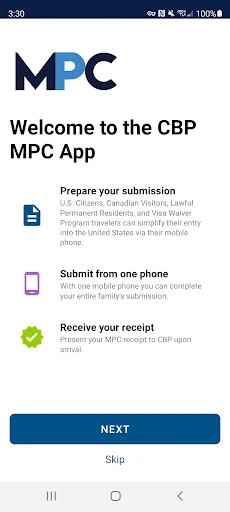
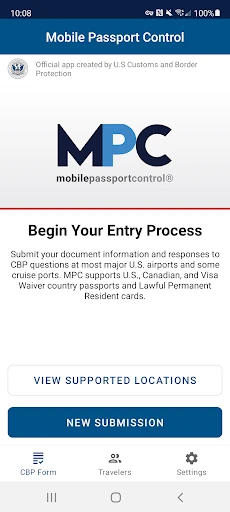
Mobile Passport Control is a travel app from U.S. Customs and Border Protection for eligible travelers entering the United States at supported locations. It lets you prepare travel details, answer inspection questions and submit photos from your phone, then follow the receipt instructions. I see it as a practical way to organize part of arrival processing, especially for families, rather than a replacement for a passport or the usual inspection.
A Calmer Arrival Routine
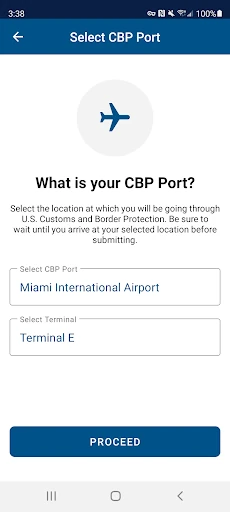
Picture landing after a long flight with a family in tow. Instead of trying to remember every detail at the counter, you can create a primary profile before the trip, save eligible group members, and prepare the travel information in the app. At the supported port of entry, you select the location and terminal when applicable, answer the inspection questions, and submit when you arrive. That sequence gives the arrival process a useful bit of structure.
The app then asks for a clear photo of you and each person included in the submission. After CBP processes it, a virtual receipt comes back to your device, with instructions to follow. I like that this lays out the steps without pretending the inspection is finished: you still need your passport and relevant travel documents, and an officer completes the inspection. If an officer needs more information or another photo, that remains part of the process.
A Narrow Travel Tool
MPC is best understood as a companion to the U.S. entry process, not a general travel organizer. It focuses on submitting travel information and inspection answers at select CBP locations. That makes it different from the broad travel apps people use for itineraries or flight planning. Its usefulness depends on whether the traveler is eligible and whether the arrival location supports the program, so checking those details before relying on it is sensible.
It also does not replace a passport, skip the CBP inspection, or turn entry into a purely phone-based task. You still present travel documents and follow the receipt instructions. I would not install it expecting every airport or every traveler to be covered. Its purpose is much narrower: prepare a submission for an eligible group and supported entry location, then use the returned receipt as part of the inspection workflow.
Prepare Before You Land
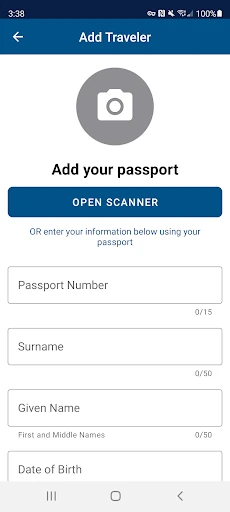
A little preparation makes the airport steps easier to follow. I would create the primary profile at home, when there is time to enter travel document and biographic information carefully, then add the eligible people traveling together. The app allows up to 11 additional group members in a submission. Doing that ahead of arrival can reduce the amount of profile work competing with the usual airport rush.
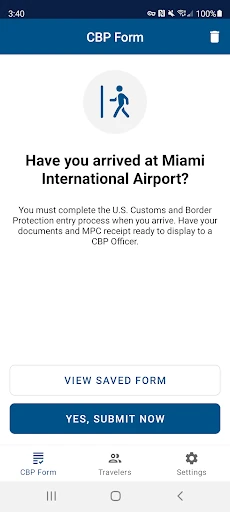
Before submitting, check that the selected port of entry and terminal match your arrival, answer the inspection questions accurately, and wait until you are at the selected port to tap the submission button. Have passports and other relevant documents accessible, and make sure each photo is clear and unobstructed. The small habit that matters most is treating the receipt as an instruction sheet, not as proof that the inspection is complete.
More From Our News Desk

Zoom Meetings, Google Meet, or Teams: Which Is Easiest to Join?

How I Build a Free Streaming Lineup With Tubi

Why Crunchyroll Is the Default Anime App for So Many Fans

YouTube TV: A Practical Guide to Cutting Cable

Rummikub and the Small Comfort of Phone Games

TeamViewer Remote Control or AnyDesk for Helping Family?
Who May Find It Useful
I would recommend MPC to eligible U.S. citizens, certain Canadian citizen visitors, lawful permanent residents, and returning Visa Waiver Program applicants with an approved ESTA who are entering through a supported CBP location. It seems particularly handy for people traveling together, since one device can hold information for a primary profile and additional eligible group members. For someone who likes sorting out forms before reaching a busy arrival hall, that preparation can feel worthwhile.
It may not suit travelers who are outside the program's eligibility groups, arriving somewhere MPC is not supported, or hoping to avoid carrying travel documents and speaking with an officer. I would also be cautious about building a tight airport plan around a faster outcome: the app helps submit information, but the officer still completes the inspection and may request more. Check eligibility and location support for your specific trip before making it part of your routine.
Mobile Passport Control is developed by U.S. Customs and Border Protection and is available on Google Play for Android. The store shows over 1 million installs and a 4.9-star rating from about 120,000 ratings. Its content rating is Everyone. The current version shown in the supplied app information is 4.0.1, and the listed Android requirement is 7.0 or later.
The app is free to download, with no in-app purchases and no ads. It was released on April 29, 2021, and its most recent update in the supplied information is dated January 28, 2026. Those details make the basic cost straightforward; the more important practical checks are whether you are eligible and whether your planned CBP entry location supports MPC.
Making the Arrival Steps Manageable
A Purposeful First Setup
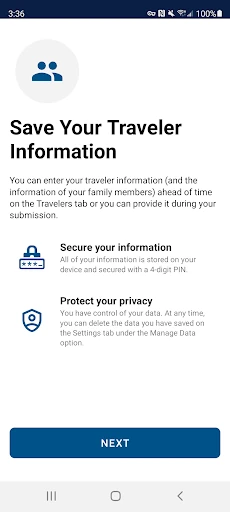
When I first opened MPC, its job seemed refreshingly specific: save relevant traveler details, make a group submission, and receive instructions for the CBP inspection. The setup is built around a primary profile with travel document and biographic information. You can add other eligible people to that profile on the same device, which gives the app a clear use for a family or travel party rather than just an individual.
I would handle that initial profile work before travel day. Entering personal and document information while rushing through an airport is an avoidable distraction, and the app says the information is stored securely on the device for future travel. Once the profiles are ready, the remaining sequence is easier to understand: choose the port, provide answers, submit after arrival, and follow the receipt.
The Day-to-Day Flow
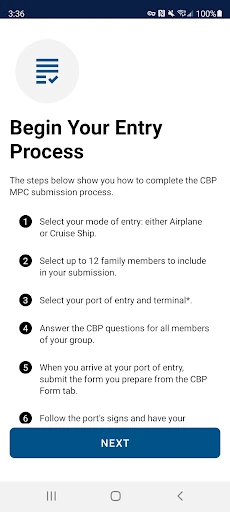
The central workflow is a short chain of decisions rather than an open-ended travel dashboard. Choose the supported CBP port of entry and terminal if the app asks for one, select the eligible people traveling in the group, and answer the inspection questions. At the selected port, tap “Yes, Submit Now” and take a clear photo of each person included. The order matters because the submission is tied to the selected entry location.
After processing, the app returns a virtual receipt. That is the point where I would pause, read the instructions, and keep passports and other relevant documents ready. The CBP officer still conducts the inspection, and may ask for more information or an additional photo. I appreciate that the workflow leaves that human review in view instead of suggesting the phone submission is the final decision.
Group Profiles and Receipts
The most distinctive practical feature is the ability to save additional eligible people and include them in one submission from a device. The group limit is up to 11 additional members, so the feature can cover more than a single traveler while keeping the process in one place. That is helpful when one person is handling the arrival details for a family, provided everyone included is eligible.
The other useful element is the virtual receipt returned after processing. It gives travelers instructions for what to do next, while keeping the passport and document requirements explicit. This is not a promise of instant clearance or a substitute for the officer's inspection. The app's value is in preparing and transmitting the requested information, then giving the traveler a receipt to follow at the port.
A Family Arrival Checklist
For a family trip, I would make MPC part of a simple pre-arrival checklist. First, check that the travelers fit the eligibility rules and that the airport or other entry location is supported. Then create the primary profile and add the eligible group members while there is time to review the information. Before landing, keep passports and any relevant travel documents somewhere easy to reach.
At the port, verify the selected location and terminal, answer the questions carefully, and submit only once you have arrived at the selected entry point. Take a clear photo of each person included, then read the receipt instructions when it returns. That routine separates preparation from the airport's busiest moments and gives the group a shared sequence to follow, without assuming the officer will not need anything further.
Keep the Scope in Mind
MPC is limited to supported CBP entry locations and the traveler groups eligible for the voluntary program. Those restrictions are central, not minor footnotes. A traveler should check the current eligibility requirements and supported locations before a trip, especially if the itinerary or travel status changes. Even a well-prepared profile cannot make an unsupported arrival location part of the program.
There are also ordinary process limits: a phone submission does not replace a passport, and the officer completes the inspection. Photos must be clear, answers must be accurate, and the receipt's instructions matter. If an officer needs clarification or another photo, the traveler follows that direction. I would treat MPC as an additional preparation option, not as a way to predict how long arrival processing will take.
Mobile Passport Control is a focused tool for eligible travelers who want to prepare some CBP arrival information on a phone, including for a group. I like its clear sequence and the way it keeps the receipt, documents, and officer's role in the picture. Its usefulness is conditional, though: eligibility and a supported entry location come first.
If those conditions fit your trip, MPC is worth considering as a free way to organize the submission steps before arrival. Set up profiles early, check the location, and keep passports ready. If you need an all-purpose travel planner or expect the app to replace inspection, this is not the right tool.
Mobile Passport Control Frequently Asked Questions
What is Mobile Passport Control used for?
Mobile Passport Control helps eligible travelers submit travel information, answer CBP inspection questions, and provide photos at supported U.S. entry locations. After processing, it returns a virtual receipt with instructions. A passport is still required, and a CBP officer completes the inspection, so the app is a companion to the arrival process rather than a replacement for it.
Which devices can run Mobile Passport Control?
Mobile Passport Control is an Android app available through Google Play. The supplied app information gives Android 7.0 as the minimum requirement. If you are checking a particular device or want to know whether availability has changed, the current Google Play store details are worth reviewing before travel.
What Android version does Mobile Passport Control require?
The listed minimum requirement for Mobile Passport Control is Android 7.0. The app information gives version 4.0.1 as the current version. Device compatibility can depend on the current store information and the device itself, so check Google Play for the latest requirements before setting up a trip.
Does Mobile Passport Control cost money?
Mobile Passport Control is free to download on Google Play, and the supplied information says it has no in-app purchases and no ads. Store details can change over time, so it is sensible to check the current Google Play page before installing. The program itself is voluntary and only applies at supported CBP entry locations.
Who is eligible to use Mobile Passport Control?
The described eligible groups are U.S. citizens, certain Canadian citizen visitors, lawful permanent residents, and returning Visa Waiver Program applicants with an approved ESTA. MPC is available only at supported CBP entry locations. Requirements and location coverage can change, so check the current store information and CBP guidance for your specific trip.
Pros
- Lets eligible travelers prepare travel details and inspection answers before completing the arrival steps.
- Supports a primary profile and up to 11 additional eligible group members on one device.
- Returns a virtual receipt with instructions after CBP processes the submission.
- Free to download, with no in-app purchases or ads in the supplied store information.
Cons
- Only works for eligible travelers at supported CBP entry locations.
- Does not replace a passport or the inspection completed by a CBP officer.
- Requires careful photo capture and accurate answers during the submission process.
- Category
- Travel & Local
- Version
- 4.0.1











