Love's Rewards
- 6.16K
- 3.8
- Installs
- —
- Price
- Free

Screenshots
Analysis by Reviewed APKs
Love’s Rewards is a travel companion for people who stop at Love’s Travel Stops, from professional drivers to casual motorists and RV travelers. It brings store finding, route planning, rewards, receipts and several stop-related services into one place. After looking through what it offers, my take is that it is most useful when Love’s is already part of your travel routine; it is less compelling as a general-purpose navigation app.
A stop along the way
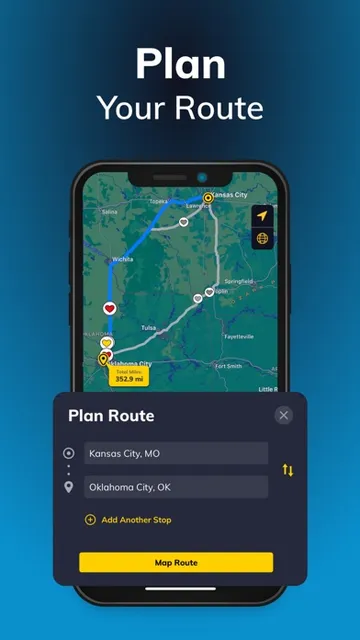
Picture a long drive with a fuel stop coming up and a few practical questions: Where is the nearest Love’s? What amenities are there? How far off the highway is it? Love’s Rewards is built for that moment. You can find locations using your current position or a city, state or ZIP code, see road distances and get directions. Search filters include highways, restaurants, fuel types, showers and other amenities.
I’d use the map before leaving, rather than waiting until I was nearly out of fuel. The app also shows real-time fuel prices at Love’s stops, so I could compare locations along a planned route. That does not replace checking the full journey in a navigation app, but it can make the next Love’s stop easier to choose. For an RV trip, the location search can also surface RV stops and available sites.
A Love’s-focused travel tool
The obvious alternative is a general maps app, which is better suited to searching across brands and planning a route around many kinds of destinations. Love’s Rewards has a narrower job: it connects location details with Love’s-specific features such as rewards, Mobile Pay, shower check-in and RV reservations. If I already know I want a Love’s stop, having those tasks together is more useful than a map pin alone.
That focus is also the app’s main limitation. It is not a universal fuel-price tracker, all-purpose trip planner or broad roadside-services directory. Its rewards and mobile transactions relate to Love’s, and the RV booking flow is for Love’s RV stops. Drivers who rarely visit Love’s may get little from installing it, while regular customers can make better use of its collection of brand-specific tools.
Small habits that help
A little preparation can make the app more useful. I’d look up likely stops before a travel day, check amenities that matter for that trip and compare fuel prices along the route. If I planned to use an RV stop, I’d check the location and available sites early enough to follow the reservation flow. These steps keep the app focused on decisions I can make before pulling off the road.
For rewards and record keeping, the useful habit is to scan the Love’s Rewards card with each eligible transaction. The app can then show digital receipts for Pay at the Pump, in-store and Mobile Pay purchases, and those receipts can be viewed or shared. Drivers using Mobile Pay can add and manage commercial fuel cards in the wallet. For shower check-in, the app requires being on-site at a location with showers.
More From Our News Desk

Zoom Meetings, Google Meet, or Teams: Which Is Easiest to Join?

How I Build a Free Streaming Lineup With Tubi

Why Crunchyroll Is the Default Anime App for So Many Fans

YouTube TV: A Practical Guide to Cutting Cable

Rummikub and the Small Comfort of Phone Games

TeamViewer Remote Control or AnyDesk for Helping Family?
Who will get the most from it
I’d recommend Love’s Rewards to people who regularly stop at Love’s, especially professional drivers who can use several of its travel-stop services in one app. Casual drivers can earn points on fuel and merchandise, browse mobile deals and keep transaction receipts together. RV travelers may appreciate being able to find Love’s RV stops, check available sites and start a reservation flow from the app.
It may not be worth much to someone who seldom visits Love’s or wants one app to plan every part of a trip across different brands. The best fit depends on whether its specific locations and services match your route. I’d also keep the on-site requirement in mind for shower check-in and treat the app’s route tools as a complement to, rather than a replacement for, broader navigation.
Love’s Rewards is published by Love’s Travel Stops & Country Stores, Inc. on the Apple App Store. The store gives it a 3.8 out of 5 rating from about 6,200 ratings and a 4+ age rating. It is free to download. The supplied store details give no install count, so there is no install figure to include.
The current version shown is 29.0.0, and the app requires iOS 26.0 or later. Its release date is May 2, 2011, and the listed last update is October 21, 2026. The store details supplied do not specify in-app purchase or advertising information.
How the Love’s toolkit fits a trip
Getting oriented
My first impression is of a practical service hub rather than a traditional trip journal or navigation app. Its main value comes from bringing Love’s locations and account-related tasks together. The app can find stops based on location, city, state or ZIP code, and its search options let travelers narrow results by amenities and other stop details.
I’d start by searching for a familiar stop or entering a destination area, then check what the location offers before driving there. The app can show road miles and provide directions, which makes it easier to compare nearby choices. It is a straightforward setup for a specific kind of trip: find a Love’s, check what is there, and decide whether it suits the next stop.
Useful on the road
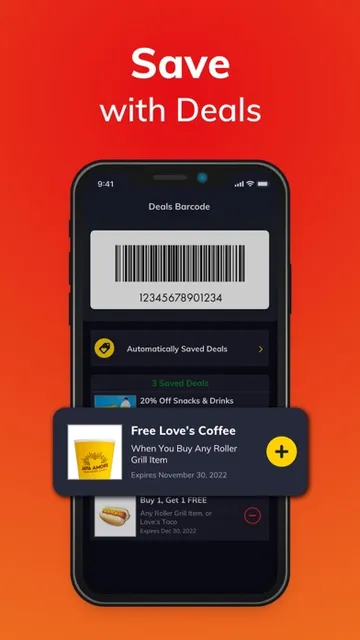
The day-to-day experience is strongest when I’m using more than one Love’s service. I can look for a stop, check its fuel prices, and use the rewards side of the app rather than treating each task as a separate errand. Points can be earned on fuel and merchandise, then spent like cash. Mobile deals add another reason for a regular customer to open the app before making a purchase.
Digital receipts make the app useful after a stop, too. Receipts for Pay at the Pump, in-store and Mobile Pay transactions can arrive within minutes when the Love’s Rewards card is scanned with the transaction. Being able to view and share those records can help keep travel purchases together. The app’s usefulness still depends on stopping at Love’s and following the relevant transaction steps.
Features with a clear purpose
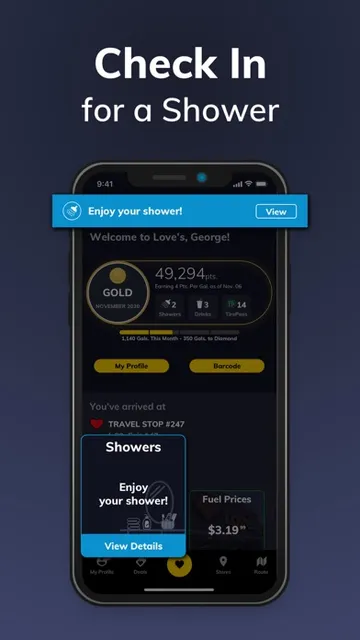
Mobile Shower Check-In is one of the more specific features. At a Love’s Travel Stop with showers, a driver needs to be on-site and have the app confirm the location before completing the transaction with shower credits and/or points. The app also lets travelers check busy times at other locations while planning. That makes it a targeted convenience, not a way to reserve a shower from anywhere.
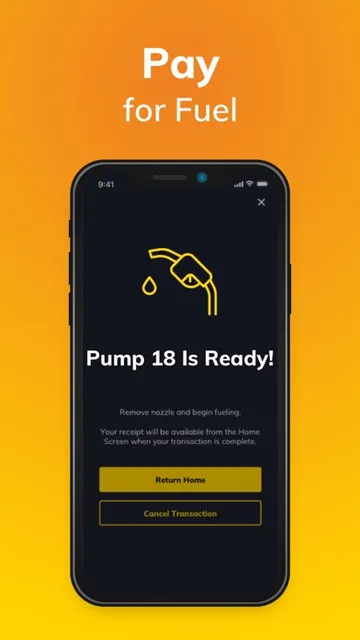
For commercial drivers, Love’s Mobile Pay can activate a fuel pump from the cab. The driver selects a pump and fuel, answers prompts, and then fuels once authorized; commercial fuel cards can also be added and managed in the wallet. The app includes Truck Tire Care roadside assistance requests and connections to Truck Care centers, giving the professional-driver side a more service-oriented role.
A simple trip routine
Before a drive, I’d search along the route for Love’s locations and check road distances, fuel prices and the amenities I need. A driver looking for a shower can compare busy times at other stops, while an RV traveler can filter for RV amenities, view available sites and start the CampLife reservation flow. This is the kind of planning where a few checks can prevent a stop from being a poor fit.
At the stop, scanning the rewards card with a transaction supports earning points and receiving eligible digital receipts. A commercial driver using Mobile Pay can select a pump and fuel from the app, and a driver checking in for a shower can do so once on-site. Afterward, I’d use the receipt view to revisit or share the transaction record. Each step ties back to a specific Love’s visit.
Keep the boundaries in mind
This app’s tools are built around Love’s locations and services. That makes it a useful companion for loyal customers, but a less natural choice for a traveler who wants to compare every fuel brand or find facilities beyond the Love’s network. Its location search and directions can support a trip, but the app is not presented as a full-featured general navigation service.
Some features also have clear conditions. Shower check-in requires being at a participating location with showers, while points and digital receipts depend on scanning the rewards card during transactions. Mobile Pay is described for commercial drivers. I’d check the details for the particular stop and service I plan to use, rather than assuming every Love’s location offers the same amenities.
Love’s Rewards makes the most sense as a companion for trips that already include Love’s. Location search, fuel prices, rewards and receipts cover everyday needs, while shower check-in, commercial Mobile Pay and RV stop tools serve more specific travelers. I like that the app links planning with what happens at the stop instead of focusing on maps alone.
I’d recommend it to regular Love’s customers, professional drivers and RV travelers who can use those services. If Love’s is only an occasional stop, a general maps app may be enough for most of your planning. The app has a focused purpose, and its value largely follows how often that purpose matches your route.
Love's Rewards Frequently Asked Questions
What is Love’s Rewards used for?
Love’s Rewards helps travelers find Love’s Travel Stops, RV stops and Country Stores, check real-time fuel prices, map a route and use rewards features. It also supports digital receipts, mobile deals, shower check-in at eligible locations, commercial Mobile Pay and RV site reservations. The right features depend on the kind of trip and the Love’s services a traveler uses.
Which devices can run Love’s Rewards?
Love’s Rewards is available for iOS through the Apple App Store. The supplied requirement is iOS 26.0 or later. Device compatibility can depend on the device and current store requirements, so it is worth checking the app’s App Store page before downloading.
What iOS version does Love’s Rewards require?
The supplied App Store details give iOS 26.0 as the minimum operating system version for Love’s Rewards. If you are unsure whether your device meets that requirement, check its software version and the current App Store page, since compatibility details can vary over time.
Does Love’s Rewards cost money?
Love’s Rewards is free to download on the Apple App Store. The supplied details do not specify whether it offers in-app purchases, so check the current store page for any purchase information that may apply.
Is Love’s Rewards useful for casual drivers?
It can suit casual drivers who stop at Love’s and want to earn points on fuel or merchandise, use mobile deals or keep digital receipts. The app also includes tools aimed at professional drivers and RV travelers. If you rarely visit Love’s, many of its location-specific features may be less useful to you.
Pros
- Combines Love’s location search, amenities and real-time fuel prices for trip planning.
- Rewards, mobile deals and digital receipts support routine visits and purchase tracking.
- Offers specialized tools for shower check-in, commercial fuel payments and RV stops.
- Includes roadside assistance requests and connections to Truck Care centers.
Cons
- Most features are useful only to travelers who stop at Love’s locations.
- Shower check-in requires being on-site at a location with shower facilities.
- Its focused location tools are not a substitute for broad, brand-neutral trip planning.
- Category
- Travel & Local
- Version
- 29.0.0











