Kobo | eBooks & Audiobooks
- 297.43K
- 4.5
- Installs
- 10.00M
- Price
- Free

Screenshots



Analysis by Reviewed APKs
Kobo | eBooks & Audiobooks turns an Android phone or tablet into a place to browse, read, and listen to books. I found its appeal in having reading and audiobooks together, with options to adjust the page and resume across Kobo devices. It suits people who move between quiet reading and listening during the day. My overall take: a flexible book companion, especially if you already use Kobo.
A Book for the Commute
Imagine having ten minutes before a bus arrives, then a longer ride with time to settle into a chapter. Kobo fits that stop-and-start pattern: I can browse by title, author, topic, or genre, open an ebook, and adjust the text to suit the moment. If reading is awkward while traveling, an audiobook offers another way to spend the trip. The app keeps both formats within the same digital library.
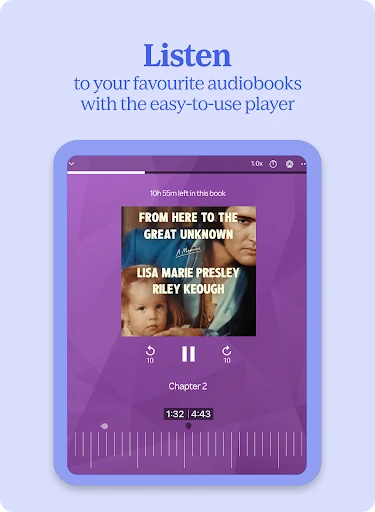
I also like the idea of picking up a book at bedtime and switching to audio when my eyes are tired. The player lets me pause, navigate, track progress, and set a sleep timer, so I can listen without having to stay alert to the screen. Audiobooks are available only in select countries, though, so that part of the experience depends on where you are. The everyday appeal is simple: fewer barriers between spare minutes and a story.
A Reading App, Not a Store Replacement
Kobo is for people who want a reading and listening app connected to a broad catalog. Its selection spans fiction, nonfiction, fantasy, graphic novels, comics, and children’s books, and the search tools make it practical to look for a particular author or subject. Kobo Plus adds a subscription option for people who want access to a large collection rather than choosing every title individually. I see it as a useful home for books, not just a single-purpose reader.
It is not a general-purpose media app, nor is it a promise that every title or audiobook will be available in every country. The catalog is the main attraction, but browsing and listening are only useful if the books you want are accessible to you. Someone who mainly wants paper books may not get much from it, and people who prefer a dedicated eReader may still want that device. Kobo’s advantage is carrying reading and audio on a phone or tablet.
Small Habits That Help
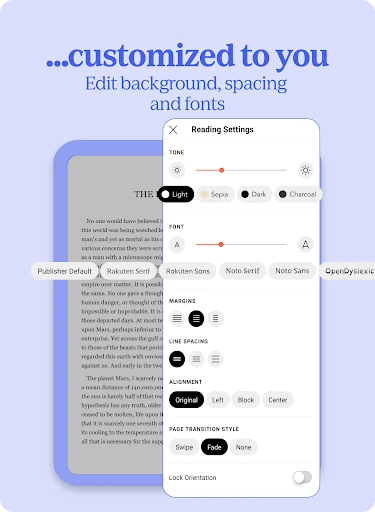
A little setup can make the app more comfortable for regular reading. I would adjust text size and style before starting a longer book, then try Night Mode for evening sessions. Portrait and landscape options give another simple way to match the page to how I am holding the device. These are small controls, but they help the app feel less like a fixed page and more like a reading space I can adapt.
For listening, I would set a sleep timer before settling in at night and choose a playback speed that feels easy to follow. If I use Kobo on more than one device, automatic progress syncing can help me return to the right place across the app, Kobo Web Reader, and a Kobo eReader. Recent changes also add bookmark previews in the Annotations list, which can make saved passages easier to recognize when I revisit them.
More From Our News Desk

Zoom Meetings, Google Meet, or Teams: Which Is Easiest to Join?

How I Build a Free Streaming Lineup With Tubi

Why Crunchyroll Is the Default Anime App for So Many Fans

YouTube TV: A Practical Guide to Cutting Cable

Rummikub and the Small Comfort of Phone Games

TeamViewer Remote Control or AnyDesk for Helping Family?
Who Will Enjoy Kobo
I would recommend Kobo to readers who like having a selection of ebooks and audiobooks in one place, especially anyone who already owns a Kobo eReader or uses Kobo Web Reader. It can suit people with varied routines: a few pages during a break, a longer reading session at home, or audio while winding down. Readers who enjoy browsing by genre or searching for a specific author have useful ways to explore the catalog.
It may be a weaker fit for someone who only wants physical books, or who expects audiobook access regardless of location. Audiobooks are available only in select countries, and Kobo Plus is an optional subscription rather than a requirement-free route to every title. People who are happy with their current reading setup may not need another library app. For those open to digital reading, the combination of adjustable pages, audio controls, and syncing is a practical reason to try it.
Kobo | eBooks & Audiobooks is a Books & Reference app from Kobo Books. Google Play shows over 10 million installs and a 4.5-star rating from about 297,000 ratings. The app is free to install and contains no ads, with in-app purchases available. Google Play gives an in-app purchase range of $0.05 to $999.99 per item, so costs depend on what you choose.
The app has a Teen content rating. Its Android version requirement and current version vary, so check Google Play for the details that apply to your device. Kobo first released the app on June 15, 2010, and the most recent update listed in the supplied app information is December 1, 2025. Audiobooks are available only in select countries; audiobook listening is supported on Android smartphones and tablets running Android 4.4 or higher.
How Kobo Fits a Reading Routine
A Straightforward First Visit
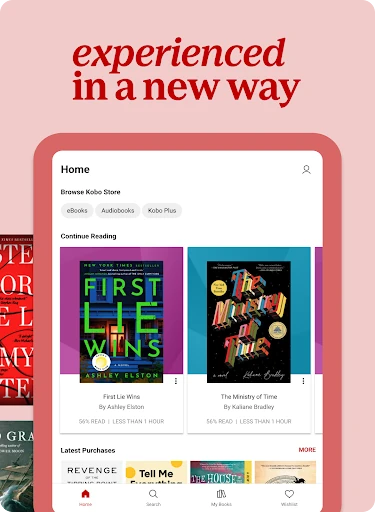
When I first open Kobo, I think of it as a library with two ways into a book: reading or listening. The catalog can be explored by author, title, topic, or genre, which gives a new user a few clear routes rather than requiring a specific book in mind. Kobo also features trending ebooks that are updated hourly, so browsing can be part of the experience instead of a chore.
Before settling into a title, I would take a moment to tune the reading display. Text size and style can be changed, and Night Mode is available for a different look in low light. I can also switch between portrait and landscape. That setup is not complicated, but it matters: a small adjustment at the start can make a long session feel more comfortable.
Reading and Listening Daily
The reading experience is built around continuity. Kobo automatically syncs reading progress between its app, Kobo Web Reader, and a Kobo eReader, which is useful when the device I have nearby changes during the day. I might read on a phone while waiting somewhere, then continue on a Kobo eReader at home. The convenience depends on using those Kobo options, but it makes the app feel connected rather than isolated.
Listening has a different rhythm, and Kobo’s audiobook player includes controls for navigating, pausing, and tracking progress. A sleep timer is a welcome touch for bedtime listening, when I do not want to guess how long I will stay awake. Recent changes introduce custom playback-speed control with quick presets. I appreciate that this is a practical listening adjustment, not just another reason to spend time inside settings.
Catalog and Kobo Plus
The breadth of the catalog is one of Kobo’s more useful strengths. The app covers genres from mysteries and romance to nonfiction, fantasy, graphic novels, comics, and children’s stories. Search by author, title, topic, or genre helps narrow that range when I know what I want. When I do not, the hourly refreshed trending ebooks offer a simple starting point. The app supports reading in English, French, Spanish, Italian, German, Dutch, Portuguese, Brazilian Portuguese, and Japanese.
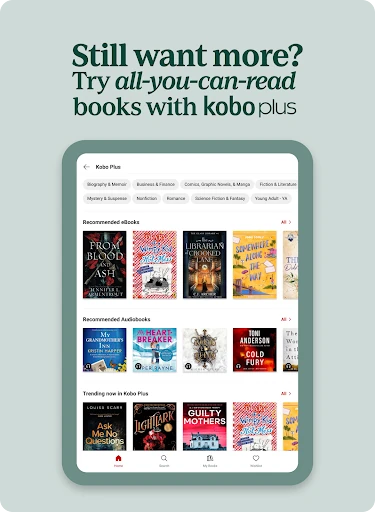
Kobo Plus is the subscription option for readers who prefer broad access over selecting books one at a time. Its plans offer ebooks, audiobooks, or both, and the described collection includes more than three million ebooks and 400,000 audiobooks. That scale may appeal to someone who reads or listens often, though it is still a separate paid choice. I would treat it as one way to use Kobo, not as a prerequisite for opening the app.
A Low-Friction Routine
A routine I can imagine is browsing for a new title during a spare moment, then adjusting the display once I know I will read for a while. I would use the same book for short sessions throughout the day and let progress syncing handle the handoff between Kobo devices. The app is most useful in that kind of repeated, modest use: it does not require a special reading occasion to make a few pages worthwhile.
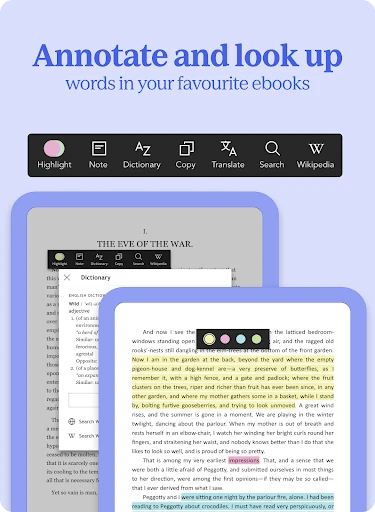
In the evening, I would switch to audio when reading no longer feels comfortable, choose a suitable playback speed, and set the sleep timer if I am listening in bed. If I save a passage, the Annotations list now gives bookmarks a preview of their first few lines. That makes returning to a particular note more convenient. These habits make the app feel better organized without requiring a complicated system.
Limits to Keep in Mind
Kobo’s strongest features depend on the books and formats that matter to you. Audiobooks are available only in select countries, so someone choosing the app mainly for listening should check availability before making that the center of a routine. Kobo Plus is another paid option, and the broad catalog does not mean every reader will find every desired title. The app offers ways to discover books, but the experience still begins with what is available to you.
There are also a couple of details that may not suit everyone. The vertical-scrolling option mentioned in the latest changes is a beta for select ebooks, so it is not a general reading mode for the whole library. And while syncing is handy across Kobo’s app, web reader, and eReader, it is most relevant if you use more than one of those. If you want a dedicated physical page or do not read digitally, Kobo may have less to offer.
Kobo makes a convincing everyday companion for people who want ebooks and audiobooks close at hand. I like the adjustable reading display, useful listening controls, and the option to continue across Kobo devices. Browsing tools and Kobo Plus give the library more than one entry point, while small touches such as the sleep timer help it fit naturally into a routine.
I would try it if digital reading is already part of your week, or if you want to explore listening alongside it. Check audiobook availability in your country and look at the store for current purchase details before choosing a paid option. If you prefer paper or rarely read on a phone or tablet, this may not change your habits. For regular readers, it is a practical, flexible place to keep going.
Kobo Books Frequently Asked Questions
What is Kobo | eBooks & Audiobooks used for?
Kobo is used to browse and read ebooks, and to listen to audiobooks where they are available. You can search by author, title, topic, or genre, adjust text size and style, and use Night Mode. The audiobook player includes playback controls and a sleep timer. Reading progress can sync with Kobo Web Reader and a Kobo eReader.
Which devices can I use Kobo on?
The app is available for Android devices through Google Play. The description also identifies Kobo Web Reader and Kobo eReader as places that can sync reading progress with the app. Audiobooks can be listened to on Android smartphones and tablets running Android 4.4 or higher, and are available only in select countries.
What Android version does Kobo require?
The Android requirement for the app varies, so check the Google Play store entry for the version that applies to your device. The description specifically says audiobook listening is supported on Android smartphones and tablets running Android 4.4 or higher. That audiobook detail should not be treated as the app’s general minimum requirement.
Does Kobo cost money to use?
Kobo is free to install and contains no ads, but it offers in-app purchases. Google Play gives a purchase range of $0.05 to $999.99 per item, and Kobo Plus is an optional subscription with plans for ebooks, audiobooks, or both. Current prices and purchase options may vary, so check the store before buying.
Who is Kobo best suited for?
Kobo is a good fit for people who read ebooks, listen to audiobooks, or want both formats in one app. Its adjustable display, player controls, and syncing can suit changing routines. It may be less useful if you prefer physical books or mainly want audiobooks in a country where they are unavailable. The app is rated Teen.
Pros
- Keeps ebook reading and audiobook listening together in one library.
- Offers adjustable text, Night Mode, and portrait or landscape reading.
- Syncs reading progress with Kobo Web Reader and Kobo eReaders.
- Includes audiobook controls, a sleep timer, and custom playback speeds.
Cons
- Audiobooks are available only in select countries.
- Kobo Plus is an optional subscription, not included with installation.
- Vertical scrolling is still beta and limited to select ebooks.
- Category
- Books & Reference
- Version
- VARY