iHealth MyVitals
- 26.03K
- 4.8
- Installs
- 500.00K
- Price
- Free

Screenshots
Analysis by Reviewed APKs
iHealth MyVitals is a companion app for viewing and organizing measurements from compatible iHealth devices, including blood pressure monitors, scales and thermometers. It suits people who already use that equipment and want a clearer record than a handful of readings on separate screens. After looking at what it offers, I see it as a practical tracking hub rather than a general wellness coach or a substitute for professional medical care.
A clearer record of readings
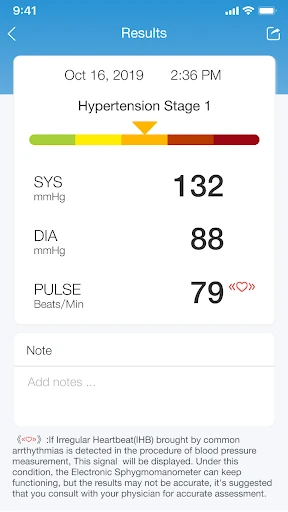
Imagine taking a blood pressure reading at home before breakfast, then wanting to compare it with one from last week. MyVitals is built around that kind of routine: take a measurement with a supported iHealth device, see the result, and connect the device to an account so the data can sync and remain accessible. Instead of relying on memory, you have a place to look back at readings and see how they change over time.
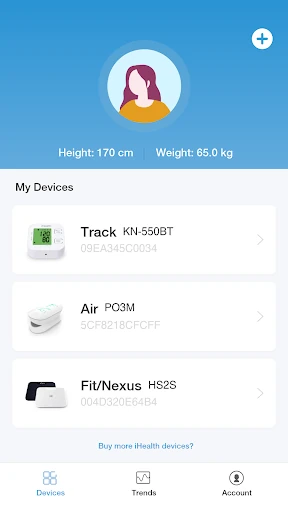
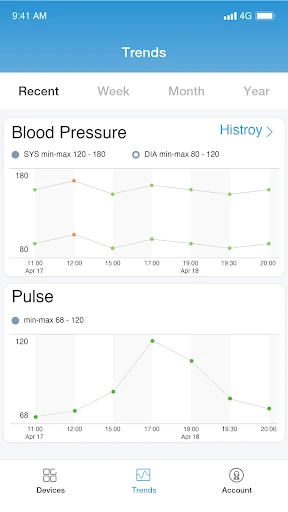
When I picture using it day to day, the appeal is having several kinds of measurements gathered in one app. A household might use an iHealth scale as well as a thermometer or pulse oximeter, and MyVitals is intended to bring data from those devices together. Its charts and graphs offer another way to review the record, while sharing gives users a way to pass relevant information along to a care team.
A device companion, not a coach
MyVitals makes the most sense if you have compatible iHealth equipment and want a place to view its measurements. It is not simply a manual wellness journal: the described workflow centers on initiating measurements with iHealth devices and syncing results through an account. That focus is useful when your routine already involves the company’s hardware, but less compelling if you are looking for a broad collection of diet, exercise, medication or lifestyle-planning tools.
Compared with checking each device on its own, a shared history and trend charts can make it easier to review changes. Still, this is not a diagnostic service. The app says its information is for general purposes and should not replace professional advice. I would treat it as a record-keeping companion that can help organize conversations, rather than a place to decide what a reading means or what care to pursue.
Make the history useful
A small habit can make any measurement history easier to use: take readings consistently and check the app when you have a reason to review the record. MyVitals is designed to show trends over time, so scattered, occasional checks may be less helpful than a regular routine. I would also make sure the device is connected to the account so the result can sync and remain available rather than relying on a single session.
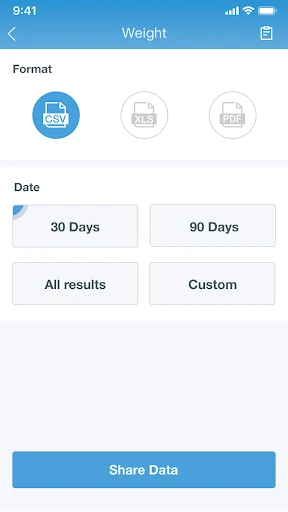
When it is time to discuss a pattern with a clinician, the app’s sharing function can help keep the care team up to date. I would use that selectively and focus on the information relevant to the conversation, rather than assuming the app interprets the data for me. If I use more than one supported device, keeping measurements together in the same account should make it easier to review them in context.
More From Our News Desk

Zoom Meetings, Google Meet, or Teams: Which Is Easiest to Join?

How I Build a Free Streaming Lineup With Tubi

Why Crunchyroll Is the Default Anime App for So Many Fans

YouTube TV: A Practical Guide to Cutting Cable

Rummikub and the Small Comfort of Phone Games

TeamViewer Remote Control or AnyDesk for Helping Family?
Who may find it useful
I would recommend MyVitals to people who already own supported iHealth devices and want a convenient place to view and retain their measurements. It may be particularly handy for someone who checks readings at home and wants to look at changes over time, or who needs to share a record with a care team. The charts, account syncing and support for several device types give it a clear job beyond displaying one isolated result.
It may not suit someone without iHealth equipment, or anyone expecting a general-purpose fitness tracker, personalized coaching or medical guidance. The app’s stated role is managing and viewing data from connected devices, not diagnosing or treating conditions. I would also be cautious about treating any graph as a conclusion on its own. If you want a broader wellness routine, this looks more like one focused tool than an all-in-one health platform.
iHealth MyVitals is developed by iHealth Labs, Inc. On Google Play, it has more than 500,000 installs and a 4.8-star rating from about 26,000 ratings. It is listed in Health & Fitness and has an Everyone content rating. The available version is 4.17.1, with a release date of October 16, 2020, and a last update dated November 3, 2026.
The app is free to download on Google Play, with no in-app purchases or ads indicated in the supplied app facts. MyVitals is described for Android, but a minimum Android version was not supplied, so check Google Play for current device compatibility. Its account-based syncing and device connections are intended for users working with supported iHealth products.
Turning Measurements Into a Useful Record
First steps and setup
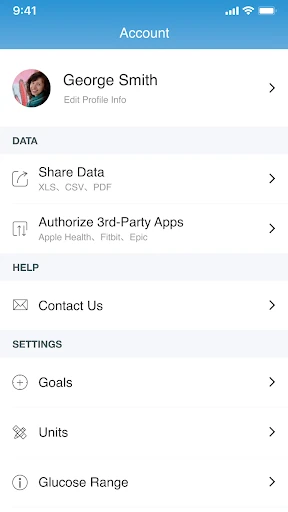
My first impression of MyVitals is that it has a focused purpose: connect compatible equipment, manage the resulting health data and review it in one place. The setup described begins with creating an iHealth account and connecting devices. That may feel like an extra step if you only want to glance at a reading once, but it is central to keeping measurements synced and accessible later.
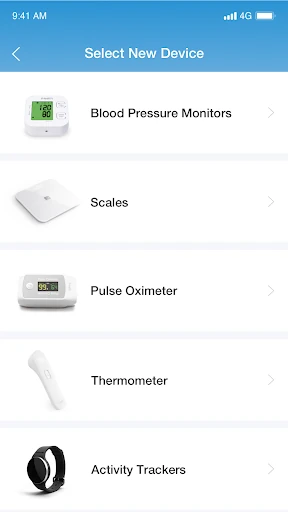
I would start by checking that the particular iHealth device I use is among the supported types: blood pressure monitor, pulse oximeter, touchless forehead thermometer, weighing scale or smartwatch. The app’s job depends on that connection, so it is not a generic tracker that promises to collect every kind of health information from any source.
The everyday experience
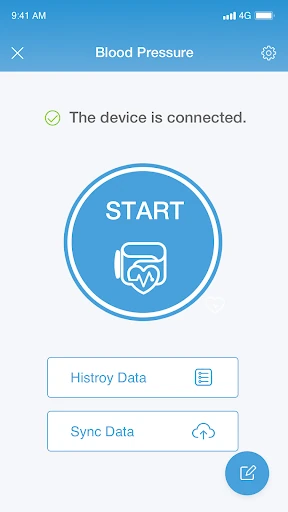
The core experience follows a straightforward loop: take a measurement, see the result in real time, and sync it to an iHealth account for later access. That gives the app a practical role in a home routine, especially when you want more than a one-time number. I would open it to review what has been recorded, rather than expecting it to replace the measuring device itself.
Over time, graphs and charts are the part that can make a stored history more useful. MyVitals says users can view different graphic trends on the same screen, which offers a way to compare changes without paging through isolated readings. The value depends on having measurements to look at, of course; the app is a viewing and management layer, not a measurement on its own.
Features with a clear purpose
The support for multiple iHealth device categories is a meaningful feature for households or individuals who use more than one kind of measurement equipment. Blood pressure, oxygen, temperature and weight data can be part of the same broader picture in the app. I appreciate that this is a concrete organizing role, rather than a vague promise to improve health without explaining how the app fits into daily life.
Trend charts and the option to share information with a care team stand out because they connect personal tracking to a real conversation. The app also describes secure cloud storage when users create an account and connect devices. I would use sharing as a way to provide context when needed, while keeping in mind that the app does not interpret results as medical advice.
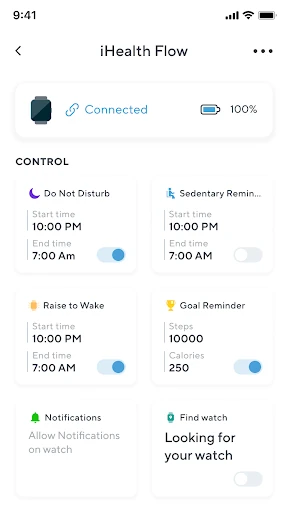
The description also mentions smartwatch support, including connecting a mobile device to a connected smartwatch to send and receive texts and phone calls. That extends beyond viewing measurement data, though it is still tied to a compatible setup. I would not assume every smartwatch function works with every device; the practical fit depends on the supported equipment and connection.
A simple review routine
A practical routine might be to take readings with the relevant iHealth device, check the result in real time, and let the connected account sync the data. Then, at a suitable interval, I would look at the charts to see the record as a whole rather than focusing on just the latest number. This makes MyVitals more useful as a continuing log than as an app opened only during setup.
If I had an appointment or wanted to keep a care team informed, I could use the share function to pass along relevant information. I would avoid turning that into a self-diagnosis exercise. The app is explicit that its data is general information, not a replacement for qualified medical advice, so sharing a record is best understood as supporting a discussion rather than settling one.
Limits to keep in mind
The biggest limitation is the app’s reliance on supported iHealth devices. Without compatible equipment, much of the central workflow—initiating measurements, syncing results and viewing their history—has little to work with. That also means people who want a manual diary or a broad health dashboard may prefer a different kind of app. MyVitals is most convincing when its device connections match what someone already owns.
Another important boundary is medical interpretation. The app does not diagnose, treat, cure or prevent conditions, and it says its information should not replace advice from a healthcare professional. Charts can help organize a history, but they do not explain what a result means for an individual. I would use them as a record to review, not as a basis for making medical decisions.
The setup also involves an account and connected devices, so users should be comfortable with that arrangement to get the intended syncing benefits. MyVitals is not presented as a complete wellness planner with diet, exercise or medication tools. Its narrower focus can be a strength, but it is worth knowing before downloading if you expect one app to manage every part of your health routine.
iHealth MyVitals has a useful, well-defined role: it brings measurements from supported iHealth devices into a place where users can review trends and share information with a care team. I like that the focus is on a continuing record, not just a number displayed once. Its usefulness will depend heavily on whether you already use the compatible equipment.
I would try it if I wanted a companion for iHealth measurements and understood its limits as an informational tool. I would look elsewhere for broad coaching, manual lifestyle tracking or medical interpretation. For the right device owner, MyVitals offers a practical way to keep readings together; it should complement, not replace, professional care.
iHealth MyVitals Frequently Asked Questions
What is iHealth MyVitals used for?
iHealth MyVitals is used to manage and view health data from supported iHealth devices, including blood pressure monitors, pulse oximeters, touchless forehead thermometers and weighing scales. It can show measurement results, sync data through an account, display trends in charts and share information with a care team. It is not a diagnostic tool or a replacement for professional medical advice.
Can I use iHealth MyVitals on my Android phone?
iHealth MyVitals is available for Android through Google Play. The supplied app information does not give a minimum Android version, and compatibility can vary by device and software release. Check the Google Play entry on your phone for current requirements before installing. The app is designed to work with supported iHealth devices, so the phone alone is not the whole setup.
Does iHealth MyVitals cost money?
The app is free to download on Google Play, and the supplied app facts indicate no in-app purchases or ads. You will need compatible iHealth equipment to use the measurement features described, which is separate from the app download. Store details can change, so check Google Play for the current app terms and any device-related requirements.
Does iHealth MyVitals provide medical advice?
No. MyVitals is described as a way to manage and view health information, including measurements and trends from connected devices. Its information is for general purposes and should not be used instead of professional medical advice, diagnosis or treatment. You can use the share function to keep a care team informed, but the app does not diagnose or treat a condition.
Who is iHealth MyVitals best for?
It is best suited to people who use supported iHealth devices and want a single place to review synced readings, see trends and share information with a care team. It may not suit someone without compatible equipment or someone seeking broad fitness coaching, lifestyle planning or medical interpretation. The usefulness of the app depends on the devices and routine you bring to it.
Pros
- Brings readings from several supported iHealth device types into one account.
- Charts and graphs make it easier to review changes over time.
- Includes a sharing function for keeping a care team informed.
- Free to download, with no ads or in-app purchases indicated.
Cons
- Its central measurement features depend on compatible iHealth devices.
- It does not diagnose conditions or interpret readings as medical advice.
- It is not a broad diet, exercise or wellness-planning app.
- Category
- Health & Fitness
- Version
- 4.17.1











