Holland America Line Navigator
- 2.18K
- 2.2
- Installs
- 500.00K
- Price
- Free

Screenshots
Analysis by Reviewed APKs
Holland America Line Navigator is a companion app for people planning or taking a Holland America cruise. It brings bookings, trip events, dining reservations, shore excursions and selected onboard services into one place. I found its appeal is practical rather than flashy: it can replace a handful of small planning tasks and help keep a busy cruise day straight. It is most useful when you already have a Holland America booking.
A Day With Navigator
Imagine checking your cruise plans over breakfast a few days before sailing. After logging in with a Hollandamerica.com account, you can look over your booking, browse events and excursions planned for the trip, and add events to your itinerary. That turns a vague list of things you might enjoy into a more concrete plan. I like that this preparation can happen before boarding, when there is still time to compare options.
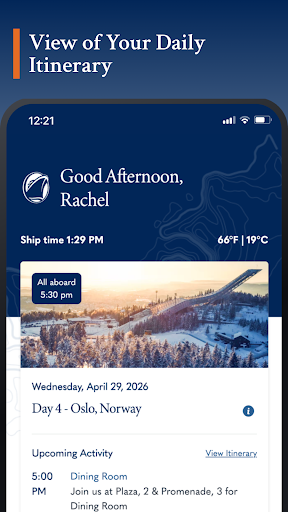
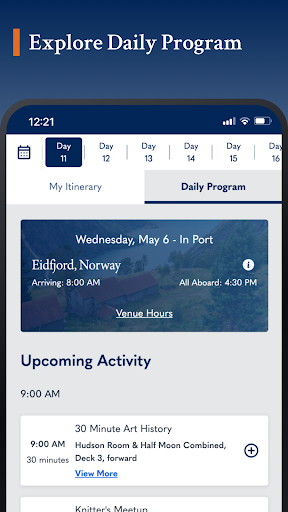
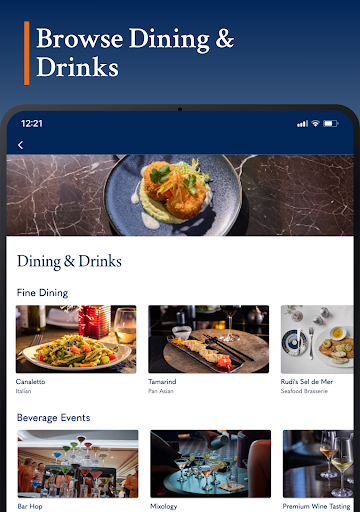
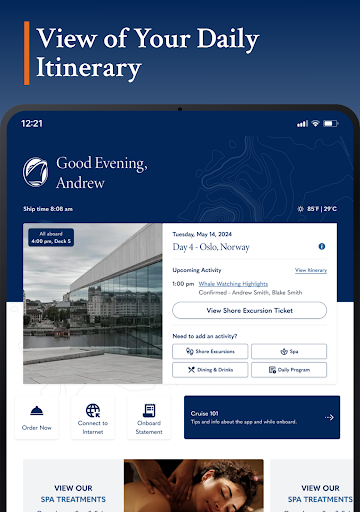
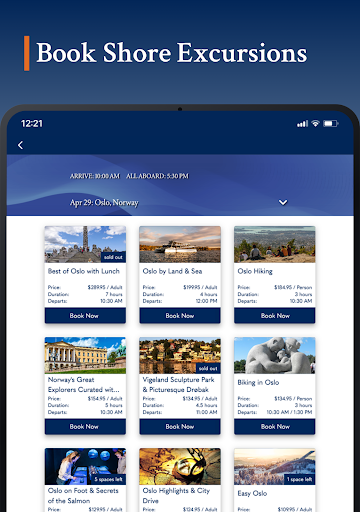
Once on board, the app becomes more of a day-to-day reference. You can check the daily itinerary, review booked excursions and dining reservations, and browse menus or spa services while connected to the ship’s WiFi. If plans include a port day, the itinerary and excursion booking tools keep the schedule close at hand. I’d use it for quick checks between activities, rather than trying to plan every hour of a holiday in advance.
A Cruise-Specific Companion
Navigator is built around Holland America Line cruises, so its strength is keeping trip-related information and services together. A general calendar or notes app could hold reminders, but it would not provide the booking details, ship events, dining reservations and excursion options described here. The fleet map also gives prospective guests a way to explore the line’s ships and destinations before they travel.
That focus is also a boundary. This is not a broad travel planner for comparing cruise lines, arranging flights or organizing a holiday unrelated to Holland America. Its usefulness depends on having a Holland America trip or wanting to learn about the fleet. I’d keep other tools for the rest of a journey and treat Navigator as the cruise-specific piece, not a replacement for every travel app.
Make It a Small Habit
A little regular checking seems more useful than one big planning session. Before sailing, I’d log in, review the booking and scan the planned events and shore excursions. Adding interesting events to the itinerary as I find them should make the schedule easier to revisit later. It is a low-effort habit that can prevent the familiar holiday scramble of trying to remember where an activity was mentioned.
On the ship, I’d make a quick itinerary check part of the morning routine, then look again before heading ashore or to dinner. Keeping reservations and booked excursions in the same app makes that review straightforward. If traveling with companions, the onboard chat can also help keep in touch. Some services, including stateroom item orders and photo purchases, are available only on select ships, so I would check what applies to my sailing.
More From Our News Desk

Zoom Meetings, Google Meet, or Teams: Which Is Easiest to Join?

How I Build a Free Streaming Lineup With Tubi

Why Crunchyroll Is the Default Anime App for So Many Fans

YouTube TV: A Practical Guide to Cutting Cable

Rummikub and the Small Comfort of Phone Games

TeamViewer Remote Control or AnyDesk for Helping Family?
Who Will Find It Useful
I’d recommend Navigator to Holland America passengers who like having practical trip details in one place. It suits people who want to review bookings, keep tabs on daily activities, reserve specialty dining or shore excursions, and check onboard services without relying on a paper schedule alone. First-time cruisers may appreciate being able to explore planned events and services before sailing, while returning guests can use it to revisit their current and past booking information.
It may be less useful if you are not traveling with Holland America or prefer to handle every detail offline and on paper. The app’s onboard tools are designed for use with the ship’s WiFi, and some options depend on the ship. I would also temper expectations if you want a general trip organizer covering every part of a vacation. Navigator’s role is narrower: it supports the Holland America cruise itself.
Holland America Line Navigator is published by Holland America Group and is available on Google Play for Android. The app is free to download, with no in-app purchases or ads. Google Play shows a 2.2-star rating from about 2,200 ratings and over 500,000 installs. Its content rating is Everyone. These figures give a useful sense of its store footprint, though ratings reflect a mix of individual experiences.
The listed version is 26.44.00. The app was released on February 14, 2019, and its listed last update is October 26, 2026. The minimum Android version is not included in the available facts, so check Google Play for the requirement that applies to your device. For onboard use, the app says it works through the ship’s WiFi without requiring an onboard internet purchase.
A Closer Look at Cruise-Day Use
Getting Ready
My first impression is that Navigator makes most sense once a cruise is part of the picture. The starting point is logging in with a Hollandamerica.com account, which gives access to profile information and past or upcoming bookings. That gives the app a clear job from the outset: connect the passenger’s trip details to the planning and onboard tools, rather than act as a generic travel dashboard.
Before the cruise, I’d spend a few minutes looking through the services available to guests and checking the planned events and shore excursions. The fleet map is another useful starting point if I’m still learning about the line’s ships, destinations and ports of call. It is not necessary to turn preparation into a project; a quick look at the options can be enough to make later decisions easier.
The Everyday Cruise Companion
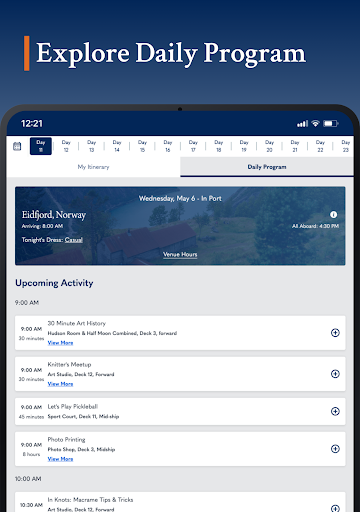
The day-to-day value is in having several cruise details close together. My itinerary can include daily activities, booked excursions and dining reservations, while the onboard event information helps me see what is planned. Instead of trying to remember every time and reservation, I can use the app as a reference when deciding what to do next. That is particularly handy when the day includes both a planned activity and open time.
The app’s onboard features are accessed over the ship’s WiFi, and an internet purchase is not required just to use Navigator. That distinction matters: the app can serve as a cruise companion without requiring a paid internet plan, while Navigator also provides a route to purchase and use additional internet plans. I’d still check the ship’s WiFi instructions before relying on any app-based information during a sailing.
Useful Onboard Extras
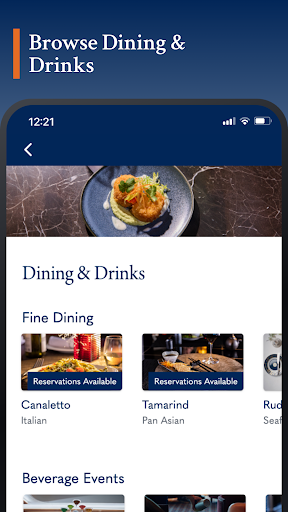
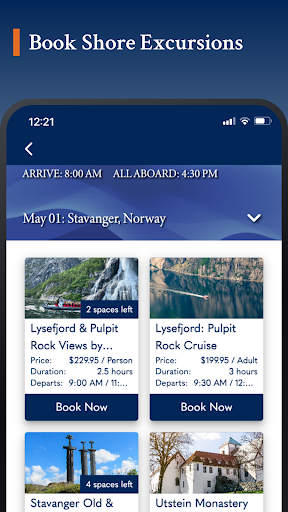
Chat is one of the more social tools, letting passengers keep in touch with traveling companions and connect with other guests while on board. Dining tools cover reservations at specialty restaurants, and the excursion section lets passengers reserve and book shore excursions. These are focused features, but they address the kinds of small coordination tasks that can otherwise interrupt a relaxed day.
There are also services for browsing spa treatments, viewing an onboard statement and reading complimentary daily news digests. On select ships, passengers can order items such as towels, pillows or ice to their stateroom, and review, purchase and share cruise photos. I would not assume every ship offers those select-ship features, but they add useful options where available.
A Routine That Works
For a practical routine, I’d check the itinerary after breakfast and note the day’s booked excursion, dining reservation and any events I saved earlier. Before leaving the ship in port, I’d check the schedule again and confirm the excursion details shown in the app. The aim is not to stare at a screen all day; it is to use one quick review to feel oriented before heading off.
Later, I’d use Navigator for the decisions that come up naturally: checking what is happening on board, looking at a dining option, or messaging a companion. This approach makes the app a reference rather than another obligation. It also leaves room for plans to change. A cruise has plenty of unscheduled moments, and a handy itinerary should support those rather than make the whole trip feel tightly managed.
Keep the Scope in Mind
Navigator’s usefulness is tied to Holland America Line, and that makes it a poor fit for travelers looking for a universal cruise organizer. It focuses on the line’s bookings, ships, onboard services and excursions. I’d use another method for unrelated travel arrangements and avoid expecting this app to cover every detail of getting to or from the port.
Some features have clear limits: stateroom item orders and photo services are available on select ships, and onboard use depends on connecting to ship WiFi. The store rating is also low, at 2.2 stars, so I would check recent Google Play feedback and the current app details before depending on it for an important part of a trip. Keeping a personal backup of key plans is sensible for any travel routine.
Holland America Line Navigator has a focused, practical purpose: it gathers cruise bookings, schedules, reservations and selected onboard services for Holland America passengers. I like the idea of checking the itinerary in the morning, then using the app only when a question comes up. Its strongest value is convenience across the planning and onboard parts of a cruise.
I’d give it a try if I had a Holland America sailing and wanted an app-based reference for the trip. It is less compelling for people who want a general travel planner, and some services depend on the ship. With a 2.2-star Google Play rating, I’d also keep expectations measured and check current store details before sailing.
Holland America Line Frequently Asked Questions
What is Holland America Line Navigator used for?
Holland America Line Navigator helps passengers review bookings and account details, check planned events and daily itineraries, book shore excursions, and make specialty dining reservations. On board, it also offers features such as chat, spa service information and daily news digests. Some options, including stateroom item orders and photo services, are available only on select ships.
What devices can run Holland America Line Navigator?
The app is available for Android through Google Play. The Android version needed to install it can vary with the current app requirements and your device, so check the Google Play entry before downloading. For onboard use, the app describes connecting through the ship’s WiFi; an onboard internet purchase is not required just to use Navigator.
Does Holland America Line Navigator cost anything?
The app is free to download on Google Play, and the available store facts show no in-app purchases or ads. Navigator can also be used over ship WiFi without buying an onboard internet plan. The app includes a portal for purchasing additional internet plans, so check the current store and cruise details for anything that may vary.
What Android version does Holland America Line Navigator require?
The Android minimum requirement can vary as the app is updated, and it is not included in the available app facts. Check the Google Play entry for the requirement shown for your device before installing. The listed app version is 26.44.00, and its listed last update is October 26, 2026.
Is Holland America Line Navigator right for every traveler?
It is best suited to people with a Holland America cruise who want booking, itinerary, excursion and onboard information in one place. It is not a general travel planner for other cruise lines or unrelated holidays. Its usefulness also depends on the ship for select services, so check the current app details and your sailing information.
Pros
- Keeps bookings, daily activities, dining reservations and excursions together for Holland America passengers.
- Offers onboard chat and ship WiFi access without requiring an internet purchase.
- Provides pre-cruise event information and a fleet map for exploring destinations.
- Includes select-ship services such as stateroom item orders and cruise photo purchases.
Cons
- Its features are focused on Holland America cruises rather than general travel planning.
- Some onboard services, including item orders and photo features, depend on the ship.
- The 2.2-star Google Play rating suggests a mixed user experience.
- Category
- Travel & Local
- Version
- 26.44.00











