FamilySearch Tree
- 52.02K
- 4.5
- Installs
- 10.00M
- Price
- Free

Screenshots


Analysis by Reviewed APKs
FamilySearch Tree is a genealogy app for building a family tree, exploring historical records, and preserving family memories. It suits curious beginners as well as relatives who already have names and dates to compare. I like that research and storytelling sit together: you can add facts, photos, written stories, and audio recordings. Its shared tree can be useful, though it also calls for care when editing information about relatives.
A name becomes a branch
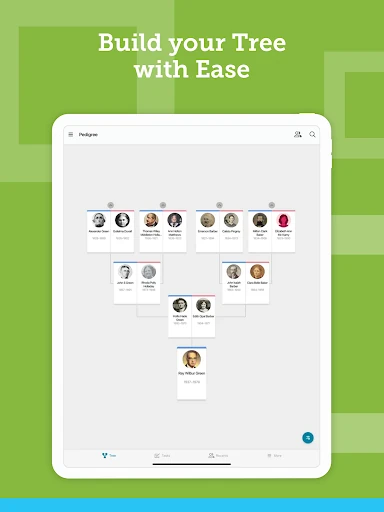
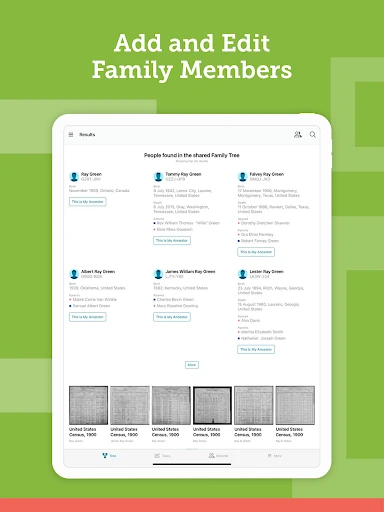
When I first opened FamilySearch Tree, I imagined using it in the familiar way genealogy often starts: someone mentions a grandparent’s birthplace over dinner, and I try to see where that detail leads. The app lets you find or add family members, then browse the tree as it grows. Adding a deceased relative can prompt FamilySearch to look for matching information in its database, giving a small family question a practical next step.
A useful session does not have to become a full research project. I can look at a relative’s details, check whether records or family memories are attached, and add a photo or story while the person who remembers it is still available to ask. The app also supports sources, so a detail can be accompanied by evidence rather than left as an unexplained entry. That mix of discovery and documentation feels grounded in how family history is actually gathered.
A shared tree, not a notebook
Compared with keeping names in a private notes app or spreadsheet, FamilySearch Tree is built around a community tree that other users can explore and contribute to. It can help when relatives have separate pieces of the same story, or when historical records offer clues that nobody in the family has seen. You can view, add, and edit ancestor information, attach sources, and communicate with other FamilySearch users through in-app messaging.
That shared approach is also a meaningful difference from treating genealogy as a private archive. I would not use the app as a general photo organizer or a substitute for every kind of record keeping; its focus is family connections and their history. Nor should a possible record match be treated as unquestionable proof. FamilySearch encourages sourcing, and that matters when several people may be working on the same branch.
Small habits, better context
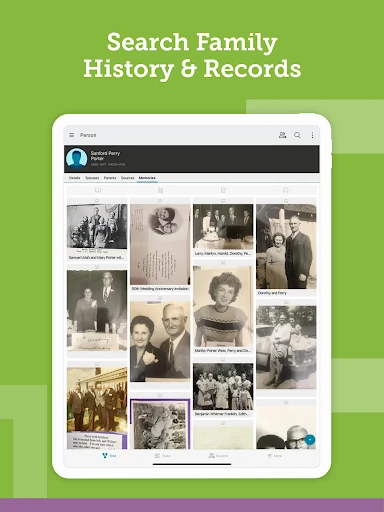
I get more from a family-history app when I add context as I go. If I enter a person, I can also capture a relevant life detail, attach a source, or preserve a story while the information is fresh. FamilySearch Tree supports photos, written stories, and audio recordings, so a relative’s voice or recollection does not have to be reduced to a date and a place.
Another useful habit is to check suggested records and the tree’s existing information before adding a duplicate or making an edit. The app can show which ancestors have already been found in historical records and offer ideas for what to do next. I would also make time to compare notes with relatives: shared contributions can uncover details, but careful discussion helps keep the tree useful and understandable.
More From Our News Desk

Zoom Meetings, Google Meet, or Teams: Which Is Easiest to Join?

How I Build a Free Streaming Lineup With Tubi

Why Crunchyroll Is the Default Anime App for So Many Fans

YouTube TV: A Practical Guide to Cutting Cable

Rummikub and the Small Comfort of Phone Games

TeamViewer Remote Control or AnyDesk for Helping Family?
Who may find it useful
I’d recommend FamilySearch Tree to anyone who wants to start tracing relatives without separating research from family memories. Beginners can add known people and see where the app’s record searches lead, while people with more established trees can explore sources, share details, and collaborate. It may be especially satisfying for families who enjoy comparing stories and preserving them as photos, writing, or recordings rather than keeping everything in conversation.
It may be a less natural fit if you want a strictly private, solo family archive. Information provided for deceased individuals is publicly available, so that is important to understand before contributing. The shared-tree model also means other users may work on the same ancestors, and edits deserve care. If your interest is only in storing everyday photos or notes, a genealogy-focused tool may feel more involved than you need.
FamilySearch Tree is developed by FamilySearch International and is in the Books & Reference category on Google Play. It has more than 10 million installs and a 4.5-star rating from about 52,000 ratings. The app is free to download, with no in-app purchases or ads. Its content rating is Everyone, which makes the store’s audience classification broad, though family-history content will naturally be most relevant to people interested in genealogy.
The Google Play information gives Android 10 as the minimum Android version and 5.3.6 as the current version. The app was released on July 15, 2014, and its last update was January 26, 2026. Those details can change as the app is updated, so I’d check Google Play for the latest compatibility and version information before installing.
A closer look at family research
Getting oriented
My first impression is that FamilySearch Tree has a clear purpose: connect people, records, and memories. Rather than being a general family scrapbook, it puts a family tree at the center and gives you ways to add information around each relative. That makes the app easier to understand if you arrive with a name or a question, even if you have not done much genealogy before.
A sensible way to begin is with information you already trust, such as the names of close relatives and details your family can explain. From there, you can look for connections and see whether FamilySearch has information about a deceased relative. I would take suggestions as prompts for further research, not as a reason to rush through adding people. Building slowly gives you a better chance of keeping the tree coherent.
The everyday research loop
The basic rhythm is straightforward: browse a branch, open a relative’s information, add or edit details, and see whether records or memories help fill in the picture. FamilySearch can search its historical records as you add information, while the app lets you explore facts, documents, stories, photos, and recordings associated with ancestors. The result is a research loop that can fit into short sessions rather than requiring an entire free afternoon.
I also appreciate that collaboration is part of the day-to-day experience, rather than an afterthought. You can share information with other family members, view and edit ancestor details, and use in-app messaging to communicate with other FamilySearch users. That can help when one person has a photograph and another recognizes someone in it. The trade-off is that shared work benefits from clear sources and a little patience.
Records and family memories
The combination of historical records and personal memories is the feature set that stands out most to me. The app can help connect a relative to information in FamilySearch’s database, and it lets you add sources to support details. Alongside that more documentary side, you can preserve photos, written stories, and audio recordings. Having both kinds of material in one family-history setting makes the tree feel less like a bare list of names.
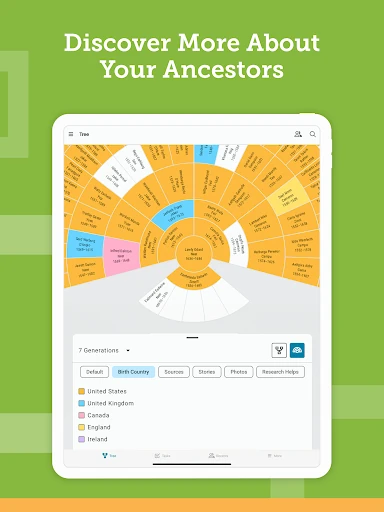
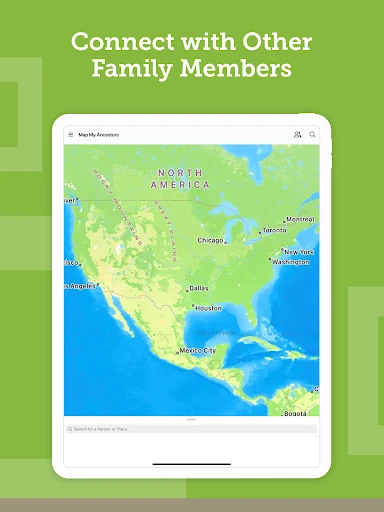
Maps add another way to explore family history, showing where key events in ancestors’ lives took place. I can see that being a useful change of perspective when dates and places have started to blur together. The app also points out ancestors already found in historical records and offers ideas for what to explore next. These tools support discovery, but the meaningful work of checking that a record belongs to the right person remains important.
A practical family routine
One routine I would use is to set aside a few minutes after a conversation with a relative. I could note a newly remembered detail, add a source if I have one, and save a story or recording that might otherwise be lost. If the detail concerns a deceased ancestor, I could then check whether the app has found related information. Keeping the session small makes it easier to follow up without turning family history into a chore.
For a shared project, I’d ask relatives to contribute what they know and explain where each detail came from. One person might recognize a portrait, while someone else knows a place or family story. FamilySearch Tree gives users ways to share information and collaborate, and its messaging can support those exchanges. I’d still review changes thoughtfully, especially when an entry concerns a person whose history is already being explored by others.
Keep expectations realistic
A worldwide community tree can bring useful connections, but it also means information is shared rather than held only in a personal notebook. The app states that content you provide for deceased individuals will be publicly available. I would keep that in mind before adding material, and be careful about the accuracy and context of what I contribute. The ability to add sources is valuable precisely because family details can be incomplete or mistaken.
The app’s research tools can point toward records and potential connections, but they do not remove the need to judge evidence. A name that looks familiar may not be the right person, and a story remembered differently by relatives may need discussion. FamilySearch Tree is most satisfying when I treat it as a place to investigate and preserve information collaboratively, rather than expecting every question to receive an immediate answer.
FamilySearch Tree brings tree building, record discovery, collaboration, and family memories into one genealogy-focused app. I like its balance of practical research and personal storytelling, especially for relatives who want to contribute together. The shared nature of the tree calls for thoughtful editing, and public availability of content about deceased individuals is worth considering before adding information.
I’d recommend it to curious family historians who are comfortable exploring a collaborative tree and checking the evidence behind discoveries. Start with what your family knows, then build carefully with records and sources. If you want a private, general-purpose place for notes and photos, this is probably not the most natural fit.
FamilySearch Tree Frequently Asked Questions
What is FamilySearch Tree used for?
FamilySearch Tree is used to build and explore a family tree, look for historical information about ancestors, and preserve family memories. You can add or edit relatives, attach sources, and contribute photos, written stories, and audio recordings. The app also supports collaboration with other FamilySearch users, making it useful for people who want to research and share family history.
Which devices can run FamilySearch Tree?
The facts provided describe the Android version of FamilySearch Tree, available through Google Play. They give Android 10 as the minimum Android version. Device compatibility can depend on current app and store requirements, so check the Google Play information for your device before installing. The information here does not establish availability on other platforms.
Does FamilySearch Tree cost money?
FamilySearch Tree is free to download on Google Play. The provided app facts say it has no in-app purchases and contains no ads. Store details can change, so it is worth checking the current Google Play information before installing if you want to confirm the latest terms.
Is FamilySearch Tree suitable for beginners?
It can suit beginners who want to start with relatives they know and follow possible record connections from there. The app supports adding people, exploring family branches, and preserving stories and photos. Its shared tree means it is sensible to check details and sources as you contribute. People looking for a strictly private archive may prefer a different approach.
Are details added to FamilySearch Tree private?
The app description says content provided for deceased individuals will be publicly available. That is an important consideration before adding material. FamilySearch Tree is designed for collaboration, including sharing and editing information about ancestors. For details about privacy and how particular information is handled, review the app’s privacy information and current Google Play details.
Pros
- Combines family-tree building with historical records and personal memories.
- Supports photos, written stories, audio recordings, and sources.
- In-app messaging and shared contributions can help relatives collaborate.
- Maps and record suggestions offer useful directions for further research.
Cons
- Information contributed for deceased individuals is publicly available.
- A community tree calls for careful checking before editing details.
- Record suggestions still need thoughtful review and verification.
- Category
- Books & Reference
- Version
- 5.3.6











