Evvie
- 423
- 1.8
- Installs
- 50.00K
- Price
- Free
Screenshots

Analysis by Reviewed APKs
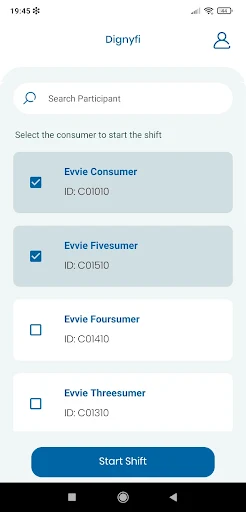
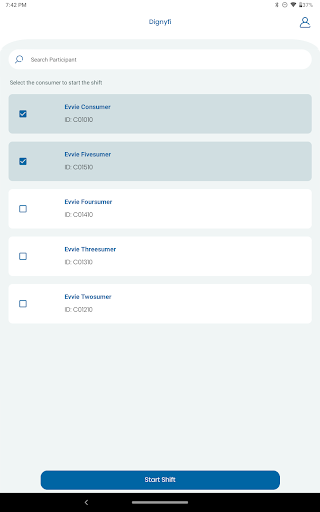
Evvie is a work-time recording app for direct care workers whose agencies use Annkissam software. It is designed to make recording EVV-compliant shifts a simpler alternative to paper timesheets, with location captured at clock-in and clock-out. I like the focus on a specific job rather than trying to be a general-purpose home care tool, but that narrow availability is important: it is not intended for everyone who provides care.
Recording a care shift
Imagine arriving for a direct care shift and needing to record the start of your work without digging out a paper timesheet. Evvie is built for that moment: an eligible worker can use it to clock in, then clock out when the shift ends, recording the location at those two points. The point is a short, practical record of the shift, rather than a complicated scheduling system or a lengthy daily log.
When I think through that routine, the appeal is its limited scope. A worker can search for their Fiscal Intermediary and use the app to record an EVV-compliant shift. Evvie says it aims to meet EVV requirements with as few clicks as possible, which suits a task that needs to happen around the workday, not become another project. The location detail is also specific: it is recorded at clock-in and clock-out.
A focused work tool
Evvie is best compared with paper timesheets and other ways of recording a shift, not with broad productivity apps. Its job is to help eligible direct care workers document EVV-compliant shifts. It does not require schedules in the software; the description says scheduling is between the individual and their staff. That makes the app feel intentionally narrow, rather than like a full staffing or shift-planning system.
There is an important boundary to that comparison. Evvie is available to employees at agencies using Annkissam software, and the mobile solution is not meant for general home care use. So a caregiver looking for a universal clock, a family care organizer, or a tool to find work should not assume this app will fit. Its usefulness depends on the worker's agency being part of the intended setup.
Make the clock-in routine easier
The most useful habit is to treat Evvie as the shift-recording step itself. If you are an eligible employee, you can search for your Fiscal Intermediary and use the app when recording a shift, rather than trying to reconstruct the details later from memory. Since location is recorded at clock-in and clock-out, those are the moments to keep in mind when building the app into a work routine.
I would also keep the app's role clear when coordinating with staff. Evvie does not require schedules in the software, so it should not be treated as a substitute for whatever scheduling arrangements an individual has with their staff. Used for its stated purpose, it can reduce reliance on paper timesheets; used as a general planner or all-in-one care record, it may leave expectations unmet.
More From Our News Desk

Zoom Meetings, Google Meet, or Teams: Which Is Easiest to Join?

How I Build a Free Streaming Lineup With Tubi

Why Crunchyroll Is the Default Anime App for So Many Fans

YouTube TV: A Practical Guide to Cutting Cable

Rummikub and the Small Comfort of Phone Games

TeamViewer Remote Control or AnyDesk for Helping Family?
Who Evvie suits
I would recommend Evvie to direct care workers who are employees of agencies using Annkissam software and need a mobile way to record EVV-compliant shifts. Its narrow focus may be a plus for someone who wants a straightforward shift-recording task rather than a large suite of unrelated tools. The location is recorded only at clock-in and clock-out, a detail worth understanding before making it part of a work routine.
It may not suit people seeking a general home care app, a scheduling service, or a tool for an agency that does not use the relevant Annkissam software. The app's low Google Play rating is another reason to check that it matches your work setup and expectations. I would regard it as a purpose-built option for the supported work context, not a recommendation for caregivers as a whole.
Evvie is a productivity app developed by Annkissam. On Google Play, it has over 50,000 installs and a 1.8-star rating from 423 ratings. Those figures give useful context, though a rating does not explain why individual workers liked or disliked the app. The app is free, with no listed in-app purchases and no ads, so its stated use does not come with a purchase price.
Google Play gives Evvie an Everyone content rating. Its version varies with device, and the release date shown is November 23, 2020. The available details do not include a specific minimum Android version or a last-update date, so check the Google Play entry for current device compatibility and version information before relying on it for work.
A closer look at shift recording
A specific first impression
My first impression of Evvie is that it knows exactly what work task it is supposed to support. This is not presented as a lifestyle app or a broad home care platform; it is a mobile way for eligible direct care workers to record EVV-compliant shifts. That clarity makes its intended purpose easy to understand, even if it also means many people will not be its intended users.
Getting started, as described, centers on finding the worker's Fiscal Intermediary and using the app to record shifts. I would first make sure the agency uses Annkissam software, because the app is available to employees in that context. Without that fit, a simple-looking tool still may not be useful. I would also check the store entry for device requirements before planning to depend on it during a shift.
The everyday shift flow
Day to day, the core experience is a pair of moments: clocking in and clocking out. Evvie records location at those points, rather than describing continuous location tracking throughout a shift. For a worker, that distinction is practical information to know before using it. The app is meant to help capture an EVV-compliant shift efficiently, with as few clicks as possible.
I can see the appeal on a busy workday, when remembering paperwork after a shift is one more thing to handle. An app dedicated to recording the shift may make that task easier to fit into the start and end of work. Still, the description does not make Evvie a replacement for all communication with staff or for whatever other work arrangements are in place.
What makes Evvie distinct
The clearest distinguishing detail is the way Evvie handles location: it is recorded at clock-in and clock-out. That is more specific than a vague promise of location features and helps set expectations about the app's role. Its other stated priority is efficiency, with the aim of meeting EVV requirements in as few clicks as possible.
Another useful distinction is that schedules are not required in the software. Evvie leaves scheduling between the individual and their staff, keeping its focus on recording shifts rather than organizing them. It also describes itself as fully accessible. I would take these as the app's stated design goals, while recognizing that the available description does not detail particular accessibility tools or controls.
A simple workday routine
A sensible routine for an eligible worker is to make the app part of the two natural transition points in a shift. At the start, use it to clock in; at the end, use it to clock out. Since those are also the points where location is recorded, keeping the steps together may make the process easier to remember than treating timesheets as a separate task afterward.
I would keep scheduling and shift recording as separate responsibilities. Evvie does not require schedules in the software, so workers should continue to coordinate schedules with their staff as they normally do. This division is simple: use the app for its stated EVV shift-recording purpose, and use the existing arrangement for planning. That helps avoid expecting Evvie to cover jobs it was not designed to do.
Limits to keep in mind
The biggest limit is eligibility, not a missing general-purpose feature. Evvie is for employees of agencies using Annkissam software, and its mobile solution is not intended for general home care use. That narrows the audience considerably. Before investing time in a new workflow, a worker should make sure their agency is in the supported context and that the app is appropriate for their shift-recording needs.
The Google Play rating is 1.8 stars from 423 ratings, which is a notable caution alongside the app's focused purpose. A rating alone cannot tell me what any particular worker will experience, but it is a reason to approach expectations carefully. The version varies by device, and a specific Android requirement is not included in the available facts, so checking the store details is sensible.
Evvie has a clear, practical job: help eligible direct care workers record EVV-compliant shifts without relying on paper timesheets. The clock-in and clock-out location detail, along with its limited focus on shift recording, makes the purpose easy to grasp. It is not a general caregiver app, and that distinction matters more than any broad productivity promise.
I would consider it if I worked for an agency using Annkissam software and needed this specific mobile workflow. For everyone else, the app is unlikely to be the right fit. The low Google Play rating also makes it worth checking current details and expectations with the relevant agency before relying on it.
Evvie Frequently Asked Questions
What is Evvie used for?
Evvie helps direct care workers record EVV-compliant shifts. Workers can search for their Fiscal Intermediary and use the app to record a shift, with location recorded at clock-in and clock-out. It is intended for employees at agencies using Annkissam software, not as a general home care app.
Which devices can run Evvie?
Evvie is an Android app available through Google Play. Its version varies with device, and a specific minimum Android version is not given in the available details. Check the Google Play entry for current compatibility information for your phone before depending on the app for work.
Does Evvie cost money or have purchases?
Evvie is free on Google Play, with no in-app purchases or ads listed in the available facts. Store details can change, so it is worth checking the Google Play entry for the current information before installing or making plans around the app.
Can anyone use Evvie for home care?
No. Evvie is available to employees at agencies using Annkissam software, and its mobile solution is not intended for general home care use. If you are unsure whether your workplace is supported, check with your agency before treating Evvie as an option for recording shifts.
Is Evvie a good fit for every care worker?
It may suit direct care workers in the supported Annkissam agency context who need to record EVV-compliant shifts. It may not suit people looking for general home care, scheduling, or a broader care-management tool. The 1.8-star Google Play rating is also worth considering alongside your specific needs.
Pros
- Focused on recording EVV-compliant shifts for eligible direct care workers.
- Location is recorded at clock-in and clock-out, not described as continuous tracking.
- Free to use, with no listed in-app purchases or ads.
- Does not require schedules to be managed in the software.
Cons
- Only intended for employees at agencies using Annkissam software.
- Not designed for general home care or broad scheduling needs.
- Its Google Play rating is low at 1.8 stars.
- Category
- Productivity











