DWG FastView-CAD Viewer&Editor
- 113.72K
- 3.8
- Installs
- 10.00M
- Price
- Free
Screenshots

Analysis by Reviewed APKs
DWG FastView-CAD Viewer&Editor is a mobile CAD tool for opening, viewing, editing, measuring, and sharing technical drawings. It suits people who need to check or make changes to a drawing away from a desktop, and it can also help when a colleague sends a file that needs a quick look. After exploring its range, my take is that it offers serious capabilities, though its breadth may feel like a lot on a phone.
A drawing on the go
When I first opened DWG FastView, I imagined the familiar workday interruption: someone sends a DWG or DXF drawing while I’m away from my desk, and I need to check one dimension before replying. The app is built for that kind of moment. I can open a drawing, zoom into its details, and use measurement and editing tools rather than settling for a static preview.
The practical appeal is having a drawing available on a phone when a computer isn’t handy. I could picture checking a layout between meetings, reviewing a change while traveling, or making a small adjustment before sending a file back. The app supports local drawings and files brought in from email or cloud services, so it can fit into an existing exchange rather than requiring every drawing to begin inside the app.
More than a quick viewer
A basic file viewer is the obvious alternative when I only need to confirm that a drawing arrived or inspect it briefly. DWG FastView goes further, with tools for editing, measuring, dimensions, text searches, layers, and layouts. That extra depth is useful when a quick check turns into a small piece of real drawing work, but it also means the app is a more involved choice than a simple previewer.
I wouldn’t treat a phone as a comfortable substitute for a full desktop CAD setup on a long, detailed project. The app makes mobile viewing and editing possible, but the small screen still asks for patience when a drawing is dense or a change needs careful control. Its strongest role is a capable companion for access and focused tasks, not a reason to abandon a larger workspace.
Small habits, smoother work
I’d start by keeping the drawing’s source and destination clear: open a local file or one from a service I already use, make the change, and save a local copy when I want it available offline. DWG FastView says it works without registration and can save drawings in a local workspace. That’s a useful pattern for a commute or a site visit where an internet connection may not be convenient.
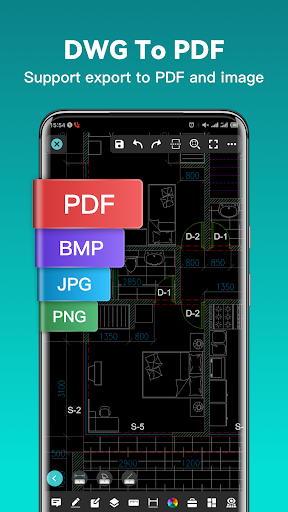
For sharing, exporting a drawing as a PDF, BMP, JPG, or PNG can be more useful than sending a CAD file to someone who only needs to see the result. I’d also use the measurement and text-finding tools for a specific question instead of trying to inspect everything at once. Those small, focused tasks play to the strengths of a mobile screen and keep a drawing review manageable.
More From Our News Desk

Zoom Meetings, Google Meet, or Teams: Which Is Easiest to Join?

How I Build a Free Streaming Lineup With Tubi

Why Crunchyroll Is the Default Anime App for So Many Fans

YouTube TV: A Practical Guide to Cutting Cable

Rummikub and the Small Comfort of Phone Games

TeamViewer Remote Control or AnyDesk for Helping Family?
Who will find it useful
I’d recommend DWG FastView to designers, technicians, students, and anyone who regularly receives DWG or DXF drawings and needs to inspect or adjust them away from a computer. Its measurement, editing, export, and 3D viewing options give it more reach than a read-only viewer. It should be especially appealing to someone who already understands CAD drawings and wants a portable way to handle smaller tasks.
It may be less comfortable for someone who only needs to glance at an occasional file, since the broader toolset can be more than that simple job requires. I’d also be cautious about relying on any phone app for extended, precision-heavy work that is easier to control on a larger screen. If your needs are mostly viewing, try a drawing you know well and see whether the controls suit your routine.
DWG FastView-CAD Viewer&Editor is a Productivity app from Gstarsoft Co., Ltd. On Google Play, it has over 10 million installs and a 3.8-star rating from about 114,000 ratings. The app is rated Everyone. It was released on May 14, 2013, and the current version shown in the supplied app details is 5.18.11.
The app is free to download and contains ads. It also offers in-app purchases, with listed items ranging from $0.49 to $69.99 each. The supplied details give an update date of October 20, 2026. Android version requirements can vary by release, so check the Google Play page for the requirement that applies to your device before installing.
A full CAD toolkit in your pocket
Getting started
My first impression is that this is more than a file-opening utility. The app’s pitch covers both familiar 2D drawings and 3D models, with viewing, editing, and conversion all part of the same package. That range is promising, but it also sets expectations: people who have never worked with CAD may need time to understand what the available tools are for.
One reassuring detail is that the app says registration isn’t needed to start, and that local drawings can be saved for offline use. For a first test, I’d open a drawing I already know, zoom around, and check whether its details display as expected. If a drawing uses uncommon fonts or symbols, the app describes importing or downloading those resources to help display them.
The everyday experience
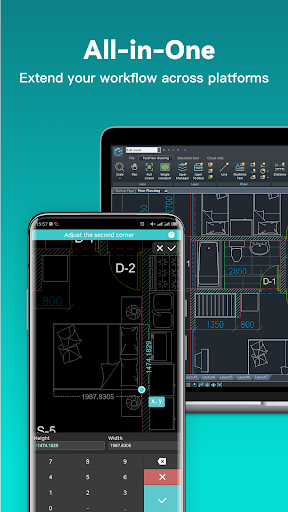
The central routine is straightforward to picture: open a DWG or DXF file, inspect its geometry, then measure or edit what needs attention. Two-finger zooming helps with the basic navigation, while the app also describes a magnifier for examining a touched area and snapping to objects. These controls matter because a drawing can be difficult to read when reduced to a phone-sized view.
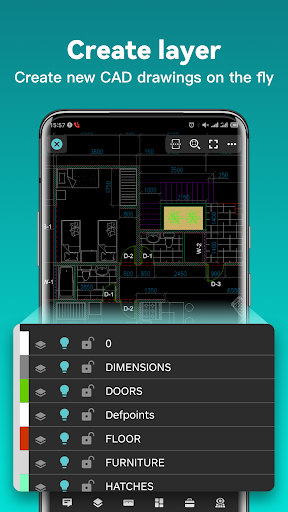
For a quick correction, the listed tools include moving, copying, rotating, scaling, changing color, and working with layers and layouts. More advanced options include trim, offset, dimensions, and text search. I like that the range addresses both navigation and actual edits, though I’d expect the experience to be most comfortable for targeted changes rather than a long session of detailed drafting.
A broad format range
The app’s strongest point is how many kinds of drawing work it aims to cover. It supports DWG and DXF, offers conversion between drawing versions, and can export to PDF, BMP, JPG, and PNG. The PDF export can be adjusted for paper size, orientation, and color, which gives a little more control over how a drawing is presented when the recipient doesn’t need an editable CAD file.
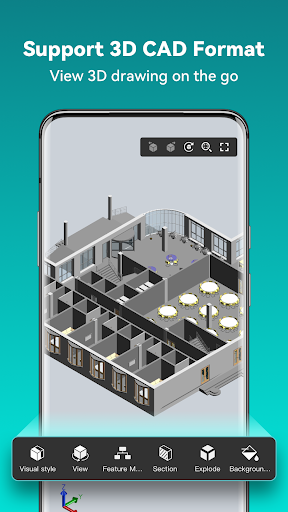
There’s also a substantial 3D side. The description names formats associated with tools such as Revit, Solidworks, NX, CATIA, Inventor, SolidEdge, and Creo, among others. For 3D models, it describes rotating, scaling, sectioning, and exploding assemblies, along with different visual modes and perspectives. That makes the app more versatile than a strictly 2D viewer, especially for people who need to inspect models on the move.
A practical review routine
For a small review task, I’d begin with one question: does a particular dimension look right, where is a note, or what needs changing? I’d open the drawing from its current location, use zoom and text search to find the relevant area, then measure or make a focused edit. Having a clear question keeps the work from becoming a slow attempt to navigate every layer and detail on a small screen.
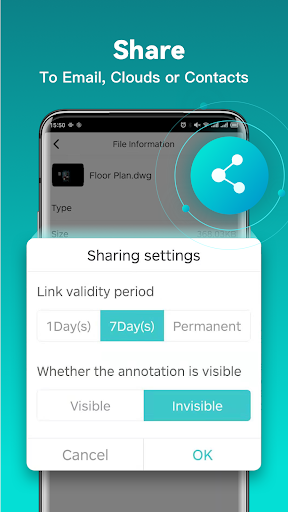
Once the review is done, I’d save the drawing locally if I might need it offline, or export a view as a common image or PDF for sharing. The app says drawings can also be opened and shared through services including Dropbox, OneDrive, Google Drive, Box, and WebDAV when connected to the internet. That combination gives the workflow a useful path from incoming file to checked, shareable result.
Keep the screen in mind
A phone is a convenient place to access a drawing, but it remains a small workspace. Pinching and magnifying help with detail, yet they don’t make a dense drawing as easy to understand as it may be on a larger display. I’d use the app for checking, measuring, and limited edits, then move to a desktop when a project calls for extended drafting or a broad view of several parts at once.
The toolset may also feel intimidating if CAD terms and drawing conventions are new to you. Some features are described as advanced, and the app offers Premium or Super subscription plans for advanced editing and tools. Since it contains ads and offers in-app purchases, anyone who wants a simpler, distraction-free viewer should consider whether this broader app matches their needs before settling into it.
DWG FastView-CAD Viewer&Editor is a capable mobile companion for people who work with CAD files and want more than a quick preview. I value its combination of 2D editing, measurement, export, offline access, and 3D viewing, along with the option to work with drawings from familiar cloud services.
I’d recommend giving it a try if you already handle CAD drawings and need occasional access or focused edits away from a computer. If you only need a basic viewer, or expect to do long, intricate drafting on a phone, its breadth may not be a good fit. Think of it as a practical tool for mobile CAD tasks, not a larger-screen replacement.
DWG FastView CAD Frequently Asked Questions
What is DWG FastView-CAD Viewer&Editor used for?
DWG FastView is used to open, view, edit, measure, and share CAD drawings, including DWG and DXF files. It also supports viewing a range of 3D model formats and exporting drawings to formats such as PDF, BMP, JPG, and PNG. It can suit someone who needs to check or make focused changes to a drawing away from a desktop.
Which devices support DWG FastView-CAD Viewer&Editor?
The supplied app information is for the Android version, which is distributed through Google Play. Its description also calls it cross-platform, but the device details here cover Android. The Android version requirement can vary by release and device, so check the Google Play page for the current requirement before installing.
What Android version does DWG FastView require?
The Android version requirement can vary with the app release and the device. Check the Google Play page for DWG FastView-CAD Viewer&Editor to see the minimum Android version currently shown for your phone or tablet. The app details identify version 5.18.11, but a version number by itself doesn’t determine which Android releases are supported.
Does DWG FastView-CAD Viewer&Editor cost money?
DWG FastView is free to download and contains ads. It also offers in-app purchases, with listed items ranging from $0.49 to $69.99 each; its description mentions Premium and Super subscription plans for advanced editing and tools. Prices and available purchase options may vary, so check the Google Play page for current details.
Is DWG FastView-CAD Viewer&Editor right for beginners?
It may suit beginners who need to view or share a drawing, but its broad set of CAD tools may take time to learn. I’d recommend it most to people who already recognize CAD drawings and need mobile access or focused edits. Someone seeking only a simple occasional preview may prefer a less involved viewer.
Pros
- Opens and edits DWG and DXF drawings, with tools for measuring, dimensions, layers, and text search.
- Exports drawings to PDF, BMP, JPG, and PNG for sharing beyond CAD workflows.
- Includes 3D model viewing tools alongside its 2D drawing features.
- Supports local offline work and opening drawings from several cloud services.
Cons
- A dense CAD drawing can be difficult to review comfortably on a phone screen.
- The wide range of advanced tools may feel overwhelming to occasional viewers or new CAD users.
- The free app contains ads and offers a broad range of in-app purchase prices.
- Category
- Productivity
- Version
- 5.18.11











