Divine Office
- 1.81K
- 4.8
- Installs
- 100.00K
- Price
- Free

Screenshots


Analysis by Reviewed APKs
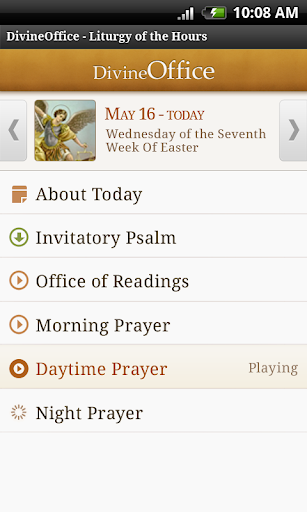
Divine Office brings the Catholic Liturgy of the Hours to a phone through daily prayer texts and audio. It suits people who want a structured way to pray alone while joining a tradition shared with others. I like its focused purpose: rather than trying to be a general spiritual library, it centers on the prayers for each day and makes them available in a format that can fit into an ordinary routine.
A prayer break in a busy day
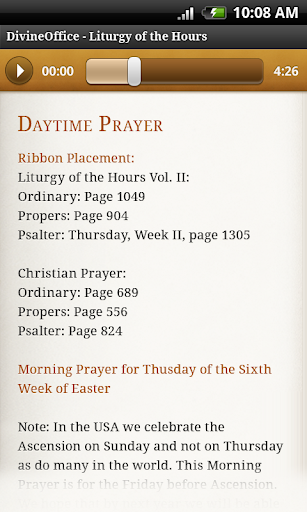
When I picture using Divine Office on a regular weekday, it is during a quiet pause between other commitments. I can open the app and follow the prayer text for the appropriate office, or listen to its audio when reading is inconvenient. That makes the app useful for someone who wants a guided structure without needing to gather a group or work out which prayers belong to the day.
The appeal is not that it turns a phone into a church service. It gives an individual a way to take part in the Liturgy of the Hours, a cycle of psalms, hymns and scripture used as public prayer in the Christian community. The app also shows locations of Christians praying at the same time, a thoughtful reminder that solitary use can still feel connected to a wider practice.
A focused alternative to prayer books
A printed breviary offers the same broad kind of material, but a reader must find and follow the right pages. Divine Office instead downloads the prayers appropriate to each office and day, including solemnities, feasts and memorials. That makes it a practical digital alternative for someone who wants the daily sequence in one place, particularly when carrying a book is not convenient.
It is not a broad reference shelf, a general meditation app or a substitute for every kind of Christian worship. Its center of gravity is the Roman Catholic Liturgy of the Hours, though the description says it is suitable for Christian traditions beyond Catholicism. If you mainly want informal devotional reading or a large range of unrelated religious resources, this narrower focus may not match your needs.
Small habits that help
I would get the most from Divine Office by tying it to a moment already present in the day: a quiet start in the morning, a lunch break or the wind-down before bed. Opening the relevant office at roughly the same time makes the app feel less like another task and more like a repeatable pause. The daily selection means I do not have to assemble a prayer sequence myself.
Audio is especially handy when my attention is divided or my hands are occupied, while text works better when I want to move at my own pace. I would also take a moment to look at the simultaneous-prayer locations when the sense of shared practice matters. Those are modest habits rather than elaborate setup, which suits an app whose purpose is to help make prayer part of an ongoing routine.
More From Our News Desk

Zoom Meetings, Google Meet, or Teams: Which Is Easiest to Join?

How I Build a Free Streaming Lineup With Tubi

Why Crunchyroll Is the Default Anime App for So Many Fans

YouTube TV: A Practical Guide to Cutting Cable

Rummikub and the Small Comfort of Phone Games

TeamViewer Remote Control or AnyDesk for Helping Family?
Who may find it useful
I would recommend Divine Office to Catholic readers who want access to the daily Liturgy of the Hours without carrying a physical prayer book everywhere. It also makes sense for Christians from other traditions who are interested in this form of structured prayer. The combination of text and audio gives people a choice in how they participate, and the daily selection takes some of the navigation work out of following a changing calendar.
It may be a poor fit for someone looking for a broad collection of unrelated prayers, a social discussion space or a highly customizable spiritual planner. The material is organized around a particular liturgical tradition, so users who prefer completely free-form prayer may not want that structure. I would also suggest trying the audio and text approach to see which feels comfortable; the app's core value is participation, not a feature-heavy toolkit.
Divine Office is made by Divine Office, Catholic Ministry. On Google Play, it has over 100,000 installs and a 4.8-star rating from about 1,800 ratings. The app is free, with no in-app purchases and no ads. Google Play gives it an Everyone content rating, making its store classification straightforward for a general audience.
The current version shown is 1.4.9. Divine Office first appeared on May 13, 2011, and its last update is dated November 3, 2026. The app automatically downloads the prayers for each office and day, including solemnities, feasts and memorials. A minimum Android version is not provided in the available app details, so check Google Play for device compatibility.
Making the Hours Part of Daily Life
A straightforward first impression
When I first opened Divine Office, what stood out was how clearly its purpose is defined. This is an app for following the Liturgy of the Hours, with the day's prayers available as text and audio. It does not need to explain itself through a long list of different activities. That focus is reassuring for a first-time user who wants to get to the prayer rather than browse a catalogue.
Getting into the daily material is helped by the app's automatic handling of the appropriate prayers for each office and date. In practice, that removes one possible obstacle: having to work out the sequence or locate a different set of pages for a feast or memorial. The result is a more direct starting point, especially for someone who is learning how this prayer cycle is arranged.
The daily prayer experience
The basic experience is built around the text and audio of daily prayers. I can imagine choosing text when I have a quiet minute and want to read carefully, then using audio when I would rather listen. Neither mode changes the app's central purpose; both make the same structured practice available in different everyday circumstances.
That flexibility matters because a prayer routine rarely happens under identical conditions. A calm morning at home is different from a short pause during a busy day. Divine Office offers a way to keep the same general practice in both situations, without requiring the user to rely on memory for the day's material. Its strength is convenience in service of a specific devotional routine, not novelty for its own sake.
A sense of praying together
The feature that most distinctly broadens the experience is the view of locations where other Christians are praying at the same time. I like the idea because it addresses a real feeling that can come with praying alone: the routine may be personal, but it is also part of a shared practice. The app makes that connection visible without making social interaction the main event.
The daily calendar coverage is another practical strength. Prayers are automatically downloaded for each office and day, with solemnities, feasts and memorials included. That matters to anyone following a liturgical cycle, because the material is not simply a static collection of generic readings. The combination of the day-specific selection, audio and text gives the app a clear role as a companion to the Hours.
A routine that can travel
For a workable routine, I would choose one office that naturally fits an existing part of my day instead of expecting to use every opportunity immediately. A morning prayer before checking messages, for example, creates a clear boundary. On days when reading is awkward, audio gives me another way to participate. The point is to make the practice repeatable, not to turn the app into a source of pressure.
Over time, I would use the app's daily selection as a cue: open the relevant prayers, follow the text or listen, then return to the day. If I am curious about the wider community aspect, I can also view where others are praying at that moment. These are simple steps, but they reflect the app's strongest idea: support a regular form of prayer in a way that can fit around ordinary life.
Keep its scope in mind
Divine Office is deliberately centered on the Liturgy of the Hours, so its narrowness is both a benefit and a limitation. Someone who wants that particular daily prayer practice gets a focused tool. Someone hoping for many kinds of devotion, study material or general religious reference may find the app's remit too specific. It is best approached as a digital prayer book rather than an all-purpose faith companion.
The description identifies the prayers as the official text and audio of the Roman Catholic Church's Liturgy of the Hours and says they are suitable for all Christian faith traditions. That does not mean every tradition will use the same liturgical structure. Prospective users should consider whether this form of prayer is what they want. The app's value depends more on that fit than on the number of features it offers.
Divine Office succeeds by making a defined, substantial prayer practice easier to access day by day. The text and audio give it flexibility, while the automatic daily selection removes some of the work of finding the right material. I also appreciate the small but meaningful reminder that other people may be praying at the same time.
I recommend it to people who want the Liturgy of the Hours close at hand, especially those who value a steady routine that can work with reading or listening. It is less suited to people seeking a wide-ranging religious resource or an informal, unstructured devotional app. If the Hours are what you are looking for, Divine Office keeps its attention in the right place.
Divine Office Frequently Asked Questions
What is Divine Office used for?
Divine Office provides text and audio for daily prayers from the Liturgy of the Hours of the Roman Catholic Church. It automatically downloads the appropriate prayers for each office and day, including solemnities, feasts and memorials. The app is intended to help people take part in this structured form of prayer, whether they read the text or listen to the audio.
Which phones and devices support Divine Office?
Divine Office is available for Android through Google Play. The available app details do not specify a minimum Android version, and compatibility can vary by device and software version. Check the Google Play store page on your device for current requirements before installing. The provided information describes an Android app and does not establish availability on other platforms.
Does Divine Office cost money or include purchases?
Divine Office is free on Google Play. The available app facts say it has no in-app purchases and contains no ads. Store details can change over time, so it is sensible to check the current Google Play page for the latest cost information. Its main offering is access to the daily prayer text and audio.
What Android version does Divine Office require?
The minimum Android version is not specified in the app details provided here. Requirements may vary as the app and Android devices change, so check Google Play for the current compatibility information shown for your phone or tablet. The app's listed version is 1.4.9, but that does not by itself indicate which Android versions it supports.
Is Divine Office suitable for non-Catholic Christians?
The app's description says it is suitable for all Christian faith traditions, while its content follows the Roman Catholic Liturgy of the Hours. That makes it worth considering for Christians interested in this particular structured prayer practice, even if they are not Catholic. It may be less suitable for people who want prayers organized around a different tradition or prefer an unstructured approach.
Pros
- Daily prayers are automatically selected for each office, including solemnities, feasts and memorials.
- Text and audio offer two practical ways to follow the Liturgy of the Hours.
- A view of simultaneous prayer locations adds a sense of shared practice.
- Free to use, with no ads or in-app purchases.
Cons
- Its focus on the Liturgy of the Hours may not suit every devotional routine.
- The app's specialized scope may feel limited to users seeking broader religious resources.
- A minimum Android requirement is not provided in the available app details.
- Category
- Books & Reference
- Version
- 1.4.9











