Autodesk Fusion
- 4.91K
- 1.5
- Installs
- 1.00M
- Price
- Free

Screenshots
Analysis by Reviewed APKs
Autodesk Fusion is a mobile companion for viewing and sharing 3D CAD projects, not a replacement for designing them on a desktop. I found its appeal clearest for people who need to check a model, inspect an assembly or discuss a design while away from their main workstation. It keeps useful project context close at hand, though its value depends on already working with Fusion and having designs to review.
A model check between meetings
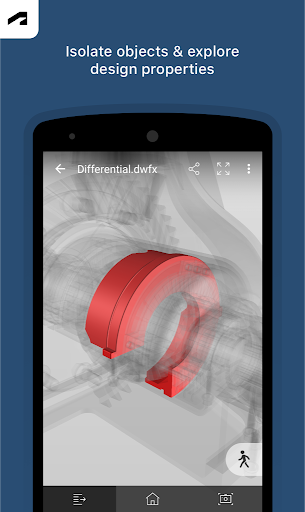
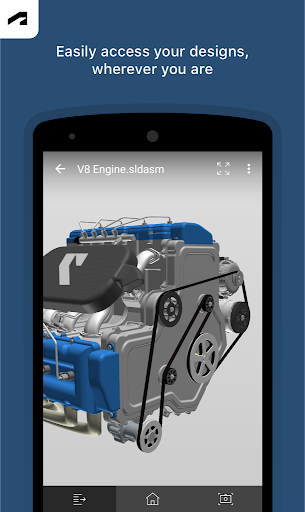
When I imagine using Autodesk Fusion in a normal workday, the useful moment is a quick design check away from my desk. A colleague or client asks about a part, and I can open the project on my Android device, rotate the model with touch controls, and zoom in on the area we are discussing. I can also hide or isolate components, which helps make a busy assembly easier to inspect without needing the desktop in front of me.
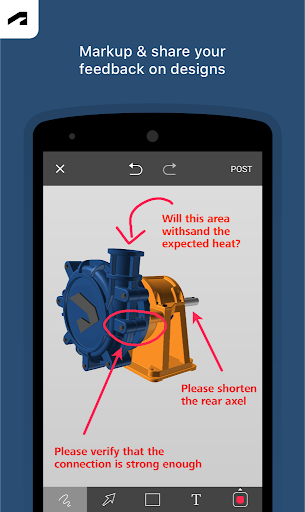
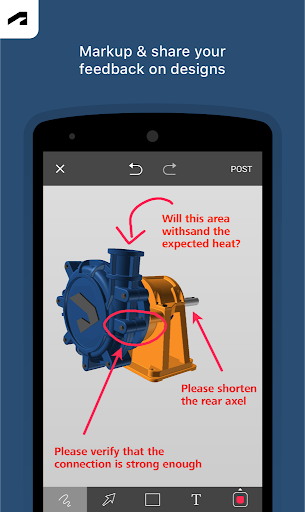
The app supports viewing project activity and updates, along with design properties and complete parts lists. That makes it more than a lightweight model viewer: there is context to check alongside the shape itself. If a discussion needs a visual reference, I can share a screenshot with markups from the app. For a quick conversation about what a design looks like or which components it contains, those tools make a phone or tablet genuinely useful.
A companion, not a CAD desk
Autodesk Fusion makes most sense beside its cloud-based desktop companion, which Autodesk describes as a 3D CAD, CAM and CAE tool for product design and development. The Android app is the mobile side of that relationship: it helps me view, share and collaborate on designs, rather than taking over the work of creating and developing them. That distinction matters if I am comparing it with a full desktop CAD workspace.
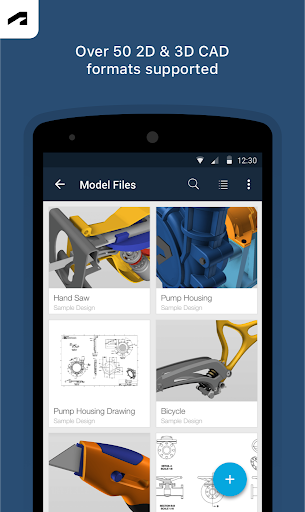
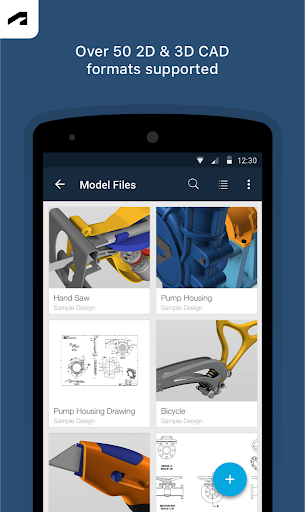
It can also handle more than 100 file formats, including familiar formats such as DWG, STEP, STL and SLDPRT. That breadth is useful when a project involves files from different sources, but the app still focuses on viewing and collaboration. I would not choose it as a general-purpose drawing app, a standalone 3D modeling tool or a substitute for desktop design work. Its purpose is narrower and more practical.
Small habits that help
I would get the most from the app by treating it as a project check-in tool. Before a conversation, I can open the relevant design, inspect its parts list and properties, and look at recent project activity. That keeps the model and its surrounding information together when I need to answer a straightforward question. It is a modest routine, but it is more useful than opening a file only to spin it around.
For a complicated assembly, I would use isolate and hide controls deliberately, then adjust the view with touch-based zoom, pan and rotation. If a detail needs discussion, a screenshot with markups can make the point clearer than a verbal description alone. The app also supports offline data storage if needed, so keeping data available on the device can be part of a workflow when connectivity is a concern.
More From Our News Desk

Zoom Meetings, Google Meet, or Teams: Which Is Easiest to Join?

How I Build a Free Streaming Lineup With Tubi

Why Crunchyroll Is the Default Anime App for So Many Fans

YouTube TV: A Practical Guide to Cutting Cable

Rummikub and the Small Comfort of Phone Games

TeamViewer Remote Control or AnyDesk for Helping Family?
Who will find it useful
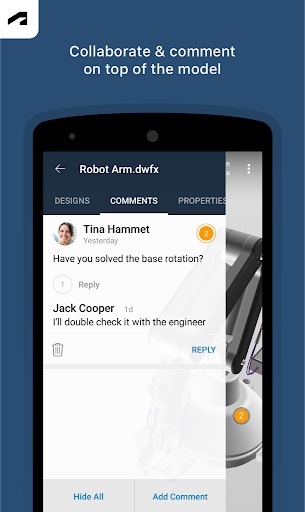
I would recommend Autodesk Fusion to people who already use the desktop Fusion product and regularly need to check designs away from their computer. Product teams, collaborators and clients can use it to inspect models, follow project updates and discuss a visual detail. The broad file-format support may also be handy when someone needs to view a design shared in a format beyond Autodesk’s own F3D files.
It is less compelling for someone who wants to build 3D models entirely on a phone, or who has no reason to review CAD projects. The app is built around viewing and collaboration, so it will not replace a desktop design workflow. Anyone unsure whether their device or file needs fit should check the Google Play details and the app’s current requirements before relying on it for a particular project.
Autodesk Fusion is made by Autodesk Inc. On Google Play, it has over 1 million installs and a 1.5-star rating from 4,911 ratings. The app is free to download, with no in-app purchases or ads. Its content rating is Everyone. Those store figures provide a quick snapshot, while the app’s practical fit depends more on whether you need mobile access to 3D design projects.
The supplied app details give version 2.9.8, a release date of July 2, 2015, and a last-updated date of October 21, 2026. The minimum Android version is not specified in the details available for this review, so check Google Play for the current device requirements. Autodesk describes the app as working with its cloud-based desktop Fusion product.
A practical window into 3D projects
First look and setup
When I first opened Autodesk Fusion, the defining idea was clear: this is a mobile window into design work, rather than a pocket-sized version of a full CAD workstation. The app is designed to connect with Fusion projects and make them available for review and collaboration. That framing helps set expectations. I would approach it with a project already in mind, not as an app to explore for casual 3D modeling.
The app can use an Autodesk account, and its description says Android Account Manager access helps manage that account and connect other Autodesk applications. Storage can be used for offline data, while photo access can support viewing, sharing and marking up files on the device. Camera access is optional for taking pictures, such as drawings. The app still functions if a user declines those permissions.
Everyday model review
The core experience is hands-on inspection. I can use touch gestures to zoom, pan and rotate a 3D model, which suits quick checks on a phone and closer inspection on a larger screen. For assemblies, hiding or isolating components offers a straightforward way to focus on one part at a time. That is useful when the overall model is visually crowded or when a conversation is about a particular piece.
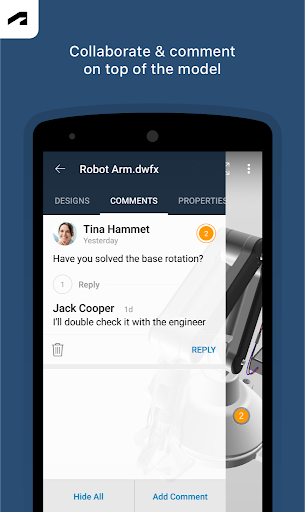
I also like that the review can include more than geometry. The app can show design properties, complete parts lists, and project activity and updates. Those details give a collaborator a way to orient themselves before commenting or sharing a view. It is still a review-oriented experience, but the extra context makes it easier to use the app for a purposeful project check rather than just a quick look at a rendered shape.
Broad file support
A standout capability is support for more than 100 data formats. The examples include DWG, SLDPRT, SAT, IGES, STEP, STL, OBJ, F3D, SMT and DFX, as well as additional formats named in the app description. That range gives the app a role in mixed-file conversations, where a team may need to share or inspect designs that did not all originate in the same format.
The other notable strength is built-in sharing for collaboration with people inside or outside a company. I can share a screenshot of a design with markups directly from the app, which is a practical way to point out a detail. Alongside model navigation and project updates, that creates a compact review toolkit. Autodesk does not present it as a full design authoring environment, and the feature set described stays focused on review and sharing.
A useful review routine
A simple routine could start with checking project activity to see what has changed, then opening the relevant model and inspecting the parts list or properties. If the design is an assembly, I would hide or isolate components to keep the view focused. That sequence makes sense before a meeting or during a quick exchange with a teammate, when I need enough context to discuss the design without settling in for a full desktop session.
For a specific point, I would adjust the view until the relevant part is clear and share a marked-up screenshot. That gives the other person a visual reference to discuss. If I expect to be away from a reliable connection, the app’s offline data storage option may also help keep data available on the device. I would make that choice around the project and situation, rather than assuming every file is already stored offline.
Limits to keep in mind
The clearest limit is that Autodesk Fusion is not described as a place to create or develop CAD models from scratch. Its job is to let users view, manage and collaborate on designs associated with the desktop product. If my main goal were to do detailed modeling, CAM or CAE work, I would look to the desktop Fusion environment rather than expect the Android app to provide that full experience.
The app also depends on having relevant design files or projects to review, so it may offer little to someone outside a CAD workflow. Its Google Play rating is 1.5 stars from 4,911 ratings, a low score worth keeping in perspective when deciding whether to try it. The best test is whether its viewing, project-context and sharing tools match a real need in your own workflow.
Autodesk Fusion has a clear, useful role: it brings model inspection and collaboration to Android when I cannot or do not need to sit at my desktop. File-format support, project context and marked-up screenshot sharing give it more substance than a bare 3D viewer, while its mobile focus keeps the experience specific.
I would recommend it to existing Fusion users and collaborators who need to review designs on the move. I would skip it if I wanted a standalone mobile modeling app. The low Google Play rating is worth weighing, but the app’s focused feature set may still suit a particular team workflow.
Autodesk Fusion Frequently Asked Questions
What is Autodesk Fusion used for?
Autodesk Fusion for Android is used to view and collaborate on 3D CAD designs. It supports model navigation, project activity and updates, design properties, parts lists, hiding or isolating components, and sharing screenshots with markups. It works alongside Autodesk’s cloud-based desktop Fusion product rather than serving as a complete mobile design workspace.
Which devices can run Autodesk Fusion?
Autodesk Fusion is an Android app. The minimum Android version is not specified in the information for this review, so it is worth checking Google Play for current device requirements before installing. The app description also says it can store offline data if needed, so designs may be available to view on the device when offline data has been stored.
Is Autodesk Fusion free, and does it have purchases?
The Android app is free to download. The supplied details say it has no in-app purchases and contains no ads. It is designed to work with Autodesk’s companion cloud-based desktop Fusion product, so anyone considering the wider desktop workflow should check the relevant product information for details that may vary.
Can Autodesk Fusion create 3D models on Android?
The app is presented as a tool for viewing, sharing and collaborating on Fusion CAD models, including designs in more than 100 file formats. Its described features cover inspection, project context and marked-up screenshot sharing, not full model creation. For CAD, CAM and CAE product design and development, Autodesk points to its cloud-based desktop Fusion product.
Who is Autodesk Fusion best suited to?
It is best suited to people who need to inspect or discuss CAD projects on an Android device, especially those already working with Autodesk Fusion on desktop. It may not suit someone looking for a standalone mobile modeling tool or with no CAD projects to review. Whether a particular device and project workflow fit is worth checking in Google Play.
Pros
- Supports more than 100 formats, including common CAD and 3D file types.
- Touch controls make it easy to zoom, pan and rotate models.
- Includes project activity, properties, parts lists and component isolation.
- Lets users share design screenshots with markups directly from the app.
Cons
- Focused on viewing and collaboration, not full mobile CAD authoring.
- Most useful when you already have Fusion projects or CAD files to review.
- Its Google Play rating is low, at 1.5 stars from 4,911 ratings.
- Category
- Productivity
- Version
- 2.9.8











