Amtrak
- 48.65K
- 4.2
- Installs
- 5.00M
- Price
- Free

Screenshots
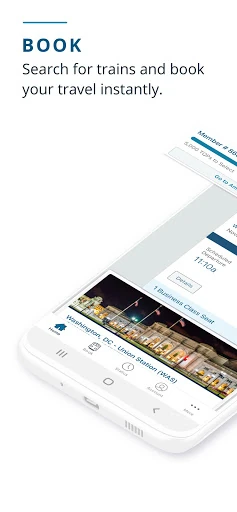
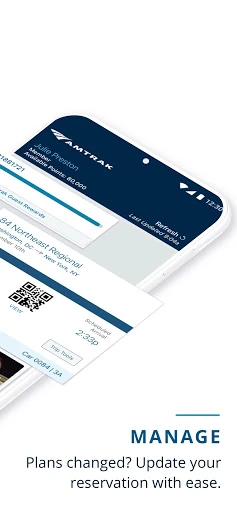
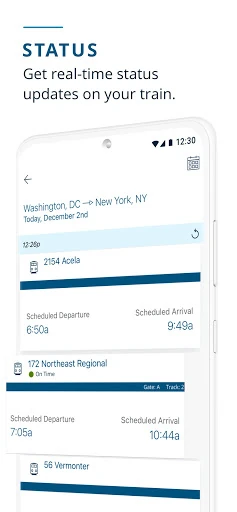
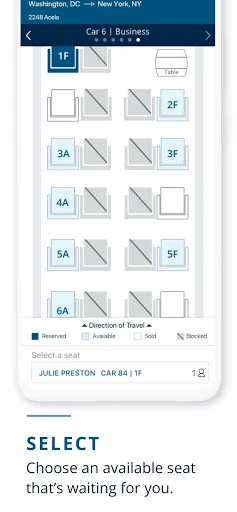
Analysis by Reviewed APKs
Amtrak is a travel app for people booking or taking Amtrak train trips. I found its main appeal in keeping a few useful parts of a journey together: buying tickets, checking train status, finding station information, and showing an eTicket onboard. It suits occasional riders as well as people who travel regularly. My overall take is practical: it handles the basics that matter before and during a train trip without trying to replace every travel-planning tool.
From Booking to Boarding
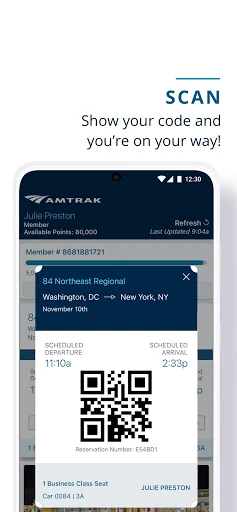
When I first opened Amtrak, I pictured a familiar travel-day problem: I’m heading to the station, trying to remember where I put my ticket while also wondering whether the train is running on time. The app brings several relevant tasks into one place. I can purchase a one-way or roundtrip ticket, check train status, and pull up an eTicket to show onboard. That makes it useful before departure and at the moment I need to board.
The same setup can help with longer-term travel, too. Amtrak supports multi-ride and monthly tickets, so someone commuting or making repeat trips can use it for more than a single vacation booking. I can also look up station information and manage my account profile. Rather than treating the app as a general trip diary, I think of it as a practical companion for the Amtrak-specific details that can otherwise get scattered across a booking process and a travel day.
A Train Trip Companion
Compared with a general travel-planning app, Amtrak has a narrower job. Its useful territory is buying Amtrak tickets, keeping track of train status, finding station information, and presenting the ticket onboard. If I’m deciding which city to visit, comparing train travel with flights, or organizing activities after arrival, I’d still need other tools for those broader plans. The app is most valuable once an Amtrak journey is already on my mind.
It also isn’t a substitute for the train journey itself or a promise that every travel question can be handled in one screen. Its listed features focus on bookings, tickets, train status, station details, and account management. That focus is a plus when I want a clear place for the essentials, but it may feel limited to someone looking for a comprehensive itinerary manager or information about transportation beyond Amtrak.
Small Habits That Help
I’d make checking the train status part of my routine on travel day rather than relying only on an earlier glance. The app includes a train-status feature, giving me a place to check the information connected to my trip. I’d also open the eTicket before reaching the boarding moment, especially if I’m juggling a bag or moving through a busy station. A quick preparation step can make the handoff from waiting to boarding feel less rushed.
For booking, saving a credit card can make checkout quicker, according to the app’s feature description. I’d also keep my account profile current and consider whether a multi-ride or monthly ticket suits repeat journeys. Those are small choices rather than complicated systems, but they help the app fit different travel patterns. For an occasional trip, the simple ticket-and-status routine is probably enough; frequent riders may get more value from its pass options.
More From Our News Desk

Zoom Meetings, Google Meet, or Teams: Which Is Easiest to Join?

How I Build a Free Streaming Lineup With Tubi

Why Crunchyroll Is the Default Anime App for So Many Fans

YouTube TV: A Practical Guide to Cutting Cable

Rummikub and the Small Comfort of Phone Games

TeamViewer Remote Control or AnyDesk for Helping Family?
Who Will Find It Useful
I’d recommend Amtrak to anyone who expects to book or take an Amtrak train and wants a convenient way to manage the ticket side of the trip. It covers the practical moments I care about: purchasing several ticket types, checking train status, finding station information, and presenting an eTicket without printing. Riders who use multi-ride or monthly tickets may also appreciate having those options included alongside one-way and roundtrip purchases.
It may be less useful if you rarely travel by Amtrak or want one app to plan every part of a vacation. The described tools center on Amtrak travel, rather than broad destination research or a general-purpose itinerary. I’d treat it as a focused companion, not a replacement for every travel resource. For someone who simply needs a ticket and a way to check train details, that focus is sensible rather than a drawback.
Amtrak is published by Amtrak and is listed in the Travel & Local category on Google Play. The app has more than 5 million installs and a 4.2-star rating from around 48,700 ratings. It is free to download. The store information says it contains no ads and offers no in-app purchases, so there are no app purchase options reported beyond the free download.
The listed content rating is Everyone. The current listed version is 6.1.8, with a release date of September 28, 2012, and a last update date of October 5, 2026. The minimum Android version is not included in the available app details, so check the Google Play page on your device for the requirement that applies to your phone.
A Closer Look at the Travel-Day Details
A Straightforward First Visit
My first impression is that Amtrak is organized around recognizable travel needs rather than a long list of abstract planning tools. The app description points to ticket purchases, eTickets, train status, station information, and account controls. That gives me a clear sense of why I’d open it: I’m planning an Amtrak trip or dealing with one already booked. It doesn’t need to be a complicated concept to earn a spot on my phone.
Getting started makes the most sense when I have a specific trip in mind. I can use the app to buy a ticket, and the available options include one-way, roundtrip, multi-ride, and monthly tickets. It also supports saving credit cards for quicker checkout. I’d take a moment to review my account profile as part of setup, since the app includes profile management. Those basics make the app more useful when travel plans move from idea to booking.
Useful on the Travel Day
The day-to-day value is less about spending time in the app and more about having it ready at the right moments. Before leaving, I can check train status and look up station information. Once onboard, the app can display an eTicket, including multi-ride and monthly passes. That combination covers several small points of friction: confirming the train details, orienting myself around a station, and having the ticket available when it is needed.
I like that the ticket function is described as an alternative to printing. For a trip where I already carry a phone, showing an eTicket is a straightforward way to keep the booking accessible on the device. I’d still make sure I can reach the ticket before I’m at the boarding point. The app’s role is practical rather than theatrical: it helps me handle a few essential trip tasks without turning every minute of the journey into screen time.
Ticket Choices and Account Tools
The range of ticket types is one of the more useful details. Amtrak supports one-way and roundtrip purchases, along with multi-ride and monthly tickets. That means the app’s booking side can serve a single planned outing as well as repeated travel. The option to use Amtrak Guest Rewards points is also included, giving eligible users another way to make a purchase. I appreciate that these choices are part of the described experience rather than assuming every rider books the same way.
Account features add a little convenience around the transaction. The app lets users edit and manage an account profile and save credit cards for faster checkout. I see those as supporting details, not the reason to choose the app on their own. But when I’m already booking a ticket, having profile and payment management in the same travel app can reduce the number of separate steps I need to handle.
A Simple Journey Routine
For a typical trip, I’d start by choosing the ticket type that fits the journey and completing the purchase in the app. If I expect to travel more than once, I’d consider whether a multi-ride or monthly ticket is relevant instead of treating every trip as a separate one-way booking. Since the app supports purchases with dollars or Amtrak Guest Rewards points, I’d also check which of those options makes sense for my account before finishing checkout.
On the day itself, I’d check train status, use station information when I need it, and bring up the eTicket when boarding. That’s a modest routine, but it covers the main reasons I’d want the app close at hand. I wouldn’t spend time trying to make it into a full travel planner. Keeping it focused on the booking and rail details makes the app easier to remember and more useful when I’m in a hurry.
Keep the Scope in Mind
The main limitation is also the app’s defining boundary: it is built around Amtrak travel. Its described features don’t make it a general destination guide or an all-purpose transportation planner, so I’d pair it with other resources if I needed those kinds of plans. Riders who rarely take Amtrak may not have much reason to keep it installed between trips. Its value depends on whether its specific travel tools fit a person’s routine.
I’d also keep the phone requirement in mind before installing. The available details do not state a minimum Android version, so it is worth checking the Google Play page for the requirement that applies to a particular device. Beyond that, the listed features are easy to understand, but each traveler’s needs differ. Someone who wants Amtrak tickets and train information in one app may find it useful; someone expecting a complete travel-planning suite may want more.
Amtrak makes a good case for itself through practical coverage rather than an expansive feature list. Booking several kinds of tickets, checking train status, finding station information, managing an account, and showing an eTicket are all relevant to the same journey. I’d be comfortable recommending it as a focused travel companion for people who ride Amtrak.
If you take Amtrak regularly, the multi-ride and monthly ticket options make it worth a closer look. For an occasional passenger, the ticket and travel-day basics may be enough. I wouldn’t choose it as my only travel-planning app, but for Amtrak-specific tasks, it brings the important pieces together.
Amtrak Frequently Asked Questions
What is the Amtrak app used for?
The Amtrak app is for handling Amtrak travel tasks. Users can purchase one-way, roundtrip, multi-ride, and monthly tickets, show an eTicket onboard, check train status, and find station information. It also includes account profile management and saved credit cards for quicker checkout. Its focus is Amtrak journeys rather than general travel planning.
Which devices can run the Amtrak app?
The app is listed for Android on Google Play. The available details do not provide a minimum Android version, so the requirement for a particular phone may vary and is worth checking on the Google Play page. The listed information does not describe versions for other platforms.
Does the Amtrak app cost money?
The app is free to download on Google Play, and the store details report no ads and no in-app purchases. Tickets can be purchased through the app, but the cost of travel is separate from downloading the app and depends on the ticket being bought. Check the store and booking details for current information.
Can I show tickets in the Amtrak app?
Yes. The app supports showing an eTicket onboard, including multi-ride and monthly passes, so a printed ticket is not required for that listed ticket feature. It also supports purchasing several ticket types in the app. I’d open the ticket before reaching the boarding moment so it is ready when needed.
Is the Amtrak app a good fit for occasional travelers?
It can suit occasional travelers who want to book an Amtrak ticket, check train status, find station information, and keep an eTicket on their device. It may be less useful for people who rarely use Amtrak or want one app for every part of a trip. Its tools are specifically centered on Amtrak travel.
Pros
- Supports one-way, roundtrip, multi-ride, and monthly ticket purchases.
- Lets riders show eTickets onboard instead of printing them.
- Includes train status and station information for travel-day planning.
- Offers account management and saved cards for quicker checkout.
Cons
- Its features are focused on Amtrak rather than general travel planning.
- The available app details do not state a minimum Android version.
- Travelers who rarely use Amtrak may have little need for it.
- Category
- Travel & Local
- Version
- 6.1.8











