Allegiant
- 17.02K
- 3.3
- Installs
- 5.00M
- Price
- Free

Screenshots
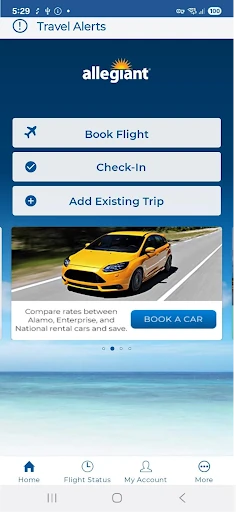
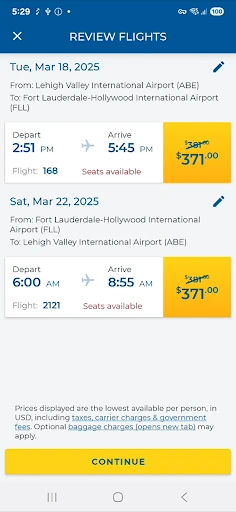
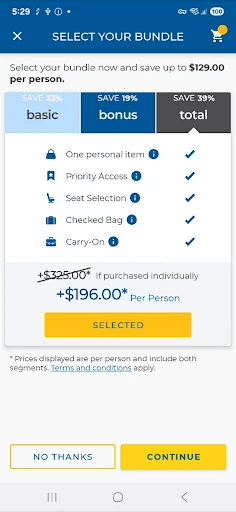
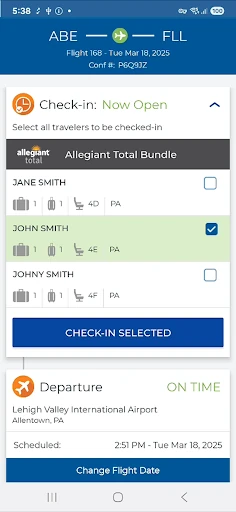
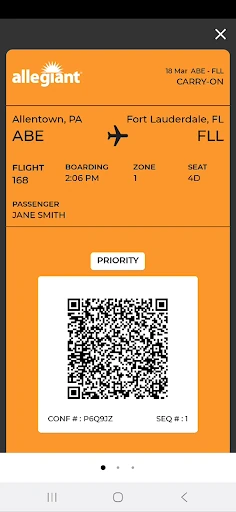

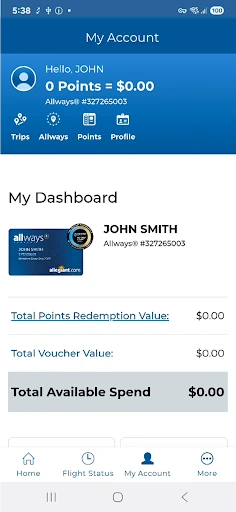
Analysis by Reviewed APKs
Allegiant is a travel app for booking flights and keeping track of an Allegiant trip from check-in through arrival. I’d recommend it most to people already flying with the airline, especially anyone who wants their itinerary, boarding pass and flight updates together on a phone. Its trip-card approach gives the journey a clear structure, though its usefulness is naturally tied to Allegiant travel.
A trip, one card at a time
Picture a travel day with an early flight and a few details to keep straight. I’d open Allegiant and look at the upcoming trip, then use its timeline of cards to follow each part of the journey. The app describes cards for tasks such as checking in, viewing a boarding pass and checking departure or arrival information. That step-by-step framing is more helpful than trying to remember which task comes next.
The practical appeal is having trip information and actions gathered in one place. If I needed to check in, I could tap the relevant card and follow its instructions; at the airport, I could display the boarding pass in the app. Flight-status notifications can also flag important updates. It is a focused travel companion rather than a general trip organizer, but for an Allegiant itinerary that focus can reduce the number of things I need to juggle.
An airline companion, not a travel hub
Compared with a general travel-planning app, Allegiant is narrower and more directly tied to the airline. It lets passengers book flights, review upcoming trips, check in, access boarding passes and manage certain trip extras. That makes it a practical place to handle the airline-specific parts of a journey. I wouldn’t treat it as a universal travel wallet or expect it to organize travel booked with other airlines.
It also isn’t a substitute for every part of vacation planning. The supplied feature information focuses on flights and managing an Allegiant trip, rather than broad destination research or coordinating an entire itinerary across providers. I’d use it alongside whatever tools I already rely on for other travel arrangements. If I’m not flying Allegiant, the app’s main purpose has little to offer me; if I am, its focused approach makes sense.
Small habits for travel day
One useful habit is to review the upcoming trip before travel day, rather than waiting until I’m heading out the door. Allegiant can show upcoming trips, and a My Allegiant account can automatically download trips to the phone. I’d check that the itinerary is available ahead of time, then revisit the trip cards as each task becomes relevant. That gives me a simple sequence to follow without turning the app into a complicated planning project.
I’d also make a point of checking the app for flight-status notifications and opening the relevant trip card when I need an update or action. If I want to change the trip’s arrangements, the app supports viewing and adding seats, purchasing bags and upgrading to Priority Boarding. Those options are useful to know about, but I’d review any decisions carefully before proceeding. The app’s self-service functions are most useful when I use them for a specific trip need.
More From Our News Desk

Zoom Meetings, Google Meet, or Teams: Which Is Easiest to Join?

How I Build a Free Streaming Lineup With Tubi

Why Crunchyroll Is the Default Anime App for So Many Fans

YouTube TV: A Practical Guide to Cutting Cable

Rummikub and the Small Comfort of Phone Games

TeamViewer Remote Control or AnyDesk for Helping Family?
Who will get the most from it
I’d recommend Allegiant to passengers who have booked, or plan to book, an Allegiant flight and want a mobile way to follow the trip. The combination of trip cards, check-in instructions, boarding-pass display and flight-status notifications is aimed at the ordinary needs of an airline journey. Occasional vacation travelers can benefit too: the app’s structure is easy to understand without needing to be a frequent flyer.
It may not suit someone looking for a single app to manage flights across several airlines or organize every detail of a vacation. Its value depends on having an Allegiant trip, and the supplied description centers on that airline’s services. I’d also avoid choosing it as a destination-discovery tool; the most clearly supported jobs are booking flights and managing an existing journey. For those purposes, its airline-specific focus is a reasonable trade-off.
Allegiant is developed by Allegiant Travel Company. On Google Play, it has over 5 million installs and a 3.3-star rating from about 17,000 ratings. The app is free to download, and the supplied store facts say it contains no ads and offers no in-app purchases. Its content rating is Everyone.
The current listed version is 7.8.16, last updated February 2, 2026. It requires Android 6.0 or later. These details describe the Android app; the release date is not included in the available facts.
A closer look at the travel workflow
A clear starting point
When I first consider opening Allegiant, its purpose is easy to grasp: it is there to book flights and help manage a trip with the airline. The main idea is not a sprawling dashboard of unrelated travel services, but a journey represented as a sequence of cards. That gives the app a practical starting point for someone who wants to get from booking to boarding without hunting through separate sections.
The app supports automatic trip downloads when a passenger is logged into a My Allegiant account. That can make the trip easier to find again on a phone. I’d start by checking that my upcoming journey appears, then use the cards as a guide to what I can do next. The setup described is tied to an account and a trip, rather than a lengthy process of building a travel plan from scratch.
Following the journey
Day to day, the timeline is the feature that gives the app its shape. Each phase of a trip appears as a card, and tapping a card brings up instructions for managing that part of the journey. I like that this is organized around the traveler’s progress rather than a generic collection of airline links. It gives a passenger a direct route to tasks such as check-in and boarding-pass display.
Departure and arrival information is also part of the trip experience, while important flight-status notifications can help passengers keep up with changes. I’d use those functions as supporting information during travel, not as a reason to stop paying attention to airport announcements or other instructions. The app puts useful details within reach, but its strongest role is helping a passenger access Allegiant trip information and actions on a mobile device.
Useful trip controls
The ability to book flights in the app is a meaningful addition to its trip-management tools. After booking, passengers can review upcoming trips, and those signed into My Allegiant can have trips downloaded automatically. That makes the app relevant both before a journey is arranged and after it is on the calendar, while keeping the supported focus squarely on Allegiant travel.
There are also options to view or add seats, purchase bags and upgrade to Priority Boarding. These are concrete self-service tasks, not general travel-planning features. I’d value having them available from the trip context, where they relate to a specific journey. The app also invites passengers to provide feedback about their Allegiant experience, rounding out a set of airline-focused functions without suggesting that it can manage every travel provider.
A simple travel-day routine
For a practical routine, I’d look over the upcoming trip before leaving home and use the app’s cards to see which actions are available. If check-in is the next task, I’d open that card and follow its instructions. Before heading to the airport, I’d make sure I can get to the trip and its boarding pass in the app. That small review is more useful than trying to learn every function during a busy moment.
At the airport, I’d keep the trip available on my phone and check for flight-status notifications or the departure information shown in the app. If I decide I need a seat, bag or Priority Boarding upgrade, the app provides ways to handle those options. Once the flight is underway, arrival information can help me follow the last part of the journey. The whole routine is built around checking the next relevant trip detail.
Keep the scope in mind
The main limitation is also the app’s clearest design choice: Allegiant is for Allegiant passengers. It won’t be a central place for someone whose travel is spread across other airlines, and the supplied description doesn’t present it as a broad vacation organizer. I’d install it because I have an Allegiant journey to manage, not because I want one app to plan every part of a trip.
The Google Play rating is 3.3 stars from about 17,000 ratings, so the overall response is mixed. That number is useful context, but it doesn’t tell me which parts individual passengers value or find frustrating. I’d focus on whether the supported tools match my needs: booking, trip access, check-in, boarding-pass display and status updates. Travelers expecting a wider range of services may find the airline-specific focus restrictive.
Allegiant makes the most sense as a focused companion for an Allegiant flight. Its trip cards bring together the steps passengers commonly need, and its options for booking, trip management and flight updates give it a clear everyday purpose. I appreciate that it concentrates on the journey instead of pretending to be a complete travel planner.
I’d recommend it to Allegiant passengers who want their trip details and airline tasks on a phone. If you fly other airlines or want broad vacation-planning tools, it is unlikely to replace your existing setup. For the audience it serves, the core idea is straightforward and useful.
Allegiant Frequently Asked Questions
What is the Allegiant app used for?
Allegiant is used to book flights and manage Allegiant trips. Passengers can review upcoming trips, follow journey steps through cards, check in, display a boarding pass, view departure and arrival information, and receive important flight-status notifications. It also supports viewing or adding seats, purchasing bags and upgrading to Priority Boarding.
Which devices can run the Allegiant app?
The facts provided cover the Android app, which is available through Google Play and requires Android 6.0 or later. The app description refers to using it on a mobile phone. Details about other platforms or device support may vary, so check the relevant store listing for current availability.
Does the Allegiant app cost money?
The app is free to download on Google Play. The supplied facts say it contains no ads and has no in-app purchases. The app does let passengers purchase bags and make other trip choices, but those are travel services rather than in-app purchases as described in the store facts. Check the store for current details.
What Android version does Allegiant require?
The listed minimum is Android 6.0. The current version in the supplied facts is 7.8.16, last updated February 2, 2026. Device compatibility can vary, so it is worth checking the Google Play listing from the Android device you plan to use.
Is Allegiant a good fit for every traveler?
It is best suited to people flying with Allegiant who want to manage airline-specific trip steps on a phone. Its tools cover flights, upcoming trips, check-in, boarding passes and status updates. Travelers looking for a cross-airline trip organizer or a general vacation-planning app may find its focus too narrow.
Pros
- Trip cards organize check-in, boarding-pass access and other journey steps in a clear sequence.
- Flight booking and upcoming-trip management sit alongside practical passenger self-service options.
- Flight-status notifications help passengers keep track of important trip updates.
Cons
- Its main tools are tied to Allegiant trips, limiting its usefulness for other airline passengers.
- The 3.3-star Google Play rating reflects mixed overall user feedback.
- It focuses on airline tasks rather than organizing a whole vacation across providers.
- Category
- Travel & Local
- Version
- 7.8.16











