Acode - Terminal & AI Coding
- 14.71K
- 3.5
- Installs
- 1.00M
- Price
- Free

Screenshots
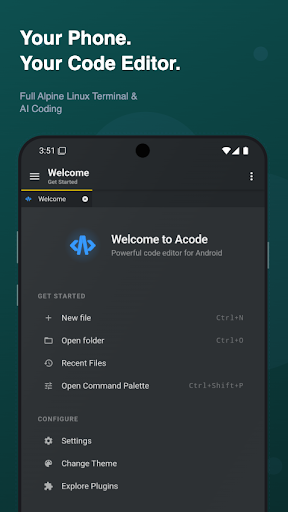
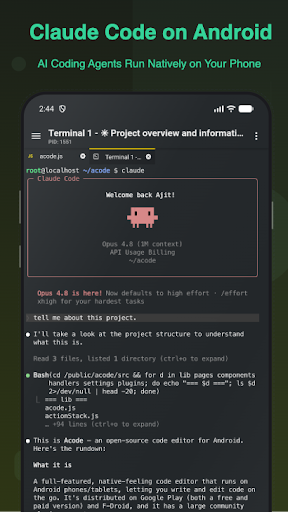
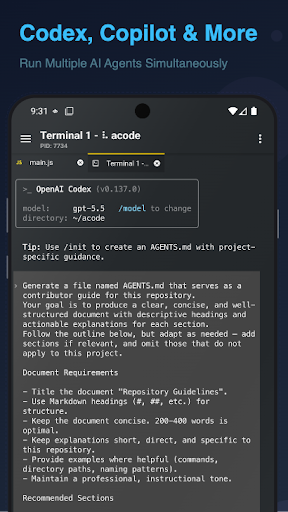
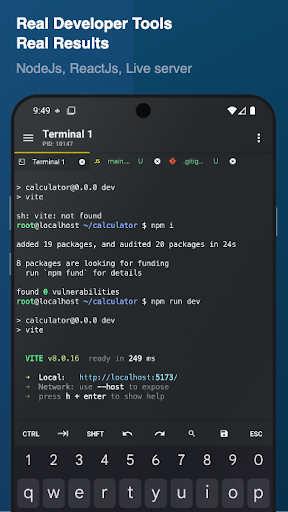
Analysis by Reviewed APKs
Acode - Terminal & AI Coding is an Android code editor and web IDE for people who want to work on projects from a phone or tablet. It brings file editing, a Linux terminal, Git and remote access tools, and plugin support into one app. I see its appeal for mobile web developers and curious learners, though its broad toolset is more involved than a simple text editor.
A project in your pocket
Imagine you have a few minutes between errands and want to check a small change in a web project. In Acode, you can open project files, edit across tabs, and use syntax highlighting to keep the code readable. For an HTML page or Markdown document, the preview gives you a way to inspect the result without switching to a separate desktop editor.
When the change needs more than a quick edit, the terminal can run supported command-line tools, and the app also includes Git workflows. That combination makes Acode feel suited to continuing work rather than just viewing files. I would still treat a phone session as a useful extension of a larger workflow, especially when the project calls for sustained typing or a wide view.
More than a text editor
Acode sits somewhere between a lightweight code editor and a mobile development workspace. A basic notes app can handle plain text, but it is not built around programming languages, project-wide search, terminal access, or Git. Acode gathers those capabilities alongside web previews and plugin options, so it can cover more of a small development task without requiring a separate app for every step.
That range does not make it a replacement for every desktop development setup. Acode is specifically an Android app, and its workflow centers on editing and managing projects on a mobile device. It is not simply a beginner course or a no-code site builder; users still need to understand the project and the tools they choose to install. Its breadth may feel like too much for occasional plain-text edits.
Make the setup yours
Acode is easier to approach if I start with one real need instead of installing every available tool at once. I might open a project, choose a theme and font that are comfortable on my screen, and use the editor’s tabs to move between the files I actually need. Search across a project can also help when I remember a term but not the file where it appears.
For a web project, I would add only the relevant packages or plugins after completing the terminal’s initial setup. Acode supports multiple terminal tabs, and its terminal setup can be backed up or restored. That makes a deliberate routine useful: keep the editor readable, install what the project calls for, and use previews or the JavaScript console when they help answer a specific question.
More From Our News Desk

Zoom Meetings, Google Meet, or Teams: Which Is Easiest to Join?

How I Build a Free Streaming Lineup With Tubi

Why Crunchyroll Is the Default Anime App for So Many Fans

YouTube TV: A Practical Guide to Cutting Cable

Rummikub and the Small Comfort of Phone Games

TeamViewer Remote Control or AnyDesk for Helping Family?
Who will get the most from it
I would recommend Acode to Android users who already work with code, especially web developers who want to inspect or adjust projects away from a computer. Its mix of editing, previews, a Linux terminal, Git, SSH, and plugin support gives experienced users room to shape a practical mobile workflow. Learners who enjoy experimenting with code may also appreciate having several tools together, provided they are comfortable with some setup.
It may be a poor fit if all you want is a clean place to jot down occasional notes, or if you expect a phone to offer the same comfort as a full-size coding workstation. Acode’s many options can take time to understand, and its terminal and plugin capabilities are most useful when you know what you want to accomplish. Someone seeking a guided programming course should look for a different kind of app.
Acode - Terminal & AI Coding is developed by Foxbiz Software Pvt. Ltd. It is a free Android app on Google Play, where it has over a million installs and a 3.5-star rating from about 14,700 ratings. The app contains ads, and in-app purchases are available. The stated price range for individual in-app items is $0.19 to $114.99.
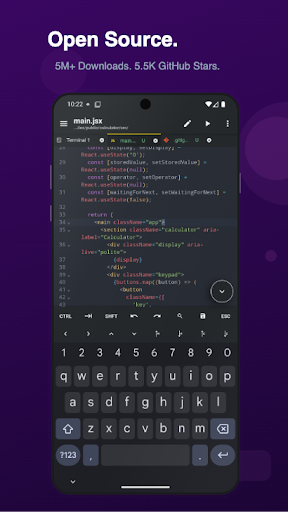
The content rating is Everyone. Acode’s description says it requires Android 7.0 or later. The current version shown is 1.13.5; it was released on November 9, 2019, and last updated on September 12, 2026. It is described as open source under the MIT license, with a Pro version offering ad removal and premium themes.
A Mobile Workspace for Real Code
First steps on Android
My first impression of Acode is that it aims well beyond opening a file and changing a line. The editor is paired with project management tools, terminal access, previews, and a community plugin ecosystem. That can be reassuring if I want one app to grow with a project, but it also means the best first session is probably a focused one rather than a tour of every option.
The terminal has a one-time setup, after which the description points users toward installing packages and plugins as needed. Acode’s terminal is based on Alpine Linux through proot and does not require root. That distinction makes its purpose clear: it provides a terminal environment within the app, rather than asking users to root their device.
Editing from day to day
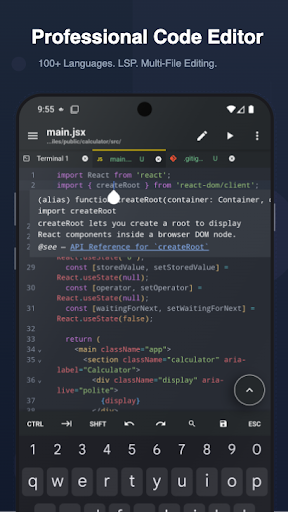
The core editor is equipped for more than one-file tinkering. Acode supports syntax highlighting for over 100 programming languages, multi-file tabs, project-wide file search, and a command palette. Code completion and IntelliSense are available through language-server plugins, so the precise editing experience can depend on the tools a user adds.
Keyboard shortcuts and Emmet support give the editor options for faster work, particularly when authoring HTML or CSS. On a phone, a keyboard can make shortcuts more practical, while a tablet may provide more room for several open files. Those details do not remove the limits of a mobile screen, but they show that Acode takes focused editing seriously.
Tools beyond the editor
The standout idea is the way Acode brings coding tools together. Its terminal can run Node.js and npm workflows, including package scripts, while the editor offers an interactive JavaScript console for debugging. HTML and Markdown previews help with checking content in context, rather than relying only on the source view.
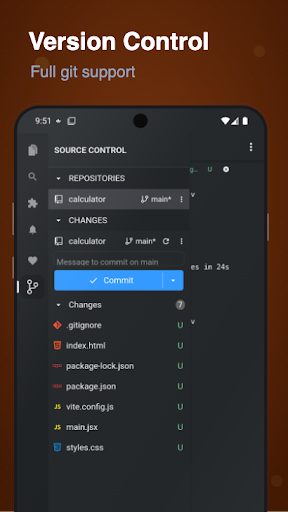
For project work, Acode includes Git actions such as cloning, committing, pushing, pulling, and managing branches. The description also includes SSH access, FTP and SFTP file management, and GitHub integration for project sync. Those tools make the app relevant to both local edits and remote work, though exactly which plugins or packages are useful will depend on the project.
A useful short-session routine
A practical routine might start with opening a project and using search to locate the file or text that needs attention. I can keep a handful of related files in tabs, make the edit, and use an HTML or Markdown preview to check the result. If the task involves JavaScript, the interactive console offers another place to investigate behavior.
When the project needs command-line work, I would move to the terminal and run the relevant package script, rather than trying to turn every editing session into a full setup exercise. Git tools can fit at the end of a change when I need to commit or sync work. Keeping each visit tied to one clear task makes Acode’s range feel more manageable.
Keep the trade-offs in view
Acode’s flexibility comes with a learning curve. A Linux terminal, package installation, Git, SSH, and plugins are useful only when the user is comfortable making choices about tools and project setup. IntelliSense depends on language-server plugins, and other extensions may also take some configuration. Someone expecting an editor that is instantly tailored to every language may need to spend time building that experience.
There are also practical mobile limits: long coding sessions and complex projects can be less comfortable on a small screen than on a desktop. The app’s free version contains ads, while a Pro version offers ad removal and premium themes through in-app purchases. Those are worth weighing alongside the broad feature set, rather than assuming every capability comes in the same package.
Acode - Terminal & AI Coding is an ambitious Android workspace that combines a capable editor with terminal, Git, remote-access, preview, and plugin tools. Its strongest case is for developers who want to keep a project moving when a computer is not handy. It asks for some setup and familiarity, but that flexibility is also what separates it from a basic text editor.
I would try it if mobile coding is part of your routine, particularly for web projects and short, practical work sessions. If you only need occasional notes or expect a polished desktop replacement on a phone, the extra tools may feel like clutter. For curious, hands-on users willing to configure their workflow, Acode is worth exploring.
Acode Frequently Asked Questions
What is Acode - Terminal & AI Coding used for?
Acode is an Android code editor and web IDE for editing projects and managing files. It includes a Linux terminal, Git and remote-access tools, community plugins, and previews for HTML and Markdown. Its feature set is aimed at coding and project work, rather than serving as a general notes app or a guided programming course.
Which devices can run Acode - Terminal & AI Coding?
Acode is an Android app available through Google Play. Its description says Android 7.0 or later is required, so check your device’s Android version before installing. The editor is intended for phones and tablets, though screen size and typing preferences can affect how comfortable a particular project feels.
Is Acode - Terminal & AI Coding free?
Acode is free to download and contains ads. It also offers in-app purchases, with individual item prices shown in a range from $0.19 to $114.99. The description says a Pro version provides ad removal and premium themes. In-app purchase options and prices may vary by region, so check Google Play for current details.
Does Acode - Terminal & AI Coding require Android 7.0?
Yes. Acode’s description gives Android 7.0 or later as its requirement. The version available for your particular device and the store’s compatibility information are worth checking on Google Play, especially if you are using an older Android device.
Is Acode - Terminal & AI Coding suitable for beginners?
It can suit learners who want to experiment with code and are comfortable exploring tools, but Acode is an editor and development workspace rather than a step-by-step course. Its terminal, Git features, and plugins may take time to learn. Beginners who prefer guided lessons or a simpler writing app may find a more focused option easier.
Pros
- Combines code editing, terminal access, previews, and project tools in one Android app.
- Supports syntax highlighting for more than 100 programming languages.
- Includes Git workflows and SSH, FTP, and SFTP tools for project work.
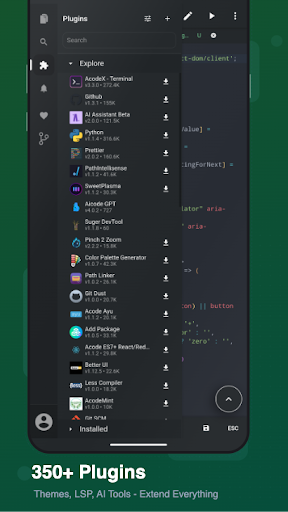
- Plugin support lets users extend the editor with language servers and other tools.
Cons
- The broad feature set and terminal setup may take time for new users to learn.
- The free version contains ads, with paid in-app options for Pro benefits.
- A phone screen may be less comfortable for long sessions or complex projects.
- Category
- Productivity
- Version
- 1.13.5