Washington Post: Live News
- 90.60K
- 4.4
- Installs
- 1.00M
- Price
- Free

Screenshots


Analysis by Reviewed APKs
Washington Post: Live News is a mobile news app for keeping up with current events through a continuous news feed, morning briefings, alerts, and audio. It suits readers who want reporting from The Washington Post in several formats, not just a list of headlines. After looking at the mix of daily updates and deeper multimedia, my take is that it offers useful ways to catch up, though its many options may be more than a casual reader needs.
A Day With The News
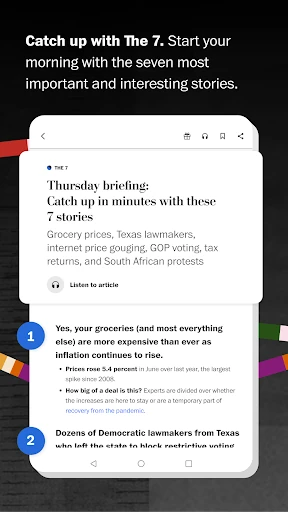
When I think about using this app on an ordinary weekday, I picture opening it over breakfast and starting with The 7, its morning briefing on notable stories. That gives the day some shape before I move into the broader news feed. Later, if a developing story catches my attention, the 24/7 feed offers another place to check what is happening without waiting for a single daily edition.
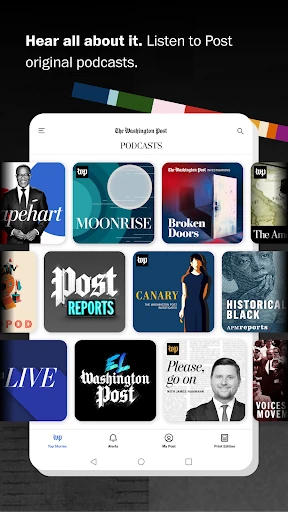
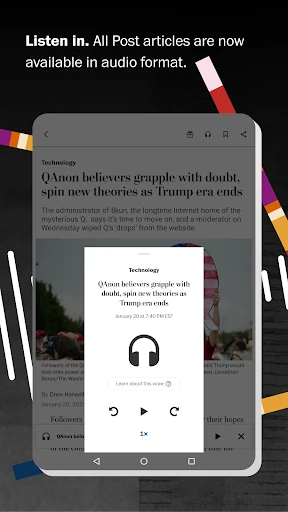
The useful part is having different levels of attention available. I can take in the briefing when time is short, then spend longer with a story that matters to me. If reading is inconvenient, the app also offers podcasts and audio articles. I would not treat every moment as a full news session; the mix makes it easier to fit a short check-in or a more focused listen around the day.
More Than A Headline List
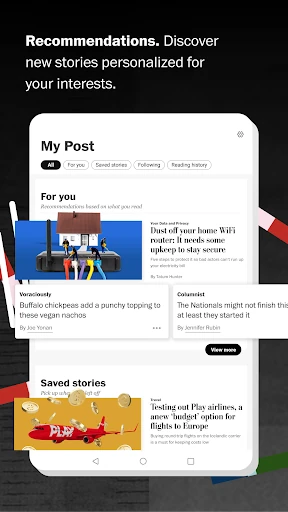
Compared with a basic headline reader, Washington Post: Live News brings together reporting, a morning briefing, customizable breaking-news alerts, audio, and visual formats. That makes it a stronger fit for someone who wants to follow the day's coverage and occasionally explore a subject in more depth. My Post adds a curated feed of recommendations, while podcasts and audio articles give the experience an option beyond scrolling through text.
It is still a news app, not a general-purpose information hub or a replacement for every source a reader might use. The description focuses on The Post's journalism and formats rather than a broad collection of outside publishers. If all I wanted were a bare list of headlines with no audio or visual extras, this might feel like more app than I need. Its value depends on wanting those different ways into the news.
Small Habits That Help
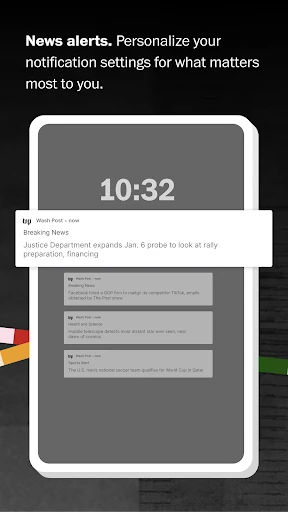
I would start by making alerts deliberate rather than letting every developing story interrupt the day. The app lets users customize alerts, so choosing the subjects that matter most should make notifications more useful. A quick morning check of The 7 can then serve as a regular overview, with the main feed there for updates when I have time to look more closely.
My Post is worth checking when I want recommendations rather than deciding what to open from scratch. I would also keep audio in mind for moments when reading is awkward, such as while doing a simple household task. The recent Personal Podcast feature adds another way to shape listening: users can pick topics and ask questions during an episode. These habits make the variety feel purposeful instead of like a pile of separate options.
More From Our News Desk

Zoom Meetings, Google Meet, or Teams: Which Is Easiest to Join?

How I Build a Free Streaming Lineup With Tubi

Why Crunchyroll Is the Default Anime App for So Many Fans

YouTube TV: A Practical Guide to Cutting Cable

Rummikub and the Small Comfort of Phone Games

TeamViewer Remote Control or AnyDesk for Helping Family?
Who May Enjoy It
I would recommend Washington Post: Live News to readers who want regular access to The Post's coverage and appreciate more than one way to follow a story. The morning briefing is suited to a quick start, while the ongoing feed, audio articles, podcasts, graphics, and video offer ways to spend more time with the news. People who like choosing which breaking alerts they receive may also appreciate that added control.
It may be less appealing to someone who only checks headlines occasionally and wants the simplest possible reading experience. The app includes several formats and personalized elements, which can be unnecessary if a plain feed is enough. I would also keep the difference between a free download and any paid in-app options in mind before deciding how extensively to use it. The right fit depends on your interest in its coverage and features.
Washington Post: Live News is published by The Washington Post and is in the News & Magazines category on Google Play. The store shows over 1 million installs and a 4.4-star rating from about 90,600 ratings. It is free to download, but it contains ads and offers in-app purchases. Listed in-app items range from $5.00 to $189.99 each.
Google Play gives the app an Everyone 10+ content rating and lists Android 5.0 as the minimum version. The current version shown is 7.1.3. The app was released on October 2, 2011, and its listed last update was February 7, 2026. These figures describe the store details and may change over time.
A News Routine With Room To Listen
First Look And Setup
When I first opened the app, the clearest idea was that it wants to be a daily news companion rather than a single-purpose headline ticker. The 24/7 feed is the central promise, but the morning briefing, alerts, recommendations, and audio give the experience several entry points. That variety can be appealing when I want to switch between a quick overview and a more involved session.
I would begin by deciding how much interruption I want from news alerts. Customizable notifications are useful in principle, but their value depends on making choices that suit my day. The app also has My Post, a curated recommendations feed, so a reader can explore suggested coverage as well as the ongoing news. The setup is best approached as a few small choices, not an obligation to use every feature.
The Daily Reading Rhythm
For routine use, the app's strongest structure is the contrast between a morning briefing and a feed that stays active throughout the day. The 7 offers a compact starting point, while the 24/7 feed is there for returning to current coverage later. I like that this gives the app a natural role in both a quick breakfast check and a longer pause when a story deserves attention.
The format also makes it possible to vary the session. I might read an article when I have a quiet moment, or choose an audio article or podcast when looking at the screen is less convenient. That flexibility does not mean every story will suit every moment, but it offers a practical alternative to treating news as something that always requires focused reading.
Formats Beyond Text
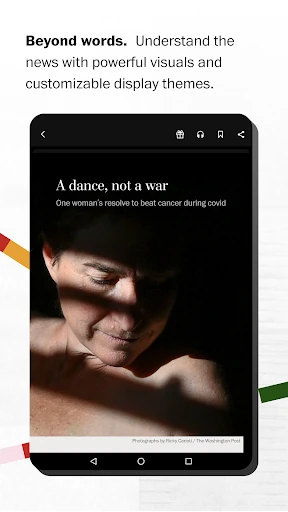
The multimedia options are among the app's more distinctive features. In addition to podcasts and audio articles, The Post's coverage can include graphics, video, and augmented reality experiences. Those formats can give a story a different way to communicate information, particularly when a visual element is more useful than another block of prose. They also make the app feel more varied than a straightforward list of written articles.
My Post adds a different kind of feature: a curated feed of recommendations. It is intended to help surface material rather than simply presenting the day's news in one continuous stream. The recent Personal Podcast feature gives listeners some say in an episode by letting them select topics and ask questions during it. I see these as optional routes through the coverage, not reasons every reader has to change their usual habits.
A Practical News Routine
A routine I would use is to begin with The 7, then leave the main feed for moments when I can check in without rushing. If a developing story is important to me, a customized alert can bring it to my attention; otherwise, I can return to the app on my own schedule. That balance helps news remain available without making every update the center of the day.
For a story I want to spend more time with, I would choose the format that suits the moment: reading, listening to an audio article, or exploring available graphics or video. My Post can be a useful starting point when I want recommendations instead of picking a subject myself. The goal is not to consume every format, but to use the ones that fit the time I have.
Limits To Keep In Mind
The range of features is also a possible drawback. Someone who wants only occasional headlines may find the briefing, curated recommendations, audio, alerts, and visual experiences unnecessary. A continuous feed can also invite frequent checking, so I would be selective about notifications and decide when I actually want to catch up. Those are practical considerations rather than faults unique to this app.
The app is free to download, but it contains ads and offers in-app purchases, so free installation does not tell the whole story about every available option. The listed purchase prices cover a wide range. Readers should check the Google Play details for the current terms and decide whether the app's coverage and features suit what they want from a news routine.
Washington Post: Live News works best as a flexible home for following The Post's coverage: a briefing for the morning, an active feed for later, and audio or visual formats when reading is not the right fit. I like that its features can support different routines without requiring one fixed way to keep up.
I would recommend giving it a try if you regularly read The Washington Post and expect to use more than headlines alone. If you prefer a minimal news reader or rarely follow current events, the extra formats may not add enough to your day. Check the store for current purchase details before choosing.
Washington Post Frequently Asked Questions
What is Washington Post: Live News used for?
Washington Post: Live News is for following current news through The Post's 24/7 feed, its morning briefing called The 7, and customizable breaking-news alerts. It also offers podcasts, audio articles, a curated recommendations feed called My Post, and some coverage with graphics, video, or augmented reality. The recent Personal Podcast feature lets listeners choose topics and ask questions during an episode.
Which devices can run Washington Post: Live News?
The app is available on Google Play for Android devices. Google Play lists Android 5.0 as the minimum Android version. The information here does not specify particular device models, so compatibility can depend on the device and current store requirements. I would check the Google Play listing on the device you plan to use.
Is Washington Post: Live News free?
The app is free to download, but it contains ads and offers in-app purchases. The listed in-app items range from $5.00 to $189.99 per item. Those figures and purchase options can change, so check Google Play for the current details before buying anything.
What Android version does Washington Post: Live News require?
Google Play lists Android 5.0 as the minimum version for Washington Post: Live News. The app's current version is listed as 7.1.3, though versions and compatibility requirements can change with updates. Check the store listing for the latest requirements for your device.
Who is Washington Post: Live News best suited to?
It is a good fit for readers who want to follow The Washington Post through a daily briefing, ongoing coverage, alerts, and audio or visual formats. It may be less suitable if you want only a very simple headline list or rarely check the news. The app is rated Everyone 10+ on Google Play; check the store for current details.
Pros
- Combines a morning briefing with an ongoing feed for different daily routines.
- Offers podcasts and audio articles when reading is inconvenient.
- Customizable alerts help readers choose which breaking news to follow.
- Includes visual formats and curated recommendations alongside articles.
Cons
- The many formats and feeds may feel excessive for occasional headline checks.
- The app contains ads and offers a wide range of in-app purchases.
- Frequent updates and alerts can encourage more checking than some readers want.
- Category
- News & Magazines
- Version
- 7.1.3