TeamReach - Your Team App
- 2.68K
- 4.3
- Installs
- 1.00M
- Price
- Free

Screenshots
Analysis by Reviewed APKs
TeamReach - Your Team App gives sports teams, clubs, and other groups one place for messages, schedules, attendance responses, and event updates. I can see it working especially well for coaches and parents who are tired of chasing details across texts and email. Its focus is practical rather than flashy: it helps a group keep track of what is happening and where everyone needs to be.
A Team Week, In One Place
Picture a week when practice time shifts, a game is coming up, and a parent needs to know who can attend. Instead of sending a string of separate texts, a coach can post an update or event in TeamReach, then ask the group about availability. Players and parents have a shared place to check the details, and the team can see responses without piecing together replies from several conversations.
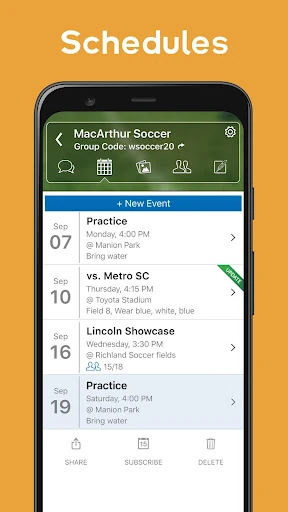
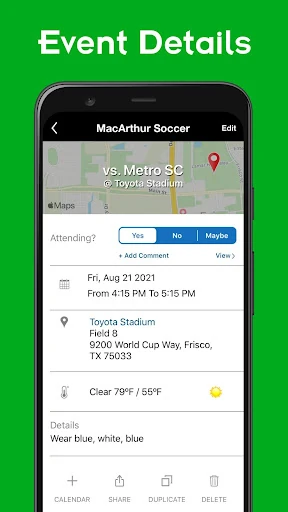
That central approach suits the small, recurring coordination jobs that make team life feel scattered. Event details can include time, place, directions, a forecast, and attendees, while reminders and notifications help bring changes to people's attention. I like that the app is built around the team's real calendar rather than a generic checklist. The goal is not to make sports more complicated; it's to reduce the small misunderstandings around showing up.
More Than a Group Chat
A regular group text can handle quick questions, and email can carry longer announcements, but both can become awkward when dates, attendance, and last-minute changes are mixed into the same stream. TeamReach is a better fit when a group needs recurring events and a clear place for updates. The schedule and availability requests give the conversation some structure, while polls help collect opinions without requiring everyone to reply in a particular format.
I wouldn't treat it as a full sports operations system or a substitute for every tool a club might use. The material describes communication, event planning, polls, and photo sharing, not detailed performance tracking or project management. For a casual group that only needs an occasional message, a simple chat may be enough. TeamReach makes the most sense when the same people need to coordinate regularly around shared activities.
Small Habits That Help
The simplest useful habit is to put the latest event information in the event itself, rather than relying on an old message that someone has to find. If a location or time changes, sending an update through the group gives members a central reference point. Availability requests can also be sent early enough for a coach or organizer to see who expects to attend before making plans.
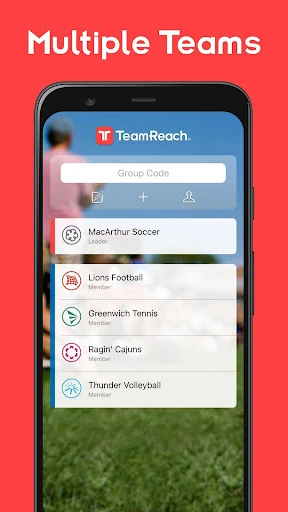
I would use polls for decisions that otherwise generate a long back-and-forth, such as choosing a practice time or asking about gear. Photos can stay with the group rather than getting scattered through individual threads, and event details can be added to a phone calendar. For families involved in multiple activities, the option to have more than one group can keep one team's schedule from getting tangled with another's.
More From Our News Desk

Zoom Meetings, Google Meet, or Teams: Which Is Easiest to Join?

How I Build a Free Streaming Lineup With Tubi

Why Crunchyroll Is the Default Anime App for So Many Fans

YouTube TV: A Practical Guide to Cutting Cable

Rummikub and the Small Comfort of Phone Games

TeamViewer Remote Control or AnyDesk for Helping Family?
Who Will Get the Most From It
I'd recommend TeamReach to coaches, team managers, parents, and players who need a dependable shared channel for schedules and changes. It should also suit clubs, school groups, and activity organizers whose members need event reminders, attendance requests, or quick polls. The group-code joining approach is useful when an organizer wants members to join the same team space without relying on a chain of individual introductions.
It may be more app than a group needs if everyone already communicates easily and there are few events to coordinate. People who want detailed athletic statistics, task assignment, or project tracking should look for those specific tools elsewhere; those are not the functions described here. I would also consider whether every member is comfortable checking a shared app for updates. A central channel only helps when the group actually uses it.
TeamReach - Your Team App is a sports app from TeamReach LLC. On Google Play it has over one million installs and a 4.3-star rating from 2,682 ratings. The app is free to download and contains in-app purchases priced from $2.99 to $9.99 per item. Google Play marks it as suitable for Everyone.
The listed Android requirement is Android 7.0 or later. The current listed version is 9.7.1, with a last update dated January 13, 2026. TeamReach was released on May 4, 2016. These details give a practical snapshot of its availability, but the app's store information can change over time.
How TeamReach Fits Into Team Life
A Straightforward First Look
When I first opened TeamReach, the clearest idea was its role as a shared home for a group, not a personal planner. A coach or manager can create a team and reach out to members, while players or parents can join using a group code. That gives the organizer a simple way to bring people into the same space instead of starting separate conversations with each family.
The description emphasizes messages, schedules, availability, and updates, which makes the app's purpose easy to grasp. There is no need to learn a complicated system before understanding the basic value: one group can look in one place for the information it shares. I would expect the experience to be most useful once the relevant teammates or families have joined, since a team space depends on group participation.
The Day-to-Day Experience
Most of the value comes from the routine cycle of planning an event, checking who can make it, and communicating changes. For a parent juggling a school pickup and practice, seeing the time and location alongside event details is more convenient than searching an old text. For a coach, an availability request can replace the guesswork of asking the same attendance question one person at a time.
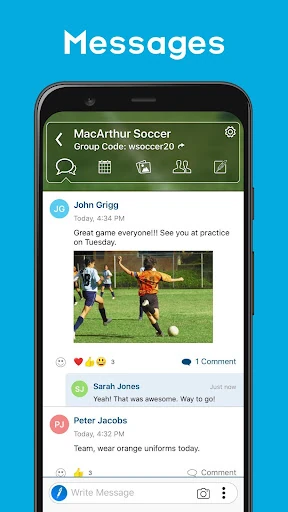
Instant updates are particularly practical when plans change close to the event. A location change, cancellation, or uniform note can be sent to the group, and members can receive notifications. That does not guarantee everyone will read a message at once, but it gives the team a common channel for the update. In my view, that consistency is more important than adding a pile of extra communication tools.
Useful Group Features
Schedules are more than bare calendar entries in TeamReach's description: event details can include directions, a map, forecast information, and attendees. Reminders help organizers prompt the group, and events can be added to a phone calendar. Those touches make it easier to move from seeing an announcement to making a plan for getting there.
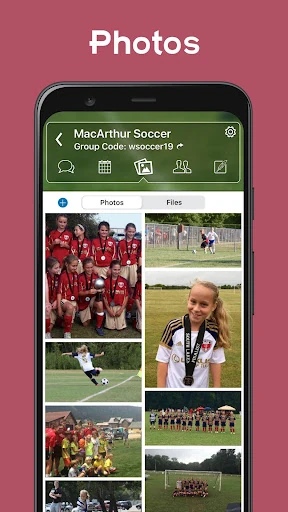
Polls and photos add useful flexibility without changing the app's main purpose. A poll can collect quick input about practice times, hotels, restaurants, or gear. Shared photos give members a place to view and download pictures together. These are supporting features rather than reasons to use TeamReach alone, but they help keep common team activity in the same group space.
A Practical Weekly Routine
For a team with regular practices, I would start by keeping upcoming events current and including the time and location in each one. Before a game, the organizer could send an availability request, then use the response to get a clearer sense of attendance. If someone needs to share a map location in a message, the app supports that too, which can be handy for an unfamiliar field or venue.
If a storm forces a change, the coach can send a group update rather than asking a few parents to pass the word along. After the event, photos can be shared with the group, and a poll can gather opinions on a question the team needs to settle. This kind of light routine makes TeamReach feel like a useful coordination layer, not another system that demands constant attention.
Limits to Keep in Mind
A shared app cannot remove the need for clear communication. Organizers still need to enter accurate event details, and members need to check the group for updates. If some families prefer texts or email and rarely open another app, the team may still end up repeating information in multiple places. TeamReach can centralize a group's communication, but it cannot make every member adopt the same habits automatically.
The feature set described here centers on messages, events, attendance, polls, and photos. That is a sensible scope for group coordination, but it should not be confused with a comprehensive coaching or club-management suite. I would also check the Google Play details for current purchase information and requirements before installing, since store facts can change. For a team that mainly needs simple chat, its scheduling tools may be more than necessary.
TeamReach is at its best when a group has recurring events and needs one place to handle the details around them. Scheduling, attendance requests, updates, and polls address familiar coordination headaches without pretending to solve every part of team management. The app's practical focus is its strongest quality.
I would recommend it to coaches, parents, and organizers who want less scattered communication around a team or club. If your group rarely meets or already has a channel everyone uses consistently, the benefit may be modest. For a busy team trying to keep plans clear, TeamReach is worth considering.
TeamReach Frequently Asked Questions
What is TeamReach - Your Team App used for?
TeamReach is for communication and coordination among sports teams, clubs, and other groups. It supports group messages, schedules, event updates, availability requests, and polls. Members can also view and share photos, and organizers can include event details such as time, place, directions, and attendees. It is intended to keep shared plans and updates together rather than replace every tool a group might use.
Which phones and devices support TeamReach?
TeamReach is an Android app available through Google Play. The listed requirement is Android 7.0 or later. The supplied information does not describe support for other platforms, so check the current Google Play details for device compatibility and any changes. The description also notes that events can be added to a phone calendar, but that does not establish support for a particular calendar service or device.
What Android version does TeamReach require?
The listed minimum is Android 7.0. The current version in the supplied store details is 9.7.1, and the app was last updated on January 13, 2026. Requirements and version information can change, so it's worth checking TeamReach's Google Play page before installing, especially if your phone is running an older version of Android.
Does TeamReach cost money to use?
TeamReach is free to download, and Google Play lists in-app purchases priced from $2.99 to $9.99 per item. The app description presents its group communication features as free, but purchase details can change and may depend on the current offer. Check the Google Play page for up-to-date pricing and purchase information before deciding whether it fits your needs.
Is TeamReach a good fit for my group?
It may suit a team or club that regularly coordinates events, attendance, schedule changes, and group decisions. Coaches, parents, players, and organizers can share a common communication space. A group that only needs occasional messages may find a basic chat sufficient, while people seeking detailed performance tracking should look for a tool built for that purpose. Its usefulness also depends on members checking the group.
Pros
- Combines group messages, event schedules, attendance requests, and updates in one place.
- Event details can include directions, a map, forecast information, and attendees.
- Polls, shared photos, reminders, and calendar additions support everyday group coordination.
- Group-code joining gives organizers a straightforward way to bring members together.
Cons
- The group benefits most when members consistently check the app for updates.
- Its described tools focus on communication and events, not detailed performance tracking.
- Groups already content with basic chat may not need its broader scheduling features.
- Category
- Sports
- Version
- 9.7.1