sportsYou
- 1.33K
- 4.4
- Installs
- 1.00M
- Price
- Free

Screenshots

Analysis by Reviewed APKs
sportsYou is a team communication app for coaches, athletes, families, photographers, and school athletic staff. It brings schedules, announcements, group chats, shared files, and team photos into one place. I see its strongest fit in the everyday coordination around youth and school sports, where messages and event details can otherwise get scattered. It is practical and focused, though some advanced tools require a paid upgrade.
A Busy Team Week
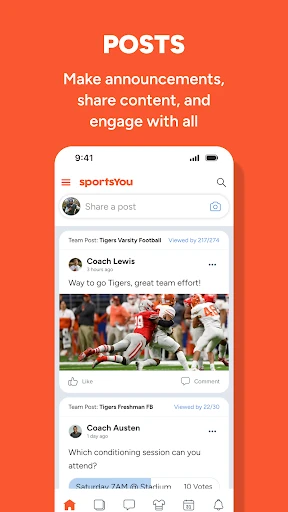
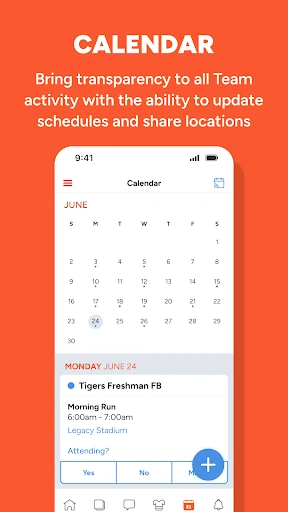
When I picture sportsYou in a normal week, I think of a parent checking where Saturday’s game is, an athlete looking for a team announcement, and a coach sharing a schedule update. The app’s calendar can hold team activity and share locations through Google Maps, while posts provide a place for broader announcements. Instead of digging through separate message threads for every detail, team members have a shared place to check.
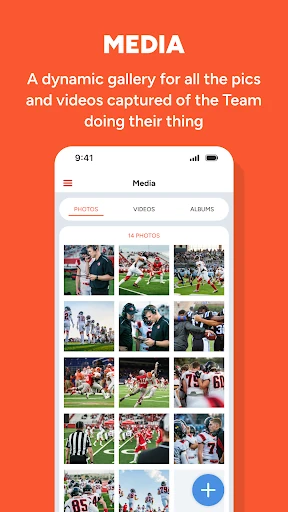
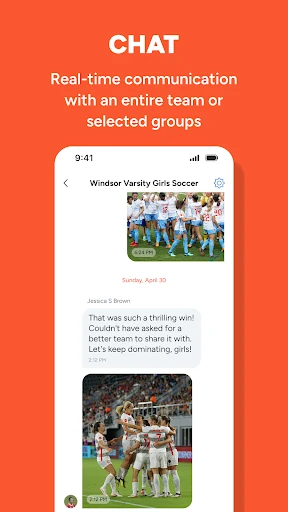
A coach can also use chat to reach the whole team or a selected group, which is useful when a note applies only to certain athletes or families. Files offer a central spot for important documents, and the media gallery gives team photographers and families a place to share photos and videos. The appeal is less about any single tool than having these everyday pieces of team coordination together.
Team Tool, Not Fan Hub
sportsYou is aimed at the people who make a team run: coaches, athletes, parents, photographers, and athletic directors. Its focus is coordinating team activity and keeping communication in a shared space. That makes it a different choice from a general-purpose messaging app, where team details can get mixed in with unrelated conversations, or from a sports-news service built around scores and player statistics.
I would not choose sportsYou as a way to follow professional leagues, browse sports analytics, or get general fan updates. Those uses are not what its described tools are built around. Instead, it suits an organized team or group that needs schedules, announcements, conversations, and shared media. If your only goal is to send an occasional message to one person, its broader team structure may be more than you need.
Make the Shared Space Useful
A helpful habit is to treat the calendar as the place to check for team activity and locations, rather than relying on an old message with event details. When something changes, an updated schedule gives the group a shared reference. Posts can carry announcements that matter to everyone, while chat is better suited to a real-time exchange or a smaller group. Keeping those purposes distinct can make a busy team space easier to follow.
I would also use the file library for documents people need to find again, rather than letting them disappear into chat history. For photos and videos, the media gallery gives the team a dedicated place to collect moments from the season. Coaches and athletic staff may find it useful to divide communication among teams or groups, while families can check the relevant team space for updates instead of following every conversation.
More From Our News Desk

Zoom Meetings, Google Meet, or Teams: Which Is Easiest to Join?

How I Build a Free Streaming Lineup With Tubi

Why Crunchyroll Is the Default Anime App for So Many Fans

YouTube TV: A Practical Guide to Cutting Cable

Rummikub and the Small Comfort of Phone Games

TeamViewer Remote Control or AnyDesk for Helping Family?
Who May Find It Useful
I’d recommend sportsYou to coaches and team organizers who want a shared place for schedules, announcements, group messaging, documents, and team media. It also makes sense for athletes and parents who need to keep up with the same information. Athletic directors may appreciate having team activity organized across groups, while photographers have a place to share the pictures and videos they capture.
It may be less appealing if you want a sports news feed, scores, stats, or a social network centered on professional teams. The app’s described purpose is team communication, so its value depends on being part of a group that uses it. Someone who already has a reliable way to coordinate a small group may not need another place to check, and some enhanced tools are tied to sportsYou Pro.
sportsYou is developed by sportsYou and is available on Google Play for Android. The app requires Android 8.0 or later. It was released on July 31, 2017, and the current version is 4.1.2, updated February 4, 2026. Google Play shows over one million installs and a 4.4-star rating from around 1,300 ratings.
The app is free to download and contains ads. It offers in-app purchases, with listed items ranging from $1.99 to $19.99. sportsYou Pro is described as an upgrade that adds features such as scheduled messaging, advanced calendar capabilities, priority support, and other time-saving tools. Google Play rates the app Teen.
How sportsYou Fits Team Life
Starting With the Team
My first impression of sportsYou is that it is organized around teams rather than individual sports fans. The main ingredients are familiar: a calendar, posts, chat, files, and media. That combination gives a coach or group organizer a clear set of places for the different kinds of information that come up during a season, from a schedule note to a photo from the weekend.
The app is designed to connect coaches with athletes and families without requiring them to share personal email addresses or phone numbers. Once a group is using the same space, the basic idea is straightforward: check team activity, read announcements, and communicate with the people involved. Its usefulness will depend on teammates adopting it, since a shared communication space works best when the whole group checks in.
The Everyday Flow
The day-to-day experience is built around choosing the right channel for the job. A calendar entry can make an event and its location easier to find. A post can communicate a team-wide announcement, and chat supports real-time communication with everyone or selected groups. This division is sensible for the rhythm of a season, when a permanent schedule detail and a quick question should not have to compete in one long thread.
Files and media round out that routine. Important documents have a central library, while team photos and videos have a gallery of their own. I can see this helping when a family wants to revisit shared team information or when a photographer wants to contribute captured moments. The app is more useful as an ongoing team workspace than as a tool opened only to send a single message.
Features With a Team Focus
The calendar is one of the more practical features because it brings team activity into view and can share locations through Google Maps. Posts give organizers a way to make announcements and share content, while chat covers team-wide or selected-group conversations. Those options address different communication needs without turning the app into a general sports-content service.
The group structure is another notable part of the design. Teams can bring together unlimited teammates, and athletic directors can organize activity across teams and seasons, including creating captains groups. A shared file library and media gallery add places for documents and team photos or videos. These features are most relevant when an organization has several people and recurring activity to coordinate.
A Simple Weekly Routine
For a family, a low-effort routine could be to check the team calendar at the start of the week, note any event locations, and then read posts for broader updates. Chat can handle questions or a time-sensitive exchange, while files remain the place to look for documents that need to be found again. That approach uses each part for a distinct purpose instead of treating every update as another message.
For a coach, I’d keep general announcements in posts and use selected-group chat when a message is relevant to only part of the roster. New schedule details can go on the calendar, and photos or videos can collect in the media gallery. A team does not need a complicated system to benefit; consistency about where information goes is the habit that makes the shared space easier to use.
Keep the Tradeoffs in View
sportsYou depends on the team using it together. If coaches, athletes, and families split updates across several channels, the app cannot make the information feel centralized on its own. That is a practical adoption hurdle for any group communication tool, especially when people already have established habits. Its best use case is a team that agrees to treat it as a regular place to check.
There is also a distinction between the free app and its paid Pro upgrade. Scheduled messaging and advanced calendar capabilities are among the premium features, and the app contains ads and offers in-app purchases. That does not prevent someone from using its basic team communication tools, but it is worth keeping in mind if those enhanced options are central to the way a coach wants to organize a season.
sportsYou brings several useful team tasks into one Android app: schedules, announcements, group chats, documents, and shared media. I like that its tools are aimed at the real coordination work around a team rather than at sports fandom in general. The clearest payoff comes when a whole group uses the same space consistently.
I’d recommend giving it a try if you coach, organize, or take part in a team that needs a shared communication hub. If you are looking for scores, sports news, or a fan community, this is not the right fit. Keep the ads and paid Pro features in mind, and check the store for current purchase details.
sportsYou Frequently Asked Questions
What is sportsYou used for?
sportsYou is a team and group communication app for coaches, athletes, families, photographers, and athletic staff. It includes a calendar for team activity and locations, posts for announcements, chat for team or selected-group communication, a shared file library, and a gallery for team photos and videos.
Which devices can run sportsYou?
sportsYou is available on Google Play for Android devices. The listed minimum requirement is Android 8.0. Store availability and device compatibility can vary, so it is worth checking the Google Play page for your device before installing.
Does sportsYou cost anything?
The app is free to download, contains ads, and offers in-app purchases. sportsYou Pro is a paid upgrade with features including scheduled messaging and advanced calendar capabilities. Listed in-app purchase prices range from $1.99 to $19.99 per item; current purchase options are worth checking on Google Play.
Does sportsYou show scores and sports news?
The app is designed for communication and coordination within teams, with tools for schedules, announcements, chats, files, and media. It is not described as a general scores, sports-news, or player-statistics service. Its fit is strongest for people involved with a team that uses the app.
Who should use sportsYou?
sportsYou may suit coaches, athletes, parents, team photographers, and athletic directors who want team information and communication in one shared place. It may be less useful to someone seeking a fan-focused sports app or to a group that already has a communication routine everyone prefers.
Pros
- Combines team calendars, announcements, chats, files, and shared media.
- Supports communication with an entire team or selected groups.
- Calendar events can share locations through Google Maps.
- Useful for coaches, families, athletes, photographers, and athletic staff.
Cons
- Its usefulness depends on the team adopting it consistently.
- The app contains ads and offers paid in-app purchases.
- It is focused on team coordination, not sports news or statistics.
- Category
- Sports
- Version
- 4.1.2