Golf Genius
- 6.18K
- 4.7
- Installs
- 500.00K
- Price
- Free

Screenshots



Analysis by Reviewed APKs
Golf Genius is a companion app for golf events and leagues already organized with Golf Genius Software. It brings tee times, group scorecards, live scoring, leaderboards, photos and event information onto a phone. I found its appeal clearest when thinking of a player following a round or an organizer checking results as they arrive. It is a focused event tool, rather than a general golf improvement app.
Following a Round
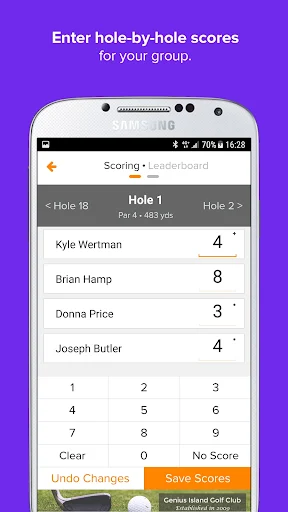
Picture a weekend tournament where your group is spread across the course and nobody wants to keep asking someone to read out the latest standings. With Golf Genius, players can enter scores from their phones while they play, and the leaderboard updates as scores come in. I like that the app connects the practical bits of the day: tee times, pairings, hole-by-hole cards and results all relate to the same event.
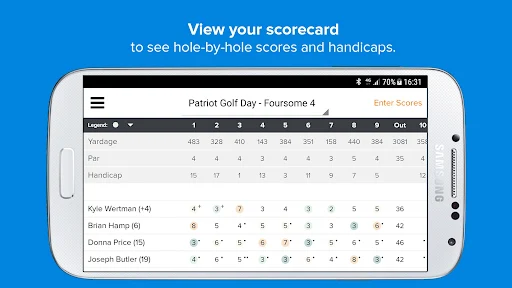
For a golfer, that means a quick check before heading to the first tee and another between holes or after finishing. You can see who is playing in each group, then follow scores as they are entered. The detailed scorecards give more context than a single total, while the live leaderboard makes it easier to keep track of the competition without relying on a paper sheet or someone relaying updates.
An Event Companion
Golf Genius is most useful when an organizer, manager or PGA Professional is already using Golf Genius Software for an event or league. Its job is to put that organized activity within reach of golfers and staff, including scoring, pairings, results and event-specific information. That makes it different from a general-purpose golf app aimed at finding courses, improving a swing or independently keeping a personal record of every round.
I would not choose it as a standalone coaching tool or as a substitute for a broad golf course guide. The described features center on an event: tee sheets, group scorecards, live scoring, leaderboards, photos and a custom event or league website. If you are not taking part in an event managed with Golf Genius, there may be little here for your everyday recreational round. Its value depends on having that event connection.
Small Ways to Use It
A useful habit is to check the tee sheet before leaving for the course. That puts your pairing and tee time in view and can help avoid last-minute confusion about where you are meant to be. Once the round starts, entering scores as you go keeps the live results current for the group and anyone following the event. The app supports score entry from smartphones, so players do not have to wait until the round is over to contribute.
After play, I would use the scorecard and event website as a tidy recap. The card shows the round hole by hole, while the customized site can bring together results, statistics, photos and a message board. If your group takes pictures on the course, the photo gallery lets you snap and upload them to the event website. These small steps make the app more useful than opening it only to check the final leaderboard.
More From Our News Desk

Zoom Meetings, Google Meet, or Teams: Which Is Easiest to Join?

How I Build a Free Streaming Lineup With Tubi

Why Crunchyroll Is the Default Anime App for So Many Fans

YouTube TV: A Practical Guide to Cutting Cable

Rummikub and the Small Comfort of Phone Games

TeamViewer Remote Control or AnyDesk for Helping Family?
Who Will Get the Most From It
I would recommend Golf Genius to golfers participating in a tournament or league that uses the Golf Genius platform, especially players who want to follow scores and standings during the round. It also makes sense for event managers and PGA Professionals who want to handle scoring and results from a phone. The combination of tee times, group cards and a live leaderboard serves both sides of the event without turning the app into a general golf toolbox.
It may not suit someone looking for lessons, swing analysis, course discovery or a personal practice tracker; those are not the functions described here. Casual golfers who simply head out for an unorganized round may have little reason to open it. I see the best fit as a social, organized golf day where several people need access to the same schedule and evolving results. For that audience, its narrow focus is a practical advantage.
Golf Genius is made by Golf Genius Software, Inc. On Google Play, it has over 500,000 installs and a 4.7-star rating from about 6,200 ratings. The app is listed as free, with no in-app purchases and no ads. Its content rating is Everyone, and the current version shown in the supplied store facts is 20.0.0.
The supplied Google Play facts give an original release date of October 23, 2012, and a last update date of November 3, 2026. No minimum Android version is provided in those facts. If your phone’s compatibility is a concern, check the app’s Google Play page for the requirements shown for your device before installing.
A Closer Look at Golf Genius
First Open and Setup
My first impression is that Golf Genius has a clear, specific purpose: it is meant to connect golfers and organizers to events run with Golf Genius Software. That context matters more than any one feature. A player looking for a tee time or a tournament participant checking a pairing has a reason to be here; someone expecting a broad golf dashboard may be looking for the wrong kind of app.
The description emphasizes access to event and league information, rather than describing a long setup process or a general account-building experience. I would start by opening the relevant event details and checking the tee sheet, then use the scoring and results tools as the round unfolds. That straightforward sequence suits an app intended to be useful while people are moving around a course.
During the Round
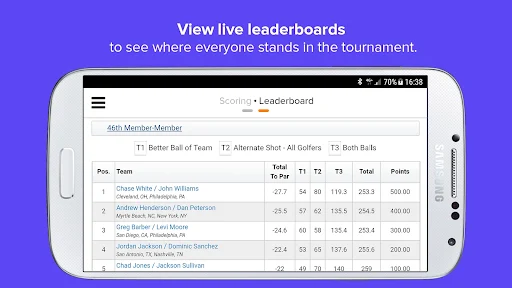
The core experience is shared scoring. Managers and golfers can enter scores from smartphones while out on the course, and the leaderboard fills in as scores are submitted. This makes the app useful to the people playing and to those interested in how the event is going. Rather than treating the leaderboard as a static result, Golf Genius ties it to the scoring activity happening during the round.
The hole-by-hole scorecard is a helpful companion to that live view. It lets a group look back at the round in detail instead of relying only on a total score. Tee times and pairings give the event a practical starting point, while score entry and standings take over once play begins. The functions feel connected to the rhythm of an organized golf day, not bolted on as unrelated extras.
Event Features That Matter
The real-time leaderboard is the most immediately visible feature for anyone following a competition. As scores are entered, standings update, making it easier to check how the event is developing. For organizers, the scoring tools can reduce the tedious work of calculating results and statistics. For players, the same system offers a simple way to contribute scores and keep up with the field.
Golf Genius also includes a photo gallery tied to a custom event website. Players can take and upload course photos, while the customized site can provide access to results, statistics, photos and a message board. That gives an event a shared place for both its competitive information and social details. The features are especially relevant to leagues and group events that want participants to stay connected beyond the scorecard.
A Simple Event Routine
Before the round, I would check the tee sheet for the group’s pairing and start time. That is an easy way to make the app useful before anyone has hit a shot. During play, the player or manager can enter scores from a phone, then use the leaderboard to follow the event as the numbers arrive. The scorecard offers a more detailed check when the group wants to review individual holes.
When the round is over, the event website can serve as the natural place to revisit results and statistics. Photos from the course can add a personal touch, and the message board provides another event-related destination. This routine does not require treating the app as a daily golf companion; it is more about using the right feature at the right point in an organized event. That focused approach is where Golf Genius makes sense.
Keep Its Scope in Mind
The main limitation is also the app’s defining boundary: it is built around events and leagues organized with Golf Genius Software. Its described tools do not cover general course discovery, swing coaching or personal practice tracking. If those are the reasons you want a golf app, Golf Genius is unlikely to replace the specialist tools you have in mind. It is better judged as event access than as an all-purpose golf resource.
The live features also depend on scores being entered during play. The leaderboard reflects submitted scores, so it is most useful when players or managers are actively keeping the event’s scoring current. That is a sensible setup for shared scoring, but it means the app is not an automatic account of every shot. Its strengths show up when participants use the tools together and the event itself is being managed through the platform.
Golf Genius does a focused job of putting organized golf events on a phone. I like the practical pairing of tee sheets, group scorecards, live scoring and a leaderboard, with event photos and a custom website adding a social layer. It is not a general golf utility, and it does not need to be to serve its intended audience well.
I would try it if my league or tournament already used Golf Genius Software, particularly if I wanted scores and standings during play. For an unorganized round, lessons or course-finding, I would look elsewhere. The recommendation is simple: useful for connected event participants and organizers, but dependent on that event context.
Golf Genius Frequently Asked Questions
What is Golf Genius used for?
Golf Genius gives golfers and organizers access to events and leagues managed with Golf Genius Software. Its described tools include tee times and pairings, smartphone score entry, hole-by-hole group scorecards, a live leaderboard, event photos and a custom website with results, statistics and a message board.
Which devices can run Golf Genius?
Golf Genius is described as an Android app, available through Google Play. It is intended for use on smartphones, including entering scores while out on the course. Device compatibility can vary, so check the Google Play page for the requirements that apply to your phone.
What Android version does Golf Genius require?
The Android version requirement can vary by device and app release. Check Golf Genius on Google Play for the current compatibility details for your phone before installing. The app’s supplied store facts identify version 20.0.0, but do not specify a minimum Android version.
Does Golf Genius cost money?
Golf Genius is listed as free on Google Play, with no in-app purchases and no ads in the supplied store facts. Store details can change over time, so it is worth checking the current Google Play page for the latest cost and availability information.
Is Golf Genius useful for casual golfers?
It can be useful for a casual golfer taking part in a league or event managed with Golf Genius Software, since the app provides pairings, scoring and standings. For an unorganized round or someone seeking coaching or course-finding tools, its event-focused features may not be a good fit.
Pros
- Combines tee times, pairings, group scorecards and event results in one place.
- Players and managers can enter scores from smartphones during a round.
- Live leaderboard and event website help participants follow shared results.
- Photo gallery adds a social element to organized golf events.
Cons
- Most useful when an event or league already uses Golf Genius Software.
- Not presented as a tool for coaching, course discovery or practice tracking.
- Live standings rely on scores being entered during play.
- Category
- Sports
- Version
- 20.0.0