WLBT First Alert Weather
- 5.59K
- 4.7
- Installs
- 500.00K
- Price
- Free
Screenshots
Analysis by Reviewed APKs
WLBT First Alert Weather is a local weather app for checking conditions, following radar, and receiving severe weather alerts. It suits people who want a quick look at their current location as well as a way to keep tabs on other saved places. After reviewing its feature set, my take is that it focuses on practical forecasting and storm awareness rather than turning weather into a sprawling lifestyle dashboard.
Checking Before Heading Out
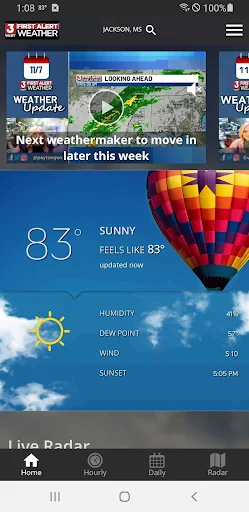
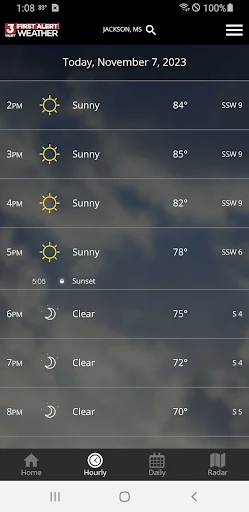
On a morning when the sky looks uncertain, I would start by checking the current conditions and hourly forecast before deciding whether to walk, drive, or bring an umbrella. WLBT First Alert Weather updates current weather multiple times per hour, while its hourly and daily forecasts are refreshed hourly. That makes it a practical stop in a familiar routine: check the day ahead, then take a closer look at radar if rain seems likely.
If a storm is approaching later, the future radar gives me another way to think about timing and direction instead of relying on a single snapshot. I can also save favorite locations, which is useful when my day involves more than home: perhaps a workplace, a relative’s town, or a place I am planning to visit. GPS can provide current-location awareness, so the app can adapt when I am away from my usual saved spots.
Local Forecast, Not Everything
The app’s identity is closely tied to WLBT station content and weather information for mobile users. That gives it a more local, station-centered feel than a generic forecast tool, while the radar, satellite imagery, forecasts, and National Weather Service severe weather alerts cover the basics many people need throughout the day. I see it as a focused companion for checking weather and monitoring changing conditions, not an all-purpose travel or planning suite.
It is also not a replacement for careful judgment during severe weather. The app can deliver alerts and show radar, but those tools are ways to stay informed, not a promise about what will happen at a particular address or minute. Someone who mainly wants a broad lifestyle app, or who expects features beyond local weather and alerts, may find its focus narrow. For a quick forecast and storm tracking, though, that focus is part of the appeal.
A Few Useful Habits
I would make the most of the app by saving the places I check repeatedly rather than searching for them every time. A short list of home, work, and a frequently visited town makes a quick forecast check more useful, especially when weather differs across locations. GPS adds a convenient current-location option for errands or trips, while saved favorites keep familiar places close at hand when I am back in my normal routine.
For unsettled days, I would pair the hourly forecast with a look at future radar, then opt in to push alerts if I want notifications about severe weather. Satellite cloud imagery can add context when I want to see broader cloud cover, while the high-resolution radar is useful for a more localized view. Checking these tools at natural moments—before leaving home and again if conditions change—keeps the app helpful without making weather watching a full-time hobby.
More From Our News Desk

Zoom Meetings, Google Meet, or Teams: Which Is Easiest to Join?

How I Build a Free Streaming Lineup With Tubi

Why Crunchyroll Is the Default Anime App for So Many Fans

YouTube TV: A Practical Guide to Cutting Cable

Rummikub and the Small Comfort of Phone Games

TeamViewer Remote Control or AnyDesk for Helping Family?
Who May Find It Useful
I would recommend WLBT First Alert Weather to people who want a straightforward way to check forecasts, see radar, and keep severe weather alerts within reach. It should be especially convenient for anyone who regularly checks more than one location or wants current-location weather when away from home. The combination of hourly and daily forecasts with radar gives everyday planning and storm monitoring a clear place in the same app.
It may be less appealing to someone looking for a broad collection of non-weather tools or a forecast experience tailored around elaborate personal planning. The available description centers on local station content, forecasts, maps, locations, and alerts, so I would approach it as a dedicated weather utility. Since it contains ads, users who prefer an ad-free experience may also want to consider that before making it their regular weather check.
WLBT First Alert Weather is developed by Gray Media and is available on Google Play for Android. It has more than 500,000 installs and a 4.7-star rating from 5,594 ratings. The app is free to download, contains ads, and does not offer in-app purchases. Its content rating is Everyone, making it suitable for a general audience.
The current version is shown as varying with device. The recorded release date is February 3, 2011. A minimum Android version and a last-updated date are not included in the available app facts, so it is sensible to check Google Play for device-specific compatibility and the latest store details before installing.
How the Weather Tools Fit Together
A Direct First Look
When I first opened the app, the feature set suggested a direct purpose: put local weather information, forecasts, and storm tools in one place. The description emphasizes station content for mobile users alongside current conditions, radar, satellite imagery, and alerts. That mix gives the app a clear starting point for someone who wants to check the weather without first sorting through unrelated services.
Setup is built around location awareness and saved places. GPS can help the app use the current location, and favorite locations can be added and saved for repeat checks. I like that these options support two common patterns: checking where I am now and keeping an eye on places I care about even when I am somewhere else. The available information does not spell out every setup step, but those location functions are central to the experience.
The Everyday Forecast
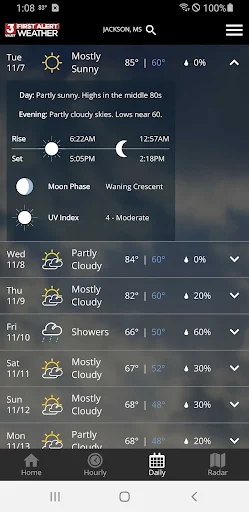
For routine decisions, the hourly and daily forecasts are the practical core. Current weather is updated multiple times per hour, and the forecasts are refreshed hourly from computer models. That gives me a reason to check back when the day is changing, rather than assuming a morning glance will answer every question about the afternoon.
I would use the daily view for the broad shape of the day and the hourly view when timing matters more, such as deciding when to leave or whether an outdoor plan might meet rain. The app’s focus is on weather information rather than a calendar or itinerary, so I would still make my own plans. It works best as a quick source of context that helps me prepare for changing conditions.
Radar and Alert Options
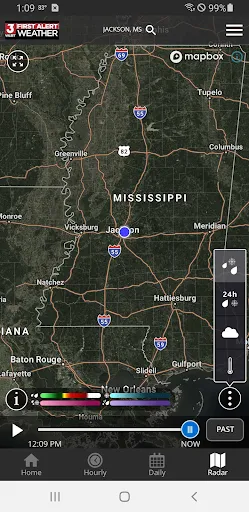
Radar is one of the more distinctive parts of the package. The app describes 250-meter radar resolution and future radar, giving users a way to look at precipitation and where severe weather may be headed. When a forecast calls for rain, I would use the map to get a more visual sense of what is approaching rather than relying only on a line of text.
High-resolution satellite cloud imagery offers a broader view of cloud cover, which complements the more localized radar perspective. The app also includes severe weather alerts from the National Weather Service, with opt-in push alerts for people who want notifications. I appreciate that alerts are opt-in: users can choose whether those prompts fit their routine instead of assuming everyone wants the same notification approach.
A Simple Storm Routine
On a day with unsettled weather, my routine would be to check the hourly forecast first, then open radar if rain or storms are part of the outlook. If I am away from home, GPS current-location awareness can help orient the check; if I am planning around another town, I can use a saved favorite. That sequence keeps the app grounded in a real decision rather than inviting endless map browsing.
If severe weather is a concern, I would also decide whether to opt in to push alerts and keep the app available for updated information. The combination of National Weather Service alerts, future radar, and frequently updated conditions can be useful for staying informed as the picture changes. I would treat each as one source of weather information and continue to pay attention to conditions around me.
Things to Keep in Mind
The app is focused, which is helpful for quick weather checks but may feel limited if you want a wider set of planning tools. Its described features cover forecasts, weather maps, saved locations, GPS, and alerts; they do not make it a general-purpose organizer. People who only need an occasional basic forecast may also have little reason to explore every radar and imagery option.
The app contains ads, and some users may prefer a different experience for that reason. Android compatibility can vary by device, so checking the Google Play details before installing is sensible, especially on an older phone. Finally, forecasts and alerts are information for planning, not certainty about local conditions. For a focused local weather app, those are reasonable boundaries to keep in view.
WLBT First Alert Weather brings together the everyday pieces I would want from a local weather utility: updated conditions, hourly and daily forecasts, saved locations, radar, satellite imagery, and optional severe weather alerts. Its station-centered focus gives it a clear job, and the mix of quick forecast checks with more detailed storm tools makes it useful beyond a single glance.
I would try it if I regularly check weather around my area or want a convenient way to follow several places and approaching storms. It is less compelling if I want an ad-free or much broader planning app. For people who value local forecasts and practical weather awareness, WLBT First Alert Weather looks like a sensible option to consider.
First Alert Weather Frequently Asked Questions
What is WLBT First Alert Weather used for?
WLBT First Alert Weather is used to check current weather, hourly and daily forecasts, radar, and satellite cloud imagery. It also lets users save favorite locations, use GPS for current-location awareness, and receive National Weather Service severe weather alerts. Push alerts for severe weather are opt-in, so users can choose whether to receive them.
Which devices can run WLBT First Alert Weather?
WLBT First Alert Weather is an Android app available through Google Play. The minimum Android version can vary by device and app release, so check the Google Play details for the requirements that apply to your phone or tablet. The available information describes the Android version of the app.
Does WLBT First Alert Weather cost money?
The app is free to download and does not offer in-app purchases. It contains ads, which is worth keeping in mind if you prefer apps without advertising. Store details can change over time, so Google Play is the place to check for current information before installing.
Can WLBT First Alert Weather show weather for other places?
Yes. The app allows users to add and save favorite locations, so it can be used to check places beyond the current GPS location. GPS provides current-location awareness, while saved favorites are useful for locations you check repeatedly. Its weather information includes forecasts and radar tools.
Who should use WLBT First Alert Weather?
It may suit people who want local weather information, forecasts, radar, and optional severe weather notifications in one app. The focus is on weather rather than a broad collection of planning features. It contains ads, and anyone checking compatibility should review the Google Play requirements for their device.
Pros
- Hourly and daily forecasts pair well with frequently refreshed current conditions.
- Future radar and satellite imagery offer complementary views of changing weather.
- Saved locations and GPS support checking weather at home or elsewhere.
- Opt-in severe weather alerts let users choose whether to receive push notifications.
Cons
- The app contains ads, which may bother users who prefer an ad-free experience.
- Its focus is weather, so it may not suit broader planning needs.
- The minimum Android requirement varies by device and should be checked in Google Play.
- Category
- Weather