CompuSport
- 538
- 3.3
- Installs
- 100.00K
- Price
- Free

Screenshots
Analysis by Reviewed APKs
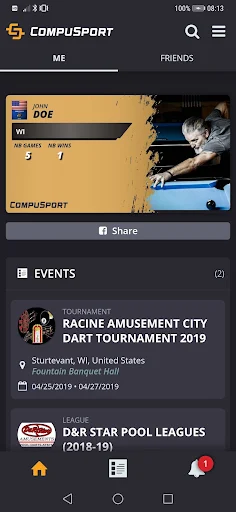
CompuSport is a companion for keeping up with leagues and tournaments, with schedules, brackets, match times, statistics, winners, and awards in one place. I’d point players toward it when their event uses CompuSport and they want to check details from a phone instead of relying on memory or scattered updates. Its purpose is narrow and practical, which makes it useful for participants but less relevant outside an organized event.
Checking the next match
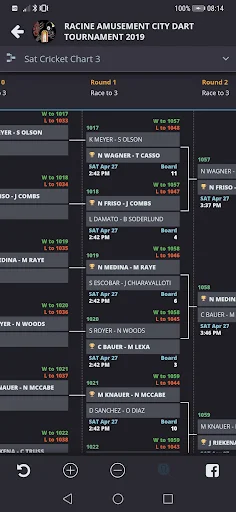
I’d use CompuSport on a tournament day when I’m trying to work out when I play next. Rather than asking around or trying to remember a schedule, I can check the event’s match information in the app, then look at the bracket to see how the competition is progressing. It gives a participant a straightforward place to consult the details that matter between matches.
The same idea works over a league season. I can check the schedule before making plans and return to the app to look at league statistics. After a tournament, the winners and awards offer a way to see how the event concluded. CompuSport is most useful as a companion to an event I’m already involved in, not as a general sports feed.
An event companion, not a coach
Compared with keeping a paper schedule or checking messages from other participants, CompuSport puts event information into a dedicated app. Its focus is the practical side of taking part: schedules, tournament brackets, match times, results in the form of winners and awards, and league statistics. That’s a more specific job than following professional teams or browsing broad sports news.
I wouldn’t choose it as a training planner, performance tracker, or social network. The described features are about following leagues and tournaments, not coaching, workout videos, personal goal setting, or athlete-to-athlete comparisons. That distinction matters: if my event isn’t using CompuSport, the app has little reason to be part of my routine. Its value depends on the competitions I want to follow.
A few useful habits
Before a match day, I’d make a habit of checking the schedule and confirming the next match time rather than relying on a notification to tell me when to move. During a tournament, looking at the bracket between games can help me understand where my match sits in the larger event. These are small checks, but they suit the app’s role as an event reference.
For league play, I’d check the schedule when planning the week and return to the statistics when I want a quick view of league information. If I choose the push-notification option, I’d treat alerts as a helpful extra rather than my only reminder. The app itself cautions that delivery can be delayed by connection or delivery problems, so keeping an eye on the schedule is sensible.
More From Our News Desk

Zoom Meetings, Google Meet, or Teams: Which Is Easiest to Join?

How I Build a Free Streaming Lineup With Tubi

Why Crunchyroll Is the Default Anime App for So Many Fans

YouTube TV: A Practical Guide to Cutting Cable

Rummikub and the Small Comfort of Phone Games

TeamViewer Remote Control or AnyDesk for Helping Family?
Who will find it useful
I’d recommend CompuSport to players who take part in leagues or tournaments that use it and want an easy phone-based way to check schedules, match details, brackets, and event outcomes. It may also suit someone who follows a participant or competition and wants to consult the available league or tournament information. The app’s appeal is clearest when there is a specific event to follow.
It may not suit someone looking for a broad sports app, training guidance, or personal athletic analytics. There’s also a practical limitation for anyone who depends on alerts: push notifications are available through an in-app purchase, and the app says delivery is not always timely. I’d still check the schedule directly, especially on a day when arriving at the right time matters.
CompuSport is developed by CompuSport and is a sports app for Android. Google Play shows over 100,000 installs and a 3.3-star rating from 538 ratings. It is free to download, with ads and optional in-app purchases. The listed in-app purchase range is $0.99 to $34.99 per item.
Google Play gives the app an Everyone content rating. The current version shown is 2.6.1.0. CompuSport was released on February 3, 2015, and its listed last update is May 26, 2026. No minimum Android version is included in the supplied app details, so it’s worth checking compatibility on Google Play for the device you plan to use.
A focused tool for event days
A focused first impression
When I first opened the idea of CompuSport, what stood out was how clearly it sticks to event information. This isn’t trying to be an all-purpose sports hub. It’s built around leagues and tournaments, with the useful basics for a participant gathered in one app: schedules, tournament brackets, match information, statistics, and event outcomes.
That focus also shapes what I’d expect from getting started. The app is useful when there’s a league or tournament to follow, so I’d begin by looking for the relevant event information rather than expecting a personalized training setup. The available description doesn’t spell out a particular onboarding flow, but the purpose is easy to understand: use it to keep track of competition details.
The day-to-day checks
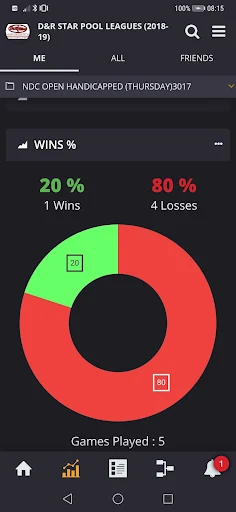
On an ordinary league week, the schedule is the feature I’d expect to revisit most. I can check when matches are planned, then look at statistics when I want more context about the league. It’s a practical pattern: consult the app when planning, rather than opening it repeatedly without a particular question in mind.
Tournament days call for a different kind of check-in. Brackets and scheduled matches help me follow the event’s structure and find the information relevant to my next game. The winners and awards provide a natural place to look after the competition. I like that these functions are tied to the event rather than mixed with unrelated sports content.
Features with a clear purpose
The tournament tools are the most distinctive part of the described experience. Brackets or charts show how a competition is arranged, while scheduled matches let participants check their upcoming games. The app also includes information about winners and awards, making it useful beyond the moment when I’m simply trying to find a match time.
League support covers schedules and statistics, giving the app a role that continues beyond a single tournament. Push notifications are another option, but they require an in-app purchase. I’d consider them a convenience, not a substitute for checking match details directly, because CompuSport notes that notifications may not arrive on time.
A simple event routine
My practical routine would start the night before a match day: open the schedule, check the listed match information, and make a note of when I need to be ready. Once I’m at the event, I’d consult the bracket when I want to understand the competition’s progress. That keeps the app tied to concrete questions instead of turning it into another thing to check constantly.
For league play, I’d look at the schedule when arranging the week and return for statistics when I want to review league details. If I’ve purchased notifications, I’d still make direct checks at important points. That combination respects the app’s convenience while accounting for its warning that delivery can be affected by network or other delivery issues.
Keep its limits in mind
CompuSport’s usefulness depends on the league or tournament information it provides. It isn’t presented as a universal directory of sports events, so I wouldn’t expect it to help me follow every competition or team. Nor does the described feature set point to training plans, personal progress tracking, or coaching resources. It has a defined job, and it makes most sense within that boundary.
The modest 3.3-star Google Play rating is worth keeping in view alongside the app’s specific purpose. Ratings can reflect different devices and event experiences, but this score suggests I shouldn’t assume every user finds it equally smooth. Notifications also have an explicit timing caveat, while the optional purchases and ads are practical considerations for anyone deciding whether to install it.
CompuSport makes sense when I have a real league or tournament to follow. Its schedules, match information, brackets, and statistics address the small logistical questions that come up around organized play, without pretending to be a complete sports or training platform.
I’d recommend it to participants whose events use CompuSport, with one practical reminder: check match information directly instead of relying entirely on push alerts. If you’re after coaching tools or broad sports coverage, this focused event companion probably isn’t the app you want.
CompuSport Frequently Asked Questions
What is CompuSport used for?
CompuSport is used to follow leagues and tournaments. Participants can view tournament brackets or charts, scheduled matches, winners, and awards. For league play, the app provides schedules and statistics. Push notifications are available through an in-app purchase, though the app notes that delivery may be delayed.
Which devices can run CompuSport?
CompuSport is an Android app available through Google Play. The supplied app details don’t give a minimum Android version, and compatibility can vary by device and software version. Check the Google Play store page on the device you plan to use for current compatibility information.
Does CompuSport cost money?
CompuSport is free to download and contains ads. It offers in-app purchases, with listed item prices ranging from $0.99 to $34.99. Push notifications are one feature described as requiring an in-app purchase. Check Google Play for current purchase details before deciding what, if anything, to buy.
Can I rely on CompuSport notifications for match times?
Notifications can be useful, but CompuSport says delivery is not guaranteed to be on time and can be affected by connection or delivery problems. I’d use them as an extra reminder, not the only way to check a match schedule. Confirming event details in the app is the more cautious approach.
Who is CompuSport best suited to?
It is best suited to people following a league or tournament that uses CompuSport, especially participants who want schedules, match details, brackets, or league statistics on a phone. It may not suit someone looking for training plans, personal performance analytics, or broad sports news, since those aren’t among its described features.
Pros
- Combines tournament brackets, scheduled matches, winners, and awards in one event-focused app.
- Includes league schedules and statistics for use beyond a single tournament.
- Free to download, with optional paid push notifications.
- Keeps its purpose clear for people following organized competition.
Cons
- Its usefulness depends on having a league or tournament to follow in CompuSport.
- Push notifications may be delayed and require an in-app purchase.
- Google Play shows a 3.3-star rating from 538 ratings, so experiences may vary.
- Category
- Sports
- Version
- 2.6.1.0