TikTok Shop Seller Center
- 403.46K
- 4.5
- Installs
- 10.00M
- Price
- Free

Screenshots
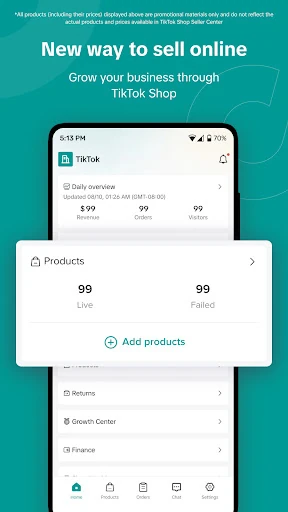
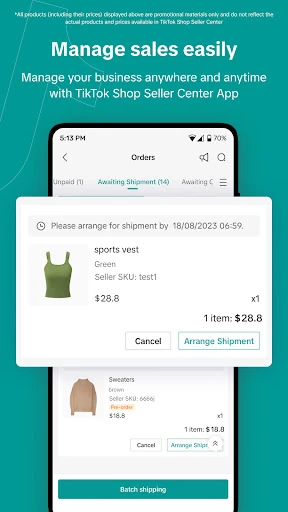
Analysis by Reviewed APKs
TikTok Shop Seller Center is a mobile workspace for businesses that sell products through TikTok Shop. I see it as a practical companion for sellers who need to keep an eye on products, orders, customer questions, and promotions without sitting at a computer. Its main appeal is bringing those jobs together on a phone; it is less useful if you do not sell through TikTok.
A seller’s daily check-in
When I picture using TikTok Shop Seller Center during an ordinary workday, it’s between other tasks: I check for new orders, handle fulfillment, and see whether a customer has sent a question. Having product and order work on my phone makes those quick gaps more useful. Instead of treating every small shop task as a reason to sit down at a computer, I can use the app as a compact place to keep work moving.
The same routine can include checking the shop’s real-time data, responding to customers, and reviewing a promotion or campaign. I like that these jobs belong to the same seller-focused app rather than being separate parts of a general shopping experience. It does not make the work disappear, of course. It gives me a way to stay involved when I’m away from my usual workspace.
A focused selling tool
The obvious alternative is handling shop work from a computer, where a larger screen can be more comfortable for longer sessions. Seller Center has a different strength: it is built around managing a TikTok Shop from a phone. I would reach for it to check orders, add products, manage returns, chat with customers, or look at data while away from my desk, then use a bigger screen if that suits a task better.
It is not a general marketplace app for browsing products, and it is not a standalone way to run every part of a business. Its purpose is tied to selling through TikTok Shop. If your sales happen elsewhere, or you are simply looking for a place to shop, most of its tools will not fit your needs. That focus is useful for the right seller, but it narrows the audience.
Small habits that help
I’d make short check-ins part of the day rather than waiting for a long admin session: glance at orders, answer customer messages, then revisit product or return tasks that need attention. The app’s mix of shop management and real-time data makes that kind of routine feel natural. Keeping each visit focused also helps a phone-based workflow stay manageable instead of turning into constant, unfocused checking.
For promotions, I’d set aside a deliberate moment to review campaigns and create promotions rather than trying to squeeze that work in between every other task. Product updates and order handling can be checked separately, depending on what the day brings. There is no need to treat every feature as a daily chore. A simple rhythm—messages and orders first, planning when needed—makes the app easier to use consistently.
More From Our News Desk

Zoom Meetings, Google Meet, or Teams: Which Is Easiest to Join?

How I Build a Free Streaming Lineup With Tubi

Why Crunchyroll Is the Default Anime App for So Many Fans

YouTube TV: A Practical Guide to Cutting Cable

Rummikub and the Small Comfort of Phone Games

TeamViewer Remote Control or AnyDesk for Helping Family?
Who will find it useful
I’d recommend TikTok Shop Seller Center to a business that already sells, or plans to sell, through TikTok Shop and wants a phone-based way to manage everyday shop work. It can be a handy fit for someone who handles products, orders, returns, customer conversations, and promotions as part of the same role. The app’s value comes from bringing those tasks together around one sales channel.
It may not suit someone who wants a general online store manager or a shopping app for personal purchases. Sellers who prefer to do every administrative task on a larger screen may also want to treat the phone app as a companion rather than their main workspace. I’d consider it most useful for quick checks and routine management, with the understanding that it serves a specific selling setup.
TikTok Shop Seller Center is developed by TikTok Pte. Ltd. On Google Play, it has over 10 million installs and a 4.5-star rating from about 403,000 ratings. The app is free to download, and the store information says it contains ads. It is rated Everyone, so its content rating is suitable for a broad audience.
The app requires Android 6.0 or later. The current version is 10.0.1, released on May 25, 2023, and it was last updated on February 10, 2026. The update notes describe bug fixes and minor improvements. Those are practical details for checking compatibility and keeping the app current before relying on it for regular shop tasks.
How Seller Center Fits the Workday
First look and setup
When I first opened the idea of Seller Center, what stood out was its narrow job description: it is for managing a TikTok Shop, not for watching videos or browsing as a customer. The stated setup flow is designed to let sellers register and set up a store from their phone. That makes the app sound approachable for getting started, though running a shop still involves the usual decisions about products and orders.
I appreciate that the listed tasks are concrete. Adding products, handling orders and returns, and contacting customers give a new seller a clear sense of what the app is meant to support. I would approach setup as the start of a working routine, not as the whole business operation. Once the shop is in motion, the value is in returning to the app for the recurring jobs.
The day-to-day experience
For routine use, the combination of order handling and customer chat is the most immediately practical part. A customer question and an order that needs attention are both time-sensitive in different ways, so being able to check shop activity from a phone can help me fit those tasks around the rest of the day. It is a useful companion when I’m out of the usual workspace.
The app also includes access to real-time data, which gives sellers another reason to check in beyond simply clearing tasks. I’d use that as a quick view of how the shop is doing, then set aside more focused time if I wanted to think through a campaign or a product decision. The appeal is convenience, not a promise that every decision can be made in a glance.
Tools beyond orders
Promotions and campaigns add a planning side to the app. Rather than only responding to sales activity, sellers can create promotions and launch campaigns through Seller Center. That makes it more than an order inbox, at least in the range of jobs it is designed to cover. I’d use those options when I have a specific offer or campaign in mind, rather than treating promotion creation as an automatic daily task.
Product management is another central piece: sellers can add products and manage returns alongside fulfillment. The app also connects shop management with TikTok’s in-app shopping context, where product discovery can lead to purchases. That connection is the reason this tool is distinctive, but it also explains why it is not a universal solution for businesses selling through unrelated channels.
A practical shop routine
A realistic routine might begin with a brief order check in the morning, followed by replies to customer messages that need attention. Later, I’d return to fulfillment or returns as required, then use a separate moment to review real-time data. This splits the work into manageable passes instead of demanding one long session, and it makes use of the app’s phone-friendly role without implying that every task needs constant monitoring.
If a campaign is coming up, I’d reserve a calmer block of time to create a promotion or launch the campaign, rather than doing it while juggling customer questions. Product additions can fit into that planning window too. The app brings these responsibilities together, but a little separation between reactive work and planning still makes the overall process feel more orderly.
Keep the scope in mind
The main limitation is also the app’s defining choice: it is specifically for TikTok Shop sellers. If I do not use that sales channel, its store setup, product, order, campaign, and customer tools are not likely to be relevant. It is also a phone app, so people who prefer handling all their shop administration on a larger screen may not want it to be their only way of working.
There is a practical learning curve in managing a shop that no app can remove. Seller Center can provide a place to work on products, fulfillment, returns, promotions, and customer conversations, but sellers still need to decide how to run those parts of their business. I’d judge it as a useful management companion, not a shortcut to sales or a replacement for thoughtful shop operations.
TikTok Shop Seller Center makes the most sense when TikTok Shop is already part of your selling plans. I like its practical mix of product, order, return, customer, campaign, and data tools, especially for quick phone-based check-ins. Its focused purpose is a strength for sellers on the platform and a clear reason others can skip it.
I’d recommend giving it a try if you want to manage a TikTok Shop while away from a computer. If you need a general retail management app or mainly prefer desktop work, it may not become part of your routine. For the right seller, it offers a convenient home for recurring shop tasks without pretending those tasks run themselves.
TikTok Shop Seller Center Frequently Asked Questions
What is TikTok Shop Seller Center used for?
TikTok Shop Seller Center is for managing a shop that sells through TikTok. The app supports tasks such as registering and setting up a store, adding products, fulfilling orders, handling returns, creating promotions, chatting with customers, and viewing real-time data. It is aimed at sellers rather than people looking for a general shopping app.
Which phones can run TikTok Shop Seller Center?
TikTok Shop Seller Center is an Android app and requires Android 6.0 or later. The Google Play store is the place to check current compatibility details for your device, since requirements and availability can vary. The app is intended for phone-based shop management, including product, order, return, and customer tasks.
Does TikTok Shop Seller Center cost money?
The app is free to download, and Google Play indicates that it contains ads. The store information says it does not offer in-app purchases. If you want to check the latest cost or any terms related to selling through TikTok Shop, review the current Google Play information and the relevant shop details.
Can I use TikTok Shop Seller Center without selling on TikTok?
The app is designed for businesses managing a TikTok Shop, so its tools are most relevant if you sell through that channel. It covers shop tasks such as adding products, fulfillment, returns, promotions, customer chat, and real-time data. If you are looking for a general marketplace or personal shopping app, this is not its purpose.
Is TikTok Shop Seller Center a good fit for every seller?
I’d consider it a fit for sellers who want to manage TikTok Shop tasks from a phone. It may be less suitable if you do not sell through TikTok or prefer to handle all shop work on a larger screen. Check the Google Play store for current app details and availability before installing.
Pros
- Brings product, order, return, promotion, and customer tasks into one seller-focused app.
- Lets sellers check real-time data and manage shop work from a phone.
- Free to download and available for Android 6.0 and later.
- Useful for quick shop check-ins away from a computer.
Cons
- Its tools are specifically aimed at sellers using TikTok Shop.
- Phone-based management may not suit people who prefer a larger screen.
- Contains ads, according to the Google Play store information.
- Category
- Shopping
- Version
- 10.0.1