Skool
- 6.88K
- 4.2
- Installs
- 1.00M
- Price
- Free

Screenshots
Analysis by Reviewed APKs
Skool is a mobile companion for keeping up with communities: I can read discussions, work through courses, check event calendars, and message other members. It suits people who already belong to Skool communities and want to stay involved away from a computer. My overall take is that it brings the main community activities into one straightforward app, though it works best as a place to participate rather than as a general-purpose social network.
A quick community check-in
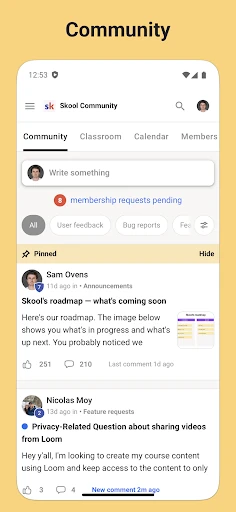
When I picture using Skool in an ordinary week, it is during a short break between errands or while settling in at home. I open the app to see what people in a community have posted, read a thread, and add a comment if I have something useful to say. The discussion format makes the app feel more like a shared group space than a stream of unrelated updates.
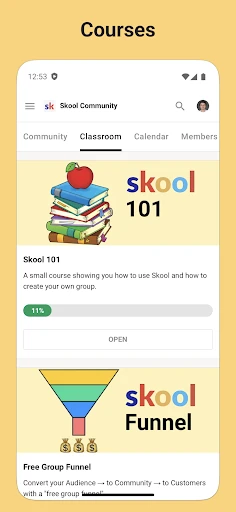
If I have more time, I can move from conversation to learning without leaving the app. Courses include video and text-based lessons, so I can pick up a lesson when it suits me rather than treating every visit as a live session. I can also check the community calendar for events or send a direct message to someone in my communities. That combination gives a check-in a few useful directions.
Community, not everything
The obvious comparison is with a group chat or a social network. Skool brings together posts and comments, direct messages, course lessons, and event information in the context of communities. That makes it a more focused choice when the people I want to follow, the learning material, and the events all belong to a Skool community. Push notifications are also part of the app, helping keep community activity within reach.
That focus is also a boundary. Skool is not described as a general social network for discovering every kind of conversation, nor is it simply a standalone video-course player. Its usefulness depends on having communities to participate in. Someone looking for a broad entertainment feed, a private personal organizer, or a course catalog unrelated to communities may find that the app is aimed at a different job.
Make visits count
A small habit that makes sense here is to give each visit a purpose. I might scan new posts first, reply to one discussion, and then check whether an event is coming up. On another visit, I might open a lesson and spend that time on the course rather than bouncing between conversations. Since discussions, learning, and events sit together, a simple routine can keep the app from becoming one more place to browse without direction.
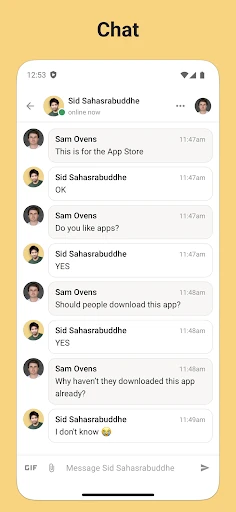
Direct messages are another reason to use the app deliberately. If a discussion raises a question for one person, I can continue the exchange privately with someone in my community. Push notifications can help me notice activity while away from the app, but I would still choose when to respond rather than treating every alert as urgent. The app supports those check-ins; the useful rhythm comes from how I fit them into my day.
More From Our News Desk

Zoom Meetings, Google Meet, or Teams: Which Is Easiest to Join?

How I Build a Free Streaming Lineup With Tubi

Why Crunchyroll Is the Default Anime App for So Many Fans

YouTube TV: A Practical Guide to Cutting Cable

Rummikub and the Small Comfort of Phone Games

TeamViewer Remote Control or AnyDesk for Helping Family?
Who will find it useful
I would recommend Skool to someone who is already part of one or more Skool communities and wants their conversations, lessons, event information, and direct messages on a phone. It is especially practical for members who check in between other tasks, or who prefer to read a lesson or respond to a post without waiting until they are at a computer. The mix of community features makes repeat visits feel purposeful.
It may be a poor fit if I do not belong to a Skool community, since the app’s central purpose is staying connected to those groups. It also may not suit someone who wants only a dedicated course reader or only a standalone messaging app. The app combines those activities around communities; it does not replace every other social or learning tool for every person.
Skool is developed by skool.com and is available on Android through Google Play. It has more than one million installs and a 4.2-star rating from about 6,900 ratings. The app is rated Teen. Its listed version is 1.0.57, and its release date is June 1, 2023.
Google Play lists Skool as free, with no in-app purchases or ads. The recorded last update is July 29, 2026. The minimum Android version is not included in the supplied app details, so check Google Play for the requirement that applies to your device. Store information can change over time, so the current listing is the best place to verify practical details before installing.
A closer look at community life
A focused first impression
When I first opened Skool, the clearest idea was that it is meant to bring a community along on the go. Rather than presenting itself as a single-purpose chat tool, its feature set includes discussions, courses, a calendar, and direct messages. That gives the app a defined role: it is a mobile way to stay involved with communities, not a general phone utility that happens to include group features.
Getting started is easiest to understand if I already have a reason to be there: a community whose conversations or lessons I want to follow. The app’s description emphasizes access to Skool features and push notifications. I would approach setup with the same practical expectation as any community app: the value comes from the groups I use and the activity I want to keep up with.
Everyday participation
The day-to-day experience centers on returning to community activity. Posts and comments give members a place to follow group discussions and contribute their own thoughts. That is useful for a question that can benefit from a shared answer, or for keeping track of a conversation that continues over time. The structure feels more deliberate than a string of disconnected one-to-one messages.
When I have only a few minutes, a quick look at discussions is an easy kind of visit. When I have longer, I can turn to a course lesson or check the calendar for upcoming community events. Direct messages offer another path when a conversation is better handled with one person. The app groups these activities together, so I can choose based on what I need from the community that day.
Four useful building blocks
The standout feature is the combination of four community activities: discussion, courses, a calendar, and chat. Discussions use posts and comments, while courses can contain video and text-based lessons. That range means the app can support both conversation and structured learning without asking me to switch to a separate app for every part of community life.
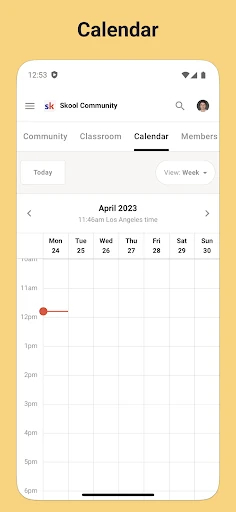
The calendar adds an event-focused view, which is useful when a group has activities to keep in mind. Chat supports direct messages to people in a member’s communities. Push notifications round out the mobile experience by helping users stay connected while away from the app. None of these features needs an elaborate pitch: together, they make the app’s role easy to understand.
A realistic weekly rhythm
A useful routine might begin with a short check-in in the morning: see whether there is a new discussion worth reading, then leave a comment if I can contribute. Later in the week, I could open a course and continue with a video or text lesson. This keeps the learning part distinct from casual browsing, while still letting me return to the same community space.
Before an event, I could check the calendar and use a direct message to follow up with someone in the group. The point is not to spend all day in the app. It is to use each feature when it fits: discussion for shared conversation, lessons for learning, the calendar for events, and chat for a one-to-one exchange. That makes short visits feel more purposeful.
Keep the scope in mind
Skool’s main limitation is the same thing that gives it focus: it is built around communities. If I have no relevant community to follow, the app has little to offer as a general browsing destination. Its courses are community-based features, not evidence of a broad independent catalog, and its chat is described as messaging people in those communities rather than a universal messaging service.
The supplied details also do not specify a minimum Android version, so I would check Google Play before relying on compatibility with an older device. Beyond that, the app’s usefulness depends on how active and relevant the communities I use are. Skool provides tools for participation, but the quality of the conversations, lessons, and events depends on the communities themselves.
Skool makes sense to me as a compact mobile home for community activity. Discussions, courses, event calendars, direct messages, and push notifications cover the everyday reasons I might want to check in. The experience is focused rather than sprawling, and that is a strength when the communities I care about already use Skool.
I would recommend it to existing members who want to stay involved from a phone, especially if they make use of both conversation and learning. I would not choose it as a general social app or a standalone course service. If that community-centered purpose matches what I need, Skool is a practical app to try.
Skool Frequently Asked Questions
What is Skool used for?
Skool is a mobile app for staying connected to communities. Members can take part in discussions through posts and comments, use video and text-based course lessons, see community events on a calendar, and send direct messages to people in their communities. Push notifications are also included.
Which phones and platforms support Skool?
Skool is available as an Android app through Google Play. The supplied details do not specify other platforms, so check the relevant store or Skool information if you want to use it somewhere else. The minimum Android version may vary with the current release and is worth checking in Google Play.
What Android version does Skool require?
The minimum Android requirement is not included in the app details provided here. Requirements can change as an app is updated and may depend on the device, so check Skool’s current Google Play page to see whether your phone is compatible before installing.
Is Skool free, and does it have purchases?
Skool is listed as free on Google Play, with no in-app purchases or ads in the supplied store details. Store information can change, so check the current Google Play page for the latest cost and purchase information before downloading.
Who is Skool best suited for?
Skool is best suited to people who are already members of communities on the platform and want to keep up with discussions, lessons, events, and direct messages on a phone. It may not suit someone looking for a general social network or a standalone course app, since its features are organized around communities.
Pros
- Combines community discussions, courses, event calendars, and direct messages in one mobile app.
- Supports both video and text-based course lessons.
- Push notifications help members stay connected while away from the app.
- Free to install, with no ads or in-app purchases listed.
Cons
- Its usefulness depends on having communities to follow on Skool.
- The community-centered focus may not suit people seeking a general social network.
- The minimum Android requirement should be checked in Google Play.
- Category
- Social
- Version
- 1.0.57