SCRUFF
- 121.36K
- 4.1
- Installs
- 10.00M
- Price
- Free

Screenshots
Analysis by Reviewed APKs
SCRUFF is a social and dating app for gay, bi, trans, and queer people who want to meet others, chat, and explore LGBTQ events. I found it most useful as a flexible place to browse profiles and start conversations, whether I was thinking about a nearby connection or an upcoming trip. It offers more than swiping, though its many options take a little time to get comfortable with.
A Quick Look Around
When I first opened SCRUFF, I treated it like a place to browse at my own pace rather than a task to finish. I looked through profiles, checked the ways people can describe themselves, and got a feel for the community before deciding who to contact. That approach suits a quiet moment on the couch or a spare few minutes between errands: look around, note someone interesting, and chat when there is a reason to.
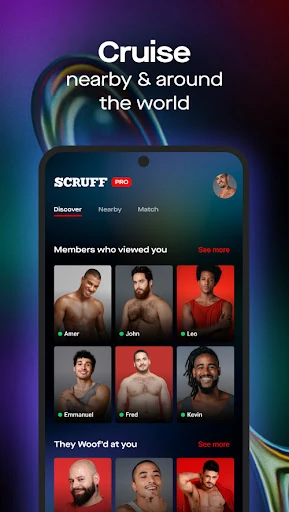
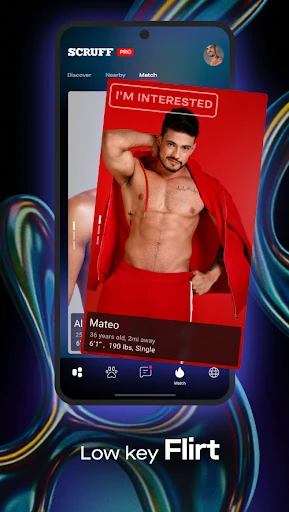
The app gives you more than one route into a connection. You can view profiles, use search and filters, send a “Woof,” or start a conversation. Match adds a daily stack of profiles, with options to pass, show interest, or ask to see someone again. I like having those different levels of commitment. A quick signal can open the door without requiring me to write a polished introduction immediately.
More Than Swipe Matching
Compared with a dating app built mainly around swiping, SCRUFF feels like a broader social space. Match is there for the familiar left-or-right decision, but profile browsing, search, messaging, video chat, and event discovery give people other ways to connect. I can see the appeal for someone who wants to start with a conversation or shared interests instead of treating every interaction as a match-or-pass moment.
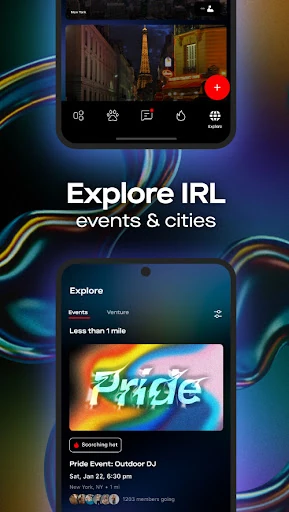
It is still a social and dating app, not a general-purpose event planner or a substitute for meeting people offline. Explore can help users find LGBTQ parties, prides, and festivals, and the travel option can help start local conversations before a visit. Those tools support connection; they do not guarantee a particular kind of relationship or make the app equally useful to someone who has no interest in dating or community networking.
Small Ways to Use It
I would start by filling in the profile details that feel useful, choosing photos, and adding preferences that help explain what I am looking for. SCRUFF supports multiple profile pictures, profile details, pronouns, gender identity options, hashtags, and private albums. That gives someone room to be specific without relying on a single photo or a one-line description to do all the work.
A simple habit is to check Match when I have a few minutes, then use search or profile browsing when I want to be more deliberate. If someone catches my eye, I can mark interest or send a message rather than endlessly collecting profiles. For travel, I would set aside time before a trip to let people know I will be in their area and talk with local members ahead of arrival.
More From Our News Desk

Zoom Meetings, Google Meet, or Teams: Which Is Easiest to Join?

How I Build a Free Streaming Lineup With Tubi

Why Crunchyroll Is the Default Anime App for So Many Fans

YouTube TV: A Practical Guide to Cutting Cable

Rummikub and the Small Comfort of Phone Games

TeamViewer Remote Control or AnyDesk for Helping Family?
Who May Enjoy SCRUFF
I would recommend SCRUFF to LGBTQ people looking for a mix of profile discovery, dating, messaging, and community-oriented features. The options for pronouns and gender identity, along with detailed profiles and photo verification, give users several ways to present themselves and learn about others. It may be especially appealing if you like having both a daily match feature and a less structured way to browse and start conversations.
It may be less comfortable for someone who wants a very simple app with one clear path from profile to match. SCRUFF includes several ways to interact, and the choices can feel like a lot at first. It is also not a fit for someone who does not want a social or dating experience, or who prefers not to share profile information or photos. As with any social app, users should decide what they are comfortable sharing.
SCRUFF is developed by Perry Street Software and is available on Google Play. It has more than 10 million installs and a 4.1-star rating from about 121,000 ratings. The app is free to download, with in-app purchases priced from $0.99 to $169.99 per item. Google Play assigns it a Mature 17+ content rating.
The current version is 8.18.0. SCRUFF was released on January 22, 2011, and its last update was November 2, 2026. The app contains ads, though its description says users will not see banner ads. The minimum Android version is worth checking on Google Play, since it can vary with app updates and device compatibility.
A Closer Look at Daily Use
Getting Started
My first impression was that SCRUFF wants to support several kinds of interaction rather than funnel everyone into one matching routine. Profiles are the natural place to begin: photos and written details help establish who someone is, while identity and preference fields can make the basics clearer. I would take a moment to fill out what matters instead of rushing straight into browsing.
The range of options can be a small hurdle. Search, Match, profile browsing, and Explore each serve a different purpose, so there is a little orientation involved before the app feels straightforward. I found it easier to think of them as separate doors: one for discovery, one for daily matching, and another for events and travel-related connections.
Browsing and Conversations
Day to day, the core experience is a loop of looking at profiles and deciding whether to make contact. A “Woof” is a lighter signal, while a message gives me room to say something more personal. That distinction is useful when I want to show interest without overthinking the opening move, or when a profile gives me a specific detail to ask about.
Match adds a more structured check-in: it presents a new stack each day, and I can pass, show interest, or ask to see a profile again. I appreciate the last option because not every first impression is decisive. If both people show interest, the app notifies them of a match. The format is familiar, but it sits alongside other ways to connect rather than replacing them.
Profiles and Verification
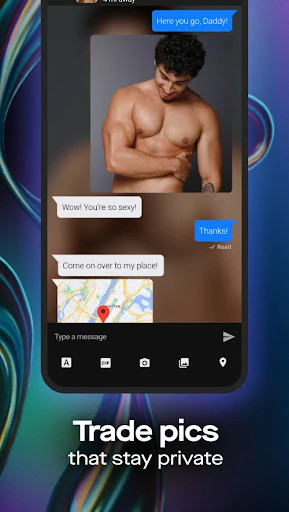
The profile tools are among SCRUFF’s more useful features for people who want to express themselves with some nuance. Multiple photos, profile details, preferences, hashtags, and private albums give users more ways to share context than a short bio alone. Comprehensive pronoun and gender identity options also help people describe themselves in their own terms.
Photo verification offers another piece of context. Users can verify their profile photos and receive a badge, and other members can look for that badge on profiles. I see it as a helpful signal, not a reason to stop using judgment. The app also includes video chat, which can let two people get to know each other virtually before deciding whether to meet.
Planning Around a Trip
SCRUFF’s travel tools make sense as something to use before a trip, not just once I arrive. I could let people know when I expect to be in another area, browse local members, and start conversations ahead of time. That may make a new city feel a little less anonymous, especially for someone hoping to meet people or get a sense of the local community.
Explore adds a related angle by featuring LGBTQ parties, prides, and festivals around the world. Users can RSVP, see who else is going, and connect with people who may attend. I would treat it as a way to discover social possibilities rather than a complete itinerary. The strongest use is combining event discovery with conversation, while keeping expectations realistic about who will actually be available.
Things to Keep in Mind
SCRUFF has a lot of features, and that breadth will not suit everyone. People who prefer a minimal interface may find the mix of search, Match, profile tools, video chat, travel, and Explore more than they need. It also depends on having enough nearby or relevant profiles to make browsing worthwhile, so the experience can feel different depending on where a user is and what they are seeking.
Privacy deserves thoughtful attention in any app built around profiles, photos, and conversation. SCRUFF provides private albums, profile controls, and in-app links to a Safety Center, as well as 24/7 community support. Those are useful resources, but they do not remove the need to decide carefully what to share and how to approach new interactions. The app is best used at a pace that feels comfortable.
SCRUFF works best for me as a flexible LGBTQ social app, not just a daily swipe routine. Its profile options, different ways to signal interest, travel connections, and event discovery give users room to choose how they want to meet people. The trade-off is a busier experience that asks for a little exploration before all the pieces click.
I would recommend trying SCRUFF if you want several routes into dating and community connections in one app. It is less compelling if you want something very stripped down or have no interest in profile-based socializing. Take time to set up your profile, use the tools that fit your goals, and keep sharing choices within your comfort zone.
SCRUFF Frequently Asked Questions
What is SCRUFF used for?
SCRUFF is a social and dating app for gay, bi, trans, and queer people to discover profiles and connect. It supports browsing, search and filters, messaging, Match, video chat, and profile photo verification. Explore features LGBTQ parties, prides, and festivals, while travel tools let users tell others when they will be in an area and chat with local members.
Which devices can I use SCRUFF on?
SCRUFF is an Android app available through Google Play. The minimum Android version can vary with updates and device compatibility, so check the current Google Play information for your phone or tablet before installing. The app description also says message history, photos, and videos sync across devices.
How much does SCRUFF cost?
SCRUFF is free to download and includes in-app purchases, with listed item prices ranging from $0.99 to $169.99. The app contains ads, although its description says it does not show banner ads. Store details and available purchase options can change, so check Google Play for the current information before you decide.
Does SCRUFF suit someone new to dating apps?
It can, especially if you want different ways to meet people rather than swiping alone. You can browse profiles, send a “Woof,” message, or use Match, and the profile includes options for identity and preferences. There are several features to learn, though, so someone who wants a very simple app may prefer a more focused experience.
Who is SCRUFF intended for?
SCRUFF is described as a place for gay, bi, trans, and queer people to connect. Its tools cover dating, social discovery, travel-related conversations, and LGBTQ event discovery. Whether it fits your needs depends on the kind of connections you want and the profiles and events available to you. Check the Google Play page for current age and compatibility details.
Pros
- Several ways to connect, from profile browsing and messages to Match and video chat.
- Detailed profile options include pronouns, gender identity, preferences, and private albums.
- Travel and event tools add social discovery beyond nearby profile browsing.
- Photo verification gives users a visible profile badge to look for.
Cons
- The number of features may feel overwhelming if you prefer a minimal dating app.
- The experience depends on finding profiles and events relevant to your location and interests.
- In-app purchases span a wide price range, so check options before buying.
- Category
- Social
- Version
- 8.18.0